Open Source Alternatives
  • Alternatives
  • Categories
    Categories by size1,039 projects
    • Developer Tools530
    • AI & Machine Learning459
    • Business & Productivity241
    • Web Development204
    • Security & Monitoring155
    • Communication & Collaboration140
    • IT Management137
    • Cloud & Hosting122
    • LLMOps & AI Tooling120
    • Data & Analytics112
    Browse all 21 categoriesDesign & Creative, Product & Project Management and 9 more
  • Blog
  • Advertise
SearchNotion, Slack, password manager.../
Submit
Open Source Alternatives
  • Alternatives
    • Developer Tools530
    • AI & Machine Learning459
    • Business & Productivity241
    • Web Development204
    • Security & Monitoring155
    • Communication & Collaboration140
    • Browse all 21 categories
  • Blog
  • Advertise
Submit your project

New open source projects by email

The projects we add and every new guide. Free, unsubscribe any time.

Open Source Alternatives LogoOpen Source Alternatives

Handpicked Open Source Alternatives to Paid Softwares

Product

  • Categories
  • Tag
  • Advertise

Resources

  • Blog
  • Collection
  • Submit

Company

  • Privacy Policy
  • Terms of Service
  • Refund Policy
  • Sitemap

Alternatives

  • Claude Code
  • Jira
  • Notion
  • Slack
  • Linear
  • Wispr Flow
  • All alternatives
© 2026 Open Source Alternatives. All rights reserved.
Open SourceAlternatives
Home/Categories/Business & Productivity/Stenor
icon of Stenor

Stenor

Open source alternative to Wispr Flow, Superwhisper, Willow Voice, Aqua Voice and Dragon Professional

  • 0 stars
  • MIT
  • Active this week
  • Last commit today

Last verified Nov 4, 2026

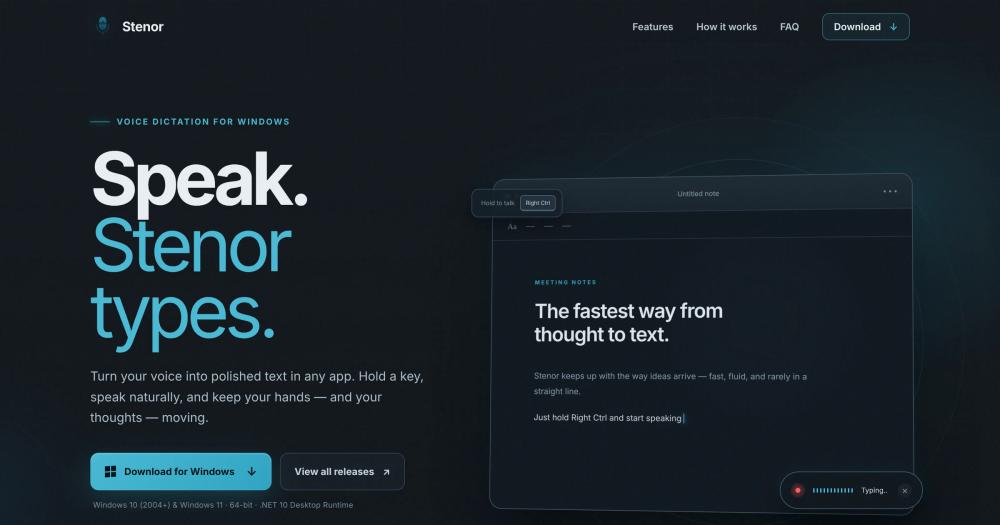
Convert speech to typed text in any Windows app by holding a hotkey, with Google Gemini transcription. MIT licensed and free, requires a Gemini API key.

Visit websiteGitHub0 stars
image of Stenor
TL;DR

Stenor is a free, MIT-licensed Windows voice dictation app that uses Google Gemini to transcribe speech into any focused text field. It replaces paid tools like Wispr Flow, Superwhisper, and Dragon Professional for Windows users who want voice input at no subscription cost. The only ongoing cost is Gemini API usage, billed by Google under your own key. Best for Windows 10 or 11 users who dictate into multiple applications and prefer not to pay a monthly fee.

Read the full breakdownHide the full breakdownWho it is for, how it works, trade-offs, the quick start and the FAQ
who it's for

Who Stenor is for#

Writers and content creators who think faster than they type

Stenor lets you dictate into any writing environment, including Google Docs, Notion, WordPress, or plain text editors, without switching to a dictation app first. The hold-and-release workflow keeps the dictation transparent to the broader writing session.

Skip if:

If you need speaker separation, timestamps, or a transcription archive, Stenor stores nothing. A dedicated transcription tool or a meeting recorder is better suited to those workflows.

Developers documenting code as they write

Dictating comments, commit messages, and documentation directly into VS Code or a text editor saves the context switch between keyboard and voice. Stenor injects into any focused field in a code editor, including input dialogs and search boxes.

Skip if:

Stenor cannot inject text into elevated prompts without being run as administrator itself. Developer environments that frequently require admin prompts need that one-time setup step.

Support agents and customer success teams on Windows

Agents can dictate responses in CRM fields, email clients, and ticketing tools without leaving the focused window. The 97-language support handles multilingual queues without reconfiguring the tool between tickets.

Skip if:

Teams using macOS or Linux workstations need a different tool. Stenor is Windows-only.

the problem

The problem it solves#

Fast typing on a keyboard is not how ideas arrive for many people. Writers, support agents, and developers who need to capture thoughts as they occur find that dictation is faster than typing, but Windows lacks a built-in voice-to-text tool that works reliably across every application.

Paid voice dictation tools like Dragon Professional charge per license, while subscription services like Wispr Flow and Superwhisper require a monthly fee. Free alternatives either lack accuracy, require extensive configuration, or are locked to a specific app rather than working wherever your cursor is. Users who want privacy, low cost, and cross-app dictation on Windows have had to piece together awkward workarounds or pay for a tool they would prefer not to depend on.

how Stenor solves it

How it solves it#

Universal text field injection

Works in any Windows application with a focused text field, including Word, Slack, VS Code, browsers, and email clients. The finished transcription is injected directly where the cursor is, with no copy-paste step required.

Google Gemini transcription with 97 languages

Sends recorded audio to Google Gemini for transcription, which supports 97 spoken languages with automatic detection. Mixed-language speech is handled without any configuration change between languages.

Hold-to-talk and toggle mode

Default hotkey is Right Ctrl, with hold-to-talk (hold to record, release to transcribe) or toggle mode available. Any key or combination can be substituted in Settings.

Windows DPAPI key protection

Your Gemini API key is encrypted on disk using Windows Data Protection API (DPAPI), which ties the key to your Windows account. No audio, no transcript, and no API key is ever written to application logs.

Live typing mode

An experimental mode that types sentence by sentence while you speak and pause, rather than waiting until you release the hotkey. Useful for long-form dictation where you want to see progress mid-session.

Automatic background updates

New releases download silently in the background. A tray notification prompts you to restart when an update is ready, or the update installs when you quit the app.

strengths · trade-offs

Strengths and trade-offs#

Strengths

  • MIT licensed with no subscription feeThe app is MIT licensed and free to download. The only ongoing cost is Gemini API usage, billed by Google under your own key. Paid alternatives like Wispr Flow and Superwhisper charge monthly subscription fees; Stenor has none.
  • Works in every focused text fieldMost voice dictation tools inject text into their own editor and require a paste step to move it elsewhere. Stenor injects directly into whichever Windows text field has focus, whether that is a browser form, a code editor, a chat window, or a document.
  • Local privacy by designYour Gemini API key is encrypted on your PC with Windows DPAPI. Audio goes to Google Gemini only for the transcription call; no audio, transcript, or key is written to logs. The source code is on GitHub for anyone to verify the data flow.

Trade-offs

  • -Windows-onlyStenor runs only on Windows 10 (version 2004 or newer) and Windows 11, 64-bit. macOS and Linux users need a different tool.
  • -Requires a Google Gemini API keyYou must register for a Google AI Studio API key before first use. The app does not work without one. While the key is currently free within Google's limits, any change to Google's pricing policy would directly affect Stenor users.
  • -Text injection fails in elevated windows without running as administratorWhen dictating into an application running with administrator privileges, Stenor cannot inject text directly. The transcription falls back to the clipboard for a manual Ctrl+V paste. Running Stenor as administrator resolves this, but requires launching it elevated.
  • -Installer is unsignedThe current installer has no code-signing certificate, so Windows SmartScreen displays a first-run warning. Users must click 'More info' and then 'Run anyway' to proceed.
versus alternatives

Stenor vs alternatives#

Stenor vs Wispr Flow

Wispr Flow is a paid voice dictation product. Stenor covers the same hotkey-to-text job as a free, MIT-licensed Windows app that sends your speech to Google Gemini with your own API key.

FeatureStenorWispr Flow
LicenseMIT, source on GitHubProprietary
CostFree app, you pay for Gemini API usagePaid product
PlatformWindows 10 and 11Check the maker's site
Languages97Check the maker's site

Stenor is the better fit if you are on Windows, want to read the source and would rather bring your own Gemini key than pay for a subscription. Wispr Flow is the safer pick if you want a commercial product with vendor support.

Stenor vs Superwhisper

Superwhisper is a paid dictation app. Stenor does the same basic job, a held key and text in the focused field, but it is free, open source and tied to Gemini.

FeatureStenorSuperwhisper
LicenseMIT, source on GitHubProprietary
CostFree app, Gemini API usage on topPaid product
TranscriptionGoogle Gemini in the cloudCheck the maker's site
Works offlineNoCheck the maker's site

Stenor is the better option when you want free, inspectable dictation on Windows. If audio leaving your machine is a problem, note that Stenor sends every recording to Google Gemini, so check how Superwhisper handles transcription before you choose.

Stenor vs Dragon Professional

Dragon Professional is a long-established paid dictation suite for Windows. Stenor covers a narrower workflow: quick hotkey voice input into any text field through a cloud API.

FeatureStenorDragon Professional
PlatformWindows 10 and 11Windows
LicenseMIT, source on GitHubProprietary
CostFree app, Gemini API usage on topPaid license
TranscriptionGoogle Gemini (cloud)Check the maker's site
Internet requiredYesCheck the maker's site

Stenor is the better starting point for general dictation on Windows at no licence cost, but it needs an internet connection and a Gemini API key. For specialised vocabularies or offline needs, evaluate Dragon Professional's own documentation before switching.

install · quick start

Quick start#

bash
Download the Windows installer from GitHub Releases: https://github.com/giorgi02/Stenor/releases/latest
tech stack · detected from GitHub

What it's built on#

Languages
C#
Runtimes
.NET
frequently asked

FAQ#

Is Stenor free to use?

Yes. Stenor is MIT licensed with no paid tier, subscription, or trial period. The only associated cost is your Google Gemini API usage, which Google currently provides at no charge within its standard free-tier limits.

What do I need to get started with Stenor?

You need a 64-bit PC running Windows 10 version 2004 or newer, or Windows 11. Download the installer from GitHub Releases, allow the .NET 10 Desktop Runtime to be installed if prompted, then paste a Gemini API key from Google AI Studio when Settings opens on first launch.

Does Stenor store my audio or transcripts?

No. Audio is sent directly to Google Gemini for transcription and is not saved locally. Stenor logs do not contain your audio, transcripts, or API key. The source code is on GitHub for anyone to review the data flow.

Can I change the hotkey from Right Ctrl?

Yes. Right Ctrl is the default, but any key or combination can be set in Settings. You can also switch between hold-to-talk (hold the key to record, release to submit) and toggle mode (one press to start, one to stop).

Why does Windows show a SmartScreen warning when installing Stenor?

The installer is not code-signed. When SmartScreen appears, click 'More info' to see the application name, then 'Run anyway' to proceed. The source code is public on GitHub if you want to review what the installer contains.

Looking for more

Other ways to replace Wispr Flow, Superwhisper, Willow Voice, Aqua Voice and Dragon Professional#

Handy

#1 in the Wispr Flow guide

Cross-platform offline dictation on Windows, macOS, and Linux, with the largest community of the eight

36,645 GitHub stars

VoiceInk

#2 in the Wispr Flow guide

Apple Silicon Mac dictation with local AI enhancement and no subscription

6,992 GitHub stars

FluidVoice

#3 in the Wispr Flow guide

macOS 15+ dictation with live transcription preview and optional on-device AI cleanup

12,660 GitHub stars

OpenWhispr

#4 in the Wispr Flow guide

Cross-platform dictation with documented meeting transcription, live diarization, and optional cloud processing

10,514 GitHub stars
All 15 Wispr Flow alternatives8 open source Wispr Flow alternatives, ranked
by category

Open source tools in these categories#

241

Business & Productivity

OpenClaw, Excalidraw, RustDesk
459

AI & Machine Learning

freeCodeCamp, REA (Reverse Engineer Anything), OpenClaw

Sponsors

Inbox Zero

Alternative toSuperhuman

AI email assistant that drafts replies and clears your inbox

  • 12,889 GitHub stars
  • AGPL-3.0Licence AGPL-3.0
  • #Email

rakazo

Alternative toGrok Bot

AI teammates you own: your keys, your model, your machine.

  • 6,568 GitHub stars
  • Apache-2.0Licence Apache-2.0
  • #AI Agents

SnitchFeed

Live monitoring on LinkedIn, X, Reddit & more. Agentic social listening for startups.

Marketing & Growth

Advertise your product

New open source projects by email

The projects we add and every new guide. Free, unsubscribe any time.

Find open source alternatives to paid software

/
  • Claude Code to OpenCode
  • Jira to Windshift
  • Notion to AppFlowy
  • Slack to Mattermost
  • Linear to GitLab
  • Wispr Flow to Handy
  • Arc to Zen Browser
  • CapCut to Concat
  • Grok Bot to rakazo
  • Superhuman to Inbox Zero
  • Airtable to AITable
  • Muse to OpenClaw
  • Railway to Coolify
  • GitHub Copilot to Cline
  • Datadog to Netdata
  • Microsoft Teams to Rocket.Chat
  • Confluence to Docmost
  • Pinecone to Qdrant
  • Zapier to n8n
  • Devin AI to OpenHands
  • Firebase to Supabase
  • 1Password to KeePassXC
  • Contentful to Strapi
  • Adobe Premiere Pro to Shotcut
  • Claude Code to OpenCode
  • Jira to Windshift
  • Notion to AppFlowy
  • Slack to Mattermost
  • Linear to GitLab
  • Wispr Flow to Handy
  • Arc to Zen Browser
  • CapCut to Concat
  • Grok Bot to rakazo
  • Superhuman to Inbox Zero
  • Airtable to AITable
  • Muse to OpenClaw
  • Railway to Coolify
  • GitHub Copilot to Cline
  • Datadog to Netdata
  • Microsoft Teams to Rocket.Chat
  • Confluence to Docmost
  • Pinecone to Qdrant
  • Zapier to n8n
  • Devin AI to OpenHands
  • Firebase to Supabase
  • 1Password to KeePassXC
  • Contentful to Strapi
  • Adobe Premiere Pro to Shotcut