Open Source Alternatives
  • Alternatives
  • Categories
    Categories by size1,075 projects
    • Developer Tools544
    • AI & Machine Learning470
    • Business & Productivity251
    • Web Development205
    • Security & Monitoring166
    • Communication & Collaboration145
    • IT Management143
    • Cloud & Hosting126
    • LLMOps & AI Tooling122
    • Data & Analytics116
    Browse all 21 categoriesProduct & Project Management, Design & Creative and 9 more
  • Blog
  • Advertise
SearchNotion, Slack, password manager.../
Submit
Open Source Alternatives
  • Alternatives
    • Developer Tools544
    • AI & Machine Learning470
    • Business & Productivity251
    • Web Development205
    • Security & Monitoring166
    • Communication & Collaboration145
    • Browse all 21 categories
  • Blog
  • Advertise
Submit your project

New open source projects by email

The projects we add and every new guide. Free, unsubscribe any time.

Open Source Alternatives LogoOpen Source Alternatives

Handpicked Open Source Alternatives to Paid Softwares

Product

  • Categories
  • Tag
  • Advertise

Resources

  • Blog
  • Collection
  • Submit

Company

  • Privacy Policy
  • Terms of Service
  • Refund Policy
  • Sitemap

Alternatives

  • Claude Code
  • Jira
  • Notion
  • Slack
  • Linear
  • Wispr Flow
  • All alternatives
© 2026 Open Source Alternatives. All rights reserved.
Open SourceAlternatives
Home/Categories/No-Code & Low-Code/Teable
icon of Teable

Teable

Open source alternative to Airtable, Notion, Smartsheet and SmartSuite

  • 22K stars
  • AGPL-3.0 with brand protection terms
  • Active this week
  • Last commit today

Last verified Nov 5, 2026

Build custom apps and AI workflows on a spreadsheet backed by real PostgreSQL, with self-hosting and 1,600+ integrations.

Visit websiteGitHub22K starsDeploy on Hostinger
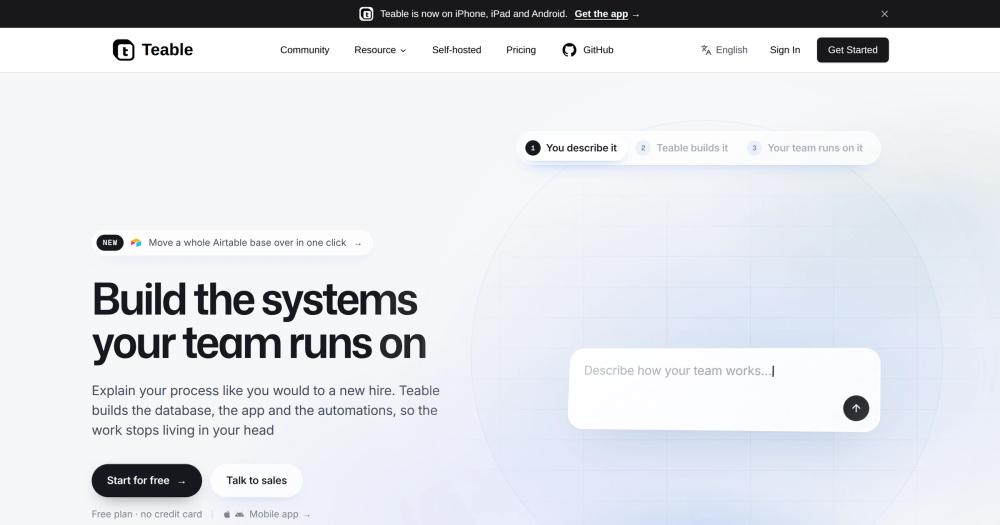
image of Teable
TL;DR

Teable is a spreadsheet-database tool backed by real PostgreSQL, with AI chat, App Builder, and workflow automations built into one self-hosted install. It replaces Airtable and Notion for teams building structured data workflows, with a self-hosted path that keeps data on the team's own infrastructure. The Community Edition is AGPL-3.0 with additional brand protection terms, free to self-host for internal use; paid plans in the cloud unlock AI features and enterprise capabilities.

Read the full breakdownHide the full breakdownWho it is for, how it works, trade-offs and the FAQ
who it's for

Who Teable is for#

Ops teams replacing Airtable for structured workflows

Teams tracking requests, managing approvals, or running lightweight CRMs in Airtable can move the same tables to Teable's PostgreSQL backend and get formula compatibility, real-time collaboration, and AI chat without a per-seat bill. The Airtable import handles the migration.

Skip if:

If the main value your team gets from Airtable is its ecosystem of native integrations with tools like Stacker or Softr that connect specifically to Airtable, check whether those tools support Teable first before migrating.

Teams building internal tools without dedicated developers

App Builder lets non-developers describe the app they need and deploy it to a URL wired to the team's existing data in one click. For use cases like approval forms, inventory dashboards, or internal portals that do not need a production software team, this path produces working apps without opening a code editor.

Skip if:

Teams that need a production-grade web app with custom business logic, authentication, and a full test suite should use an application framework. App Builder covers internal tools, not customer-facing production software.

Organizations with data sovereignty requirements

Self-hosting on your own infrastructure keeps all records, AI session data, and app usage logs within your own perimeter. No data leaves to a third-party AI provider unless you configure it to do so. The containerized agent sandbox means AI sessions cannot access data outside their allocated scope.

Skip if:

If your team has no infrastructure capacity (no VMs, no container management, no on-call engineers), self-hosting the full AI plane will require more operational investment than the cloud plan.

Data teams querying operational records with SQL

Tables in Teable live in real PostgreSQL, so a data engineer can open a PostgreSQL client and run SQL against the same records a business team manages through the spreadsheet interface. No ETL is required to move operational data to a query layer: query it in place.

Skip if:

If your data team already has a dedicated OLAP warehouse (BigQuery, Snowflake) and only needs to pipe data there, a lightweight connector to that warehouse may be simpler than moving the operational layer to Teable.

the problem

The problem it solves#

Teams building business workflows typically end up managing data in a spreadsheet tool, custom apps in a separate codebase, and AI assistants that have no access to either. Each integration between these layers breaks on its own schedule, and every new workflow either requires developer time or another product subscription.

Spreadsheet tools like Airtable cap rows, charge per seat at scale, and store data in proprietary formats. When a team needs real database behavior (joins, queries across millions of rows, server-side processing), those tools buckle. When the same team wants to generate an app from that data, they open a third product and start the integration work again. The result is a stack of disconnected tools held together by exports and manual updates.

how Teable solves it

How it solves it#

AI Chat on Live Data

Ask questions and run operations against your real records in natural language. Because the AI session connects directly to the PostgreSQL tables behind your spreadsheets, answers reflect the current state of your data, not a snapshot or an export. Analyses that would require a custom formula or a SQL query can be run as plain questions in the chat interface.

App Builder with Isolated Sandbox

Describe the app your team needs in plain language, and an AI agent builds it in a containerized sandbox, then deploys it to its own URL with one click. Each app runs as a long-lived container wired to the same database your team already uses, so what gets built is an extension of an existing workflow rather than another silo.

AI Workflow Automations

Set up automations triggered by record changes, schedules, or webhooks, with AI steps doing the reasoning in the middle: classifying a record, generating a summary, or deciding a routing rule. Automations run where the data lives, so there is no separate sync layer to maintain between the trigger and the action.

Real PostgreSQL Backend with SQL Access

Tables, views, and automations sit on a real PostgreSQL database, not a proprietary storage format. You can query your data with SQL directly, hit row counts in the millions without throttling, and migrate off if you need to. No export format lock-in and no row count per-plan restrictions.

Grid, Kanban, Calendar, Gallery, and Form Views

Every table can be displayed as a grid, kanban board, gallery, calendar, or form view without copying the data. Filtering, grouping, sorting, and aggregation work across all view types. The form view handles data collection; the gallery view handles visual browsing of the same records.

1,600+ Integrations and Airtable Migration

Teable connects to over 1,600 external tools, so the data it manages can flow to Stripe, HubSpot, Slack, and the other products your team already uses. Direct Airtable import is supported: a whole Airtable base can be moved over in one import, covering the most common migration case in the category.

strengths · trade-offs

Strengths and trade-offs#

Strengths

  • AI runs on your own infrastructureSelf-hosting the full-featured stack gives teams AI chat, App Builder, and automations on their own compute, with no AI provider keys shared with a third-party cloud. Every AI session runs in an isolated container that starts on demand and exits when the session ends. Organizations with data residency requirements can run the entire AI plane inside their own perimeter.
  • PostgreSQL backend unlocks real database behaviorTeable's storage layer is real PostgreSQL, so row counts in the millions do not degrade the interface, SQL queries work against live tables, and data can be accessed by external tools using standard PostgreSQL connections. This separates it from spreadsheet tools that store data in proprietary formats and throttle performance above certain row counts.
  • Four tools consolidated into one deployOne self-hosted install covers a database collaboration layer, an AI workflow engine, a secure agent sandbox, and an app deployment runtime. Teams that would otherwise integrate four separate products get a single system where each layer shares the same data model and authentication.
  • Direct Airtable import pathTeable supports importing an entire Airtable base directly, covering the most common migration case in its category. Teams moving off Airtable's per-seat pricing can transfer an entire base and start from a familiar spreadsheet interface on their own PostgreSQL without manual data restructuring.

Trade-offs

  • -Full-featured self-hosting requires a multi-container setupRunning AI features and App Builder requires the full deployment stack from the teableio/teable-deployment repository, which manages containerized runtimes for the agent sandbox and app deployment plane. The standalone Docker path works for database collaboration only: AI chat and App Builder are not available on a standalone install. Teams wanting the full feature set should plan for a multi-container setup that goes beyond a single docker run command.
  • -AGPL-3.0 with brand restrictions limits redistributionThe Community Edition is AGPL-3.0 with additional terms that forbid modifying or removing Teable's brand assets (name, logo, icons, visual identity). AGPL-3.0 also requires sharing source changes if you distribute or offer a modified version as a network service. Teams self-hosting for internal use are not affected, but SaaS operators who want to white-label or offer it as a managed product cannot do so under the community license.
  • -97 open issues as of November 2026The repository carried 97 open issues at time of review, typical for an actively developed project at this stage. The last commit was November 4, 2026, and the project has 21,953 GitHub stars, indicating an active community. The issue count alone does not indicate a neglected codebase.
versus alternatives

Teable vs alternatives#

Teable vs Airtable

Teable and Airtable occupy the same spreadsheet-meets-database category: grid views, multiple view types, real-time collaboration, automations, and APIs. The key differences are storage architecture, self-hosting, and pricing model.

FeatureTeableAirtable
StoragePostgreSQLProprietary
Self-hostingYesNo
LicenseAGPL-3.0 (community)Proprietary
AI featuresBuilt-in (AI chat, App Builder)Airtable AI (paid add-on)
Row limitsMillions (PostgreSQL)Plan-dependent caps
Pricing modelFree self-hosted; cloud plans per featurePer seat

Teable is the stronger choice for teams that need a self-hosted path, cannot absorb Airtable's per-seat pricing at scale, or want AI features integrated into the database layer. Airtable remains the better fit for teams that depend on the Airtable app ecosystem (native integrations with Stacker, Softr, and similar no-code builders) or organizations with existing Airtable enterprise governance and SSO configured.

Teable vs Notion

Notion is a document and wiki tool that added databases as a secondary feature. Teable is a database tool that covers only structured data, not document authoring. These are partial overlaps, not full substitutes.

FeatureTeableNotion
StoragePostgreSQLProprietary
Self-hostingYesNo
Primary useStructured data, automationsDocuments and light databases
AI featuresAI chat on data, App BuilderNotion AI (writing assistant)

Teable is the better fit when the team's work centers on structured records, workflows, and automation rather than collaborative writing and wikis. Notion's database views cover lightweight tracking; they do not support the row counts, SQL access, or AI automation that Teable's PostgreSQL backend enables. Notion is still the stronger choice for knowledge management, internal documentation, and teams that need a document editor alongside a lightweight tracker.

Teable vs Smartsheet

Smartsheet is a grid-first work management tool used primarily for project tracking, Gantt charts, resource planning, and PMO reporting. Teable is a database tool with automation and AI, with less emphasis on traditional project management features.

FeatureTeableSmartsheet
StoragePostgreSQLProprietary
Self-hostingYesNo
AI featuresBuilt-in (AI chat, App Builder)Smartsheet AI (add-on)
Core strengthFlexible database workflowsWork management, Gantt, resource tracking
LicenseAGPL-3.0 (community)Proprietary

Teable fits teams building custom operational workflows (CRM tracking, inventory, request management) where the data model needs to match the business rather than a predefined project template. Smartsheet remains the stronger choice for traditional PMO use cases: Gantt charts, enterprise resource planning, program-level dashboards, and organizations that need Smartsheet's established compliance and governance features.

tech stack · detected from GitHub

What it's built on#

Languages
TypeScript
Frameworks
ExpressNestJSNext.jsReact
Databases
PostgreSQL
Infrastructure
AWS
Cache
Redis
Tooling
esbuild
frequently asked

FAQ#

What is the difference between standalone and full-featured self-hosting?

Standalone self-hosting, run from Docker, covers tables, collaboration, API, and automations but does not include AI chat, App Builder, or the agent sandbox. Full-featured self-hosting, set up from the teableio/teable-deployment repository, adds the AI plane on top of the same data layer. Teams that want only the spreadsheet-database layer can start with standalone; teams that want AI features need the full deployment.

Is Teable free to use?

The Community Edition is free to self-host under AGPL-3.0 terms. Teable Cloud at teable.ai offers a hosted version; AI features and enterprise capabilities require a paid plan, activated with a license key on any install without swapping the Docker image. Teams self-hosting for internal use pay only for their own compute.

Can I migrate an existing Airtable base to Teable?

Yes. Teable supports importing an entire Airtable base directly. The team lists this as a first-class supported scenario. Field types and formula equivalents that exist in Teable's grid transfer; custom Airtable extensions or third-party integrations that connect specifically to Airtable need to be re-pointed after migration.

What does the AGPL-3.0 with brand protection terms mean for my organization?

Under AGPL-3.0, you can self-host, modify, and use Teable for any purpose, including internal commercial use, as long as you share modifications under AGPL-3.0 if you distribute or offer a modified version as a network service. The additional brand terms forbid modifying, removing, or replacing Teable's name, logo, or visual identity, and forbid using them in a way that implies endorsement. The practical restriction for most teams: you cannot offer Teable as a white-labeled managed service under the community license. The packages directory is MIT-licensed.

Does Teable require Kubernetes to self-host?

No. The standalone self-host runs on Docker alone and covers tables, collaboration, API, and automations. The full-featured self-host, which adds AI features and App Builder, uses the teableio/teable-deployment repository and manages multiple containers, but does not require Kubernetes. The deployment guide at help.teable.ai/en/deploy/choose covers both paths.

Looking for more

Other ways to replace Airtable, Notion, Smartsheet and SmartSuite#

AITable

#1 in the Airtable guide

Direct Airtable replacement for teams migrating grid databases

15,658 GitHub stars

Budibase

#2 in the Airtable guide

Build internal apps and forms on structured data

28,382 GitHub stars

ToolJet

#3 in the Airtable guide

Build internal tools with 50+ data source connectors

41,178 GitHub stars

Appsmith

#4 in the Airtable guide

Git-versioned internal tools for engineering teams

41,157 GitHub stars
All 10 Airtable alternatives7 open source Airtable alternatives, ranked
by category

Open source tools in these categories#

37

No-Code & Low-Code

n8n, dify, Langflow
72

Databases & Storage

Immich, Supabase, Redis
251

Business & Productivity

OpenClaw, Excalidraw, RustDesk
470

AI & Machine Learning

freeCodeCamp, REA (Reverse Engineer Anything), OpenClaw
116

Data & Analytics

Firecrawl, ragflow, Worldmonitor
Hostinger

Self-host Teable on a Hostinger VPS

Keep it running 24/7, even when your laptop is off. A Hostinger VPS gives it a server of its own.

  1. 01

    Choose a plan

    Starts from $6.49/mo

  2. 02

    Apply

    Extra 10% off yearly plans

  3. 03

    Install Teable

    On a server that stays on

  4. 04

    Start building

    Focus on the app, not the server

Deploy on Hostinger

Sponsors

Inbox Zero

Alternative toSuperhuman

AI email assistant that drafts replies and clears your inbox

  • 12,889 GitHub stars
  • AGPL-3.0Licence AGPL-3.0
  • #Email

rakazo

Alternative toGrok Bot

AI teammates you own: your keys, your model, your machine.

  • 6,568 GitHub stars
  • Apache-2.0Licence Apache-2.0
  • #AI Agents

SnitchFeed

Live monitoring on LinkedIn, X, Reddit & more. Agentic social listening for startups.

Marketing & Growth

Advertise your product

New open source projects by email

The projects we add and every new guide. Free, unsubscribe any time.

Find open source alternatives to paid software

/
  • Claude Code to OpenCode
  • Jira to Windshift
  • Notion to AppFlowy
  • Slack to Mattermost
  • Linear to GitLab
  • Wispr Flow to Handy
  • Arc to Zen Browser
  • CapCut to Concat
  • Grok Bot to rakazo
  • Superhuman to Inbox Zero
  • Airtable to AITable
  • Muse to OpenClaw
  • Railway to Coolify
  • GitHub Copilot to Cline
  • Datadog to Netdata
  • Confluence to Wiki.js
  • Microsoft Teams to Rocket.Chat
  • Pinecone to Qdrant
  • Zapier to n8n
  • 1Password to KeePassXC
  • Devin AI to OpenHands
  • Firebase to Supabase
  • Contentful to Strapi
  • Adobe Premiere Pro to Shotcut
  • Claude Code to OpenCode
  • Jira to Windshift
  • Notion to AppFlowy
  • Slack to Mattermost
  • Linear to GitLab
  • Wispr Flow to Handy
  • Arc to Zen Browser
  • CapCut to Concat
  • Grok Bot to rakazo
  • Superhuman to Inbox Zero
  • Airtable to AITable
  • Muse to OpenClaw
  • Railway to Coolify
  • GitHub Copilot to Cline
  • Datadog to Netdata
  • Confluence to Wiki.js
  • Microsoft Teams to Rocket.Chat
  • Pinecone to Qdrant
  • Zapier to n8n
  • 1Password to KeePassXC
  • Devin AI to OpenHands
  • Firebase to Supabase
  • Contentful to Strapi
  • Adobe Premiere Pro to Shotcut