Open Source Alternatives
  • Alternatives
  • Categories
    Categories by size1,107 projects
    • Developer Tools557
    • AI & Machine Learning472
    • Business & Productivity270
    • Web Development208
    • Security & Monitoring171
    • Communication & Collaboration153
    • IT Management145
    • Cloud & Hosting127
    • LLMOps & AI Tooling123
    • Data & Analytics118
    Browse all 21 categoriesProduct & Project Management, DevOps & CI/CD and 9 more
  • Blog
  • Advertise
SearchNotion, Slack, password manager.../
Submit
Open Source Alternatives
  • Alternatives
    • Developer Tools557
    • AI & Machine Learning472
    • Business & Productivity270
    • Web Development208
    • Security & Monitoring171
    • Communication & Collaboration153
    • Browse all 21 categories
  • Blog
  • Advertise
Submit your project

New open source projects by email

The projects we add and every new guide. Free, unsubscribe any time.

Open Source Alternatives LogoOpen Source Alternatives

Handpicked Open Source Alternatives to Paid Softwares

Product

  • Categories
  • Tag
  • Advertise

Resources

  • Blog
  • Collection
  • Submit

Company

  • Privacy Policy
  • Terms of Service
  • Refund Policy
  • Sitemap

Alternatives

  • Claude Code
  • Jira
  • Notion
  • Slack
  • Linear
  • Wispr Flow
  • All alternatives
© 2026 Open Source Alternatives. All rights reserved.
Open SourceAlternatives
Home/Categories/Product & Project Management/Vikunja
icon of Vikunja

Vikunja

Open source alternative to Todoist, ClickUp, Asana, TickTick, Trello, monday.com and Linear

  • 6K stars
  • AGPL-3.0
  • Active this week
  • Last commit today

Last verified Nov 5, 2026

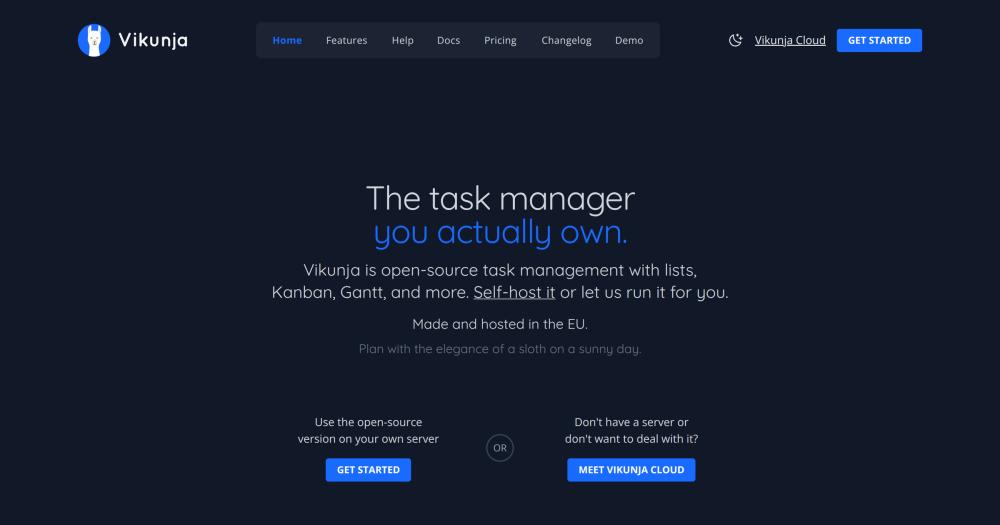
Manage tasks and projects across list, Kanban, Gantt, and table views on your own server, with built-in migration from Todoist and Trello.

Visit websiteGitHub6K starsDeploy on Hostinger
image of Vikunja
TL;DR

Vikunja is an open source task manager that replaces paid services like Todoist, Trello, and Asana for teams and individuals who want to own their data. It offers list, Kanban, Gantt, and table views on a single codebase, licensed under the AGPL-3.0 and deployable via Docker or native binaries. Built-in migration covers Todoist, Trello, and Microsoft To-Do, so moving existing tasks takes minutes. Best for small teams, freelancers, and privacy-conscious users who need full task management without per-seat SaaS costs.

Read the full breakdownHide the full breakdownWho it is for, how it works, trade-offs, the quick start and the FAQ
who it's for

Who Vikunja is for#

Small teams migrating away from Todoist or Trello

Teams paying per seat on Todoist Business or Trello Premium can run Vikunja on a small VPS and eliminate the monthly SaaS fee. The built-in migration imports their existing tasks and project structure directly from both services.

Skip if:

Your team is non-technical and has no one to manage a server. Vikunja Cloud is an option, but it adds a managed-hosting cost; Todoist may still be cheaper for small teams with no server.

Developers managing personal projects on their own server

Vikunja runs as a single Docker container. A developer comfortable with Docker can have a personal task manager running on their home server via a single container, with the full Kanban and Gantt view set available without a subscription.

Skip if:

You need mobile apps with offline sync and native push notifications as a primary workflow. Check Vikunja's current mobile app status before choosing it as your offline-capable mobile task manager.

Privacy-focused teams with data-residency requirements

Organizations that cannot store work data on US-based SaaS servers (GDPR compliance, client NDAs, public sector requirements) can run Vikunja on their own EU or on-premises infrastructure. The EU origin of the project and its cloud option reduces jurisdictional risk for European organizations.

Skip if:

Your compliance requirements extend to certifications (SOC 2, ISO 27001) that Vikunja does not currently hold. Enterprise compliance needs may require a certified SaaS tool regardless of self-hosting preference.

Freelancers replacing Todoist Premium or TickTick Premium

A single self-hosted Vikunja instance replaces Todoist Premium or TickTick Premium for a freelancer. No subscription, no per-device cap, and all four views (list, Kanban, Gantt, table) available without a tier paywall.

Skip if:

You rely heavily on calendar integrations or inbox-email-to-task capture. Verify those integrations are available and stable in Vikunja before switching from a tool that has them natively.

the problem

The problem it solves#

Most task managers are subscription-based SaaS products. You pay per seat, your data lives on someone else's servers, and when the company pivots or raises prices, your workflow goes with it. Todoist, Asana, ClickUp, and monday.com all operate this way: the more collaborators you add, the more you pay, with no option to run the software yourself.

The challenge gets sharper for teams with data-residency or compliance requirements. A GDPR-sensitive business cannot casually store tasks, project notes, and client names on a third-party server in an unknown jurisdiction. The workaround, managing tasks in a local spreadsheet or a note app, loses the scheduling, Kanban, and collaboration features the team actually needs. Vikunja exists because those features should be separable from the subscription and the data lock-in.

how Vikunja solves it

How it solves it#

Four Task Views on the Same Data

List, Kanban, Gantt, and table view on the same project data. Switch between them per project without reorganizing your tasks. The Gantt chart supports due dates and scheduling; the table view gives a spreadsheet-style row layout for bulk editing.

Built-in Migration from Todoist, Trello, and Microsoft To-Do

Import existing tasks and projects directly from the Vikunja interface. The migration runs against the official APIs of each service, so subtasks, due dates, labels, and project structure transfer without manual cleanup.

Full Team Collaboration

Share projects with team members, assign tasks, leave comments, and attach files. Vikunja handles personal task lists and team projects in the same instance: start solo and add collaborators when the team grows, without migrating to a different tool.

Fully Documented REST API

Every action available in the UI is accessible through a fully documented REST API (OpenAPI spec hosted at try.vikunja.io). Integrations, automation scripts, and third-party clients all use the same API the frontend does.

Docker and Native Binary Deployment

Ships as a single Docker image (vikunja/vikunja on Docker Hub) or as native binaries for Linux, macOS, and Windows. Supports Postgres, MySQL, and SQLite as the backing database. An official install wizard guides first-time setup.

strengths · trade-offs

Strengths and trade-offs#

Strengths

  • Data stays on infrastructure you ownYour tasks and project data stay on the server you run. No third-party company holds your to-do list. For teams with GDPR requirements or clients who cannot consent to SaaS storage, this is the decisive advantage over Todoist or Asana.
  • Made and hosted in the EUThe project and its cloud option are operated from the EU. The founder cites privacy as a core design value. For European teams, this reduces the jurisdictional complexity that comes with US-based SaaS tools.
  • No per-seat pricing for self-hostersRun Vikunja on your own server and there is no licence fee, no per-user charge, and no plan tier that removes features. The AGPL-3.0 source is freely available; you pay only for the hardware you already own.
  • Active development since 2018The repository has been in continuous development since November 2018 and received its latest push on 2026-11-05. With nearly 6,000 GitHub stars and 800 forks, the project has consistent contributor interest.

Trade-offs

  • -AGPL-3.0 restricts managed-service resaleThe AGPL-3.0 license requires you to publish source changes if you run a modified version as a network service for others. Self-hosting Vikunja internally as a team or for personal use is fully permitted. What is restricted is offering Vikunja as a managed service to external customers without releasing your modifications.
  • -186 open issues in the repositoryThe repository carries 186 open issues as of 2026-11-05. For a project of its scope this is manageable, but users relying on specific integrations or edge-case features may encounter unresolved bugs. Check the issue tracker before committing to a workflow that depends on a less-common feature.
  • -Self-hosting requires a databaseVikunja needs a Postgres, MySQL, or SQLite database. SQLite works for single-user or low-traffic setups; teams should provision a Postgres instance before deploying. This is a one-time setup step but higher than zero-dependency tools.
versus alternatives

Vikunja vs alternatives#

Vikunja vs Todoist

Todoist and Vikunja overlap on personal task management and small-team to-do lists. The key difference is data location and pricing model.

FeatureVikunjaTodoist
LicenseAGPL-3.0Proprietary
Self-hostingYesNo
Kanban viewYesYes
Gantt viewYesNo
Table viewYesNo
PricingFree (self-hosted)Subscription, per user

Vikunja is the stronger choice when you want self-hosting, need a Gantt chart, or want to avoid per-user subscription costs. Todoist is a better fit when you need a polished mobile experience with offline sync and reliable push notifications; its native apps are more mature than Vikunja's current mobile client.

Vikunja vs Trello

Both tools offer Kanban boards and project-based task organization. Trello's card model is simpler for teams new to task boards.

FeatureVikunjaTrello
LicenseAGPL-3.0Proprietary
Self-hostingYesNo
ViewsList, Kanban, Gantt, TableKanban (Timeline on paid plans)
PricingFree (self-hosted)Subscription, per user

Vikunja is the better choice when you need multiple views, Gantt scheduling, or self-hosted storage. Trello is still the right call for teams that need Power-Ups with deep integrations into third-party tools; Vikunja's integration options are more limited.

Vikunja vs ClickUp

ClickUp covers more workflow automation and configuration options than Vikunja. Vikunja is focused on task management without the overhead that comes with a more expansive tool.

FeatureVikunjaClickUp
LicenseAGPL-3.0Proprietary
Self-hostingYesNo
ViewsList, Kanban, Gantt, TableMultiple views
AutomationNoYes
PricingFree (self-hosted)Subscription, per user

Vikunja is the better choice when you want a focused task manager you can self-host and do not need automations or native integrations. ClickUp wins when your team needs built-in automations, goal tracking, or time tracking and is willing to pay per seat for that breadth. At team sizes where ClickUp's per-seat pricing becomes a concern, Vikunja's self-hosted model offers a path to control costs.

Vikunja vs Linear

Linear is built for software development teams. It centers on issues, cycles, and sprint-based tracking within an engineering workflow, and is SaaS-only with no self-hosting option. Vikunja is a general task manager that handles personal to-do lists and team projects across any kind of work, from design and ops to engineering.

For teams that need an opinionated developer workflow with git integration and sprint planning, Linear is purpose-built for that. Vikunja suits teams wanting flexible task management across different work types on self-hosted infrastructure, at no per-seat cost. If your team already uses a dedicated issue tracker for code work and needs a separate general task tool, Vikunja fills that role without a subscription.


install · quick start

Quick start#

bash
Self-hosting Vikunja uses a single Docker image with a Postgres, MySQL, or SQLite database.

```bash
docker run -d -p 3456:3456 vikunja/vikunja
```
tech stack · detected from GitHub

What it's built on#

Languages
GoTypeScript
Frameworks
ElectronExpressVue
Tooling
Rollup
frequently asked

FAQ#

Is Vikunja free to self-host?

Yes. Vikunja is licensed under the AGPL-3.0 and free to run on your own server with no licensing fee. The AGPL requires you to publish the source of any modifications if you offer it as a service to others, but internal self-hosting for personal or team use has no such restriction. A hosted cloud option (Vikunja Cloud) is also available for a fee.

Can I import my tasks from Todoist, Trello, or Microsoft To-Do?

Yes. Vikunja has built-in migration support for Todoist, Trello, and Microsoft To-Do. The migration runs from within the Vikunja interface and transfers tasks, project structure, and due dates directly.

What views does Vikunja support?

Vikunja supports four views on the same task data: list, Kanban, Gantt, and table. Each view can be used independently on a per-project basis; you do not need to reorganize your data to switch views.

What database does Vikunja require for self-hosting?

Vikunja supports Postgres, MySQL, and SQLite. SQLite is suitable for single-user or low-traffic setups. Teams should use Postgres for reliability at multi-user scale. The database is configured in Vikunja's config file at first setup.

Does Vikunja have a hosted cloud option?

Yes. Vikunja Cloud is the officially hosted version, operated from the EU. It includes automatic updates, backups, and no server maintenance. It is the fastest way to start and directly funds the project's development.

Looking for more

Other ways to replace Todoist, ClickUp, Asana, TickTick, Trello, monday.com and Linear#

GitLab

#1 in the Linear guide

Teams on GitLab for code hosting

24,549 GitHub stars

OpenProject

#2 in the Linear guide

Teams needing Scrum boards, Gantt charts, and time tracking

16,986 GitHub stars

Taiga

#3 in the Linear guide

Agile teams wanting Scrum sprints without enterprise overhead

385 GitHub stars

Gitea

#4 in the Linear guide

Small teams wanting lightweight git hosting and issue tracking

58,885 GitHub stars
All 19 Linear alternatives8 open source Linear alternatives, ranked
by category

Open source tools in these categories#

118

Product & Project Management

freeCodeCamp, agency-agents, Gstack
271

Business & Productivity

OpenClaw, Excalidraw, RustDesk
Hostinger

Self-host Vikunja on a Hostinger VPS

Keep it running 24/7, even when your laptop is off. A Hostinger VPS gives it a server of its own.

  1. 01

    Choose a plan

    Starts from $6.49/mo

  2. 02

    Apply

    Extra 10% off yearly plans

  3. 03

    Install Vikunja

    On a server that stays on

  4. 04

    Start building

    Focus on the app, not the server

Deploy on Hostinger

Sponsors

Inbox Zero

Alternative toSuperhuman

AI email assistant that drafts replies and clears your inbox

  • 12,889 GitHub stars
  • AGPL-3.0Licence AGPL-3.0
  • #Email

rakazo

Alternative toGrok Bot

AI teammates you own: your keys, your model, your machine.

  • 7,028 GitHub stars
  • Apache-2.0Licence Apache-2.0
  • #AI Agents

SnitchFeed

Live monitoring on LinkedIn, X, Reddit & more. Agentic social listening for startups.

Marketing & Growth

Advertise your product

New open source projects by email

The projects we add and every new guide. Free, unsubscribe any time.

Find open source alternatives to paid software

/
  • Claude Code to OpenCode
  • Jira to Windshift
  • Notion to AppFlowy
  • Slack to Mattermost
  • Linear to GitLab
  • Wispr Flow to Handy
  • Arc to Zen Browser
  • CapCut to Concat
  • Grok Bot to rakazo
  • Superhuman to Inbox Zero
  • Airtable to AITable
  • Muse to OpenClaw
  • Railway to Coolify
  • GitHub Copilot to Cline
  • Datadog to Netdata
  • Confluence to Wiki.js
  • Microsoft Teams to Rocket.Chat
  • Firebase to Supabase
  • Pinecone to Qdrant
  • Zapier to n8n
  • 1Password to KeePassXC
  • Devin AI to OpenHands
  • Asana to Leantime
  • Contentful to Strapi
  • Claude Code to OpenCode
  • Jira to Windshift
  • Notion to AppFlowy
  • Slack to Mattermost
  • Linear to GitLab
  • Wispr Flow to Handy
  • Arc to Zen Browser
  • CapCut to Concat
  • Grok Bot to rakazo
  • Superhuman to Inbox Zero
  • Airtable to AITable
  • Muse to OpenClaw
  • Railway to Coolify
  • GitHub Copilot to Cline
  • Datadog to Netdata
  • Confluence to Wiki.js
  • Microsoft Teams to Rocket.Chat
  • Firebase to Supabase
  • Pinecone to Qdrant
  • Zapier to n8n
  • 1Password to KeePassXC
  • Devin AI to OpenHands
  • Asana to Leantime
  • Contentful to Strapi