Open Source Alternatives
  • Alternatives
  • Categories
    Categories by size1,312 projects
    • Developer Tools677
    • AI & Machine Learning550
    • Business & Productivity314
    • Web Development219
    • Security & Monitoring199
    • Communication & Collaboration169
    • IT Management165
    • Design & Creative148
    • DevOps & CI/CD142
    • LLMOps & AI Tooling142
    Browse all 21 categoriesCloud & Hosting, Product & Project Management and 9 more
  • Blog
  • Advertise
SearchNotion, Slack, password manager.../
Submit
Open Source Alternatives
  • Alternatives
    • Developer Tools677
    • AI & Machine Learning550
    • Business & Productivity314
    • Web Development219
    • Security & Monitoring199
    • Communication & Collaboration169
    • Browse all 21 categories
  • Blog
  • Advertise
Submit your project

New open source projects by email

The projects we add and every new guide. Free, unsubscribe any time.

Open Source Alternatives LogoOpen Source Alternatives

Handpicked Open Source Alternatives to Paid Softwares

Add Open Source Alternatives as a preferred source on Google

Product

  • Categories
  • Tag
  • Advertise

Resources

  • Blog
  • Collection
  • Submit

Company

  • Privacy Policy
  • Terms of Service
  • Refund Policy
  • Sitemap

Alternatives

  • Claude Code
  • Jira
  • Notion
  • Slack
  • Linear
  • Wispr Flow
  • All alternatives
© 2026 Open Source Alternatives. All rights reserved.
Open SourceAlternatives
Home/Categories/Developer Tools/WinGit
icon of WinGit

WinGit

Open source alternative to GitKraken, Tower, Fork and SmartGit

  • 3 stars
  • Apache-2.0
  • Active this week
  • Last commit today

Last verified Nov 19, 2026

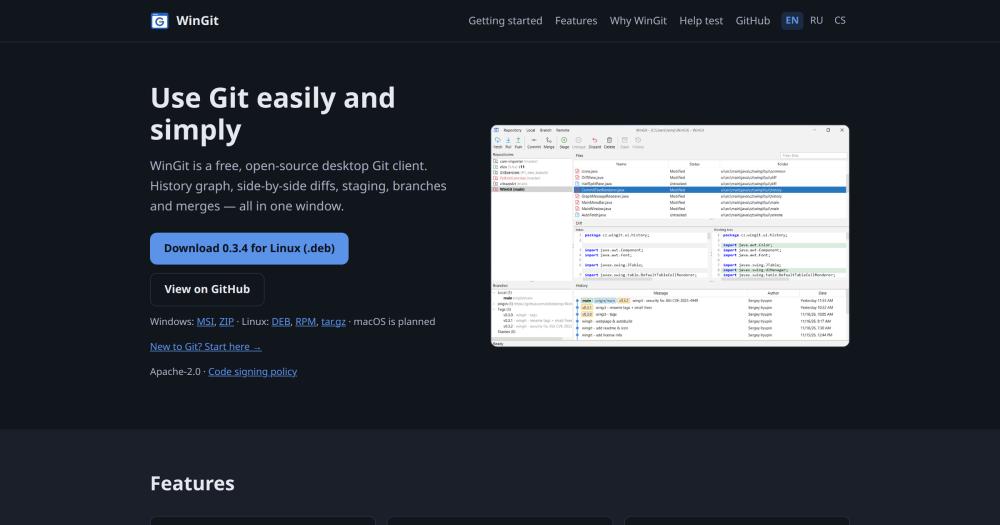
Manage Git repositories on Windows and Linux with a visual history graph, side-by-side diffs, and staging in a single desktop window.

Visit websiteGitHub3 stars
image of WinGit
TL;DR

WinGit is a free, open source desktop Git client for Windows and Linux, written in Java. It replaces commercial paid clients like GitKraken and Fork for developers who need daily Git operations (commit, push, pull, branch) without subscription fees. Licensed under Apache 2.0, it is free to use, modify, and redistribute. Best for individual developers and small teams on Windows or Linux who want a capable GUI at no cost and are willing to work with early-stage software.

Read the full breakdownHide the full breakdownWho it is for, how it works, trade-offs, the quick start and the FAQ
who it's for

Who WinGit is for#

Developers replacing a paid Git GUI subscription

If your daily workflow is commit, push, pull, and branch management, WinGit covers it at no cost. The single-window layout with a commit graph and side-by-side diffs is comparable in concept to a commercial client.

Skip if:

If you rely on interactive rebase, merge conflict wizards, multi-repo workspaces, or cloud integrations with GitHub or Jira, WinGit does not yet offer those features. A mature commercial client is the more complete choice for those workflows.

Linux developers who need a visual Git interface

Fork does not support Linux. Tower does not support Linux. WinGit runs natively on Linux as DEB, RPM, and tar.gz, making it one of the few open source options for Linux users who want a visual Git interface.

Skip if:

If you need a long-supported Linux Git GUI with broad community documentation, a more mature client is the safer choice for now.

Teams evaluating open source developer tooling

Organizations moving away from commercial software licenses can add WinGit to their open source developer toolkit. The Apache 2.0 license permits internal team deployment across machines without licensing negotiations.

Skip if:

Teams that need enterprise support SLAs, production-stable software, or a GUI with advanced Git operations should evaluate more mature options first. WinGit is early-stage and best adopted alongside a fallback.

the problem

The problem it solves#

Most capable Git GUI clients require a paid subscription or a one-time commercial license. That cost adds up for independent developers or small teams using Git across multiple machines, and commercial clients may restrict modification or redistribution under their license terms.

For Linux users, the choice is especially limited: several well-known Git GUIs do not support Linux at all, leaving command-line Git or a small number of less polished alternatives. For teams with tight budgets or organizations that require open source tooling by policy, finding a capable Git GUI with no licensing restrictions has historically been difficult.

how WinGit solves it

How it solves it#

Commit history graph

Displays branches, merges, and the full commit history as a visual graph. Each commit is listed with its message, date, and author, making it easy to trace how the codebase evolved and where branches diverged.

Side-by-side diff viewer

Shows file changes in two aligned columns with syntax highlighting. This layout lets you review exactly what changed on each line before staging or committing, without switching tools.

Granular staging area

Stage, unstage, or discard individual files before committing. The staging area lets you review pending changes and build a clean commit without including unrelated edits from the same working directory.

Branch management

Create, rename, delete, and merge branches from the GUI without typing branch commands. Branching operations are available from the commit graph or the branch list.

All repositories in one list

Keeps every local repository in a single list, with repositories that have uncommitted changes marked so they stand out. Switching between projects does not require navigating the file system.

strengths · trade-offs

Strengths and trade-offs#

Strengths

  • Apache 2.0 license with no usage restrictionsWinGit is licensed under Apache 2.0, which permits use, modification, and redistribution for any purpose, including commercial and internal team use, with no fee. The source code is available to inspect, fork, and extend: if a feature is missing, you can add it.
  • No subscription and no license feeWinGit is free to download and run on as many machines as needed, with no subscription and no per-seat fee. Paid clients such as GitKraken, Tower, Fork and SmartGit all charge for commercial use.
  • Native Linux supportAvailable as DEB, RPM, and a portable tar.gz archive for Linux. Several well-known Git GUI clients do not support Linux; WinGit treats Linux as a first-class target alongside Windows.

Trade-offs

  • -Early development stageThe author describes WinGit as 'early but working.' Features beyond the daily workflow (interactive rebase, merge conflict visualization, stash management, reflog access) are not yet present. If your workflow requires those operations, a mature client is a better fit for now.
  • -No macOS support yetmacOS support is planned but not shipped. WinGit currently runs on Windows and Linux only. macOS users will need to use a different Git client until the macOS build is available.
  • -Very small user communityThe project launched in November 2026 and has a very small user base. Community resources such as tutorials, third-party guides, and answered forum questions are not yet available. Bug reports and feature requests go directly to the project's GitHub Issues.
versus alternatives

WinGit vs alternatives#

WinGit vs GitKraken

Both tools provide a visual Git GUI with commit graphs and branch management. The key difference is licensing: GitKraken is a commercial product with paid plans for teams, while WinGit is Apache 2.0-licensed and free for all use.

FeatureWinGitGitKraken
LicenseApache-2.0Proprietary
PriceFreePaid for teams
PlatformsWindows, LinuxWindows, Linux, macOS
Interactive rebaseNoYes
Merge conflict wizardNoYes
Multi-repo workspacesNoYes

WinGit covers the daily Git workflow (commit, push, pull, branch, merge) at no cost. GitKraken adds multi-repo workspaces, interactive rebase, a merge conflict wizard, and integrations with GitHub, GitLab, and Jira that WinGit does not yet offer. If your team needs those collaboration features or macOS support, GitKraken is the more capable choice for now.

WinGit vs Fork

Fork and WinGit are both focused desktop Git clients with a visual layout. Fork is a commercial product for Mac and Windows; WinGit is free and open source.

FeatureWinGitFork
LicenseApache-2.0Proprietary
PriceFreePaid license
PlatformsWindows, LinuxWindows, macOS
Diff viewerSide-by-sideSide-by-side
macOSPlannedYes

WinGit is the better choice for Linux users (Fork does not support Linux) and for developers who want a free, open source client for daily commit and branch work. Fork is the stronger option for teams that need a stable, polished GUI on macOS or Windows today, with a merge conflict resolver.

WinGit vs Tower and SmartGit

Tower (commercial, macOS and Windows) and SmartGit (commercial for professional use, cross-platform) both offer deeper feature sets than WinGit's current state: Tower adds a merge conflict wizard, worktree support and Git LFS; SmartGit adds SVN and Mercurial support alongside interactive rebase and reflog access. Neither is free for commercial use. WinGit is the right choice when you need only standard Git operations and want a client you can run, study, and modify at no cost.


install · quick start

Quick start#

bash
Download the Windows installer (MSI or ZIP) or Linux packages (DEB, RPM, or tar.gz) from GitHub Releases: https://github.com/biblelamp/WinGit/releases/latest
tech stack · detected from GitHub

What it's built on#

Languages
Java
frequently asked

FAQ#

Is WinGit free to use for commercial projects?

Yes. WinGit is licensed under Apache 2.0, which permits use in commercial projects, internal team deployments, and proprietary software development at no cost. The license also allows you to modify and redistribute the software.

What platforms does WinGit support?

WinGit runs on Windows (MSI installer or ZIP) and Linux (DEB, RPM, or portable tar.gz). macOS support is planned but not yet available. The name 'WinGit' refers to its windowed interface, not Windows exclusivity.

Is WinGit stable enough for daily use?

The author describes it as 'early but working' and uses it for their own daily Git work. It handles the core workflow: browsing repositories, staging, committing, pushing, pulling, and managing branches. More advanced features (interactive rebase, stash management) are not yet present. Try it on non-critical projects first if you need confidence before fully switching.

How does WinGit compare to GitKraken or Tower?

GitKraken and Tower are mature commercial Git clients with broader feature sets including interactive rebase, merge conflict wizards, and multi-repo management. WinGit covers the daily Git workflow at no cost under an open source license. If your workflow stays within commit, push, pull, and branch management, WinGit is a capable free alternative; for advanced features, those commercial clients are more complete today.

also worth a look

Similar open-source tools#

worktrunk

Alternative toConductor

Git worktree management for parallel AI agents

  • 12,624 GitHub stars
  • CustomLicence MIT OR Apache-2.0

gitdeck

Alternative toGitKraken

Self-hosted Git dashboard for GitHub, GitLab, and Forgejo

  • 432 GitHub stars
  • MITLicence MIT

Nuphos

Featured

Alternative toConductor

Agent workspace for teams running Claude Code or Codex

  • 707 GitHub stars
  • Apache-2.0Licence Apache-2.0

CleanYourTV

Featured

Alternative toATV Launcher Pro

Debloat any Android or Google TV over Wi-Fi and get an Apple TV-style home.

  • 59,494 GitHub stars
  • MIT LicenseLicence MIT License

REA (Reverse Engineer Anything)

Featured

Alternative toRevEng.AI

AI-powered reverse engineering for binaries, apps, and assemblies.

  • 464,805 GitHub stars
  • MITLicence MIT

rakazo

Featured

Alternative toGrok Bot

AI teammates you own: your keys, your model, your machine.

  • 8,913 GitHub stars
  • Apache-2.0Licence Apache-2.0
by category

Open source tools in these categories#

677

Developer Tools

REA (Reverse Engineer Anything), Skills for Real Engineers, superpowers

Sponsors

Inbox Zero

Alternative toSuperhuman

AI email assistant that drafts replies and clears your inbox

  • 13,058 GitHub stars
  • AGPL-3.0Licence AGPL-3.0
  • #Email

rakazo

Alternative toGrok Bot

AI teammates you own: your keys, your model, your machine.

  • 8,913 GitHub stars
  • Apache-2.0Licence Apache-2.0
  • #AI Agents

SnitchFeed

Live monitoring on LinkedIn, X, Reddit & more. Agentic social listening for startups.

Marketing & Growth

Advertise your product

New open source projects by email

The projects we add and every new guide. Free, unsubscribe any time.

Find open source alternatives to paid software

/
  • Claude Code to OpenCode
  • Jira to Windshift
  • Notion to AppFlowy
  • Slack to Mattermost
  • Linear to GitLab
  • Wispr Flow to Handy
  • Arc to Zen Browser
  • CapCut to Concat
  • Grok Bot to rakazo
  • Superhuman to Inbox Zero
  • Discord to Stoat
  • Airtable to AITable
  • Datadog to SigNoz
  • Muse to OpenClaw
  • Railway to Coolify
  • GitHub Copilot to Cline
  • Confluence to Wiki.js
  • Microsoft Teams to Rocket.Chat
  • 1Password to KeePassXC
  • Firebase to Supabase
  • Pinecone to Qdrant
  • Zapier to n8n
  • Devin AI to OpenHands
  • Adobe Premiere Pro to Shotcut
  • Claude Code to OpenCode
  • Jira to Windshift
  • Notion to AppFlowy
  • Slack to Mattermost
  • Linear to GitLab
  • Wispr Flow to Handy
  • Arc to Zen Browser
  • CapCut to Concat
  • Grok Bot to rakazo
  • Superhuman to Inbox Zero
  • Discord to Stoat
  • Airtable to AITable
  • Datadog to SigNoz
  • Muse to OpenClaw
  • Railway to Coolify
  • GitHub Copilot to Cline
  • Confluence to Wiki.js
  • Microsoft Teams to Rocket.Chat
  • 1Password to KeePassXC
  • Firebase to Supabase
  • Pinecone to Qdrant
  • Zapier to n8n
  • Devin AI to OpenHands
  • Adobe Premiere Pro to Shotcut