Open Source Alternatives
  • Alternatives
  • Categories
    Categories by size985 projects
    • Developer Tools505
    • AI & Machine Learning433
    • Business & Productivity222
    • Web Development202
    • Security & Monitoring149
    • Communication & Collaboration134
    • IT Management134
    • Cloud & Hosting117
    • LLMOps & AI Tooling111
    • Data & Analytics108
    Browse all 21 categoriesProduct & Project Management, Design & Creative and 9 more
  • Blog
  • Advertise
SearchNotion, Slack, password manager.../
Submit
Open Source Alternatives
  • Alternatives
    • Developer Tools505
    • AI & Machine Learning433
    • Business & Productivity222
    • Web Development202
    • Security & Monitoring149
    • Communication & Collaboration134
    • Browse all 21 categories
  • Blog
  • Advertise
Submit your project

New open source projects by email

The projects we add and every new guide. Free, unsubscribe any time.

Open Source Alternatives LogoOpen Source Alternatives

Handpicked Open Source Alternatives to Paid Softwares

Product

  • Categories
  • Tag
  • Advertise

Resources

  • Blog
  • Collection
  • Submit

Company

  • Privacy Policy
  • Terms of Service
  • Refund Policy
  • Sitemap

Alternatives

  • Claude Code
  • Jira
  • Notion
  • Slack
  • Linear
  • Wispr Flow
  • All alternatives
© 2026 Open Source Alternatives. All rights reserved.
Open SourceAlternatives
Home/Categories/AI & Machine Learning/Ai Engineering Hub
icon of Ai Engineering Hub

Ai Engineering Hub

  • 38.5K stars
  • MIT
  • Active this week
  • Last commit today

Last verified Oct 31, 2026

Learn LLMs, RAG, AI agents, and MCP with 93+ hands-on Jupyter Notebook projects, from beginner to advanced. MIT licensed.

Visit websiteGitHub38.5K stars
image of Ai Engineering Hub
TL;DR

Ai Engineering Hub is a MIT-licensed GitHub repository of 93+ Jupyter Notebook projects covering LLMs, RAG pipelines, AI agents, and the Model Context Protocol. Over 38,000 developers have starred it on GitHub, and it receives regular updates with the most recent commit in October 2026. As a free alternative to paid AI learning platforms like Udemy and DataCamp, it provides code-first examples you can run and modify rather than video lectures. The MIT license permits commercial use without restriction. Best for developers who learn by running code and want hands-on examples across beginner, intermediate, and advanced AI engineering patterns.

Read the full breakdownHide the full breakdownWho it is for, how it works, trade-offs, the quick start and the FAQ
who it's for

Who Ai Engineering Hub is for#

AI engineers learning LLM and agentic patterns

A developer building their first RAG pipeline or multi-agent workflow can start with a working notebook and trace exactly how the components connect. The tiered structure lets you start with the beginner projects and progress to advanced systems like multi-agent deep researchers and deployed agentic RAG APIs.

Skip if:

Skip if you need a structured curriculum with graded assignments and completion certificates. The repository has no curriculum track, assessments, or instructor support.

Teams evaluating agentic frameworks before committing

The repository includes parallel implementations of similar workflows using CrewAI, AutoGen, and LlamaIndex. A team deciding which framework to standardize on can run the same agentic pattern across frameworks before making the call.

Skip if:

Skip if your team has already standardized on one framework and needs deep production-level guidance for it. The repository provides breadth across frameworks, not depth in any single one.

Developers building and testing MCP integrations

The MCP section includes 10+ projects covering custom MCP server setup, RAG via MCP, memory-persistent agents with Graphiti, and multimodal MCP workflows. These are among the most concrete publicly available MCP implementation examples, covering Cursor integrations, LlamaIndex MCP clients, and voice agents backed by MCP.

Skip if:

Skip if you need MCP protocol documentation and specifications rather than code examples. The official MCP documentation covers protocol details more thoroughly.

Newsletter subscribers exploring AI projects

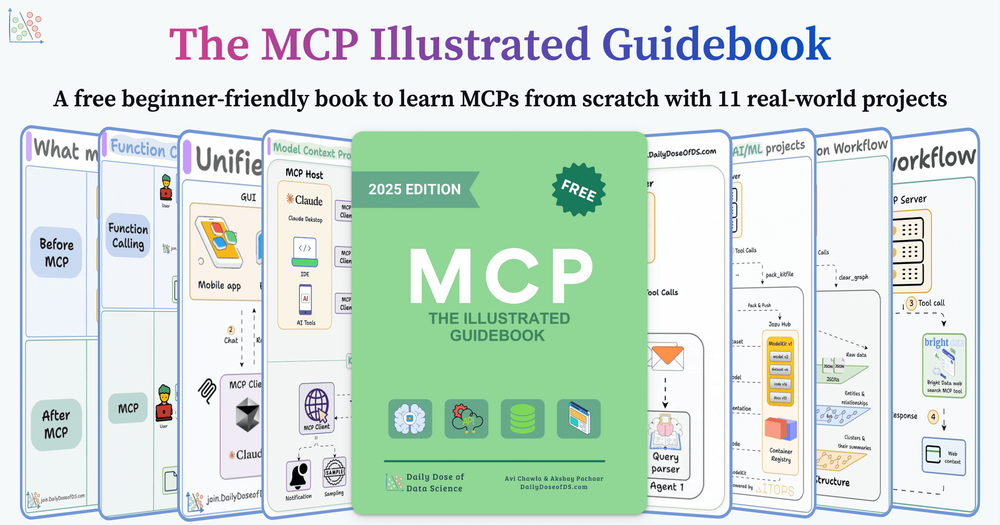
Subscribers to the Daily Dose of Data Science receive the 75-page MCP PDF guidebook covering the Model Context Protocol with structured project explanations alongside the repository code. The newsletter covers over 150,000 AI professionals and announces new projects as they are added.

Skip if:

Skip if you prefer self-contained documentation without a newsletter subscription requirement for the accompanying guidebook.

the problem

The problem it solves#

Building production AI systems requires selecting and connecting the language model, the embedding pipeline, the retrieval layer, and increasingly MCP servers for tool access. Each component has documentation, but tutorials rarely provide a full end-to-end implementation showing how all the pieces connect and what the complete working code actually looks like.

Version mismatches compound the difficulty. A tutorial written for an older version of LlamaIndex, CrewAI, or AutoGen may not run against the current API. Developers spend significant time debugging library compatibility rather than studying the AI engineering pattern they came to learn.

how Ai Engineering Hub solves it

How it solves it#

Three Difficulty Tiers Across 93+ Projects

The 93 projects divide into three tiers. Beginner (22 projects) covers single-component implementations like local chat interfaces and basic RAG. Intermediate (48 projects) covers multi-component systems and agentic workflows. Advanced (23 projects) covers fine-tuning, production deployments, and complex agent systems. Each project is self-contained with its own dependencies.

LLM, RAG, Agents, MCP, and Voice Coverage

Projects span the four major areas of modern AI engineering plus voice. The LLM section covers local models including Llama, Gemma, DeepSeek, and Qwen. The RAG section includes audio, multimodal, and SQL-routing variants. The agents section covers multi-agent frameworks including CrewAI, AutoGen, and LlamaIndex. The dedicated MCP section has over 10 projects for building and connecting Model Context Protocol servers.

Side-by-Side Model Comparison Notebooks

The intermediate and advanced sections include direct comparison notebooks pairing Llama 4 vs DeepSeek-R1, Qwen3 vs DeepSeek-R1, Claude Sonnet 4 vs o4, and GPT-OSS vs Qwen3. Each comparison uses the same RAG or coding task, so you can evaluate models under identical conditions rather than relying on benchmarks run on different hardware and datasets.

Free MCP Guidebook via Newsletter

Subscribing to the Daily Dose of Data Science newsletter at join.dailydoseofds.com delivers a free 75-page PDF on the Model Context Protocol with 10+ real-world projects. The newsletter has over 150,000 subscribers. The guidebook provides structured explanations of MCP concepts alongside the repository's runnable code examples.

AI Engineering Roadmap for Beginners

The repository includes a dedicated AI Engineering Roadmap that maps a structured learning path from Python fundamentals to production AI deployment. It is the recommended starting point for developers who need a clear progression before diving into the project notebooks.

strengths · trade-offs

Strengths and trade-offs#

Strengths

  • Updated continuously with recently released modelsThe repository was last updated on October 30, 2026, and includes notebooks for Llama 4, Qwen3-Coder, GPT-OSS, and Claude Sonnet 4. Paid course platforms take months to produce content on new models; this repository adds implementation and comparison notebooks within weeks of a model's release.
  • MIT license with no commercial use restrictionsThe MIT license allows you to copy, modify, and use any code in the repository for commercial projects without restriction. You can adapt a notebook's RAG architecture or agent workflow pattern into a production service without any license review.
  • Framework coverage across CrewAI, AutoGen, and LlamaIndexRather than committing to one framework, the projects demonstrate similar workflows using CrewAI, AutoGen, LlamaIndex, and LitServe. A developer evaluating which agentic framework to standardize on can run comparable implementations across frameworks from the same repository.

Trade-offs

  • -Requires Jupyter environment setup per projectAI Engineering Hub is a collection of Jupyter Notebooks, not a deployable application. Using it requires Python, Jupyter (or Google Colab access), and the dependencies listed in each project. Projects were created at different times, and dependency version conflicts with newer library releases are possible. The repository has 24 open issues, some related to this.
  • -Code examples, not production-hardened servicesThe projects demonstrate patterns and integrations; they are not production-ready services. A RAG notebook connects the key components but typically lacks error handling, authentication, rate limiting, and monitoring that a production deployment needs. Treat the notebooks as architecture references, not drop-in services.
versus alternatives

Ai Engineering Hub vs alternatives#

AI Engineering Hub vs Paid AI Learning Platforms

AI Engineering Hub and paid platforms like Udemy and DataCamp target the same learning domain but use different formats. Paid platforms deliver structured video courses with quizzes and completion certificates; this repository delivers Jupyter Notebooks you can run, modify, and adapt into production code.

FeatureAI Engineering HubPaid Platforms (Udemy, DataCamp)
LicenseMITProprietary
CostFree$15-$100+/month
FormatJupyter NotebooksVideo courses
CertificationNoneYes (on most platforms)
Model freshnessUpdated continuouslyLags by months after release
Framework coverageCrewAI, AutoGen, LlamaIndex, and moreVaries by course

AI Engineering Hub is the better choice when you want runnable code to study and adapt. Since it is updated continuously, it includes notebooks for models like Llama 4, Qwen3, and GPT-OSS within weeks of their release, well ahead of any structured course platform. The MIT license means you can incorporate any project's code into a commercial application without restriction.

Paid learning platforms are the better fit when you need a structured learning path with graded assignments and a certificate for employer verification. They provide more conceptual explanation per topic, which matters when encountering an idea for the first time rather than looking for an implementation reference.

install · quick start

Quick start#

bash
Clone the repository to install and access all notebook projects locally.
```bash
git clone https://github.com/patchy631/ai-engineering-hub
```
tech stack · detected from GitHub

What it's built on#

Languages
PythonTypeScript
Frameworks
ExpressNext.jsReact
frequently asked

FAQ#

Is AI Engineering Hub free to use?

Yes. The repository is MIT licensed, which means you can clone it, run any project, and use the code commercially at no cost. The free 75-page MCP guidebook requires subscribing to the Daily Dose of Data Science newsletter, but the newsletter itself is also free.

What do I need to run the notebook projects?

Each project requires Python, Jupyter Notebook (or access to Google Colab), and the dependencies listed in that project's own requirements file. Some projects require API keys for external services such as OpenAI, AssemblyAI, or GroundX, which each notebook documents. Most beginner projects work with only locally running models.

Can I use the code from these projects commercially?

Yes. The MIT license permits commercial use without restriction. You can copy any notebook's code, adapt it for a production service, or incorporate it into a commercial product without a license review.

How do I get the free MCP guidebook?

Subscribe to the Daily Dose of Data Science newsletter at join.dailydoseofds.com. The 75-page PDF covering the Model Context Protocol with 10+ real-world projects is delivered automatically to new subscribers.

How current are the projects?

The repository receives regular updates; the most recent commit was in October 2026. Projects for models released in 2025 and 2026, including Llama 4, Qwen3, Claude Sonnet 4, and GPT-OSS, are included. New notebooks are added as models and frameworks release.

also worth a look

Similar open-source tools#

REA (Reverse Engineer Anything)

Featured

Alternative toRevEng.AI

AI-powered reverse engineering for binaries, apps, and assemblies.

  • 407,266 GitHub stars
  • MITLicence MIT

Omnara

Featured

Alternative toCClaude Managed Agents

Open-source agent deployment API. Self-host or use Omnara Cloud.

  • 3,325 GitHub stars
  • Apache-2.0Licence Apache-2.0

God's Eye View

Featured

Alternative toFFlightradar24

Real-time global intelligence on a 3D globe

  • 61,172 GitHub stars
  • CustomLicence MIT with third-party data restrictions

OpenClaw

Featured

Alternative toMuse

Self-hosted AI assistant for WhatsApp, Telegram, and more

  • 393,358 GitHub stars
  • MITLicence MIT

Inbox Zero

Featured

Alternative toSuperhuman

AI email assistant that drafts replies and clears your inbox

  • 12,855 GitHub stars
  • AGPL-3.0Licence AGPL-3.0

rakazo

Featured

Alternative toGrok Bot

AI teammates you own: your keys, your model, your machine.

  • 6,242 GitHub stars
  • Apache-2.0Licence Apache-2.0
by category

Open source tools in these categories#

433

AI & Machine Learning

freeCodeCamp, REA (Reverse Engineer Anything), OpenClaw

Sponsors

Inbox Zero

Alternative toSuperhuman

AI email assistant that drafts replies and clears your inbox

  • 12,855 GitHub stars
  • AGPL-3.0Licence AGPL-3.0
  • #Email

Omnara

Alternative toCClaude Managed Agents

Open-source agent deployment API. Self-host or use Omnara Cloud.

  • 3,325 GitHub stars
  • Apache-2.0Licence Apache-2.0
  • #AI Agents

rakazo

Alternative toGrok Bot

AI teammates you own: your keys, your model, your machine.

  • 6,242 GitHub stars
  • Apache-2.0Licence Apache-2.0
  • #AI Agents
Advertise your product

New open source projects by email

The projects we add and every new guide. Free, unsubscribe any time.

Find open source alternatives to paid software

/
  • Claude Code to OpenCode
  • Jira to Windshift
  • Notion to AppFlowy
  • Slack to Mattermost
  • Linear to GitLab
  • Wispr Flow to Handy
  • Arc to Zen Browser
  • CapCut to Concat
  • Grok Bot to rakazo
  • Superhuman to Inbox Zero
  • Airtable to AITable
  • Muse to OpenClaw
  • Railway to Coolify
  • GitHub Copilot to Cline
  • Datadog to Netdata
  • Microsoft Teams to Rocket.Chat
  • Confluence to Docmost
  • Pinecone to Qdrant
  • Zapier to n8n
  • Devin AI to OpenHands
  • Firebase to Supabase
  • 1Password to KeePassXC
  • Contentful to Strapi
  • Adobe Premiere Pro to Shotcut
  • Claude Code to OpenCode
  • Jira to Windshift
  • Notion to AppFlowy
  • Slack to Mattermost
  • Linear to GitLab
  • Wispr Flow to Handy
  • Arc to Zen Browser
  • CapCut to Concat
  • Grok Bot to rakazo
  • Superhuman to Inbox Zero
  • Airtable to AITable
  • Muse to OpenClaw
  • Railway to Coolify
  • GitHub Copilot to Cline
  • Datadog to Netdata
  • Microsoft Teams to Rocket.Chat
  • Confluence to Docmost
  • Pinecone to Qdrant
  • Zapier to n8n
  • Devin AI to OpenHands
  • Firebase to Supabase
  • 1Password to KeePassXC
  • Contentful to Strapi
  • Adobe Premiere Pro to Shotcut