Black Friday at Hostinger: 15% off yearly and longer plans with BFVPS15, until 6 Dec. See plans

Black Friday: 15% off hosting with BFVPS15

Open Source Alternatives
  • Alternatives
  • Categories
    Categories by size1,336 projects
    • Developer Tools684
    • AI & Machine Learning553
    • Business & Productivity330
    • Web Development219
    • Security & Monitoring203
    • Communication & Collaboration172
    • IT Management166
    • Design & Creative151
    • DevOps & CI/CD145
    • LLMOps & AI Tooling142
    Browse all 21 categoriesCloud & Hosting, Product & Project Management and 9 more
  • Blog
  • Advertise
SearchNotion, Slack, password manager.../
Submit
Open Source Alternatives
  • Alternatives
    • Developer Tools684
    • AI & Machine Learning553
    • Business & Productivity330
    • Web Development219
    • Security & Monitoring203
    • Communication & Collaboration172
    • Browse all 21 categories
  • Blog
  • Advertise
Submit your project

New open source projects by email

The projects we add and every new guide. Free, unsubscribe any time.

Open Source Alternatives LogoOpen Source Alternatives

Handpicked Open Source Alternatives to Paid Softwares

Add Open Source Alternatives as a preferred source on Google

Product

  • Categories
  • Tag
  • Advertise

Resources

  • Blog
  • Collection
  • Submit

Company

  • Privacy Policy
  • Terms of Service
  • Refund Policy
  • Sitemap

Alternatives

  • Claude Code
  • Jira
  • Notion
  • Slack
  • Linear
  • Wispr Flow
  • All alternatives
© 2026 Open Source Alternatives. All rights reserved.
Open SourceAlternatives
Home/Categories/Security & Monitoring/AliasVault
icon of AliasVault

AliasVault

Open source alternative to Proton Pass, 1Password and Bitwarden

  • 3.6K stars
  • AGPL-3.0
  • Active this week
  • Last commit today

Last verified Nov 26, 2026

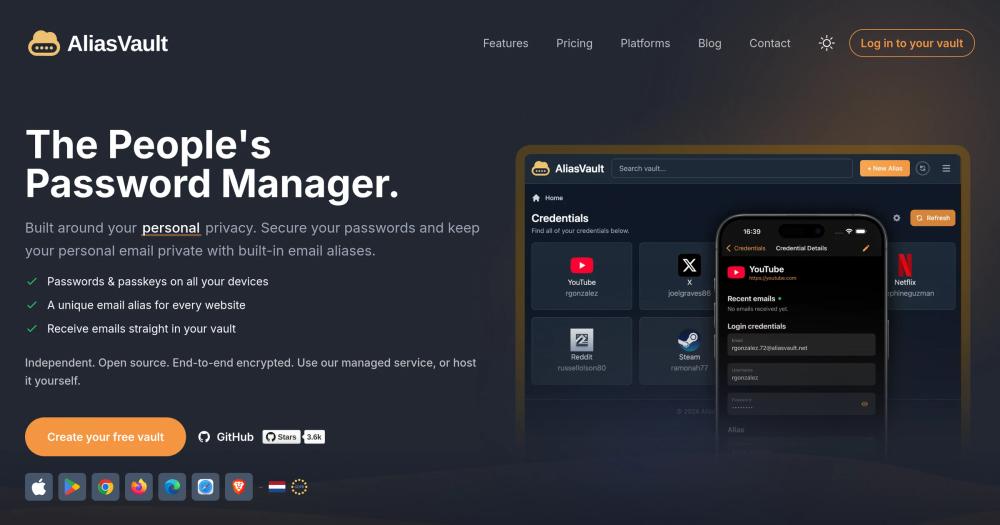
Secure your passwords, passkeys, and email aliases in a self-hosted vault with a built-in email server and end-to-end encryption.

Visit websiteGitHub3.6K starsDeploy on Hostinger
AliasVault home page with its password vault and a phone showing a saved login
TL;DR

AliasVault is a password manager with a built-in email server. It lets you create a unique email address and a strong password for each website you sign up with. This keeps your real email address private and limits what a data breach can expose. It is a free, self-hosted alternative to 1Password, Proton Pass, and Bitwarden. Unlike those, it handles email aliases itself with no outside service needed. Licensed under AGPL-3.0 and runs on Docker.

Read the full breakdownHide the full breakdownWho it is for, how it works, trade-offs, the quick start and the FAQ
who it's for

Who AliasVault is for#

Privacy-conscious individuals

If you want to keep your real email address out of every sign-up form, AliasVault is built for this. Each new account gets its own alias. If that service spams you or gets breached, you deactivate the alias and nothing else is affected.

Skip if:

You are comfortable sharing your real email address and do not care about spam or data breaches.

People switching from 1Password, Bitwarden, or Proton Pass

AliasVault imports credentials from all three. If you are paying for a password manager and want a self-hosted free option that also handles email aliases, switching takes one import step.

Skip if:

You need team or family sharing, which AliasVault does not yet support.

Home lab and self-hosting enthusiasts

The Docker install script is straightforward, and the hardware requirements are low enough for a small rented server or a spare machine at home. If you already run your own server, adding AliasVault is a natural fit.

Skip if:

You do not want to run your own server.

the problem

The problem it solves#

Most people sign up for dozens of services using the same real email address. When one company has a breach, that email address leaks. Spammers find it. Other accounts linked to that address face the same risk.

A password manager helps you use different passwords everywhere, but it does not protect your email address. Standalone email alias tools exist for this, but they add another account to manage and another service to trust. Passwords and email privacy end up needing two different apps.

how AliasVault solves it

How it solves it#

Built-in email server for aliases

When you create an account on a website, AliasVault generates a unique email address for it. Emails sent to that address arrive directly in your vault, already encrypted. No third-party email relay is needed.

End-to-end encryption

Everything in your vault, including passwords, usernames, and received emails, is encrypted on your device before anything reaches the server. Only ciphertext is stored on the server. Even if the server were broken into, your data would remain unreadable.

Browser extensions and mobile apps

AliasVault autofills passwords and passkeys from browser extensions for Chrome, Firefox, Edge, Safari, and Brave. Native iOS and Android apps give you access on mobile. All clients support full offline access.

Passkeys and TOTP codes

Store passkeys and TOTP codes (time-based one-time codes for two-step login) alongside your passwords. Everything syncs across your devices automatically.

Import from other password managers

Move your credentials from 1Password, Bitwarden, Chrome, Dashlane, Firefox, KeePass, KeePassXC, Proton Pass, or Strongbox in one import step. You can also export your vault at any time.

Docker install script

An install script downloads the Docker images and handles security certificates. You need a small Linux server: one processor core, 1 GB of memory, and 5 GB of free disk space. A second install option suits home labs and home servers with existing setups.

strengths · trade-offs

Strengths and trade-offs#

Strengths

  • Email aliases without a third-party serviceAliasVault runs its own email server, so your aliases and your vault are in the same place. No external alias service is needed. When you get an email to an alias, it arrives in your vault already encrypted.
  • Only you can read your vaultYour master password never leaves your device. Nothing on the server can decrypt your vault. This is a zero-knowledge design: even the people running the server cannot read your data.
  • Offline accessBrowser extensions and mobile apps let you view and edit your vault without an internet connection. Changes sync the next time you are back online.
  • Active development with regular releasesUpdates ship every two to three weeks. With 3,571 GitHub stars and 204 open issues, the project has an active community. Its creator has been running SpamOK.com since 2013, a 13-year track record.

Trade-offs

  • -Still pre-1.0 with some features pendingAliasVault has not yet reached its 1.0 release. Data integrity and automatic migration between updates are guaranteed. Some planned features, like hardware security keys and team sharing, are still on the roadmap.
  • -AGPL-3.0 restricts managed hostingYou can run AliasVault for personal and team use at no cost. If you plan to offer it as a managed hosted service to paying customers, the AGPL-3.0 license does not permit that.
  • -Self-hosting needs a Linux serverTo run AliasVault yourself, you need a 64-bit Linux server with Docker installed. If you are not comfortable with server management, the official cloud version at app.aliasvault.com is the easier path.
versus alternatives

AliasVault vs alternatives#

AliasVault vs Proton Pass

Proton Pass is a password manager with built-in hide-my-email aliases backed by ProtonMail. Both offer end-to-end encryption and built-in aliases. One key difference is where your data lives. Proton Pass runs on ProtonMail's servers. AliasVault lets you run your own server and your own email server.

Proton Pass has a free tier with limits and a paid plan. AliasVault is free for all current features. If you want to keep your data on your own machine and avoid subscriptions, AliasVault fits better.

AliasVault vs 1Password

1Password is a password manager for individuals, families, and teams. It stores passwords, notes, and sensitive information across devices. It is built for shared vaults and admin controls across a household or business.

1Password costs a monthly fee per person. AliasVault is free and self-hosted. For one person who wants privacy and email aliases, AliasVault is the better fit. If your team needs shared vaults, 1Password has that today and AliasVault does not yet.

AliasVault vs Bitwarden

Bitwarden is an open source password manager with free and paid cloud plans. Like AliasVault, it can be self-hosted. It supports team and family sharing today, which AliasVault does not yet have.

AliasVault adds a built-in email server for creating unique email addresses per service. If email privacy per service matters to you, AliasVault has this built in. If credential storage alone covers your needs and you want team sharing now, Bitwarden is worth checking.

install · quick start

Quick start#

bash
Self-host AliasVault on a Linux server. The install script pulls the Docker images, creates the configuration, and starts all containers with automatic SSL certificates.
```bash
curl -L -o install.sh https://github.com/aliasvault/aliasvault/releases/latest/download/install.sh && chmod +x install.sh && ./install.sh install
```
tech stack · detected from GitHub

What it's built on#

Languages
C#JavaScriptKotlinRustSwiftTypeScript
Frameworks
React
Runtimes
.NETWebAssembly
Infrastructure
Docker
frequently asked

FAQ#

Is AliasVault free to use?

Yes. All current features are free on both the official cloud and when self-hosted. After the 1.0 release, optional paid plans with higher limits and custom domains will be added for the cloud version. Its core features will always be free. Self-hosting remains free under the AGPL-3.0 license.

What does the AGPL-3.0 license allow?

You can run AliasVault on your own server for personal or team use at no cost. If you modify the code, you must share those changes. You cannot resell AliasVault as a managed hosted service to paying customers. Personal and internal team use are always allowed.

What do I need to self-host AliasVault?

A 64-bit Linux server running Docker with at least one processor core, 1 GB of memory, and 5 GB of free disk space. The install script handles security certificates and starts all containers. A Docker Compose option is also available for home labs and existing setups.

Can I import passwords from another password manager?

Yes. AliasVault imports credentials from 1Password, Bitwarden, Chrome, Dashlane, Firefox, KeePass, KeePassXC, Proton Pass, and Strongbox. You can also export your vault at any time, so you are never locked in.

Does AliasVault work offline?

Yes. Browser extensions and mobile apps let you view and edit your vault without an internet connection. Changes sync automatically when you are back online.

also worth a look

Similar open-source tools#

Gopass

Alternative to1Password

GPG-encrypted CLI password manager with Git versioning for teams

  • 7,333 GitHub stars
  • MITLicence MIT

Vaultwarden

Alternative toBitwarden

Lightweight self-hosted password manager server, Bitwarden compatible

  • 71,361 GitHub stars
  • AGPL-3.0Licence AGPL-3.0

Infisical

Alternative toHashiCorp Vault

Self-hosted secrets, certs, and privileged access in one platform.

  • 30,790 GitHub stars
  • MITLicence MIT

Bitwarden

Alternative to1Password

Open source password manager with end-to-end encryption and self-hosting.

  • 20,734 GitHub stars
  • AGPL-3.0Licence AGPL-3.0

KeePass

Alternative to1Password

Free open source password manager with encrypted local file

  • 57 GitHub stars
  • GPL-3.0Licence GPL-3.0

KeePassXC

Alternative to1Password

Offline password vault with browser autofill, TOTP, and YubiKey.

  • 30,202 GitHub stars
by category

Open source tools in these categories#

203

Security & Monitoring

REA (Reverse Engineer Anything), RustDesk, Sherlock
330

Business & Productivity

OpenClaw, Excalidraw, RustDesk
Black Friday offerHostinger

Self-host AliasVault on a Hostinger VPS

Keep it running 24/7, even when your laptop is off. A Hostinger VPS gives it a server of its own.

  1. 01

    Choose a plan

    Starts from $6.49/mo

  2. 02

    Apply

    15% off yearly and longer plans, until 6 Dec

  3. 03

    Install AliasVault

    On a server that stays on

  4. 04

    Start building

    Focus on the app, not the server

Deploy on Hostinger

Sponsors

SnitchFeed

Live monitoring on LinkedIn, X, Reddit & more. Agentic social listening for startups.

Marketing & Growth

Windshift

Alternative toJira

Self-hosted work management for teams leaving Jira

  • 481 GitHub stars
  • AGPL-3.0Licence AGPL-3.0

Nuphos

Alternative toConductor

Agent workspace for teams running Claude Code or Codex

  • 802 GitHub stars
  • Apache-2.0Licence Apache-2.0
  • #AI Agents
Advertise your product

New open source projects by email

The projects we add and every new guide. Free, unsubscribe any time.

Find open source alternatives to paid software

/
  • Claude Code to OpenCode
  • Jira to Windshift
  • Notion to AppFlowy
  • Slack to Mattermost
  • Linear to GitLab
  • Wispr Flow to Handy
  • Microsoft To Do to Super Productivity
  • Arc to Zen Browser
  • CapCut to Concat
  • Grok Bot to Rakazo
  • Superhuman to Inbox Zero
  • Discord to Stoat
  • Airtable to AITable
  • Datadog to SigNoz
  • Muse to OpenClaw
  • Railway to Coolify
  • GitHub Copilot to Cline
  • Confluence to Wiki.js
  • Microsoft Teams to Rocket.Chat
  • 1Password to KeePassXC
  • Zapier to n8n
  • Pinecone to Qdrant
  • Contentful to Strapi
  • Firebase to Supabase