Open Source Alternatives
  • Alternatives
  • Categories
    Categories by size1,010 projects
    • Developer Tools517
    • AI & Machine Learning446
    • Business & Productivity232
    • Web Development203
    • Security & Monitoring150
    • Communication & Collaboration138
    • IT Management135
    • Cloud & Hosting119
    • LLMOps & AI Tooling116
    • Data & Analytics110
    Browse all 21 categoriesProduct & Project Management, Design & Creative and 9 more
  • Blog
  • Advertise
SearchNotion, Slack, password manager.../
Submit
Open Source Alternatives
  • Alternatives
    • Developer Tools517
    • AI & Machine Learning446
    • Business & Productivity232
    • Web Development203
    • Security & Monitoring150
    • Communication & Collaboration138
    • Browse all 21 categories
  • Blog
  • Advertise
Submit your project

New open source projects by email

The projects we add and every new guide. Free, unsubscribe any time.

Open Source Alternatives LogoOpen Source Alternatives

Handpicked Open Source Alternatives to Paid Softwares

Product

  • Categories
  • Tag
  • Advertise

Resources

  • Blog
  • Collection
  • Submit

Company

  • Privacy Policy
  • Terms of Service
  • Refund Policy
  • Sitemap

Alternatives

  • Claude Code
  • Jira
  • Notion
  • Slack
  • Linear
  • Wispr Flow
  • All alternatives
© 2026 Open Source Alternatives. All rights reserved.
Open SourceAlternatives
Home/Categories/AI & Machine Learning/Aplica
A

Aplica

Open source alternative to JobCopilot, LazyApply and AIApply

  • 3 stars
  • MIT
  • Active this week
  • Last commit today

Last verified Nov 1, 2026

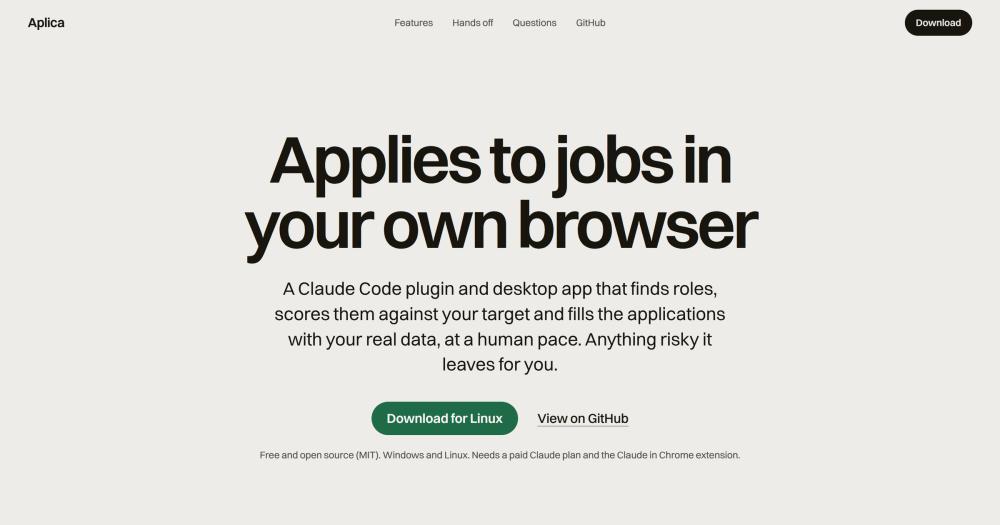
Automate job applications in your own browser using a Claude Code plugin that scores roles, fills forms from your profile, and stops at risky steps.

Visit websiteGitHub3 stars
image of Aplica
TL;DR

Aplica is a Claude Code plugin and desktop app that runs your job search in your own browser. It replaces paid tools like JobCopilot, LazyApply, and AIApply by handling search, scoring, and form-filling on your own machine and Chrome session, with your profile data never leaving your computer. MIT licensed, Windows and Linux, requires a paid Claude plan (Pro, Max, Team, or Enterprise) and Python 3.11.

Read the full breakdownHide the full breakdownWho it is for, how it works, trade-offs, the quick start and the FAQ
who it's for

Who Aplica is for#

Technical job seekers on an active search

Job hunters applying to 5 to 20 roles per week can use Aplica to handle repetitive ATS form-filling while keeping all profile data local. The plugin tracks each application in a SQLite database, deduplicates re-posts, and generates per-source metrics for the applications it sends.

Skip if:

If you are applying to fewer than a handful of roles and each board is different enough that form-filling is not repetitive, the setup cost outweighs the benefit for occasional use.

Engineers tracking multiple resume variants

If you keep a backend-focused and a full-stack resume and want to know which lands more interviews, Aplica assigns the best keyword match per role and reports reply rates broken down by variant in the daily status output. You adjust which variant wins by editing the keywords in your config file.

Skip if:

If you have one resume and are not running parallel variants, the variant tracking feature adds no value over a simpler apply flow.

Privacy-conscious applicants who won't use cloud services

Aplica stores your profile, employment history, essay answers, and application database in a local directory on your own machine. Your credentials for job boards stay in your logged-in Chrome session, not in a vendor's database. The trade for this privacy is that you manage your own machine and Claude plan.

Skip if:

If you are comfortable with cloud-based auto-apply services and prefer a managed experience with no local setup, JobCopilot or LazyApply offer that.

Non-technical job seekers who prefer a GUI

The desktop app for Windows and Linux covers the full workflow without a terminal: prerequisite checks, profile form, every toggle, a drag-and-drop pipeline board, and a Run button with live output. The app installs the plugin on first run and verifies Python and Claude in Chrome are present.

Skip if:

The desktop app does not yet support macOS. Mac users must run the plugin directly from Claude Code.

the problem

The problem it solves#

Job hunting at volume means retyping the same information across different ATS forms: your name, contact details, work authorization, and answers to essay questions that vary slightly from one application to the next. At any scale beyond a handful of roles, tracking which applications are open, which resume variant you sent, and which boards produced actual responses becomes a spreadsheet problem that breaks down fast.

Paid auto-apply services address the volume problem by managing your browser remotely and storing your profile on their servers. That means your employment history, resume files, and contact details live on a third-party service, filling forms on your behalf using data they hold. For job seekers who cannot accept that trade, manual tracking is the only fallback.

how Aplica solves it

How it solves it#

Local profile, zero data in repo

Your name, contact details, work authorization, essay answers, and resume files live in a config directory on your own machine (`~/.config/aplica` on Linux, `%APPDATA%\aplica` on Windows), never in the plugin repo. The agent reads from that directory at runtime; nothing is sent to a third-party server.

Ghost-job scoring

Before each role gets an application slot, Aplica runs a ghost-job score that flags evergreen talent pools and stale re-posts. Roles above the configurable `ghost_max` threshold are skipped automatically, so you do not spend a daily application cap on positions that have not been actively filled for months.

Resume variant selection with reply rate tracking

You can keep several resume files in your config directory. For each application, Aplica selects the variant whose keywords best match the job description and records which variant it used. The daily status report breaks down response and interview rates by variant, so you can see which version performs in practice.

Anti-ban posture with immediate CAPTCHA stop

Applications go out one per role, deduplicated, at a human pace with a configurable cadence between 45 and 240 seconds. Social actions (comments, DMs, connections) are off by default and have their own daily caps. On any CAPTCHA, block, or expired sign-in, the plugin stops immediately and logs the event to Notifications with the suggested next step.

Point-and-click desktop cockpit

The desktop app for Windows and Linux gives you onboarding with prerequisite checks, a settings modal for your profile and every toggle, a drag-and-drop pipeline board, a recruiter CRM, and a Run button with live output. The app checks for Python and the Claude in Chrome extension on first run and installs the plugin for you.

Grounded cover letter drafting

The `/aplica-draft cover <id>` command generates a cover letter, follow-up, or interview prep note for one application. Output is grounded in your profile and the recorded job facts only; the plugin rules forbid invented or inflated claims, since a false claim in an application can fail an interview.

strengths · trade-offs

Strengths and trade-offs#

Strengths

  • All application data stays on your machineProfile, answers, resume files, and the SQLite application database (`state.db`) all live in your local config directory. Nothing passes through a vendor's cloud; the only network traffic is the job applications themselves and, optionally, a summary email to yourself.
  • MIT license with no paid tierAplica is free to run without any subscription beyond the Claude plan you already pay for. The MIT license allows commercial use, modification, and distribution without restriction. You own the full stack and can fork or extend the plugin without licensing constraints.
  • Honest-by-design rules enforced at the plugin levelThe plugin rules forbid inventing or inflating any answer, including cover letters and follow-ups. Forms, letters, and follow-ups use your profile and the recorded job facts only. Anything that would require invented information is flagged for you to handle by hand, rather than auto-submitted with a fabricated answer.
  • Conservative defaults reduce ban riskSocial features (comments, connections, DMs) are off by default. Daily application caps are set low. The orchestrator applies one role at a time from your own account and IP, matching a human pace. The plugin stops immediately on any CAPTCHA or block, unlike cloud services that may retry from another IP.

Trade-offs

  • -Requires a paid Claude planAplica runs through Claude in Chrome, which does not work on a free Claude account. A Pro, Max, Team, or Enterprise subscription is required. This means the tool is not free to run; the cost floor is the Claude Pro subscription price, in addition to the zero-cost Aplica software itself.
  • -Desktop app: Windows and Linux onlyThe point-and-click desktop cockpit does not support macOS. The Claude Code plugin works wherever Claude Code runs, but the GUI is limited to Windows and Linux. Mac users must run the plugin directly from a Claude Code session without the onboarding or pipeline board.
  • -Job board Terms of Service riskLinkedIn, Indeed, and most job boards restrict automated access in their Terms of Service, and any automation can result in a limited or banned account. Aplica's conservative defaults (low caps, human cadence, CAPTCHA stop) lower this risk but do not eliminate it. The repo includes a DISCLAIMER.md that covers this explicitly.
  • -Early-stage project with low community adoptionThe repository was created in October 2026 and has a small contributor base (3 stars at time of listing). Issues and edge cases that arise in real-world use may not yet have documented fixes or community-sourced workarounds.
versus alternatives

Aplica vs alternatives#

Aplica vs JobCopilot

Both tools automate job applications across multiple boards, but they differ on where your data lives and how the automation runs. JobCopilot is a cloud service: you upload your resume and configure job preferences on their platform, and they run the automation from their servers. Aplica runs from your own machine: your profile stays in a local config directory, and the plugin applies through your own logged-in Chrome session.

FeatureAplicaJobCopilot
LicenseMITProprietary (SaaS)
Data residencyLocal config directoryVendor cloud
BrowserYour own Chrome sessionVendor-managed
PricingFree (Claude plan required)Paid subscription
PlatformsWindows, Linux (desktop app)Browser extension / web

Aplica is the better choice when data privacy matters and you cannot accept uploading your employment history to a third-party service. JobCopilot is worth considering when you want a fully managed experience with no local setup, no Python or Claude plan dependency, and support for macOS.

Aplica vs LazyApply

LazyApply is a browser extension that automates job applications on LinkedIn, Indeed, and other boards. Like JobCopilot, it is a proprietary service that manages the application process through its own infrastructure.

FeatureAplicaLazyApply
LicenseMITProprietary
Data residencyLocal onlyVendor cloud
Resume variantsMultiple, with per-variant reply rateLimited
Open sourceYesNo
PricingFree (Claude plan required)Paid subscription

LazyApply is easier to start with: install the browser extension and it is ready without Python or a Claude plan. Aplica has more setup but keeps your data local and tracks which resume variant produces responses. LazyApply is the better fit when you want a quick start with no local dependencies; Aplica is the better fit when you want full data ownership and per-variant performance tracking.

install · quick start

Quick start#

bash
Download the Windows installer (.exe) or Linux package (.AppImage or .deb) from GitHub Releases: https://github.com/eurafaeldecarvalho/aplica/releases/latest
tech stack · detected from GitHub

What it's built on#

Languages
PythonTypeScript
Frameworks
ElectronReact
frequently asked

FAQ#

Does using Aplica risk getting my LinkedIn or Indeed account banned?

Yes, it carries risk. LinkedIn and most job boards restrict automated access in their Terms of Service, and any automation can result in a limited or banned account. Aplica's defaults are conservative: social actions off, low daily caps, human cadence, immediate stop on any CAPTCHA or block. That reduces but does not eliminate the risk. The repo includes DISCLAIMER.md with a full breakdown; read it and decide for yourself before running a round.

Does my profile data leave my computer?

No. Your profile, answers, resume files, and application database live in a local config directory (~/.config/aplica on Linux, %APPDATA%\aplica on Windows). The only data that leaves your machine is the job applications you submit and, optionally, a summary email to yourself. What the agent sends to Claude to fill a form goes through your own Claude session, the same as any Claude Code prompt.

What does it cost to run Aplica?

Aplica is free and MIT licensed. The only cost is the Claude plan required to run it: a paid Claude Pro, Max, Team, or Enterprise subscription. The free Claude tier does not support Claude in Chrome, which is what the plugin uses to operate your browser. Beyond the Claude subscription you already pay, there is no additional fee.

Does it work for non-engineering roles?

Yes. The target profile is entirely config-based: job titles to search, required and excluded stack terms, accepted markets, and work mode preferences. The shipped example uses a backend engineering template; you replace it with your own titles and filters. The desktop app provides a settings form for this without editing JSON directly.

Can I run it without using Claude Code directly?

Yes, through the desktop app for Windows and Linux. The desktop cockpit handles onboarding, fills in your profile through a settings modal, exposes every toggle, and provides a Run button that starts the plugin. You do not need to open a Claude Code session manually. The app also checks for Python and the Claude in Chrome extension on first launch and installs the plugin for you.

also worth a look

Similar open-source tools#

career-ops

Alternative toAIApply

AI job search agent that scores listings and tailors CVs locally.

  • 78,672 GitHub stars
  • MITLicence MIT

rakazo

Featured

Alternative toGrok Bot

AI teammates you own: your keys, your model, your machine.

  • 6,242 GitHub stars
  • Apache-2.0Licence Apache-2.0

Kwant

InAI & Machine Learning

Self-hosted AI agent team with handoffs, routines, and approvals

  • 16 GitHub stars
  • AGPL-3.0Licence AGPL-3.0

OfficeCLI

Alternative toAspose.Total

Office automation CLI for AI agents, no Office install required

  • 32,760 GitHub stars
  • Apache-2.0Licence Apache-2.0

Zephium

Alternative toArc

Rust browser on your system's own engine, with an AI Work canvas

  • 866 GitHub stars
  • MPL-2.0Licence MPL-2.0

Parrotflow

Alternative toWispr Flow

Scriptable local dictation with rules, screen context, and vocabulary.

  • 22 GitHub stars
  • GPL-3.0Licence GPL-3.0
by category

Open source tools in these categories#

446

AI & Machine Learning

freeCodeCamp, REA (Reverse Engineer Anything), OpenClaw
232

Business & Productivity

OpenClaw, Excalidraw, RustDesk
517

Developer Tools

REA (Reverse Engineer Anything), superpowers, Skills for Real Engineers

Sponsors

Inbox Zero

Alternative toSuperhuman

AI email assistant that drafts replies and clears your inbox

  • 12,855 GitHub stars
  • AGPL-3.0Licence AGPL-3.0
  • #Email

rakazo

Alternative toGrok Bot

AI teammates you own: your keys, your model, your machine.

  • 6,242 GitHub stars
  • Apache-2.0Licence Apache-2.0
  • #AI Agents

SnitchFeed

Live monitoring on LinkedIn, X, Reddit & more. Agentic social listening for startups.

Marketing & Growth

Advertise your product

New open source projects by email

The projects we add and every new guide. Free, unsubscribe any time.

Find open source alternatives to paid software

/
  • Claude Code to OpenCode
  • Jira to Windshift
  • Notion to AppFlowy
  • Slack to Mattermost
  • Linear to GitLab
  • Wispr Flow to Handy
  • Arc to Zen Browser
  • CapCut to Concat
  • Grok Bot to rakazo
  • Superhuman to Inbox Zero
  • Airtable to AITable
  • Muse to OpenClaw
  • Railway to Coolify
  • GitHub Copilot to Cline
  • Datadog to Netdata
  • Microsoft Teams to Rocket.Chat
  • Confluence to Docmost
  • Pinecone to Qdrant
  • Zapier to n8n
  • Devin AI to OpenHands
  • Firebase to Supabase
  • 1Password to KeePassXC
  • Contentful to Strapi
  • Adobe Premiere Pro to Shotcut
  • Claude Code to OpenCode
  • Jira to Windshift
  • Notion to AppFlowy
  • Slack to Mattermost
  • Linear to GitLab
  • Wispr Flow to Handy
  • Arc to Zen Browser
  • CapCut to Concat
  • Grok Bot to rakazo
  • Superhuman to Inbox Zero
  • Airtable to AITable
  • Muse to OpenClaw
  • Railway to Coolify
  • GitHub Copilot to Cline
  • Datadog to Netdata
  • Microsoft Teams to Rocket.Chat
  • Confluence to Docmost
  • Pinecone to Qdrant
  • Zapier to n8n
  • Devin AI to OpenHands
  • Firebase to Supabase
  • 1Password to KeePassXC
  • Contentful to Strapi
  • Adobe Premiere Pro to Shotcut