Open Source Alternatives
  • Alternatives
  • Categories
    Categories by size991 projects
    • Developer Tools507
    • AI & Machine Learning435
    • Business & Productivity226
    • Web Development202
    • Security & Monitoring149
    • Communication & Collaboration135
    • IT Management134
    • Cloud & Hosting118
    • LLMOps & AI Tooling111
    • Product & Project Management109
    Browse all 21 categoriesData & Analytics, Design & Creative and 9 more
  • Blog
  • Advertise
SearchNotion, Slack, password manager.../
Submit
Open Source Alternatives
  • Alternatives
    • Developer Tools507
    • AI & Machine Learning435
    • Business & Productivity226
    • Web Development202
    • Security & Monitoring149
    • Communication & Collaboration135
    • Browse all 21 categories
  • Blog
  • Advertise
Submit your project

New open source projects by email

The projects we add and every new guide. Free, unsubscribe any time.

Open Source Alternatives LogoOpen Source Alternatives

Handpicked Open Source Alternatives to Paid Softwares

Product

  • Categories
  • Tag
  • Advertise

Resources

  • Blog
  • Collection
  • Submit

Company

  • Privacy Policy
  • Terms of Service
  • Refund Policy
  • Sitemap

Alternatives

  • Claude Code
  • Jira
  • Notion
  • Slack
  • Linear
  • Wispr Flow
  • All alternatives
© 2026 Open Source Alternatives. All rights reserved.
Open SourceAlternatives
Home/Categories/AI & Machine Learning/Kwant
icon of Kwant

Kwant

  • 16 stars
  • AGPL-3.0
  • Active this week
  • Last commit today

Last verified Oct 31, 2026

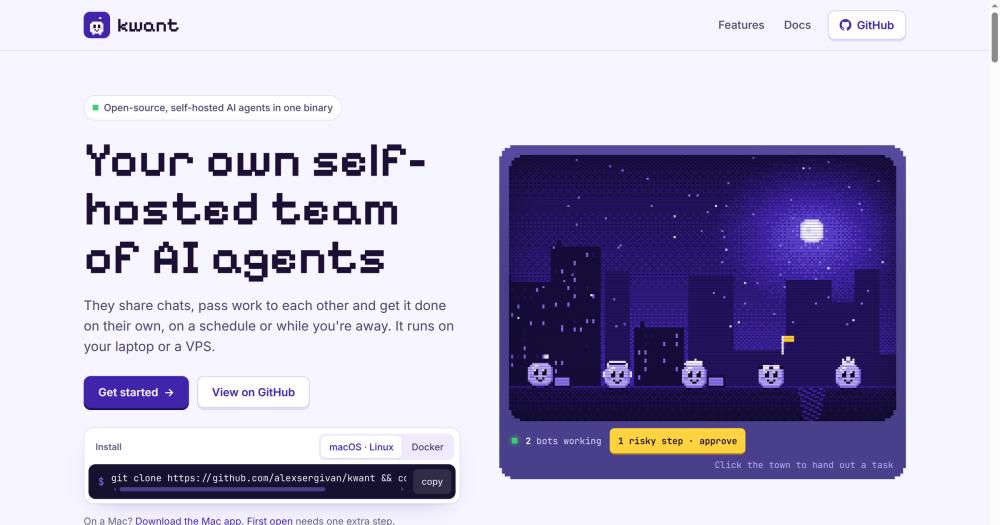
Run a self-hosted team of AI bots in one Rust binary. Bots share chats, hand work to each other via @mentions, and execute routines on a schedule.

Visit websiteGitHub16 starsDeploy on Hostinger
image of Kwant
TL;DR

Kwant is a self-hosted AI agent team in a single Rust binary. You create bots with distinct roles and models; they share channel chats and hand work to each other via @mentions, so a task flows from a TechLead bot through a Designer bot and on to QA without re-prompting each step. Unlike hosted multi-agent tools, Kwant runs on your own hardware using the Claude, Codex, or Grok CLI accounts you already have, with no telemetry and no vendor lock-in. Licensed AGPL-3.0; best for developers and small technical teams who want background automation with approval controls for risky actions.

Read the full breakdownHide the full breakdownWho it is for, how it works, trade-offs, the quick start and the FAQ
who it's for

Who Kwant is for#

Developers running recurring background tasks

Kwant's routines run on a schedule you define in plain language. Ask a bot 'every morning at 8, check the deployment logs' and it creates the routine with an Undo button. While you are offline, the bot runs, posts results to the channel, and surfaces failures on the summary page when you return.

Skip if:

If your recurring tasks are non-AI shell scripts that a cron job handles without language understanding, a standard cron scheduler is simpler and costs nothing.

Indie hackers managing multiple projects across contexts

Spaces keep work, side projects, and personal tasks in separate environments, each with its own bots, channels, accounts, and approval settings. Nothing leaks between spaces, and you switch with a keyboard shortcut. The Loose ends feature finds open GitHub issues and drafts replies for repos that have gone quiet.

Skip if:

If you only work in one context with no ongoing coordination across projects, the space isolation adds complexity with no practical benefit.

Small technical teams automating multi-step review workflows

Each step in a workflow can involve a different bot: a TechLead hands a question to a Designer with an @mention, who passes it to QA after finishing. The approval system lets team members review risky bot actions (a git push, a shell command) before they execute, showing the exact arguments.

Skip if:

If your team has non-technical members who need a GUI workflow builder, Kwant requires Rust or Docker and comfort with the command line.

Developers evaluating multi-agent patterns before committing to managed tools

Kwant runs on infrastructure you control using AI accounts you already pay for. Starting costs are only the API tokens spent on actual calls, with no platform fee. This makes it a low-overhead way to test whether multi-agent coordination improves your workflows before signing up for a hosted product.

Skip if:

If you need enterprise support, SLAs, or a product your whole team can use without any server setup, a managed multi-agent platform is a more appropriate starting point.

the problem

The problem it solves#

Using AI assistants for multi-step work means constant manual context switching. You prompt one chat, copy its output, start a new chat for the next stage, and repeat. There is no coordination layer. If you want a designer bot to check a frontend question before a QA bot signs off, you do that by hand on every task.

Scheduled work is harder. Most AI tools have no native scheduling, so recurring tasks like a daily deploy check or a weekly report summary never happen unless you are at the keyboard. Every account you hold at different providers is also siloed. When your Claude usage quota runs out mid-task, there is no automatic fallback to a Codex or Grok key. You either run out mid-task or switch tools manually.

how Kwant solves it

How it solves it#

Bot teams with @mention handoffs

Each bot has a name, role, and assigned model. When a bot's response names a teammate with an @mention, that bot picks up the work automatically. A TechLead bot can hand a layout question to a Designer, who passes it to QA, all within one channel thread. No re-prompting needed at each step.

Spaces for project context isolation

Separate spaces contain their own bots, channels, routines, and accounts, with nothing leaking between them. Keep work projects, side projects, and personal tasks in isolated spaces, each with its own icon and color, switchable with a keyboard shortcut (Command/Ctrl + 1-9).

Multi-account AI provider fallback

You can add multiple accounts per AI engine, including Claude, Codex, and Grok CLIs, plus API keys for Anthropic, OpenAI, and xAI. Set a default and a priority order. When one account hits its usage quota, the next in the chain takes over automatically, and the chat shows which account is active.

Scheduled routines from natural language

Tell a bot 'every weekday at 9, check the deploys' and it creates the routine with an Undo button on the card. Routines run on a cron-based schedule, post results to the channel, and surface what succeeded, what needs your attention, and what got stuck on a summary page.

Approval cards for risky steps

The default mode intercepts shell commands, git push operations, network calls, and changes outside the bot's folder. An approval card shows the exact arguments with three options: Allow Once, Always Allow, or Deny. Per-space and per-bot settings let you widen or tighten the threshold.

Laya model router

Laya is a bundled Python service that picks which bot answers in a multi-bot channel and which model and effort level a bot uses when set to auto. It downloads once (about 420 MB) at first start. Bots route by keyword while Laya is unavailable, and the header shows its status.

strengths · trade-offs

Strengths and trade-offs#

Strengths

  • Single binary with embedded SQLiteThe entire server, web app, and database fit in one Rust binary with no separate Postgres or Redis to provision. Your data lives in a single folder (~/.kwnt by default). On a VPS, deployment is one scp command to copy the binary and one command to start it. Backup is copying a folder.
  • No telemetry and no third-party scripts in the UIThe web app loads nothing from external servers. All API calls go only to the AI providers and MCP servers you explicitly configure. The README states kwant sends nothing to its authors and the interface pulls nothing from outside, which matters in restricted environments where outbound traffic must be auditable.
  • AGPL-3.0 with full rights for internal useRunning Kwant for yourself, your team, or your company is unrestricted under AGPL-3.0. The copyleft clause applies only when you modify the code and run it as a hosted service for external users. Commercial internal use on your own server is permitted with no licensing fee.
  • Connects to CLIs already signed in on your machineKwant detects and integrates with the claude, codex, and grok CLIs already installed on your machine without requiring separate API keys. If a CLI is signed in, Kwant can use it immediately via a sign-in button in the app, keeping credential management in the same place developers already manage it.

Trade-offs

  • -Requires building from source on LinuxThere is no prebuilt Linux binary or Homebrew formula. Command-line use on Linux or a VPS requires Rust (stable, via rustup) and Node.js 20 to compile from source. The Docker Compose path avoids the Rust requirement but still builds the image locally from the cloned repository. Mac users have a prebuilt DMG download.
  • -Laya router requires a 420 MB download at first startKwant downloads about 420 MB of Python packages and a language model from Hugging Face on its first run to set up the Laya routing service. This requires access to huggingface.co. On networks that block it, Laya fails to initialize and Kwant routes bots by keyword instead, without model-auto selection.
  • -Very early-stage project with a small communityThe repository was created in October 2026 and has 16 GitHub stars. The API surface, config format, and Docker image setup may change between releases. The README documents an ownership migration step needed when upgrading from older Docker images. Production adoption at this stage carries real upgrade risk.
versus alternatives

Kwant vs alternatives#

Kwant vs ChatGPT Team

ChatGPT Team provides a managed AI workspace on OpenAI's infrastructure with team access, shared custom GPTs, and a polished interface. Kwant targets a similar audience (developers and technical teams wanting AI automation) but runs entirely on the user's own infrastructure, keeping all conversation history and credentials local.

FeatureKwantChatGPT Team
InfrastructureSelf-hosted (laptop or VPS)OpenAI cloud
LicenseAGPL-3.0Proprietary
Bot-to-bot handoffsYes, via @mentionsNo
Scheduled routinesYesNo
Approval controlsYes, per risky actionNo
TelemetryNone sentOpenAI usage data

Kwant is the better fit for teams with data privacy requirements that prevent conversation content from leaving their own infrastructure, workflows that need multiple bots to coordinate across specializations, or background automation that should run while you are offline. ChatGPT Team is the stronger choice when you need a no-setup managed service, non-technical team members who should not operate a server, or the full breadth of OpenAI's managed features including file uploads and custom GPT sharing.

Kwant vs Relevance AI

Relevance AI is a managed multi-agent platform with a no-code workflow builder and cloud-hosted execution. It requires no self-hosting but charges per task execution. Kwant requires Rust and Node.js to build from source, or Docker Compose to deploy, but the ongoing cost is only the API tokens from providers you already use, with no per-task platform fee.

Developers and technical teams who manage their own server infrastructure and need to keep AI credentials off third-party platforms will find Kwant more cost-predictable at higher usage volumes. Relevance AI remains the better choice for non-technical teams who need a visual workflow builder and do not want to operate any server infrastructure.

install · quick start

Quick start#

bash
Download the Mac app (universal binary for Apple silicon and Intel) from GitHub Releases: https://github.com/alexsergivan/kwant/releases/latest/download/kwant_universal.dmg
tech stack · detected from GitHub

What it's built on#

Languages
JavaScriptPythonRustTypeScript
Frameworks
React
Databases
SQLite
frequently asked

FAQ#

Does Kwant work with existing Claude or Codex CLI accounts, or do I need separate API keys?

Both work. If the claude or codex CLI is already signed in on your machine, Kwant connects to it directly through a sign-in button in the app, with no separate API key needed. You can also add Anthropic, OpenAI, or xAI API keys under Space Settings for provider-specific access, or mix both approaches across different bots.

How does the approval system work for risky bot actions?

Kwant's default mode intercepts actions it classifies as risky. These include git push, network calls, shell commands outside the bot's designated folder, and unknown commands. An approval card appears in the chat with the exact arguments, and you choose Allow Once, Always Allow, or Deny. Per-space and per-bot settings let you switch to always ask or never ask.

What does the AGPL-3.0 license mean for self-hosters?

AGPL-3.0 lets you run Kwant for yourself, your team, or your company without any licensing fee and without publishing your internal configuration. The copyleft clause activates only if you modify the source and then offer the modified Kwant as a hosted service for external users; in that case you must publish those source changes. Running it for internal use is fully unrestricted.

How do I install Kwant on Linux or a VPS without the Mac app?

On Linux, the supported paths are a source build or Docker Compose. The source build requires Rust (stable, via rustup) and Node.js 20; run git clone https://github.com/alexsergivan/kwant and then make run to build and start the server. Docker Compose is simpler if you do not have Rust installed. Clone the repository and run docker compose up -d --build. The kwant doctor command reports any missing dependencies and the install command for each.

Can I access Kwant from my phone while it runs on a server?

Yes. Kwant generates a one-time sign-in link when the server starts, valid for 15 minutes. Open it in a mobile browser, then install the web app to your home screen using your browser's install option. After that, enable notifications under Settings to receive approval requests and task summaries as push notifications while Kwant is running on the server.

also worth a look

Similar open-source tools#

rakazo

Featured

Alternative toGrok Bot

AI teammates you own: your keys, your model, your machine.

  • 6,242 GitHub stars
  • Apache-2.0Licence Apache-2.0

OfficeCLI

Alternative toAspose.Total

Office automation CLI for AI agents, no Office install required

  • 32,760 GitHub stars
  • Apache-2.0Licence Apache-2.0

Zephium

Alternative toArc

Rust browser on your system's own engine, with an AI Work canvas

  • 866 GitHub stars
  • MPL-2.0Licence MPL-2.0

Parrotflow

Alternative toWispr Flow

Scriptable local dictation with rules, screen context, and vocabulary.

  • 22 GitHub stars
  • GPL-3.0Licence GPL-3.0

Cherry Studio

Alternative toTypingMind

Local-first AI workstation with agents and multi-model chat.

  • 53,049 GitHub stars
  • AGPL-3.0Licence AGPL-3.0

AutoCua

Alternative toOpenAI Operator

Computer-use agent: desktop, browser, terminal, and iOS automation.

  • 859 GitHub stars
  • MITLicence MIT
by category

Open source tools in these categories#

435

AI & Machine Learning

freeCodeCamp, REA (Reverse Engineer Anything), OpenClaw
507

Developer Tools

REA (Reverse Engineer Anything), superpowers, Skills for Real Engineers
226

Business & Productivity

OpenClaw, Excalidraw, RustDesk
Hostinger

Self-host Kwant on a Hostinger VPS

Keep it running 24/7, even when your laptop is off. A Hostinger VPS gives it a server of its own.

  1. 01

    Choose a plan

    Starts from $6.49/mo

  2. 02

    Apply

    Extra 10% off yearly plans

  3. 03

    Install Kwant

    On a server that stays on

  4. 04

    Start building

    Focus on the app, not the server

Deploy on Hostinger

Sponsors

Inbox Zero

Alternative toSuperhuman

AI email assistant that drafts replies and clears your inbox

  • 12,855 GitHub stars
  • AGPL-3.0Licence AGPL-3.0
  • #Email

Omnara

Alternative toCClaude Managed Agents

Open-source agent deployment API. Self-host or use Omnara Cloud.

  • 3,325 GitHub stars
  • Apache-2.0Licence Apache-2.0
  • #AI Agents

rakazo

Alternative toGrok Bot

AI teammates you own: your keys, your model, your machine.

  • 6,242 GitHub stars
  • Apache-2.0Licence Apache-2.0
  • #AI Agents
Advertise your product

New open source projects by email

The projects we add and every new guide. Free, unsubscribe any time.

Find open source alternatives to paid software

/
  • Claude Code to OpenCode
  • Jira to Windshift
  • Notion to AppFlowy
  • Slack to Mattermost
  • Linear to GitLab
  • Wispr Flow to Handy
  • Arc to Zen Browser
  • CapCut to Concat
  • Grok Bot to rakazo
  • Superhuman to Inbox Zero
  • Airtable to AITable
  • Muse to OpenClaw
  • Railway to Coolify
  • GitHub Copilot to Cline
  • Datadog to Netdata
  • Microsoft Teams to Rocket.Chat
  • Confluence to Docmost
  • Pinecone to Qdrant
  • Zapier to n8n
  • Devin AI to OpenHands
  • Firebase to Supabase
  • 1Password to KeePassXC
  • Contentful to Strapi
  • Adobe Premiere Pro to Shotcut
  • Claude Code to OpenCode
  • Jira to Windshift
  • Notion to AppFlowy
  • Slack to Mattermost
  • Linear to GitLab
  • Wispr Flow to Handy
  • Arc to Zen Browser
  • CapCut to Concat
  • Grok Bot to rakazo
  • Superhuman to Inbox Zero
  • Airtable to AITable
  • Muse to OpenClaw
  • Railway to Coolify
  • GitHub Copilot to Cline
  • Datadog to Netdata
  • Microsoft Teams to Rocket.Chat
  • Confluence to Docmost
  • Pinecone to Qdrant
  • Zapier to n8n
  • Devin AI to OpenHands
  • Firebase to Supabase
  • 1Password to KeePassXC
  • Contentful to Strapi
  • Adobe Premiere Pro to Shotcut