Open Source Alternatives
  • Alternatives
  • Categories
    Categories by size1,107 projects
    • Developer Tools557
    • AI & Machine Learning472
    • Business & Productivity270
    • Web Development208
    • Security & Monitoring171
    • Communication & Collaboration153
    • IT Management145
    • Cloud & Hosting127
    • LLMOps & AI Tooling123
    • Data & Analytics118
    Browse all 21 categoriesProduct & Project Management, DevOps & CI/CD and 9 more
  • Blog
  • Advertise
SearchNotion, Slack, password manager.../
Submit
Open Source Alternatives
  • Alternatives
    • Developer Tools557
    • AI & Machine Learning472
    • Business & Productivity270
    • Web Development208
    • Security & Monitoring171
    • Communication & Collaboration153
    • Browse all 21 categories
  • Blog
  • Advertise
Submit your project

New open source projects by email

The projects we add and every new guide. Free, unsubscribe any time.

Open Source Alternatives LogoOpen Source Alternatives

Handpicked Open Source Alternatives to Paid Softwares

Product

  • Categories
  • Tag
  • Advertise

Resources

  • Blog
  • Collection
  • Submit

Company

  • Privacy Policy
  • Terms of Service
  • Refund Policy
  • Sitemap

Alternatives

  • Claude Code
  • Jira
  • Notion
  • Slack
  • Linear
  • Wispr Flow
  • All alternatives
© 2026 Open Source Alternatives. All rights reserved.
Open SourceAlternatives
Home/Categories/AI & Machine Learning/Dazzi
icon of Dazzi

Dazzi

Open source alternative to Rewind AI, DEVONthink and Fenn

  • 13 stars
  • FSL-1.1-MIT
  • Active this week
  • Last commit today

Last verified Nov 5, 2026

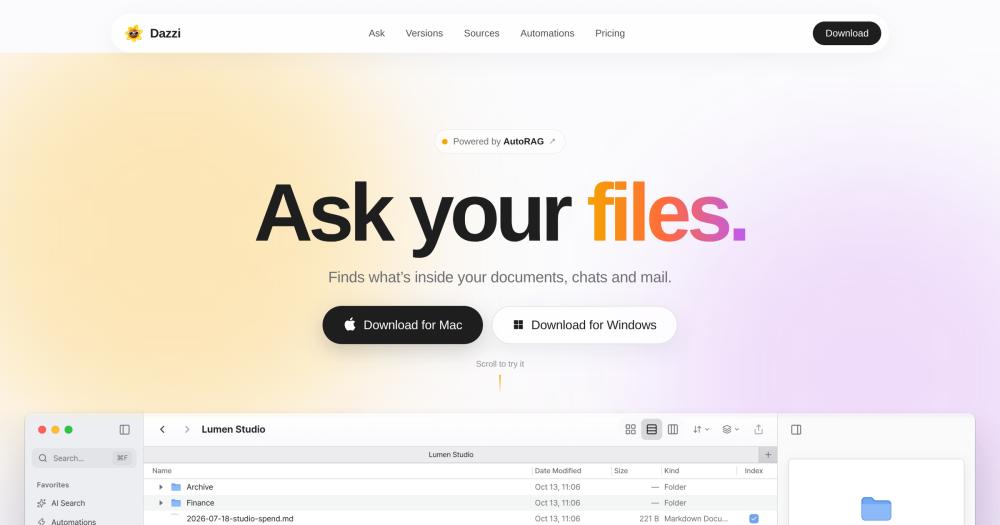
Search local files, chats, and mail by asking questions in plain language, powered by a local embedding model that keeps your data on-device.

Visit websiteGitHub13 stars
image of Dazzi
TL;DR

Dazzi is an AI file manager for macOS and Windows that indexes the contents of local files, mail, and connected chat apps and answers questions in plain English with cited sources. It replaces paid tools like Rewind AI and DEVONthink with a privacy-first, self-hosted approach; the default embedding model runs locally and file contents stay on-device. Licensed under FSL-1.1-MIT, each release converts to MIT two years after publication. Best for knowledge workers, researchers, and writers who need to search across dozens of documents and inboxes without sending data to a cloud service.

Read the full breakdownHide the full breakdownWho it is for, how it works, trade-offs, the quick start and the FAQ
who it's for

Who Dazzi is for#

Knowledge workers managing large file archives

Researchers, analysts, and consultants who build up thousands of documents over years can query across all of them in one prompt. The citation links let you verify every answer against the specific source passage, rather than opening files one by one.

Skip if:

If your files are mainly structured data like spreadsheets, databases, or CSVs, Dazzi's document search adds little. SQL or a spreadsheet formula will be faster.

Privacy-conscious users replacing Rewind AI or DEVONthink

Anyone who finds Rewind AI's continuous screen recording too invasive, or who wants a cross-platform alternative to DEVONthink's macOS-only ecosystem, can get semantic document search without sending files to an external service.

Skip if:

If you need Rewind AI's screen and audio capture specifically, to recall a website you visited or what was said in a meeting, Dazzi does not record the screen and cannot substitute for that.

Teams searching across multiple messaging apps

When conversations span Slack, Telegram, WhatsApp, and email, context is scattered. Dazzi connects all of them and searches across threads, channels, and inboxes in one query without switching apps or logging in and out.

Skip if:

If your team uses only one messaging app and already has strong built-in search, adding Dazzi is unnecessary overhead.

the problem

The problem it solves#

Finding specific information across your own computer gets harder as the number of files, folders, and connected apps grows. Standard file search matches filenames and metadata, but most useful context is buried inside documents, including a contract clause, a decision from a Slack thread three months ago, or a note in a PDF scanned last year. Switching between apps to track down information wastes time and breaks focus.

The challenge compounds when files arrive in different formats from different sources. PDFs, Word documents, markdown notes, chat exports, and email all live in separate places and require separate search tools. Most people end up with rough personal filing systems that work until volume or variety increases enough to overwhelm them.

how Dazzi solves it

How it solves it#

Local AI Search

Asks questions across the full contents of files, mail, and connected chat apps in plain English. The default embedding model (Qwen3-Embedding-0.6B) runs on-device, so documents do not leave the machine. Every answer links back to the source passages it used, with citation numbers in the response.

Connected App Search

Searches Slack channels and threads, Discord servers, Telegram chats, WhatsApp messages, GitHub repos and issues, Obsidian vaults, and mail inboxes alongside local files. One search across everything you work in, not just the filesystem.

Version Grouping

Groups duplicate and near-duplicate files into single rows in the file list, with the newest on top labeled Latest and similar variants labeled Similar or Identical. Cuts through the proliferation of files named proposal-final, proposal-v3, and proposal (1). Powered by the dupey library.

Quick Look Preview

Press Space on any file to preview it inline. Markdown, code, PDF, video, audio, Office documents, and HWP/HWPX files render immediately without opening another app. HWP and HWPX pages render locally without Hancom Office installed.

Folder Automations

Create folder-level rules that run when documents arrive or change, such as checking a PDF for a signature and filing it automatically. Automations trigger without the app being open, so a new document lands, gets checked, and is filed while you are away.

strengths · trade-offs

Strengths and trade-offs#

Strengths

  • Privacy-first local embeddings by defaultThe default embedding model (Qwen3-Embedding-0.6B) runs on-device. File contents stay on the machine unless the user explicitly opts into cloud embedding on a paid plan. No documents are uploaded without consent, and no content is sent to train a third-party model.
  • Cross-platform macOS and Windows supportInstalls from a single signed package on both Apple Silicon Macs (arm64 DMG) and Windows x64 machines. Each installer bundles the embedding model and every dependency so the first launch is the full app, with nothing extra to download.
  • Source-available with a clear MIT conversion pathFSL-1.1-MIT means every release converts to full MIT two years after publication. You can read the source, file issues, and build on it. The underlying AutoRAG engine is Apache-2.0 licensed, and the full codebase becomes OSI-compliant open source over time.
  • Broad file format support in Quick LookRenders PDF, Office documents, markdown, code, video, audio, and HWP/HWPX natively. Korean HWP pages render locally without Hancom Office, which is useful for anyone working with Korean government or enterprise documents.

Trade-offs

  • -FSL-1.1-MIT is not an OSI-approved open source licenseDazzi is Fair Source, not fully open source. You can use, modify, and self-host it for any purpose, including internal business and commercial team use. What is not permitted: offering the software (or software with substantially similar functionality) as a commercial product or service to others. Each release converts to MIT after two years, so the restriction applies only to recent versions.
  • -Early-stage project with 13 stars and 44 open issuesThe repo was created in September 2026 and has 13 stars at the time of listing. With 44 open issues logged, users should expect rough edges, missing documentation, and breaking changes between releases. It is not a good fit for a team production workflow that requires stable, well-tested releases.
  • -macOS and Windows only; no Linux buildsThe installer ships macOS arm64 and Windows x64 builds only. Linux users cannot install the signed release without building from source, which requires Bun, Node.js 24+, and the Cargo toolchain for the dupey dependency.
versus alternatives

Dazzi vs alternatives#

Dazzi vs Rewind AI

Both tools help you find information stored on your computer, but they index it differently. Rewind AI records your screen and audio continuously; Dazzi indexes the contents of files and connected apps on demand.

FeatureDazziRewind AI
LicenseFSL-1.1-MIT (Fair Source)Proprietary
Self-hostingYes (desktop installer)No
Indexing methodFile and app contentsContinuous screen recording
PlatformsmacOS, WindowsmacOS only
Local AI processingYes (default)No
PricingFree tier; paid from $4/moSubscription required

Dazzi is the better choice when privacy matters. Documents do not leave your machine by default, and there is no continuous screen capture. It also covers Windows users and connects to chat apps and GitHub for cross-service search. Rewind AI has an advantage for recalling anything you have seen on screen, including web pages, meetings, and apps Dazzi does not index; if screen-and-audio replay is what you need, Dazzi is not a substitute.

Dazzi vs DEVONthink

DEVONthink is a macOS document manager with an extensive set of organizational features built up over two decades. Dazzi is a cross-platform AI search tool that prioritizes querying over organizing.

FeatureDazziDEVONthink
LicenseFSL-1.1-MIT (Fair Source)Proprietary
PlatformsmacOS, WindowsmacOS, iOS only
AI searchYes (local or cloud)Proprietary feature set
Cross-service searchFiles, mail, chat appsLocal files and databases
PricingFree tier; from $4/moPaid, proprietary

Dazzi wins for cross-platform coverage, chat app integration, and users who do not want to invest in DEVONthink's organizational model. DEVONthink is still the better fit for macOS-only teams with large document collections who need DEVONthink's classification, smart groups, and deep macOS integration, as well as its track record of stability over many years.

install · quick start

Quick start#

bash
Download the signed macOS installer or Windows installer from GitHub Releases: https://github.com/NomaDamas/AutoRAG-app/releases/latest
tech stack · detected from GitHub

What it's built on#

Languages
JavaScriptTypeScript
Frameworks
ElectronReact
frequently asked

FAQ#

Is Dazzi free to use?

There is a free tier that includes chat, embeddings, reranking, and a small credit allowance. Paid plans start at Air ($4/month), which includes a larger credit allowance and the option to use an API key from an existing AI subscription. ProMax ($20/month) and Max ($200/month) add progressively larger credit allowances. You can also connect your own API key directly in the app settings on any plan.

Does Dazzi send my files to the cloud?

By default, the embedding model (Qwen3-Embedding-0.6B) runs locally on your machine and your documents are not uploaded. File contents are sent to a remote embedder only if you choose Dazzi's cloud embedding option, which requires a paid plan and explicit consent in the app. Sign-in tokens and API keys live in the system's encrypted store, not in a config file.

What does the FSL-1.1-MIT license allow, and what does it prohibit?

FSL-1.1-MIT (Functional Source License, Version 1.1) is a Fair Source license. You can use, modify, and self-host Dazzi for any purpose, including running it internally at your business or for commercial team use. What is prohibited: offering Dazzi (or software with substantially similar functionality) as a commercial product or service to others. This restriction applies only until two years after a release, at which point that release converts to full MIT with no restrictions.

Does Dazzi support Windows?

Yes. Dazzi ships a signed Windows x64 installer alongside the macOS arm64 DMG. Both installers bundle the app and the local embedding model, so there is nothing extra to download. Windows support is part of the initial release.

What file formats does Quick Look preview?

Markdown, code files, PDF, video, audio, Office documents (.docx, .xlsx), and HWP/HWPX files all preview with the Space bar. HWP and HWPX pages render locally without Hancom Office installed. The preview panel opens instantly beside the file list without launching a separate application.

also worth a look

Similar open-source tools#

OpenClaw

Featured

Alternative toMuse

Self-hosted AI assistant for WhatsApp, Telegram, and more

  • 393,917 GitHub stars
  • MITLicence MIT

Inbox Zero

Featured

Alternative toSuperhuman

AI email assistant that drafts replies and clears your inbox

  • 12,889 GitHub stars
  • AGPL-3.0Licence AGPL-3.0

rakazo

Featured

Alternative toGrok Bot

AI teammates you own: your keys, your model, your machine.

  • 7,028 GitHub stars
  • Apache-2.0Licence Apache-2.0

paperclip

Featured

Alternative toGrok Bot

Self-hosted AI agent management with org charts and budgets

  • 111,113 GitHub stars
  • MITLicence MIT

Teable

Alternative toAirtable

Spreadsheet-simple database and AI app builder on PostgreSQL

  • 21,953 GitHub stars
  • CustomLicence AGPL-3.0 with brand protection terms

Metabase

Alternative toTableau

Self-hosted BI with dashboards, SQL editor, and AI-native analytics.

  • 50,133 GitHub stars
by category

Open source tools in these categories#

472

AI & Machine Learning

freeCodeCamp, REA (Reverse Engineer Anything), OpenClaw
271

Business & Productivity

OpenClaw, Excalidraw, RustDesk

Sponsors

Inbox Zero

Alternative toSuperhuman

AI email assistant that drafts replies and clears your inbox

  • 12,889 GitHub stars
  • AGPL-3.0Licence AGPL-3.0
  • #Email

rakazo

Alternative toGrok Bot

AI teammates you own: your keys, your model, your machine.

  • 7,028 GitHub stars
  • Apache-2.0Licence Apache-2.0
  • #AI Agents

SnitchFeed

Live monitoring on LinkedIn, X, Reddit & more. Agentic social listening for startups.

Marketing & Growth

Advertise your product

New open source projects by email

The projects we add and every new guide. Free, unsubscribe any time.

Find open source alternatives to paid software

/
  • Claude Code to OpenCode
  • Jira to Windshift
  • Notion to AppFlowy
  • Slack to Mattermost
  • Linear to GitLab
  • Wispr Flow to Handy
  • Arc to Zen Browser
  • CapCut to Concat
  • Grok Bot to rakazo
  • Superhuman to Inbox Zero
  • Airtable to AITable
  • Muse to OpenClaw
  • Railway to Coolify
  • GitHub Copilot to Cline
  • Datadog to Netdata
  • Confluence to Wiki.js
  • Microsoft Teams to Rocket.Chat
  • Firebase to Supabase
  • Pinecone to Qdrant
  • Zapier to n8n
  • 1Password to KeePassXC
  • Devin AI to OpenHands
  • Asana to Leantime
  • Contentful to Strapi
  • Claude Code to OpenCode
  • Jira to Windshift
  • Notion to AppFlowy
  • Slack to Mattermost
  • Linear to GitLab
  • Wispr Flow to Handy
  • Arc to Zen Browser
  • CapCut to Concat
  • Grok Bot to rakazo
  • Superhuman to Inbox Zero
  • Airtable to AITable
  • Muse to OpenClaw
  • Railway to Coolify
  • GitHub Copilot to Cline
  • Datadog to Netdata
  • Confluence to Wiki.js
  • Microsoft Teams to Rocket.Chat
  • Firebase to Supabase
  • Pinecone to Qdrant
  • Zapier to n8n
  • 1Password to KeePassXC
  • Devin AI to OpenHands
  • Asana to Leantime
  • Contentful to Strapi