Open Source Alternatives
  • Alternatives
  • Categories
    Categories by size1,114 projects
    • Developer Tools562
    • AI & Machine Learning478
    • Business & Productivity274
    • Web Development208
    • Security & Monitoring171
    • Communication & Collaboration153
    • IT Management145
    • Cloud & Hosting127
    • LLMOps & AI Tooling124
    • Data & Analytics118
    Browse all 21 categoriesProduct & Project Management, Design & Creative and 9 more
  • Blog
  • Advertise
SearchNotion, Slack, password manager.../
Submit
Open Source Alternatives
  • Alternatives
    • Developer Tools562
    • AI & Machine Learning478
    • Business & Productivity274
    • Web Development208
    • Security & Monitoring171
    • Communication & Collaboration153
    • Browse all 21 categories
  • Blog
  • Advertise
Submit your project

New open source projects by email

The projects we add and every new guide. Free, unsubscribe any time.

Open Source Alternatives LogoOpen Source Alternatives

Handpicked Open Source Alternatives to Paid Softwares

Product

  • Categories
  • Tag
  • Advertise

Resources

  • Blog
  • Collection
  • Submit

Company

  • Privacy Policy
  • Terms of Service
  • Refund Policy
  • Sitemap

Alternatives

  • Claude Code
  • Jira
  • Notion
  • Slack
  • Linear
  • Wispr Flow
  • All alternatives
© 2026 Open Source Alternatives. All rights reserved.
Open SourceAlternatives
Home/Categories/Developer Tools/Docmd
icon of Docmd

Docmd

Open source alternative to Mintlify, GitBook and ReadMe.com

  • 2.6K stars
  • MIT
  • Active this week
  • Last commit today

Last verified Nov 5, 2026

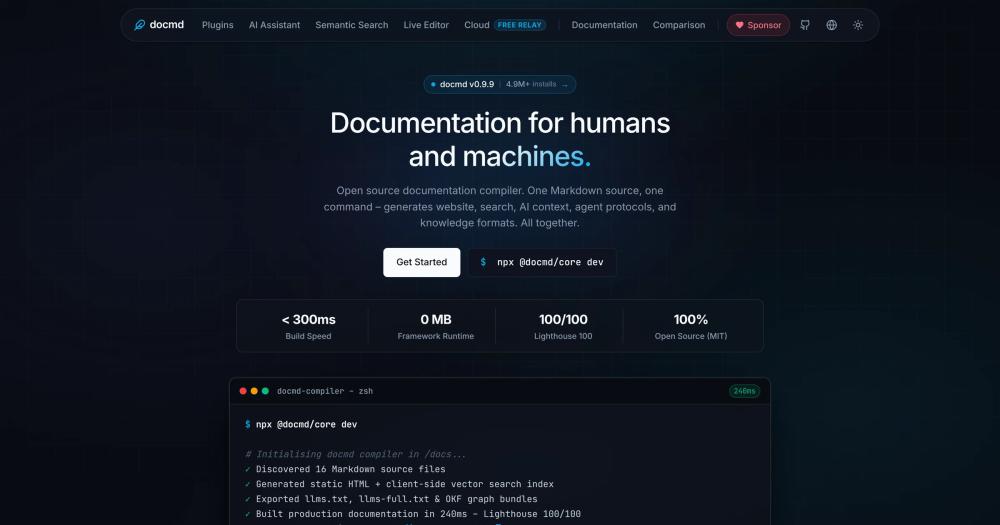
Build a documentation site, search index, and AI context files from Markdown with one command. MIT licensed, framework-free, and deploys to any static host.

Visit websiteGitHub2.6K starsDeploy on Hostinger
image of Docmd
TL;DR

Docmd is a documentation compiler that turns a folder of Markdown files into a static documentation website, offline search index, AI context files, and an MCP server for coding agents, all from one command. It replaces paid documentation platforms like Mintlify, GitBook, and ReadMe.com for teams who want their documentation in Git, deployed to any static host, with no monthly fees. MIT licensed and framework-free, it builds in under 300ms and achieves Lighthouse 100/100. Best for developer teams who want their docs to work with AI coding assistants like Claude, Cursor, and Windsurf.

Read the full breakdownHide the full breakdownWho it is for, how it works, trade-offs, the quick start and the FAQ
who it's for

Who Docmd is for#

Developer teams using AI coding assistants

The MCP server exposes your documentation directly to Claude Desktop, Cursor, and Windsurf. When a developer asks Cursor about an API pattern, it can search your docs in real time instead of relying on cached knowledge. Run `docmd mcp` and configure the server once per project.

Skip if:

Your documentation is primarily marketing copy or customer support content rather than technical reference material for developers. The MCP server is most valuable when docs describe APIs, architecture decisions, and CLI patterns that developers query during coding.

Open source maintainers with zero infrastructure budget

Docmd builds a complete static documentation site with search, SEO, and AI context from your existing Markdown. No database, no monthly subscription, no vendor account required. Host the output on GitHub Pages, Netlify, Cloudflare Pages, or any CDN.

Skip if:

Your docs require content gating, user authentication, or analytics beyond what a static site can provide without a third-party service.

Teams migrating from commercial documentation platforms

Docmd includes migration tooling from Docusaurus, VitePress, MkDocs, and Starlight. For teams leaving commercial platforms, Markdown is the universal exit format. Export your content from the platform and point docmd at the folder with `npx @docmd/core dev`. Most standard Markdown is compatible without modification.

Skip if:

Your current platform's collaborative in-browser editing, managed content permissions, or CMS-style editorial workflow are features your team actively depends on. Docmd is a compiler, not a collaborative CMS.

API-first teams combining narrative docs with API reference

The built-in OpenAPI plugin renders interactive API reference pages from OpenAPI 3.x spec files alongside narrative Markdown in one search index. One site, one `docmd build`, covering both how-to guides and the full API reference.

Skip if:

You need live API request execution, generated code samples in multiple languages, or per-user developer analytics. Those are developer portal features that tools like ReadMe.com cover.

the problem

The problem it solves#

Documentation has more than one reader, and that is where most documentation tools fall short. Human visitors need a fast, navigable website. Search engines need structured metadata and sitemaps. Language models need clean context formatted for ingest. Coding agents need machine-readable protocols and tools. When these audiences are addressed by separate tools or services, teams end up maintaining disconnected publishing pipelines. They run a website generator separately from their LLM context process, and add manual steps for agent skills.

The situation becomes harder when documentation is stored in a proprietary platform. Content tied to a hosted service cannot be version-controlled normally, cannot be searched offline, and disappears or becomes inaccessible if pricing changes. For developer teams who treat documentation as part of their codebase, the lack of a Git-native, multi-output compiler forces a constant choice between publishing quality and content portability.

how Docmd solves it

How it solves it#

Zero-config documentation site generation

Point docmd at any folder of Markdown files and run one command. It generates navigation from the file structure automatically, with no config file, frontmatter, or build pipeline required. Static HTML output achieves Lighthouse 100/100 and loads under 25 KB of client JavaScript.

MCP server for AI coding assistants

The built-in MCP server lets Claude Desktop, Cursor, and Windsurf search and read your documentation directly over stdio or SSE. Run `docmd mcp` to start it, and coding agents can query your docs in real time without manual context copying or web scraping.

Offline vector search compiled at build time

Search compiles into local index files at build time and runs entirely in the browser with no cloud API or external service required. The plugin includes keyword search and an optional semantic vector search mode. Hosting costs for search stay at zero.

AI context generation (llms.txt, SKILL.md, OKF)

Every build exports llms.txt and llms-full.txt so any language model can ingest your complete documentation in one request. SKILL.md files package your project's workflows and patterns for coding agents. The Open Knowledge Format (OKF) plugin exports structured concept graphs and semantic bundles for multi-agent systems.

Modular plugin ecosystem

Core plugins ship without configuration: search, SEO, sitemap, git history, llms, OpenAPI 3.x rendering, and Mermaid diagrams. Optional plugins add interactive code playgrounds, Progressive Web App caching, KaTeX math, and inline discussion threads. Each plugin follows the same `docmd add <name>` install pattern.

Variables and runtime personalization

Interpolate environment keys, git commits, build versions, and reactive client variables like API keys and user tokens directly in Markdown using `{{ variable }}` template syntax. Values bind in the browser at runtime with zero build-time overhead, and default values cover the unauthenticated reader.

strengths · trade-offs

Strengths and trade-offs#

Strengths

  • MIT license with no paywalled compiler featuresThe compiler and all official core plugins are MIT licensed. The docmd team has published an open source manifesto committing to never paywalling compiler features. For teams that have been burned by commercial documentation tools adding paywalls to previously free features, this is a public, written commitment.
  • Documentation stays in your Git repositoryOutput is plain Markdown in your repository and static HTML on deploy. If you switch tools, you take your content with you. Commercial platforms like GitBook and Mintlify store documentation in their infrastructure; docmd never does. Your docs remain version-controlled, auditable, and portable.
  • All human and machine outputs from one sourceOne Markdown source produces a website, search index, llms.txt, SKILL.md, OKF bundles, sitemap, and an MCP server. Teams maintaining separate documentation pipelines for human readers and AI tooling can consolidate into one build command and one source of truth.

Trade-offs

  • -Pre-1.0 release: configuration APIs may still changeDocmd is currently at v0.9.9. At this stage, configuration formats and plugin APIs may change before the 1.0 release. Teams building automation or custom plugins around specific configuration formats should track the roadmap in GitHub Discussions before committing to a fixed schema.
  • -AI assistant on static hosting requires the Cloud RelayThe RAG-powered AI assistant only works with static hosting through the Cloud Relay, which proxies AI requests to your provider. Cloud Relay is free, but it means your AI assistant query path depends on a hosted service. Teams with strict data residency requirements should run their own AI backend instead.
versus alternatives

Docmd vs alternatives#

Docmd vs Mintlify

Mintlify is a hosted documentation platform built for polished developer docs with a strong default visual design. Teams choose it for fast setup and aesthetics, but documentation content lives in Mintlify's platform, and pricing scales with usage.

Docmd takes a different path: your Markdown stays in your Git repository, the compiled output is static HTML deployable anywhere, and there are no monthly fees. For teams that need to stay off proprietary infrastructure, Docmd is the stronger fit.

FeatureDocmdMintlify
LicenseMITProprietary
Self-hostingYes (static output)No
PricingFree (self-hosted)Paid plans
AI context (MCP, llms.txt)Built inLimited
Content storageYour Git repoMintlify platform

Mintlify is worth considering when polished default design and in-browser collaborative editing are priorities, and your team is comfortable with the monthly cost.

Docmd vs GitBook

GitBook provides a collaborative writing environment with branching, in-browser editing, and team permissions. Its content lives in GitBook's cloud with optional GitHub sync.

Docmd does not offer in-browser collaborative editing. Where Docmd wins is for teams who already write documentation in Markdown in Git and want zero infrastructure costs, full content portability, and AI tooling built into the build.

FeatureDocmdGitBook
LicenseMITProprietary
Content storageYour Git repoGitBook platform
AI context generationBuilt inNone
Offline browser searchYesCloud-based
Monthly feeNonePaid plans

GitBook is still the better fit when real-time collaborative editing and managed content versioning inside the platform are requirements.

Docmd vs ReadMe.com

ReadMe.com targets developer portals with API reference documentation, per-user analytics, and personalized content. It is a hosted platform with per-seat pricing.

Docmd's OpenAPI plugin renders interactive API reference from OpenAPI 3.x specs. Where Docmd does not match ReadMe.com is in portal-specific features. It lacks per-user content personalization on the server, in-portal API request execution, and per-developer usage analytics.

FeatureDocmdReadMe.com
LicenseMITProprietary
OpenAPI renderingYes (plugin)Yes
Self-hostingYesNo
Developer portal analyticsVia third-partyBuilt in
Per-user personalizationClient-side onlyServer-side

ReadMe.com is the better fit for developer portals with tight per-user API analytics requirements. For teams publishing open documentation without gating, Docmd handles the technical reference use case with no monthly fee.

install · quick start

Quick start#

bash
Install docmd globally with npm, or run it via Docker.
```bash
npm install -g @docmd/core
docker run -p 3000:3000 ghcr.io/docmd-io/docmd:latest
```
tech stack · detected from GitHub

What it's built on#

Languages
JavaScriptTypeScript
Runtimes
Node.js
Infrastructure
Docker
Tooling
esbuildOpenAPI
frequently asked

FAQ#

How is docmd different from Docusaurus, VitePress, or MkDocs?

Docmd requires no React, Vue, or framework knowledge. The output is static HTML with under 25 KB of vanilla JavaScript, achieving Lighthouse 100/100. It includes offline search, SEO, llms.txt generation, and an MCP server out of the box, without additional plugins or configuration. Docusaurus and VitePress require Node.js framework knowledge and produce React or Vue bundles. MkDocs produces clean HTML but has no built-in AI tooling. Docmd builds all human and machine outputs from one command.

Does docmd work with AI coding assistants like Claude or Cursor?

Yes. The built-in MCP server lets Claude Desktop, Cursor, and Windsurf search and read your documentation directly over stdio or SSE. Run docmd mcp to start the server. Docmd also auto-generates llms.txt and llms-full.txt so any language model can ingest your complete documentation in one request, and SKILL.md files package project-specific workflows for coding agents.

Can I self-host the AI assistant?

Yes. The @docmd/plugin-ai RAG assistant works with any AI provider. For static deployments, the free Cloud Relay proxies queries to your provider without exposing credentials to the browser. If you prefer full control, connect the plugin directly to a self-hosted AI backend. Model usage costs are charged by your provider; docmd itself has no per-query fee.

What does the MIT license allow for commercial use?

MIT allows you to use, modify, fork, and distribute docmd for any purpose, including commercial projects, with no fee and no requirement to release your own code. You can build documentation for a commercial product, charge clients for documentation work, or modify the compiler itself. The only requirement is that the MIT license notice be preserved in the source code.

How do I migrate from an existing documentation tool?

Run docmd migrate from your project root. Migration tooling is available for Docusaurus, VitePress, MkDocs, and Starlight. For platforms like Mintlify or GitBook, export your content as Markdown, then run npx @docmd/core dev and point it at the folder. Most standard Markdown is compatible without modification; frontmatter-heavy exports may need minor cleanup.

also worth a look

Similar open-source tools#

Docusaurus

Alternative toGitBook

React-based static site generator for documentation

  • 66,653 GitHub stars
  • MITLicence MIT

DokuWiki

Alternative toConfluence

PHP wiki engine with file storage, ACLs, and 1200+ plugins.

  • 4,737 GitHub stars
  • GPL-2.0Licence GPL-2.0

Wiki.js

Alternative toConfluence

Open source wiki with real-time collaboration and two-way Git sync.

  • 29,164 GitHub stars
  • AGPL-3.0Licence AGPL-3.0

BookStack

Alternative toConfluence

Self-hosted team wiki with WYSIWYG editing and built-in diagrams

  • 311 GitHub stars
  • MITLicence MIT

Outline

Alternative toNotion

Team wiki and knowledge base with realtime collaboration

  • 41,170 GitHub stars

Paradev

Alternative toConductor

Open-source macOS workspace for parallel CLI coding agents

  • 15,923 GitHub stars
  • MITLicence MIT
by category

Open source tools in these categories#

565

Developer Tools

REA (Reverse Engineer Anything), Skills for Real Engineers, superpowers
209

Web Development

freeCodeCamp, Skills for Real Engineers, superpowers
481

AI & Machine Learning

OpenClaw, freeCodeCamp, REA (Reverse Engineer Anything)
Hostinger

Self-host Docmd on a Hostinger VPS

Keep it running 24/7, even when your laptop is off. A Hostinger VPS gives it a server of its own.

  1. 01

    Choose a plan

    Starts from $6.49/mo

  2. 02

    Apply

    Extra 10% off yearly plans

  3. 03

    Install Docmd

    On a server that stays on

  4. 04

    Start building

    Focus on the app, not the server

Deploy on Hostinger

Sponsors

Inbox Zero

Alternative toSuperhuman

AI email assistant that drafts replies and clears your inbox

  • 12,889 GitHub stars
  • AGPL-3.0Licence AGPL-3.0
  • #Email

rakazo

Alternative toGrok Bot

AI teammates you own: your keys, your model, your machine.

  • 7,028 GitHub stars
  • Apache-2.0Licence Apache-2.0
  • #AI Agents

SnitchFeed

Live monitoring on LinkedIn, X, Reddit & more. Agentic social listening for startups.

Marketing & Growth

Advertise your product

New open source projects by email

The projects we add and every new guide. Free, unsubscribe any time.

Find open source alternatives to paid software

/
  • Claude Code to OpenCode
  • Jira to Windshift
  • Notion to AppFlowy
  • Slack to Mattermost
  • Linear to GitLab
  • Wispr Flow to Handy
  • Arc to Zen Browser
  • CapCut to Concat
  • Grok Bot to rakazo
  • Superhuman to Inbox Zero
  • Airtable to AITable
  • Muse to OpenClaw
  • Railway to Coolify
  • GitHub Copilot to Cline
  • Datadog to Netdata
  • Confluence to Wiki.js
  • Microsoft Teams to Rocket.Chat
  • Firebase to Supabase
  • Pinecone to Qdrant
  • Zapier to n8n
  • 1Password to KeePassXC
  • Devin AI to OpenHands
  • Asana to Leantime
  • Contentful to Strapi
  • Claude Code to OpenCode
  • Jira to Windshift
  • Notion to AppFlowy
  • Slack to Mattermost
  • Linear to GitLab
  • Wispr Flow to Handy
  • Arc to Zen Browser
  • CapCut to Concat
  • Grok Bot to rakazo
  • Superhuman to Inbox Zero
  • Airtable to AITable
  • Muse to OpenClaw
  • Railway to Coolify
  • GitHub Copilot to Cline
  • Datadog to Netdata
  • Confluence to Wiki.js
  • Microsoft Teams to Rocket.Chat
  • Firebase to Supabase
  • Pinecone to Qdrant
  • Zapier to n8n
  • 1Password to KeePassXC
  • Devin AI to OpenHands
  • Asana to Leantime
  • Contentful to Strapi