Open Source Alternatives
  • Alternatives
  • Categories
    Categories by size1,119 projects
    • Developer Tools565
    • AI & Machine Learning481
    • Business & Productivity275
    • Web Development209
    • Security & Monitoring171
    • Communication & Collaboration153
    • IT Management146
    • Cloud & Hosting127
    • LLMOps & AI Tooling124
    • Data & Analytics118
    Browse all 21 categoriesProduct & Project Management, DevOps & CI/CD and 9 more
  • Blog
  • Advertise
SearchNotion, Slack, password manager.../
Submit
Open Source Alternatives
  • Alternatives
    • Developer Tools565
    • AI & Machine Learning481
    • Business & Productivity275
    • Web Development209
    • Security & Monitoring171
    • Communication & Collaboration153
    • Browse all 21 categories
  • Blog
  • Advertise
Submit your project

New open source projects by email

The projects we add and every new guide. Free, unsubscribe any time.

Open Source Alternatives LogoOpen Source Alternatives

Handpicked Open Source Alternatives to Paid Softwares

Product

  • Categories
  • Tag
  • Advertise

Resources

  • Blog
  • Collection
  • Submit

Company

  • Privacy Policy
  • Terms of Service
  • Refund Policy
  • Sitemap

Alternatives

  • Claude Code
  • Jira
  • Notion
  • Slack
  • Linear
  • Wispr Flow
  • All alternatives
© 2026 Open Source Alternatives. All rights reserved.
Open SourceAlternatives
Home/Categories/Databases & Storage/Duplicati
icon of Duplicati

Duplicati

Open source alternative to Arq Backup, Backblaze Computer Backup, Carbonite, CrashPlan, IDrive and MSP360 Backup

  • 15.2K stars
  • MIT
  • Active this week
  • Last commit today

Last verified Nov 5, 2026

Run encrypted, incremental backups to 20+ cloud services including Amazon S3 and Backblaze B2, with client-side AES-256 encryption and built-in scheduling.

Visit websiteGitHub15.2K starsDeploy on Hostinger
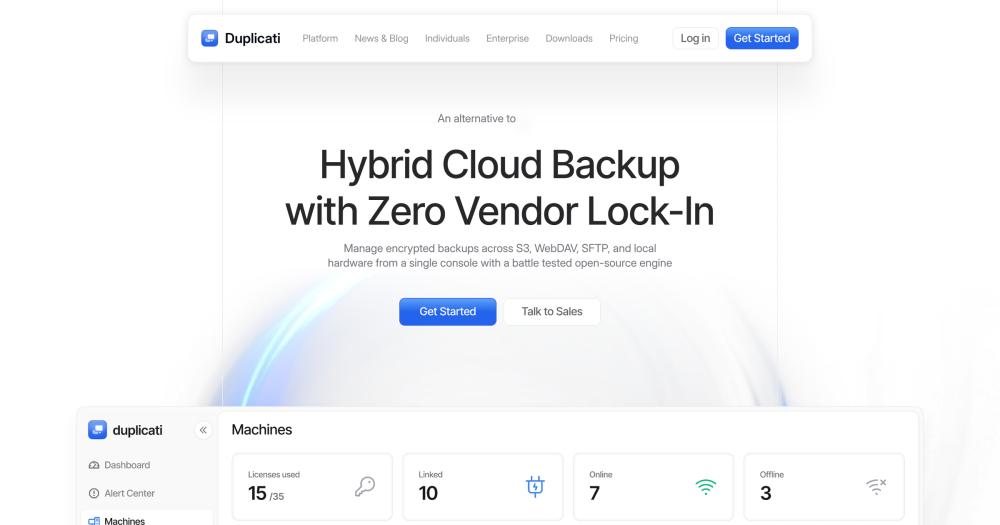
image of Duplicati
TL;DR

Duplicati is an open source backup client that encrypts your files client-side with AES-256 before uploading them to Amazon S3, Backblaze B2, Google Drive, or 20+ other destinations. It replaces paid services like Carbonite ($72/year) and CrashPlan ($88/year per endpoint) for users who want to bring their own cloud storage account. The MIT-licensed core is free and runs as a desktop application on Windows, macOS, and Linux. Best for home users and small teams who already have cloud storage and want scheduled, encrypted off-site backups without a per-seat subscription.

Read the full breakdownHide the full breakdownWho it is for, how it works, trade-offs, the quick start and the FAQ
who it's for

Who Duplicati is for#

Home users backing up to existing cloud storage

If you already pay for Amazon S3, Google Drive, or Backblaze B2, Duplicati adds encrypted scheduled backups to that storage at no additional client cost. Set a schedule, pick your encryption passphrase, and backups run automatically to the storage you already manage.

Skip if:

If you have no cloud storage account and do not want to manage one, a bundled service like Backblaze Computer Backup or Carbonite is simpler: both include storage with the subscription.

Privacy-conscious users who need client-side encryption

Duplicati's trust-no-one model encrypts data before upload, so the storage provider sees only ciphertext. Users in regulated industries or who do not trust cloud providers with plaintext files can run Duplicati on their own machine and back up to any S3-compatible storage, keeping the encryption key entirely offline if desired.

Skip if:

If you need a managed service to verify your backups are running and alert your IT team proactively, most commercial backup services offer monitoring dashboards and SLA-backed support that Duplicati does not provide.

IT administrators managing multi-machine backups on mixed OS

Duplicati runs on Windows, macOS, and Linux, and the CLI interface allows scripted deployment across machines. The web interface is accessible over the network, which lets admins configure backups remotely without installing a separate management console. Cross-platform coverage is a practical advantage over tools limited to macOS and Windows.

Skip if:

If you need centralized policy management, compliance reporting, or server-level backup with audit logs across dozens of endpoints, purpose-built tools like MSP360 Backup or CrashPlan offer those management layers that Duplicati does not.

the problem

The problem it solves#

Most consumer backup services charge recurring fees while storing your files on infrastructure you do not control. Backblaze Computer Backup, Carbonite ($72/year), and CrashPlan ($88/year per endpoint) are sold as full bundles: they provide both the backup client and the storage, so if the service shuts down or raises prices, your archive is locked in their format on their servers.

The harder problem is privacy. Standard cloud backup services see your plaintext files. Depending on the service's terms and jurisdiction, that data can be accessed, subpoenaed, or used in ways you did not intend. Encryption at rest helps, but most services encrypt with keys they control, not keys you hold.

how Duplicati solves it

How it solves it#

Client-side AES-256 encryption

All data is encrypted before it leaves your machine using AES-256 or GNU Privacy Guard. The cloud provider receives only ciphertext, so a data breach at the storage layer does not expose your files. You hold the encryption key; Duplicati's servers are not involved in the encryption process.

Incremental block-level transfers

Only the first backup uploads the full file set. Subsequent backups transfer only the changed blocks, which keeps bandwidth usage and storage costs low after the initial run. Compressed, incremental backups are stored as a deduplicated block store on the destination.

20+ cloud and remote destinations

Supported destinations include Amazon S3, Backblaze B2, Google Drive, Microsoft OneDrive, Azure Blob Storage, Dropbox, Box, MEGA, Storj DCS, SSH/SFTP servers, WebDAV, FTP, Rackspace Cloud Files, OpenStack Swift, Aliyun OSS, Tencent COS, and more. The full list is documented at docs.duplicati.com.

Built-in scheduler and auto-updater

Backups run on a configurable schedule without manual intervention. The scheduler supports custom intervals, and the integrated updater notifies you of new Duplicati releases so you can upgrade from within the app or from the command line without manually checking the project site.

Open and locked file backup

On Windows, Duplicati uses the Volume Shadow Copy Service (VSS) to back up files that are open or locked by other processes. On Linux, Logical Volume Manager (LVM) snapshots serve the same purpose. This ensures databases, Outlook PST files, and application data back up consistently without closing the application first.

GUI application and CLI

Duplicati ships as a web-based desktop GUI and as a full command-line tool. Teams that want to automate backups in scripts or on headless Linux servers can run Duplicati from the terminal with the same feature set available in the browser interface.

strengths · trade-offs

Strengths and trade-offs#

Strengths

  • Zero ongoing cost for the clientThe MIT-licensed core has no subscription, seat fee, or usage limit. You pay only for the cloud storage you use at whatever rate your chosen provider charges, which is typically less than a bundled service. Arq Backup charges $59.99 as a one-time fee per computer; Duplicati's client is free indefinitely.
  • Trust-no-one encryption modelDuplicati is built around the principle that your cloud provider, and Duplicati itself, should never be trusted with your encryption key. Encryption and decryption happen locally; the backup destination receives only encrypted blocks. This design is reflected in the GitHub topics `tno-backup` and `trust-no-one-backup` on the official repository.
  • No storage lock-inWith over 20 supported cloud services and protocols, Duplicati avoids destination lock-in. If one provider raises prices, you can redirect future backups to another destination without changing backup software or re-encrypting your existing archive. This is not possible with services that bundle client and storage together.
  • Cross-platform with Linux supportAvailable on Windows, macOS, and Linux, Duplicati covers operating system combinations that most paid alternatives do not. Arq Backup supports only macOS and Windows. CrashPlan's Linux support is limited. For teams running mixed environments or Linux servers, Duplicati is one of few free encrypted backup clients that covers all three platforms.

Trade-offs

  • -Enterprise integrations require a paid subscriptionThe `proprietary/` folder in the repository contains integrations for Google Workspace, Office 365, DiskImage, and license management. These components are covered by the Duplicati Inc Software License and require a commercial subscription for production use. The core cloud-to-storage backup functionality is MIT-licensed and unrestricted, but teams that need those specific integrations must budget for a Duplicati Inc subscription.
  • -555 open issues on the trackerThe public issue tracker shows 555 open issues. For a backup tool that runs unattended, open issues matter: a missed backup due to a bug in an edge case can be costly. Review the issue tracker for bugs affecting your specific platform and cloud destination before relying on Duplicati for critical production data.
  • -No managed storage or monitoring dashboardUnlike Backblaze Computer Backup or Carbonite, Duplicati does not include storage. You must already have a cloud storage account and manage costs, access keys, and storage quotas separately. There is also no hosted monitoring dashboard: backup success notifications go through the app's local notification system, not a centralized web console.
versus alternatives

Duplicati vs alternatives#

Duplicati vs Backblaze Computer Backup

Backblaze Computer Backup is a fully managed service that bundles the client software with Backblaze's cloud storage for a monthly subscription. Duplicati can back up to Backblaze B2 (Backblaze's object storage product), so the overlap is real, but the model differs substantially.

FeatureDuplicatiBackblaze Computer Backup
LicenseMIT (core)Proprietary
Client costFreeSubscription
StorageBring your ownBackblaze only
Encryption keyYoursProvider-held
Self-hostingYesNo
Linux supportYesNo

Duplicati wins when you need to control the encryption key, back up to multiple providers, or already have cloud storage from another vendor. Backblaze Computer Backup is simpler to set up and includes storage in the subscription, which makes it a reasonable choice for users who do not want to manage cloud storage credentials separately.

Duplicati vs CrashPlan

CrashPlan is a business endpoint backup service at $88 per year per endpoint. It offers centralized management, compliance reporting, and commercial support that Duplicati does not provide.

FeatureDuplicatiCrashPlan
LicenseMIT (core)Proprietary
Annual cost per endpointFree$88
Centralized managementNoYes
Compliance reportingNoYes
Linux supportYesLimited

Duplicati is the right tool for individuals and small teams without compliance requirements who want automated encrypted backups at no per-seat cost. CrashPlan fits IT teams managing backup policies across dozens of business endpoints with audit and compliance needs.

Duplicati vs Arq Backup

Arq Backup is a bring-your-own-cloud backup client for macOS and Windows at $59.99 one-time per computer. It is the closest commercial equivalent to Duplicati: both encrypt locally and push to your chosen storage.

FeatureDuplicatiArq Backup
LicenseMITProprietary
CostFree$59.99 one-time per computer
Linux supportYesNo
Open sourceYesNo

Duplicati is the stronger choice for Linux users and those who want an open source codebase they can inspect and fork. Arq Backup is a polished commercial product with a macOS-native experience and paid support, worth considering for macOS-first workflows where the one-time cost is acceptable.

install · quick start

Quick start#

bash
Download the signed installer for Windows (.msi), macOS (.dmg), or Linux (.deb, .rpm, .AppImage) from GitHub Releases: https://github.com/duplicati/duplicati/releases/latest
tech stack · detected from GitHub

What it's built on#

Languages
C#JavaScript
frequently asked

FAQ#

Is Duplicati free to use?

The MIT-licensed core is free for personal and commercial use with no seat limits. You pay only for the cloud storage you back up to. The enterprise components in proprietary/ (Google Workspace, Office 365, and DiskImage integrations) require a Duplicati Inc subscription for production use; most home users and small teams will never need them.

What cloud storage destinations does Duplicati support?

Duplicati supports over 20 destinations including Amazon S3, Backblaze B2, Google Drive, Microsoft OneDrive, Azure Blob Storage, Dropbox, Box, MEGA, Storj DCS, IDrive e2, Rackspace Cloud Files, OpenStack Swift, SSH/SFTP, WebDAV, FTP, Tencent COS, Aliyun OSS, and more. The full destination list is in the Duplicati documentation at docs.duplicati.com.

How does Duplicati encrypt backups?

Data is encrypted client-side with AES-256 before upload. You choose the encryption passphrase; Duplicati does not transmit or store it. GNU Privacy Guard (GPG) is also supported as an alternative. The cloud provider receives only encrypted blocks and cannot read your files. Backups are also compressed before encryption to reduce storage use.

Can Duplicati back up files that are open or in use?

Yes. On Windows, Duplicati uses the Volume Shadow Copy Service (VSS) to snapshot open files. On Linux, it uses Logical Volume Manager (LVM) snapshots. This allows Duplicati to back up databases, PST files, and other application data without closing the application first. This feature must be enabled in the backup job configuration.

How do I install Duplicati?

Download the signed installer for your platform from GitHub Releases. Installers are available for Windows (.msi), macOS (.dmg), and Linux (.deb, .rpm, .AppImage). All releases are GPG-signed with the public key 3DAC703D. Once installed, Duplicati runs as a local service with a web-based interface you open in any browser. The beta release notifies you of updates and lets you upgrade with a single click.

also worth a look

Similar open-source tools#

Gitdrive

Alternative toiCloud Drive

Your GitHub repos as a native drive in macOS Finder

  • 129 GitHub stars
  • MITLicence MIT

Keda

Alternative toKedify

Event-driven Kubernetes autoscaling with 70+ scalers and scale to zero

  • 10,687 GitHub stars
  • Apache-2.0Licence Apache-2.0

Storj

Alternative toAmazon S3

Decentralized S3 storage with end-to-end client-side encryption

  • 3,284 GitHub stars
  • AGPL-3.0Licence AGPL-3.0

Seafile

Alternative toGoogle Drive

Self-hosted file sync with client-side encryption for teams.

  • 15,424 GitHub stars
  • CustomLicence GPL-2.0 with OpenSSL exception

Pangolin

Alternative toCloudflare Zero Trust

Zero-trust network access, reverse proxy, and AI gateway, self-hosted.

  • 23,314 GitHub stars

Cloudreve

Alternative toGoogle Drive

Self-hosted file manager with ten storage backends and WebDAV

  • 28,933 GitHub stars
  • GPL-3.0Licence GPL-3.0
by category

Open source tools in these categories#

75

Databases & Storage

Immich, Supabase, Redis
172

Security & Monitoring

REA (Reverse Engineer Anything), RustDesk, Uptime Kuma
128

Cloud & Hosting

dify, RuView, rtk
Hostinger

Self-host Duplicati on a Hostinger VPS

Keep it running 24/7, even when your laptop is off. A Hostinger VPS gives it a server of its own.

  1. 01

    Choose a plan

    Starts from $6.49/mo

  2. 02

    Apply

    Extra 10% off yearly plans

  3. 03

    Install Duplicati

    On a server that stays on

  4. 04

    Start building

    Focus on the app, not the server

Deploy on Hostinger

Sponsors

Inbox Zero

Alternative toSuperhuman

AI email assistant that drafts replies and clears your inbox

  • 12,889 GitHub stars
  • AGPL-3.0Licence AGPL-3.0
  • #Email

rakazo

Alternative toGrok Bot

AI teammates you own: your keys, your model, your machine.

  • 7,028 GitHub stars
  • Apache-2.0Licence Apache-2.0
  • #AI Agents

SnitchFeed

Live monitoring on LinkedIn, X, Reddit & more. Agentic social listening for startups.

Marketing & Growth

Advertise your product

New open source projects by email

The projects we add and every new guide. Free, unsubscribe any time.

Find open source alternatives to paid software

/
  • Claude Code to OpenCode
  • Jira to Windshift
  • Notion to AppFlowy
  • Slack to Mattermost
  • Linear to GitLab
  • Wispr Flow to Handy
  • Arc to Zen Browser
  • CapCut to Concat
  • Grok Bot to rakazo
  • Superhuman to Inbox Zero
  • Airtable to AITable
  • Muse to OpenClaw
  • Railway to Coolify
  • GitHub Copilot to Cline
  • Datadog to Netdata
  • Confluence to Wiki.js
  • Microsoft Teams to Rocket.Chat
  • Firebase to Supabase
  • Pinecone to Qdrant
  • Zapier to n8n
  • 1Password to KeePassXC
  • Devin AI to OpenHands
  • Asana to Leantime
  • Contentful to Strapi
  • Claude Code to OpenCode
  • Jira to Windshift
  • Notion to AppFlowy
  • Slack to Mattermost
  • Linear to GitLab
  • Wispr Flow to Handy
  • Arc to Zen Browser
  • CapCut to Concat
  • Grok Bot to rakazo
  • Superhuman to Inbox Zero
  • Airtable to AITable
  • Muse to OpenClaw
  • Railway to Coolify
  • GitHub Copilot to Cline
  • Datadog to Netdata
  • Confluence to Wiki.js
  • Microsoft Teams to Rocket.Chat
  • Firebase to Supabase
  • Pinecone to Qdrant
  • Zapier to n8n
  • 1Password to KeePassXC
  • Devin AI to OpenHands
  • Asana to Leantime
  • Contentful to Strapi