Open Source Alternatives
  • Alternatives
  • Categories
    Categories by size1,070 projects
    • Developer Tools541
    • AI & Machine Learning468
    • Business & Productivity250
    • Web Development205
    • Security & Monitoring164
    • Communication & Collaboration145
    • IT Management141
    • Cloud & Hosting125
    • LLMOps & AI Tooling122
    • Data & Analytics115
    Browse all 21 categoriesProduct & Project Management, Design & Creative and 9 more
  • Blog
  • Advertise
SearchNotion, Slack, password manager.../
Submit
Open Source Alternatives
  • Alternatives
    • Developer Tools541
    • AI & Machine Learning468
    • Business & Productivity250
    • Web Development205
    • Security & Monitoring164
    • Communication & Collaboration145
    • Browse all 21 categories
  • Blog
  • Advertise
Submit your project

New open source projects by email

The projects we add and every new guide. Free, unsubscribe any time.

Open Source Alternatives LogoOpen Source Alternatives

Handpicked Open Source Alternatives to Paid Softwares

Product

  • Categories
  • Tag
  • Advertise

Resources

  • Blog
  • Collection
  • Submit

Company

  • Privacy Policy
  • Terms of Service
  • Refund Policy
  • Sitemap

Alternatives

  • Claude Code
  • Jira
  • Notion
  • Slack
  • Linear
  • Wispr Flow
  • All alternatives
© 2026 Open Source Alternatives. All rights reserved.
Open SourceAlternatives
Home/Categories/Cloud & Hosting/Cloudreve
icon of Cloudreve

Cloudreve

Open source alternative to Google Drive, Dropbox, Microsoft OneDrive and Box

  • 28.9K stars
  • GPL-3.0
  • Active this month
  • Last commit 15 days ago

Last verified Nov 5, 2026

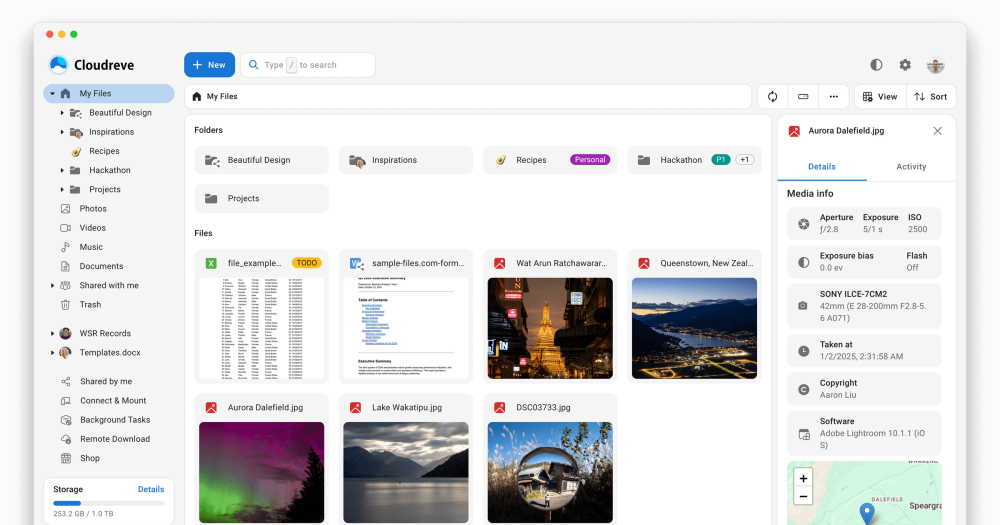
Host a self-hosted file management system with ten storage backends, direct client-to-storage transfers, and WebDAV access on any device.

Visit websiteGitHub28.9K starsDeploy on Hostinger
Image for Cloudreve
TL;DR

Cloudreve is a self-hosted file management system that replicates the browsing experience of Google Drive or Dropbox on your own infrastructure. It supports ten storage backends, including S3-compatible APIs, OneDrive, and local disk, with direct client-to-storage transfers that keep large file bytes off the server. GPL-3.0 licensed, it ships as a single binary or Docker container. Best for teams and individuals who need multi-cloud file management on their own hardware with WebDAV access for desktop clients.

Read the full breakdownHide the full breakdownWho it is for, how it works, trade-offs, the quick start and the FAQ
who it's for

Who Cloudreve is for#

Teams self-hosting shared internal file storage

IT teams and small businesses that want a shared file drive on their own servers get a fully-featured interface with user groups, permissions, and sharing links. Files stay on the team's own hardware with no recurring SaaS costs and no data leaving the organization's infrastructure.

Skip if:

Your team needs a first-party desktop sync client and cannot configure WebDAV mount points; Cloudreve ships no native sync app.

Developers aggregating multiple storage providers

Engineers who already have S3 storage, an OneDrive account, and local NAS space can expose all of them through a single Cloudreve interface and access control system. The WebDAV layer means existing tooling that speaks WebDAV works without changes to those integrations.

Skip if:

Your storage is consolidated in one provider and you do not need a web-based file browser or unified access control over it.

Individuals with data residency requirements

Users who cannot place files on US-based cloud services for legal or compliance reasons can run Cloudreve on a VPS in their required jurisdiction and configure any compliant object storage as the backend. The direct transfer model means file bytes never pass through a foreign intermediary server.

Skip if:

Compliance requirements mandate a certified vendor with formal attestations; a self-hosted open source deployment alone does not satisfy those requirements.

Power users replacing a commercial cloud drive

Technical users who want browser-based file access, media preview, and sharing links without paying per month get a close functional equivalent to Google Drive on their own hardware. Online document and ePub preview reduces the need to download files for routine review.

Skip if:

You need real-time collaborative document editing comparable to Google Docs; Cloudreve's online editing is single-user, not multi-user collaborative.

the problem

The problem it solves#

Paid cloud storage services charge per seat or per gigabyte, store files on servers you do not control, and provide no clean exit that preserves folder structure. Teams with data residency requirements cannot place files on a third-party cloud; teams with large storage needs face subscription costs that grow linearly with data volume.

The usual workarounds fall short. FTP servers lack access control and sharing features. NAS file managers are limited to local networks. Other self-hosted options require separate databases and significant configuration before they reach feature parity with commercial drives.

how Cloudreve solves it

How it solves it#

Ten Storage Backends

Cloudreve connects to local disk, S3-compatible APIs (AWS S3, Minio, Backblaze B2), OneDrive, Aliyun OSS, Tencent COS, Huawei OBS, Qiniu Kodo, Kingsoft KS3, Upyun, and remote nodes. Files can span multiple backends simultaneously, and users see a unified file browser regardless of which backend holds each file.

Direct Client-to-Storage Transfers

Upload and download traffic flows directly between the browser and the storage provider, bypassing the Cloudreve server. For large files, this means a video upload goes straight to S3 or OneDrive without passing through your Cloudreve host, reducing server load and bandwidth costs at any storage volume.

WebDAV Access Across All Backends

Every storage provider Cloudreve manages is accessible over WebDAV, so desktop file manager clients on Windows, macOS, and Linux can mount the drive natively. Mobile clients that support WebDAV can also connect without an additional dedicated app.

Online Preview and Editing

Videos, images, audio, ePub, Markdown, diagrams, and Office-format documents open directly in the browser. Text files, Markdown, and images can be edited in-browser. This covers the most common file review and editing workflows without requiring a local download or desktop application.

Background Downloads via Aria2 and qBittorrent

Cloudreve integrates with Aria2 and qBittorrent servers to download files in the background from HTTP links or torrents. Multiple download nodes can share the load across servers. Downloaded files land directly in the user's configured storage backend without passing through the browser.

Multi-User Groups and Share Links

User accounts are organized into groups with configurable permissions. Files and folders can be shared via links with optional expiration dates, covering both team file sharing and controlled external access without exposing the full directory to recipients.

strengths · trade-offs

Strengths and trade-offs#

Strengths

  • All-in-One Binary with 34 MB Release SizeThe README describes Cloudreve as 'all-in-one packaging, with all features out of the box.' It ships as a single 34 MB binary or Docker container, reducing initial setup compared to file management stacks that require configuring a separate database, cache, and application server before the interface is usable.
  • GPL-3.0 License with 28,900+ GitHub StarsCloudreve is GPL-3.0 licensed, so you can run it on any infrastructure at no cost. The project has accumulated over 28,900 stars and 3,900 forks on GitHub, indicating a mature community with an active contributor base and a broad base of production deployments.
  • Unified Interface Over Multiple Storage BackendsUnlike subscribing to Google Drive, Dropbox, and OneDrive separately, Cloudreve lets you configure multiple backends under one interface and one access control system. Users see a single file browser; storage spans providers without users needing to know which backend holds which file.
  • Direct Transfer Cuts Server BandwidthThe client-to-storage transfer model means the Cloudreve server does not proxy file bytes in transit. Teams transferring terabytes of data do not pay for that bandwidth twice; the server handles only metadata and authentication, not the content itself.

Trade-offs

  • -Primarily Chinese Documentation and CommunityCloudreve originated in China, and its primary documentation, GitHub discussions, and community forums are largely in Chinese. English documentation exists but is less comprehensive. Teams that do not read Chinese may find troubleshooting harder than with alternatives whose communities are primarily English-speaking.
  • -No First-Party Desktop Sync ClientCloudreve provides WebDAV access but does not ship a native sync client for Windows, macOS, or Linux. Users who need desktop folder sync similar to Dropbox or Google Drive desktop apps must configure WebDAV mount points themselves or use a third-party sync tool. This is a real gap for less technical users who expect sync to work automatically.
  • -133 Open GitHub IssuesThe project carries 133 open GitHub issues, excluding pull requests. For a file management system handling production data, reviewing the open issues before deployment is advisable to understand the current bug status and known limitations before committing to a production rollout.
versus alternatives

Cloudreve vs alternatives#

Cloudreve vs Google Drive

Both tools provide a web-based file browser with sharing, access control, and file preview. The choice comes down to where files live and what editing capabilities matter.

FeatureCloudreveGoogle Drive
LicenseGPL-3.0 (open source)Proprietary
Self-hostingYesNo
Storage pricingYour own backend costsSubscription-based
WebDAVYes, across all backendsNo native WebDAV
Real-time collaborative editingNoYes (Docs, Sheets, Slides)
Storage backends10 providersGoogle Cloud only

Cloudreve is the better choice when files must stay on your own infrastructure, when per-seat SaaS pricing is too expensive for a large team, or when data residency requirements prevent using third-party servers. Google Drive is the stronger choice when real-time collaborative document editing matters: Google Docs, Sheets, and Slides have no equivalent in Cloudreve, which provides preview and limited in-browser editing but not multi-user collaboration on the same document.

Cloudreve vs Dropbox

Dropbox centers on desktop folder sync with a first-party client, while Cloudreve centers on a web-based file manager and WebDAV access. Both support sharing and access control, but their primary interface differs.

FeatureCloudreveDropbox
LicenseGPL-3.0 (open source)Proprietary
Self-hostingYesNo
Desktop sync clientWebDAV only (no first-party app)First-party apps for all platforms
Storage backends10 providersDropbox Cloud only
PricingFree (self-hosted)Subscription-based

Cloudreve is the stronger choice for teams with their own storage who need a web-based file manager and want no per-user subscription cost. Dropbox is the stronger choice when users need a first-party desktop sync client that installs and works without manual WebDAV configuration, which matters for less technical users who expect folder sync to work like a local drive.

Cloudreve vs Microsoft OneDrive and Box

OneDrive is bundled with Microsoft 365 at a per-user monthly rate; Box targets enterprise compliance use cases at higher per-user rates. Both are subscription services with no self-hosting option. Cloudreve has no recurring cost beyond the server and storage you already own. The main gap versus OneDrive is Microsoft Office integration. OneDrive opens Word and Excel documents in Office Online with live co-editing; Cloudreve previews Office documents but does not connect to Microsoft's editing stack. Teams already in the Microsoft 365 ecosystem will find OneDrive's integration hard to replace. Teams without that dependency will find Cloudreve a cost-effective file management layer with no per-seat billing.

install · quick start

Quick start#

bash
Deploy Cloudreve using the official Docker image from Docker Hub.
```bash
docker run -d -p 5212:5212 cloudreve/cloudreve:latest
```
tech stack · detected from GitHub

What it's built on#

Languages
Go
frequently asked

FAQ#

Does Cloudreve support multiple storage backends at the same time?

Yes. Each storage policy in Cloudreve can point to a different backend: local disk, S3, OneDrive, Aliyun OSS, and others. Users or groups can be assigned to different storage policies, so some users store files in an S3 bucket while others use local disk, all through the same interface and access control system.

How do I deploy Cloudreve?

The recommended path is Docker, using the official cloudreve/cloudreve image from Docker Hub. For non-Docker deployments, Cloudreve also ships as a pre-built binary in the GitHub Releases at github.com/cloudreve/cloudreve/releases. The official documentation at docs.cloudreve.org covers database setup, reverse proxy configuration, and production deployment options.

Does Cloudreve have a desktop sync client?

No. Cloudreve does not ship a native desktop sync client. File access from the desktop uses WebDAV, which Windows, macOS, and Linux file managers support natively as a mount point. Third-party WebDAV sync clients can provide folder sync behavior, but this requires additional configuration beyond the base Cloudreve setup.

What does the GPL-3.0 license allow for self-hosters?

You can run Cloudreve on your own servers, use it for internal commercial team storage, and modify the source code. The restriction applies to distribution: if you offer a modified version of Cloudreve as a hosted service to other users, you must release the modified source under GPL-3.0. Running it privately for your own team imposes no such requirement.

Can Cloudreve integrate with Aria2 or qBittorrent for remote downloads?

Yes. Cloudreve connects to an existing Aria2 or qBittorrent instance and can queue downloads from HTTP links or torrents. Downloaded files land in the user's configured storage backend directly. Multiple download nodes can be added to share download load across servers, as documented in the README.

also worth a look

Similar open-source tools#

ownCloud

Alternative toDropbox

Self-hosted file sharing with data sovereignty for teams and enterprises.

  • 8,837 GitHub stars
  • AGPL-3.0Licence AGPL-3.0

Nextcloud

Alternative toMicrosoft OneDrive

Self-hosted collaboration hub with file sync, calendar, and messaging.

  • 37,410 GitHub stars
  • AGPL-3.0Licence AGPL-3.0

Twake Drive

Alternative toGoogle Drive

Twake file management for Cozy-backed Drive workflows

  • 991 GitHub stars
  • AGPL-3.0Licence AGPL-3.0

All In One

Alternative toDropbox

Full Nextcloud stack managed by one Docker container with auto-TLS.

  • 10,780 GitHub stars
  • AGPL-3.0Licence AGPL-3.0

Syncthing

Alternative toResilio Connect

Decentralized continuous file sync with no central server

  • 90,005 GitHub stars
  • MPL-2.0Licence MPL-2.0

Drivebase

Alternative toCloudFuze

Self-hosted cloud file manager with unified storage

  • 595 GitHub stars
  • MITLicence MIT
by category

Open source tools in these categories#

125

Cloud & Hosting

dify, RuView, rtk
71

Databases & Storage

Immich, Supabase, Redis
Hostinger

Self-host Cloudreve on a Hostinger VPS

Keep it running 24/7, even when your laptop is off. A Hostinger VPS gives it a server of its own.

  1. 01

    Choose a plan

    Starts from $6.49/mo

  2. 02

    Apply

    Extra 10% off yearly plans

  3. 03

    Install Cloudreve

    On a server that stays on

  4. 04

    Start building

    Focus on the app, not the server

Deploy on Hostinger

Sponsors

Inbox Zero

Alternative toSuperhuman

AI email assistant that drafts replies and clears your inbox

  • 12,889 GitHub stars
  • AGPL-3.0Licence AGPL-3.0
  • #Email

rakazo

Alternative toGrok Bot

AI teammates you own: your keys, your model, your machine.

  • 6,568 GitHub stars
  • Apache-2.0Licence Apache-2.0
  • #AI Agents

SnitchFeed

Live monitoring on LinkedIn, X, Reddit & more. Agentic social listening for startups.

Marketing & Growth

Advertise your product

New open source projects by email

The projects we add and every new guide. Free, unsubscribe any time.

Find open source alternatives to paid software

/
  • Claude Code to OpenCode
  • Jira to Windshift
  • Notion to AppFlowy
  • Slack to Mattermost
  • Linear to GitLab
  • Wispr Flow to Handy
  • Arc to Zen Browser
  • CapCut to Concat
  • Grok Bot to rakazo
  • Superhuman to Inbox Zero
  • Airtable to AITable
  • Muse to OpenClaw
  • Railway to Coolify
  • GitHub Copilot to Cline
  • Datadog to Netdata
  • Confluence to Wiki.js
  • Microsoft Teams to Rocket.Chat
  • Pinecone to Qdrant
  • Zapier to n8n
  • 1Password to KeePassXC
  • Devin AI to OpenHands
  • Firebase to Supabase
  • Contentful to Strapi
  • Adobe Premiere Pro to Shotcut
  • Claude Code to OpenCode
  • Jira to Windshift
  • Notion to AppFlowy
  • Slack to Mattermost
  • Linear to GitLab
  • Wispr Flow to Handy
  • Arc to Zen Browser
  • CapCut to Concat
  • Grok Bot to rakazo
  • Superhuman to Inbox Zero
  • Airtable to AITable
  • Muse to OpenClaw
  • Railway to Coolify
  • GitHub Copilot to Cline
  • Datadog to Netdata
  • Confluence to Wiki.js
  • Microsoft Teams to Rocket.Chat
  • Pinecone to Qdrant
  • Zapier to n8n
  • 1Password to KeePassXC
  • Devin AI to OpenHands
  • Firebase to Supabase
  • Contentful to Strapi
  • Adobe Premiere Pro to Shotcut