Open Source Alternatives
  • Alternatives
  • Categories
    Categories by size1,073 projects
    • Developer Tools542
    • AI & Machine Learning469
    • Business & Productivity251
    • Web Development205
    • Security & Monitoring165
    • Communication & Collaboration145
    • IT Management142
    • Cloud & Hosting126
    • LLMOps & AI Tooling122
    • Data & Analytics116
    Browse all 21 categoriesProduct & Project Management, Design & Creative and 9 more
  • Blog
  • Advertise
SearchNotion, Slack, password manager.../
Submit
Open Source Alternatives
  • Alternatives
    • Developer Tools542
    • AI & Machine Learning469
    • Business & Productivity251
    • Web Development205
    • Security & Monitoring165
    • Communication & Collaboration145
    • Browse all 21 categories
  • Blog
  • Advertise
Submit your project

New open source projects by email

The projects we add and every new guide. Free, unsubscribe any time.

Open Source Alternatives LogoOpen Source Alternatives

Handpicked Open Source Alternatives to Paid Softwares

Product

  • Categories
  • Tag
  • Advertise

Resources

  • Blog
  • Collection
  • Submit

Company

  • Privacy Policy
  • Terms of Service
  • Refund Policy
  • Sitemap

Alternatives

  • Claude Code
  • Jira
  • Notion
  • Slack
  • Linear
  • Wispr Flow
  • All alternatives
© 2026 Open Source Alternatives. All rights reserved.
Open SourceAlternatives
Home/Categories/Security & Monitoring/Pangolin
icon of Pangolin

Pangolin

Open source alternative to Cloudflare Zero Trust, Zscaler Private Access, Twingate, Teleport and Tailscale

  • 23.3K stars
  • Active this week
  • Last commit today

Last verified Nov 5, 2026

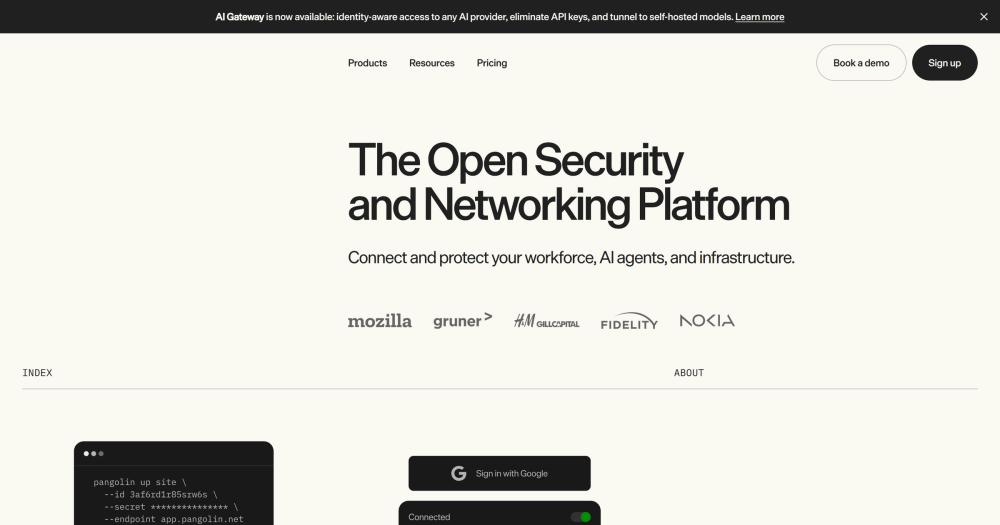
Secure remote access to private apps and infrastructure with a self-hosted SASE platform built on WireGuard and zero-trust principles.

Visit websiteGitHub23.3K starsDeploy on Hostinger
image of Pangolin
TL;DR

Pangolin is a self-hosted SASE platform built on WireGuard that unifies zero-trust VPN access, a zero-trust reverse proxy, privileged access management, and an identity-aware AI gateway behind one identity and policy model. It replaces commercial platforms like Cloudflare Zero Trust, Zscaler, and Teleport for teams that want enterprise-grade access control without routing traffic through a third-party cloud or paying per-seat fees. The core is AGPL-3.0 licensed; enterprise features use the Fossorial Commercial License, which is free for personal, hobbyist, and small business use under $100K annual revenue. Best for DevOps teams, homelab operators, and organizations managing distributed private infrastructure who need to enforce zero-trust access per resource, not per network.

Read the full breakdownHide the full breakdownWho it is for, how it works, trade-offs and the FAQ
who it's for

Who Pangolin is for#

DevOps teams managing distributed private infrastructure

Give developers access to staging databases, internal APIs, Kubernetes clusters, and production SSH servers through zero-trust resource access instead of network-wide VPN. Pangolin's per-resource policy model means a developer working on one service only reaches that service, not the entire internal network. The AI gateway also centralizes coding agent access to both cloud and self-hosted models.

Skip if:

Teams requiring a fully managed control plane with no infrastructure to maintain are better served by Cloudflare Zero Trust or Twingate. Pangolin requires at least one server running the control plane plus site connectors deployed on each target network.

Homelab operators securing remote access

Access a homelab's NAS, router admin panel, Plex server, and self-hosted apps from anywhere without exposing any port to the internet. Pangolin's NAT traversal handles carrier-grade NAT and ISP-managed networks where a static IP is unavailable. Browser-based access means family and friends use homelab services from any device without installing a VPN client.

Skip if:

Users who need a simple single-service tunnel (one app, one port) may find Tailscale or plain WireGuard simpler to set up than a full SASE stack.

Organizations replacing Cloudflare Zero Trust or Twingate

Teams migrating off a commercial SASE vendor get Pangolin's equivalent zero-trust resource access model, identity provider integration, and audit logging on their own infrastructure. The browser-based reverse proxy covers the same HTTPS application access use case as Cloudflare Tunnels, without traffic leaving your network. RBAC and SSO map directly to what Cloudflare One and Twingate users already know.

Skip if:

Enterprises with complex multi-region setups, dedicated support SLAs, or existing Cloudflare CDN and WAF integrations may find Cloudflare Zero Trust the more integrated choice.

Teams centralizing AI model access and spend

Engineering teams with unpredictable OpenAI and Anthropic API spend can route all requests through Pangolin's AI gateway to enforce per-user budgets, audit session logs, and add keyless access for desktop clients. Self-hosted models (Ollama, vLLM) and cloud models share the same gateway endpoint, so switching models or adding a new provider is a configuration change, not a code change.

Skip if:

Teams that only need basic API key management without network-level access control should evaluate dedicated AI gateway tools instead of deploying a full SASE platform for this use case alone.

the problem

The problem it solves#

Corporate networks are no longer bounded by a physical office. Teams work from home, contractors need database access, and developers SSH into production servers from anywhere. Traditional VPN software solves the connectivity problem but creates a new one: once a user connects to the VPN, they have broad network access. A developer granted VPN access to reach one internal service can often reach everything on that segment, which creates real lateral movement risk in the event of a compromised credential.

The managed SASE platforms built to fix this, including Cloudflare Zero Trust, Zscaler Private Access, and Twingate, enforce access at the application and resource level rather than the network level. That is a real improvement. But those platforms route your traffic through the vendor's infrastructure, charge per-seat subscription fees that grow with the team, and lock policy enforcement into a cloud control plane you cannot audit or customize. For teams that need enterprise-grade access control without trading data sovereignty for convenience, the only option has been to build something custom from scratch or accept those constraints.

how Pangolin solves it

How it solves it#

NAT traversal and site connectors

Site connectors create gateways into private networks by punching through restrictive firewalls using outbound WireGuard tunnels. No public IP address or open inbound port is required. Any networked resource behind the connector becomes accessible to authorized users, with strict network segmentation enforced. Connectors deploy as a binary or container on any platform.

Browser-based reverse proxy with VNC, RDP, and SSH

Expose web apps, VNC desktops, RDP sessions, and SSH terminals entirely in the browser through tunneled reverse proxies. Users authenticate and access resources without installing a client. Additional controls include PIN codes, passcodes, email OTP, geoblocking, and IP allow-lists. Pangolin handles SSL certificates automatically.

Client-based access to private resources

Pangolin clients for macOS, Windows, Linux, iOS, and Android connect to private resources such as SSH servers, databases, RDP desktops, and entire network ranges through peer-to-peer WireGuard tunnels. Intelligent NAT traversal works through restrictive firewalls. DNS aliases give friendly names to resources across all connected sites.

Identity-aware AI gateway

Proxy cloud model APIs (OpenAI, Anthropic, Gemini) and self-hosted model servers (Ollama, vLLM, Mistral) through a single Pangolin endpoint. Access can be keyless when users authenticate through the Pangolin desktop client, or key-based with personal API keys per user. Token budgets, session history, and usage analytics sit in front of every call, which helps control AI costs across a team.

RBAC with identity provider integration

Connect an existing identity provider and sync users and roles to Pangolin through OIDC. Access is granted per resource, not per network: a user gets exactly the apps, services, and routes you define. Full audit logs capture every access event. The built-in users system is available as a fallback when no external IdP exists.

Resource launcher for end users

Users get a personalized landing page listing the resources they can access, grouped by site or label, searchable, and filterable. Grid and list views are available. Saved views capture filters, grouping, and layout as personal or organization-wide defaults, so common access patterns are one click away.

strengths · trade-offs

Strengths and trade-offs#

Strengths

  • Unified identity model across all access typesSites, reverse proxy, client VPN, RBAC, and the AI gateway all share one identity and policy model. This matters because access policy set once in Pangolin applies across VPN connections, browser proxies, SSH sessions, and AI gateway calls without separate configuration per access type. Users and their permissions are managed in one place regardless of which resource they are accessing.
  • NAT traversal without public IPs or open inbound portsOutbound WireGuard tunnels bypass the need for a static IP or firewall rule changes on the private network side. This matters in home networks, ISP carrier-grade NAT, and corporate environments with strict outbound-only firewall policies. Plain WireGuard deployments require manual peer configuration and a reachable server endpoint on each side.
  • 23,000+ stars and active maintenance since 2024With over 23,000 GitHub stars since its first release in September 2024, Pangolin has grown faster than most networking tools in this space. The last commit was November 4, 2026, with active development across the TypeScript codebase. A Discord, Slack, and YouTube channel provide community adoption support.
  • Enterprise edition free for small teamsThe Fossorial Commercial License allows personal users, hobbyists, and businesses with under $100K annual gross revenue to run the Enterprise Edition at no cost. Organizations that outgrow that threshold can negotiate a written commercial agreement. This pricing model gives smaller teams access to advanced features without upfront licensing costs.

Trade-offs

  • -AGPL-3.0 source disclosure requirement on the coreThe core is licensed under AGPL-3.0, which requires distributing source code for any modified version run as a network service. For teams running an unmodified deployment this is not an issue. Teams that customize the codebase and offer Pangolin as a managed service to others must release their modifications under the same license.
  • -Enterprise features restricted under Fossorial Commercial LicenseAdvanced enterprise features are not covered by AGPL-3.0. The Fossorial Commercial License permits self-hosting free for personal use, hobbyists, and businesses under $100K annual gross revenue. Using enterprise features commercially above that threshold requires a paid written agreement with Fossorial. Teams cannot resell Pangolin-based hosted networking services without such an agreement.
  • -Self-hosting a full SASE stack requires planningPangolin is not a single container install. A production deployment includes the control plane server plus site connectors deployed on each private network. The quick install guide walks through the process, but administrators unfamiliar with server management and WireGuard-based networking will need time to understand the architecture before the platform feels manageable.
  • -77 open issues as of November 2026The project carries 77 open issues as of November 2026, which is normal for an actively developed tool with significant adoption, but it does mean rough edges exist. As a project first released in 2024, some edge cases around multi-site configurations, enterprise IdP integrations, and the AI gateway are still being worked out. The issue tracker and Discord are active channels for getting help.
versus alternatives

Pangolin vs alternatives#

Pangolin vs Cloudflare Zero Trust

Both Pangolin and Cloudflare Zero Trust enforce access at the resource level using zero-trust principles, with identity provider integration, per-resource policies, and browser-based application access. The core difference is where the control plane runs and whose infrastructure carries the traffic.

FeaturePangolinCloudflare Zero Trust
LicenseAGPL-3.0 / Fossorial Commercial LicenseProprietary
Self-hostingYesNo
Traffic routingThrough your own infrastructureThrough Cloudflare's network
PricingFree (CE) / FCL free under $100K revenueFree tier / per-seat paid
AI gatewayYesNo

Pangolin is the better choice for teams that need traffic to stay on their own infrastructure, want zero per-seat fees for the core access control, or need to proxy both cloud and self-hosted AI models through one identity-aware gateway. Cloudflare Zero Trust is worth considering when teams already use Cloudflare for DNS, CDN, and WAF and want those layers integrated with network access, or when a fully managed control plane with no infrastructure to maintain is a hard requirement.

Pangolin vs Twingate

Twingate provides zero-trust access to internal resources and replaces VPN without a broader SASE stack. Both products enforce per-resource access with NAT traversal that works without open inbound ports.

FeaturePangolinTwingate
LicenseAGPL-3.0 / Fossorial Commercial LicenseProprietary
Self-hostingYesNo
Browser proxyYes (HTTPS, VNC, RDP, SSH)No
AI gatewayYesNo
PricingFree (CE) / FCL free under $100K revenueFree tier (5 users) / per-seat

Pangolin is the better choice for teams that want a self-hosted control plane, need browser-based access to non-HTTP services like VNC and RDP, or want to centralize AI model access in the same platform. Twingate is a reasonable option for teams that want a simple, fully managed zero-trust access layer with minimal infrastructure management and do not need the broader SASE feature set.

Pangolin vs Teleport

Teleport focuses on privileged infrastructure access (SSH, Kubernetes, databases, and RDP) behind an identity-aware proxy with full session recording. Pangolin overlaps on PAM for SSH and browser-based access but covers a broader SASE surface.

FeaturePangolinTeleport
LicenseAGPL-3.0 / Fossorial Commercial LicenseAGPL-3.0 (community) / proprietary (enterprise)
Self-hostingYesYes (community edition)
SSH accessYesYes
Session recordingAudit logsFull recording (enterprise)
AI gatewayYesNo
Zero-trust VPNYesNo

Teleport's enterprise edition includes detailed session recording, compliance reports, and mature enterprise IdP integrations that Pangolin's Enterprise Edition does not yet match in depth. For teams whose primary need is audited privileged access to servers and databases with full session recording, Teleport remains the stronger choice. Pangolin is a better fit when teams need the broader connectivity layer alongside privileged infrastructure access: a zero-trust VPN for client devices, NAT traversal for home and office networks, browser-based reverse proxy, and the AI gateway.


tech stack · detected from GitHub

What it's built on#

Languages
GoTypeScript
Frameworks
ExpressNext.jsReact
Databases
PostgreSQL
Infrastructure
AWS
Cache
Redis
Tooling
esbuild
frequently asked

FAQ#

Is Pangolin free to use?

Yes, with nuance. The Community Edition is AGPL-3.0 licensed and free for all uses, with source disclosure required for modified versions run as network services. The Enterprise Edition uses the Fossorial Commercial License, which is free for personal use, hobbyists, and businesses with under $100K annual gross revenue. Organizations above that threshold need a paid written commercial agreement. Pangolin Cloud, the fully managed option, has its own pricing.

Does Pangolin require a public IP address or open inbound ports?

No. Site connectors use outbound WireGuard tunnels with intelligent NAT traversal to make private networks accessible without a public IP or open inbound ports. This works through carrier-grade NAT, home networks, and corporate firewalls with strict outbound-only policies. The control plane needs a reachable server, but the private networks being connected to it do not.

What is the difference between the Community and Enterprise editions?

The Community Edition covers the core tunnel proxy, reverse proxy, and basic access control under AGPL-3.0. The Enterprise Edition adds advanced features under the Fossorial Commercial License, and is free for personal, hobbyist, and small business use under $100K annual revenue. Both editions are self-hostable. Pangolin Cloud provides the Enterprise Edition as a fully managed service for teams that prefer not to manage the control plane.

Can Pangolin replace a traditional VPN like WireGuard or OpenVPN?

For most use cases, yes. Pangolin provides client-based access to private resources through WireGuard under the hood, so it handles the same connectivity scenarios as a traditional VPN. The difference is that Pangolin enforces access at the resource level (specific apps, servers, or port ranges) rather than granting network-wide access. Teams migrating from WireGuard or OpenVPN gain RBAC, audit logging, SSO, and browser-based access without changing the underlying tunnel protocol.

How does the AI gateway work with self-hosted models?

Pangolin's identity-aware AI gateway acts as a proxy in front of both cloud model APIs (OpenAI, Anthropic, Gemini) and self-hosted model servers (Ollama, vLLM, Mistral). Users or coding agents make API calls to the Pangolin endpoint. Access can be keyless if the user authenticates through the Pangolin desktop client, or key-based with personal API keys issued per user. Token budgets and session logs apply to all models equally.

also worth a look

Similar open-source tools#

NetBird

Alternative toTailscale

WireGuard overlay network with Zero Trust, SSO, and self-hosting

  • 30,622 GitHub stars

tailcat

Alternative toTailscale

Encrypted tunnels between machines, no account or IP needed

  • 8,707 GitHub stars
  • BSD-3-ClauseLicence BSD-3-Clause

WGDashboard

Alternative toTailscale

WireGuard VPN dashboard with peer management, MFA, and Docker support.

  • 3,767 GitHub stars
  • Apache-2.0Licence Apache-2.0

iroh

Alternative toTailscale

Connect devices seamlessly without relying on the cloud.

  • 12,927 GitHub stars
  • Apache-2.0Licence Apache-2.0

Homeio

Alternative toUnraid

Browser desktop for your self-hosted home server

  • 102 GitHub stars
  • AGPL-3.0Licence AGPL-3.0

Portainer

Alternative toRancher by SUSE

Container and Kubernetes management from one self-hosted console.

  • 38,785 GitHub stars
  • ZlibLicence Zlib
by category

Open source tools in these categories#

166

Security & Monitoring

REA (Reverse Engineer Anything), RustDesk, Uptime Kuma
112

DevOps & CI/CD

Nvm, Uptime Kuma, Netdata
126

Cloud & Hosting

dify, RuView, rtk
143

IT Management

RustDesk, Immich, Stirling PDF
Hostinger

Self-host Pangolin on a Hostinger VPS

Keep it running 24/7, even when your laptop is off. A Hostinger VPS gives it a server of its own.

  1. 01

    Choose a plan

    Starts from $6.49/mo

  2. 02

    Apply

    Extra 10% off yearly plans

  3. 03

    Install Pangolin

    On a server that stays on

  4. 04

    Start building

    Focus on the app, not the server

Deploy on Hostinger

Sponsors

Inbox Zero

Alternative toSuperhuman

AI email assistant that drafts replies and clears your inbox

  • 12,889 GitHub stars
  • AGPL-3.0Licence AGPL-3.0
  • #Email

rakazo

Alternative toGrok Bot

AI teammates you own: your keys, your model, your machine.

  • 6,568 GitHub stars
  • Apache-2.0Licence Apache-2.0
  • #AI Agents

SnitchFeed

Live monitoring on LinkedIn, X, Reddit & more. Agentic social listening for startups.

Marketing & Growth

Advertise your product

New open source projects by email

The projects we add and every new guide. Free, unsubscribe any time.

Find open source alternatives to paid software

/
  • Claude Code to OpenCode
  • Jira to Windshift
  • Notion to AppFlowy
  • Slack to Mattermost
  • Linear to GitLab
  • Wispr Flow to Handy
  • Arc to Zen Browser
  • CapCut to Concat
  • Grok Bot to rakazo
  • Superhuman to Inbox Zero
  • Airtable to AITable
  • Muse to OpenClaw
  • Railway to Coolify
  • GitHub Copilot to Cline
  • Datadog to Netdata
  • Confluence to Wiki.js
  • Microsoft Teams to Rocket.Chat
  • Pinecone to Qdrant
  • Zapier to n8n
  • 1Password to KeePassXC
  • Devin AI to OpenHands
  • Firebase to Supabase
  • Contentful to Strapi
  • Adobe Premiere Pro to Shotcut
  • Claude Code to OpenCode
  • Jira to Windshift
  • Notion to AppFlowy
  • Slack to Mattermost
  • Linear to GitLab
  • Wispr Flow to Handy
  • Arc to Zen Browser
  • CapCut to Concat
  • Grok Bot to rakazo
  • Superhuman to Inbox Zero
  • Airtable to AITable
  • Muse to OpenClaw
  • Railway to Coolify
  • GitHub Copilot to Cline
  • Datadog to Netdata
  • Confluence to Wiki.js
  • Microsoft Teams to Rocket.Chat
  • Pinecone to Qdrant
  • Zapier to n8n
  • 1Password to KeePassXC
  • Devin AI to OpenHands
  • Firebase to Supabase
  • Contentful to Strapi
  • Adobe Premiere Pro to Shotcut