Open Source Alternatives
  • Alternatives
  • Categories
    Categories by size1,063 projects
    • Developer Tools540
    • AI & Machine Learning468
    • Business & Productivity249
    • Web Development205
    • Security & Monitoring161
    • Communication & Collaboration143
    • IT Management140
    • Cloud & Hosting123
    • LLMOps & AI Tooling122
    • Data & Analytics114
    Browse all 21 categoriesProduct & Project Management, Design & Creative and 9 more
  • Blog
  • Advertise
SearchNotion, Slack, password manager.../
Submit
Open Source Alternatives
  • Alternatives
    • Developer Tools540
    • AI & Machine Learning468
    • Business & Productivity249
    • Web Development205
    • Security & Monitoring161
    • Communication & Collaboration143
    • Browse all 21 categories
  • Blog
  • Advertise
Submit your project

New open source projects by email

The projects we add and every new guide. Free, unsubscribe any time.

Open Source Alternatives LogoOpen Source Alternatives

Handpicked Open Source Alternatives to Paid Softwares

Product

  • Categories
  • Tag
  • Advertise

Resources

  • Blog
  • Collection
  • Submit

Company

  • Privacy Policy
  • Terms of Service
  • Refund Policy
  • Sitemap

Alternatives

  • Claude Code
  • Jira
  • Notion
  • Slack
  • Linear
  • Wispr Flow
  • All alternatives
© 2026 Open Source Alternatives. All rights reserved.
Open SourceAlternatives
Home/Categories/Business & Productivity/Easy!Appointments
icon of Easyappointments

Easy!Appointments

Open source alternative to Calendly, Acuity Scheduling, SimplyBook.me, Setmore, Square Appointments and Appointy

  • 4.5K stars
  • GPL-3.0
  • Active this week
  • Last commit 2 days ago

Last verified Nov 5, 2026

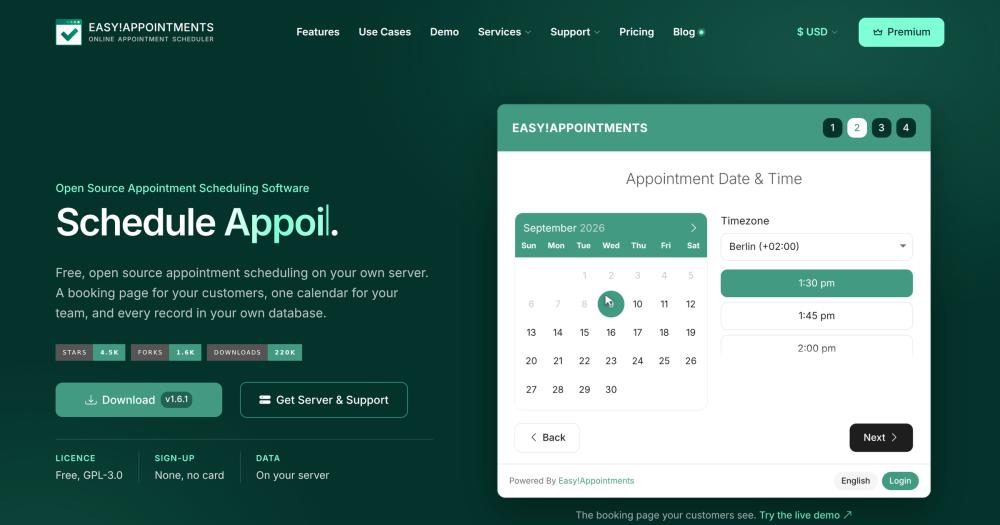
Manage self-hosted appointment bookings with a customer booking page, team calendar, and Google Calendar sync, backed by your own MySQL database.

Visit websiteGitHub4.5K starsDeploy on Hostinger
image of Easyappointments
TL;DR

Easy!Appointments is a self-hosted appointment scheduling tool that runs on PHP 8.2+ and MySQL, letting customers book through a public page while your team manages providers and schedules from a shared calendar. It replaces paid booking tools like Calendly and Acuity Scheduling with no per-seat fees and no booking limit under the GPL-3.0 license. Best for service businesses and practices that need a branded booking page, GDPR compliance on their own infrastructure, or LDAP-based staff sign-in.

Read the full breakdownHide the full breakdownWho it is for, how it works, trade-offs, the quick start and the FAQ
who it's for

Who Easy!Appointments is for#

Medical or legal offices replacing a hosted scheduling service

A clinic or law firm with multiple providers gains a customer-facing booking page, role-based staff access, and all appointment data in a database on their own server. GDPR or HIPAA documentation references infrastructure the organization controls rather than a vendor's data processing terms.

Skip if:

If the practice needs online payment collection before confirming an appointment, Easy!Appointments does not include this in the free release and requires custom development to add it.

Service businesses replacing Calendly or Acuity to cut seat costs

A team of five or more providers paying per seat at Calendly or Acuity can replace that expense with a one-time server setup. No booking limits and no per-seat fees mean the per-appointment cost approaches zero above the fixed server cost.

Skip if:

If the team depends on Calendly's native Zoom, Salesforce, or Stripe integrations and cannot build equivalent connections through Easy!Appointments' REST API, switching requires significant integration work.

Website owners embedding booking in WordPress, Joomla, or Drupal

The official plugins for WordPress, Joomla, and Drupal let customers book directly on the organization's existing site. The booking interface matches the installed theme and customers never leave the site domain.

Skip if:

If the site is built on a framework with no official plugin support, embedding requires custom integration via iframe or the REST API.

Organizations with LDAP directories

Teams whose staff authenticates against an LDAP directory can connect it to Easy!Appointments so providers sign in with existing credentials. No separate account provisioning or deprovisioning is needed when staff join or leave.

Skip if:

If the organization does not use LDAP and has only a few providers, the built-in account management is sufficient and LDAP is not needed.

the problem

The problem it solves#

Hosted booking tools price by seat, so a practice with multiple providers faces compounding subscription costs. Each additional staff member adds to the monthly bill with no ceiling. Calendly and Acuity Scheduling both use per-seat pricing; SimplyBook.me caps bookings on its free tier and charges above that threshold. For a small clinic or agency with five providers, the annual cost runs into hundreds of dollars with no way to reduce it except removing staff from the tool.

The harder problem is data control. Customer names, email addresses, appointment history, and clinical or consultation notes all sit in a third-party database. GDPR compliance then depends on a data processing agreement with the vendor, not on who physically holds the data. Organizations in regulated industries or with strict data-residency requirements have no path to genuine data ownership without running their own software.

how Easy!Appointments solves it

How it solves it#

Customer booking page, no sign-up required

Customers pick a service, select a provider, and choose a time slot without creating an account or installing an app. They enter their name, email, and phone number, then confirm. A confirmation email goes out automatically, and the booking appears in the team calendar immediately.

Multi-provider calendar with role-based access

Admins, providers, and secretaries each see an appropriate view of the shared calendar. Admins manage services, providers, and global settings; providers see their own schedule and customer records; secretaries can book on behalf of providers. All roles sign in with their own account.

Google Calendar synchronization

Providers connect their personal Google Calendar to Easy!Appointments so appointments appear alongside other events. Sync runs on a cron job; booking rules in Easy!Appointments control availability, and the Google Calendar connection keeps both sides consistent.

REST API with webhook notifications

Every booking operation is available through a REST API: list providers, check free slots, create or update appointments, and retrieve customer records. Webhooks push each new booking, change, or cancellation to a URL you configure, so external systems like n8n or Zapier can respond without polling.

LDAP integration for staff authentication

Connect an LDAP directory and providers log in with their existing corporate credentials. No separate account to create, manage, or disable in Easy!Appointments when staff join or leave the organization.

Official CMS plugins for WordPress, Joomla, and Drupal

Official plugins embed the booking interface directly inside a WordPress, Joomla, or Drupal site. Customers book without leaving the page, and all data still flows into the same Easy!Appointments installation on your server.

strengths · trade-offs

Strengths and trade-offs#

Strengths

  • No per-seat fees and no booking limitThe GPL-3.0 release has no seat count restriction and no cap on the number of appointments. A practice with twenty providers and a thousand bookings per month pays nothing beyond server costs. Paid competitors like Calendly and SimplyBook.me charge monthly per active user or per booking volume.
  • All data in your MySQL databaseEvery customer name, email address, appointment note, and scheduling record writes to a MySQL database on your own server. Nothing is sent to external services by default; the product website notes the only external call is an About page blog feed. GDPR or HIPAA documentation then references infrastructure you control.
  • More than ten years of active developmentThe first release appeared in 2014. The repository received its most recent push in November 2026 and has accumulated over 4,400 GitHub stars and 1,500 forks. The booking page and back office are translated into more than 40 languages by the community.
  • Booking interface in 40+ languagesThe customer-facing booking page and the administrative back office are both translated into more than 40 languages maintained by the community. Organizations operating across language regions can serve customers without a custom translation or a third-party localization add-on.

Trade-offs

  • -PHP 8.2+ and MySQL server requiredRunning Easy!Appointments means maintaining a web server with Apache or Nginx, PHP 8.2+, and a MySQL database. Shared hosting plans that offer PHP and cron jobs can support it, but VPS or dedicated server configuration is the more reliable path. Teams without PHP experience or existing server infrastructure will face a setup cost not present with hosted alternatives.
  • -SMS reminders and online payments are not in the free releaseScheduled SMS reminders and payment collection at booking time are not included in the GPL-3.0 release. The product website lists both as custom development services available from the core team at a separate cost. Teams that require native payment processing before confirming an appointment will need to either contract custom development or choose a different tool.
  • -149 open GitHub issuesThe repository carries 149 open issues. Active development continues, but users should check the issue tracker against their specific requirements before deploying to production. Known bugs or feature gaps for a given use case are worth confirming before committing to a migration.
versus alternatives

Easy!Appointments vs alternatives#

Easy!Appointments vs Calendly

Calendly is the best-known hosted scheduling tool, covering meeting booking well. Its free tier allows one event type; paid plans start around $10 per seat per month with no self-hosting option. Appointment data and customer records sit on Calendly's servers under its privacy terms.

Easy!Appointments stores all data in your own MySQL database. A practice with five providers on Calendly's Standard tier pays $50 per month; Easy!Appointments has no per-seat fee and no booking limit. Calendly integrates natively with Zoom, Salesforce, and Stripe; Easy!Appointments connects those through its REST API and webhooks, which requires more setup but keeps data flows under your control.

Easy!Appointments vs Acuity Scheduling

Acuity Scheduling, part of Squarespace, targets service businesses with intake forms, online payments, and package bookings built in. It starts at $16 per month for one provider with no self-hosting path.

Easy!Appointments handles core scheduling without native payment processing in the free release; the product website lists this as available custom development. For teams needing scheduling only and wanting data on their own infrastructure, Easy!Appointments is a direct replacement at infrastructure cost. Teams that require Acuity's built-in payment and form features will find meaningful gaps.

Easy!Appointments vs SimplyBook.me

SimplyBook.me offers a free tier capped at 50 bookings per month and paid plans from around $9 per month, with POS, review collection, and marketing tools included. No self-hosting option exists.

Easy!Appointments has no booking limit in the free release. Its scope is narrower: no built-in POS, review collection, or marketing automation. For businesses that need multi-provider scheduling with full data ownership and GDPR compliance on their own infrastructure, Easy!Appointments covers the core job. Teams depending on SimplyBook.me's marketing and payments layer will find the feature gap significant.

install · quick start

Quick start#

bash
Download the latest Easy!Appointments release from GitHub Releases and upload it to your PHP 8.2+ web server: https://github.com/alextselegidis/easyappointments/releases/latest
tech stack · detected from GitHub

What it's built on#

Languages
JavaScriptPHP
Databases
MySQL
frequently asked

FAQ#

What does Easy!Appointments require to self-host?

Easy!Appointments runs on a web server with Apache or Nginx, PHP 8.2+, and a MySQL database. Many shared hosting plans meet these requirements if they allow PHP 8.2+ and cron jobs. Docker images are available for containerized setups. The website also offers a managed hosting option from the core team at a fixed annual price.

Is Easy!Appointments free for commercial use?

Yes. The GPL-3.0 license allows personal and commercial use, modification, and distribution without a licensing fee. There are no per-seat charges and no booking limits in the free release. If you redistribute a modified version as a service to others, GPL-3.0 requires you to publish the source for that version.

Does Easy!Appointments support multiple providers and staff roles?

Yes. The system supports three roles: admin, provider, and secretary. Admins manage the full installation; providers see and manage their own schedule; secretaries can book on behalf of providers. LDAP integration lets staff sign in with existing corporate credentials instead of a separate Easy!Appointments account.

Can Easy!Appointments sync with Google Calendar?

Yes. Each provider can connect a personal Google Calendar to Easy!Appointments. Appointments in Easy!Appointments appear in the Google Calendar, and availability can reflect existing Google Calendar events. Sync runs on a scheduled cron job configured during setup.

What happens to my data if I stop using Easy!Appointments?

All data lives in your MySQL database on your own server. You can export it directly from the database at any time, or use the REST API to extract records in structured form. There is no vendor to request an export from and no account to deactivate.

also worth a look

Similar open-source tools#

Cal.diy

Alternative toCalendly

MIT self-hosted scheduling without Cal.com enterprise code

  • 49,632 GitHub stars
  • MITLicence MIT

CleanYourTV

Featured

Alternative toATV Launcher Pro

Debloat any Android or Google TV over Wi-Fi and get an Apple TV-style home.

  • 51,495 GitHub stars
  • MIT LicenseLicence MIT License

OpenClaw

Featured

Alternative toMuse

Self-hosted AI assistant for WhatsApp, Telegram, and more

  • 393,917 GitHub stars
  • MITLicence MIT

Inbox Zero

Featured

Alternative toSuperhuman

AI email assistant that drafts replies and clears your inbox

  • 12,889 GitHub stars
  • AGPL-3.0Licence AGPL-3.0

rakazo

Featured

Alternative toGrok Bot

AI teammates you own: your keys, your model, your machine.

  • 6,568 GitHub stars
  • Apache-2.0Licence Apache-2.0

paperclip

Featured

Alternative toGrok Bot

Self-hosted AI agent management with org charts and budgets

  • 109,899 GitHub stars
  • MITLicence MIT
by category

Open source tools in these categories#

249

Business & Productivity

OpenClaw, Excalidraw, RustDesk
Hostinger

Self-host Easy!Appointments on a Hostinger VPS

Keep it running 24/7, even when your laptop is off. A Hostinger VPS gives it a server of its own.

  1. 01

    Choose a plan

    Starts from $6.49/mo

  2. 02

    Apply

    Extra 10% off yearly plans

  3. 03

    Install Easy!Appointments

    On a server that stays on

  4. 04

    Start building

    Focus on the app, not the server

Deploy on Hostinger

Sponsors

Inbox Zero

Alternative toSuperhuman

AI email assistant that drafts replies and clears your inbox

  • 12,889 GitHub stars
  • AGPL-3.0Licence AGPL-3.0
  • #Email

rakazo

Alternative toGrok Bot

AI teammates you own: your keys, your model, your machine.

  • 6,568 GitHub stars
  • Apache-2.0Licence Apache-2.0
  • #AI Agents

SnitchFeed

Live monitoring on LinkedIn, X, Reddit & more. Agentic social listening for startups.

Marketing & Growth

Advertise your product

New open source projects by email

The projects we add and every new guide. Free, unsubscribe any time.

Find open source alternatives to paid software

/
  • Claude Code to OpenCode
  • Jira to Windshift
  • Notion to AppFlowy
  • Slack to Mattermost
  • Linear to GitLab
  • Wispr Flow to Handy
  • Arc to Zen Browser
  • CapCut to Concat
  • Grok Bot to rakazo
  • Superhuman to Inbox Zero
  • Airtable to AITable
  • Muse to OpenClaw
  • Railway to Coolify
  • GitHub Copilot to Cline
  • Datadog to Netdata
  • Confluence to Wiki.js
  • Microsoft Teams to Rocket.Chat
  • Pinecone to Qdrant
  • Zapier to n8n
  • 1Password to KeePassXC
  • Devin AI to OpenHands
  • Firebase to Supabase
  • Contentful to Strapi
  • Adobe Premiere Pro to Shotcut
  • Claude Code to OpenCode
  • Jira to Windshift
  • Notion to AppFlowy
  • Slack to Mattermost
  • Linear to GitLab
  • Wispr Flow to Handy
  • Arc to Zen Browser
  • CapCut to Concat
  • Grok Bot to rakazo
  • Superhuman to Inbox Zero
  • Airtable to AITable
  • Muse to OpenClaw
  • Railway to Coolify
  • GitHub Copilot to Cline
  • Datadog to Netdata
  • Confluence to Wiki.js
  • Microsoft Teams to Rocket.Chat
  • Pinecone to Qdrant
  • Zapier to n8n
  • 1Password to KeePassXC
  • Devin AI to OpenHands
  • Firebase to Supabase
  • Contentful to Strapi
  • Adobe Premiere Pro to Shotcut