Open Source Alternatives
  • Alternatives
  • Categories
    Categories by size1,151 projects
    • Developer Tools591
    • AI & Machine Learning503
    • Business & Productivity279
    • Web Development209
    • Security & Monitoring173
    • Communication & Collaboration154
    • IT Management146
    • LLMOps & AI Tooling129
    • Cloud & Hosting128
    • Product & Project Management123
    Browse all 21 categoriesDevOps & CI/CD, Data & Analytics and 9 more
  • Blog
  • Advertise
SearchNotion, Slack, password manager.../
Submit
Open Source Alternatives
  • Alternatives
    • Developer Tools591
    • AI & Machine Learning503
    • Business & Productivity279
    • Web Development209
    • Security & Monitoring173
    • Communication & Collaboration154
    • Browse all 21 categories
  • Blog
  • Advertise
Submit your project

New open source projects by email

The projects we add and every new guide. Free, unsubscribe any time.

Open Source Alternatives LogoOpen Source Alternatives

Handpicked Open Source Alternatives to Paid Softwares

Add Open Source Alternatives as a preferred source on Google

Product

  • Categories
  • Tag
  • Advertise

Resources

  • Blog
  • Collection
  • Submit

Company

  • Privacy Policy
  • Terms of Service
  • Refund Policy
  • Sitemap

Alternatives

  • Claude Code
  • Jira
  • Notion
  • Slack
  • Linear
  • Wispr Flow
  • All alternatives
© 2026 Open Source Alternatives. All rights reserved.
Open SourceAlternatives
Home/Categories/Business & Productivity/Flowplan
icon of Flowplan

Flowplan

Open source alternative to Notion and Coda

  • 97 stars
  • AGPL-3.0
  • Active this week
  • Last commit today

Last verified Nov 6, 2026

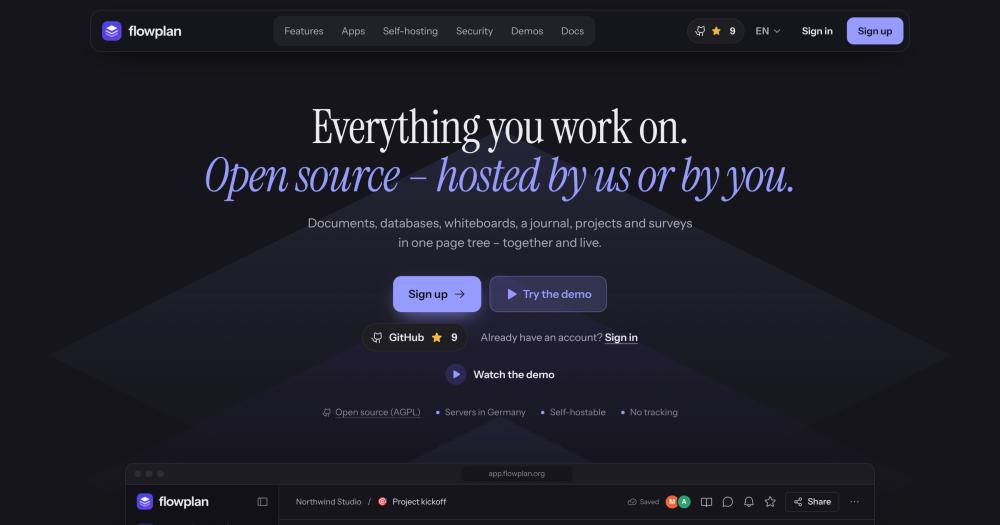
Host an open source workspace with documents, databases, whiteboards, and a daily journal in one Docker container; no tracking.

Visit websiteGitHub97 starsDeploy on Hostinger
image of Flowplan
TL;DR

Flowplan is an open source workspace for documents, databases, whiteboards, a daily journal, and project tickets, all in one page tree. It runs in a single Docker container on SQLite and replaces Notion and Coda for teams that need a self-hosted, no-tracking workspace. The AGPL-3.0 license covers the entire codebase with no features behind a license key. Best for small to mid-size teams with data-residency requirements or a preference for infrastructure they control.

Read the full breakdownHide the full breakdownWho it is for, how it works, trade-offs, the quick start and the FAQ
who it's for

Who Flowplan is for#

Small engineering teams replacing Notion with a self-hosted workspace

Engineering teams that already run Docker infrastructure can add Flowplan alongside their other services and get Notion-equivalent documents, databases, and whiteboards without a SaaS subscription. The ticketing system with WEB-123-style ticket numbers, epics, sprints, and a burndown chart covers the project management side. Git commit references attach to tickets directly.

Skip if:

Teams that need live two-way sync with Jira, GitHub Issues, or Linear for ticket management. Flowplan imports from Jira and Trello but has no ongoing sync bridge.

Privacy-conscious teams with data-residency requirements

Teams under GDPR or sector-specific data rules that prohibit storing work content in US-based SaaS tools can self-host Flowplan inside their own infrastructure. The no-tracking architecture, local AI option via Ollama, and end-to-end encryption for sensitive spaces are designed for this use case. The managed option at app.flowplan.org is available for teams that want EU-hosted managed hosting.

Skip if:

Teams whose compliance requirements include SOC 2 certification or formal audit trails. Flowplan has not published third-party compliance certifications.

Researchers and writers moving from Obsidian or Evernote to a team workspace

Flowplan imports from Obsidian, Evernote, Notion, Confluence, AppFlowy, and Google Docs, making it a viable migration destination for individuals or small teams. The block editor includes citation support (DOI, BibTeX, Zotero), footnotes, and Markdown export, which fits academic and long-form writing workflows alongside team collaboration.

Skip if:

Users who rely on Obsidian's plugin ecosystem, local vaults, or bidirectional links for personal knowledge management. Flowplan's page tree model differs from Obsidian's graph-based vault and does not replicate it.

Teams consolidating documents and whiteboards into one tool

Teams that use Miro or FigJam for whiteboards alongside Notion for documents pay for two separate subscriptions. Flowplan's built-in whiteboard supports mind maps, flowcharts, BPMN, UML, and ERD diagrams, planning poker, and voting, alongside the full document and database workspace in the same application.

Skip if:

Teams that need dedicated design tools or pixel-level fidelity for wireframing. Flowplan's whiteboard is for diagramming and workshop facilitation, not UI design.

the problem

The problem it solves#

Team knowledge fragments across tools. Notes go into one app, tasks into a project tracker, diagrams into another, and journal entries fall through the gaps entirely. Switching between them and re-syncing context adds friction to every meeting and project handoff.

Privacy and cost create separate pain. Notion is cloud-only with no self-hosting path, which rules it out for teams with data-residency requirements or organizations that cannot send internal work to US-based cloud services. Coda scales its pricing by seat, and its self-hosting option is restricted to enterprise contracts. Teams that want a team workspace without the SaaS dependency have had few mature alternatives to choose from.

how Flowplan solves it

How it solves it#

Block document editor with formulas and diagrams

Writes in blocks using / commands or Markdown shortcuts. Supports KaTeX math formulas (inline calculations with = key, function graphs), Mermaid diagrams, footnotes with bibliography citations (DOI, BibTeX, Zotero), version history with single-paragraph restore, and voice notes with transcription. PDF export and Word export are included.

Databases with ten views on the same records

Every database can switch between table, board, calendar, timeline, gallery, list, feed, chart, form, and sprint views without duplicating data. Relations, rollups, and formulas connect databases together. Grouped filters, three levels of grouping, and recurring records are supported.

Whiteboards with auto-layout and diagramming

Infinite canvas with sticky notes, connectors, shapes, and links back to pages. Supports mind maps, flowcharts, BPMN, UML, and ERD diagrams with automatic layout. Teams can run workshops with private mode, planning poker, and voting. Notes on the whiteboard convert to database records in one click.

Daily journal with automatic task carry-over

Creates one page per day automatically. Open tasks from the previous day appear at the top so nothing gets lost between sessions. Includes daily templates, mood and sleep trackers, a streak heatmap, and an on-this-day view for past entries. Each journal entry supports full block content including tasks, tables, and embeds.

Single-container deployment on SQLite

The entire application runs in one Docker container using SQLite. No Postgres, Redis, or external search service to provision. All data lives in a volume at /app/data. Continuous backup to S3 via Litestream is built in, as is optional end-to-end encryption for spaces. The image is available for linux/amd64 and linux/arm64.

Optional AI, locally or with your own API key

AI features are off by default; admins enable them per feature and per user. Local inference works with Ollama, so no data leaves your server. Alternatively, connect an OpenAI, Anthropic, Gemini, or any OpenAI-compatible API key. The admin controls which pages the AI may read, so sensitive spaces can remain off-limits.

strengths · trade-offs

Strengths and trade-offs#

Strengths

  • Fully open source with no enterprise editionThe AGPL-3.0 license covers the complete codebase. There is no closed enterprise edition and no features behind a license key. Everything in the repository is what runs in production, so self-hosters get the same feature set as the hosted version.
  • One container, no external services requiredMost workspace tools that offer self-hosting require Postgres, Redis, and a separate search service. Flowplan runs entirely in a single Docker container on SQLite. This cuts infrastructure overhead and makes backup straightforward: one volume, one database file. Kubernetes deployments use the included Helm chart.
  • No tracking and private-by-design architectureNo analytics or advertising cookies, no usage profiles sent to external services. The hosted version at app.flowplan.org runs on German servers. For self-hosted instances, the update-check with GitHub can be turned off. Statistics in the admin panel count events only without IP addresses or user paths.
  • Full offline support with automatic conflict mergingDocuments and records are readable offline; changes merge automatically when connectivity returns, including changes made by other users working simultaneously. The desktop apps (macOS, Windows, Linux) and mobile apps (iOS, Android) all carry this offline model, not a web-only viewer.

Trade-offs

  • -Early-stage project with a small contributor baseFlowplan was created in October 2026 and had 97 stars and 7 forks at the time of this writing. With a short history and 5 open issues, teams adopting it now are early adopters. Schema formats and data migration tooling may still change as the project matures, and the small contributor base means maintenance depends on a few people.
  • -SQLite prevents horizontal scalingThe single SQLite database works well for one container, but SQLite requires running exactly one container per data directory. You cannot scale horizontally to multiple app instances, which limits the architecture for very large teams or high-availability setups that need multiple active nodes. Litestream provides continuous backup to S3 but does not enable multi-instance reads.
  • -Android app ships as a direct APK, not from the Play StoreThe Android app is distributed as a direct APK download rather than through the Google Play Store. This is a deliberate privacy choice, but it means users do not get automatic Play Store update notifications and must manage updates manually. Some enterprise device management policies may also block sideloaded APKs.
versus alternatives

Flowplan vs alternatives#

Flowplan vs Notion

Notion and Flowplan both offer block documents, multi-view relational databases, and real-time collaboration. The key difference is deployment. Notion is cloud-only with no self-hosting option; Flowplan runs on your server in one Docker container.

FeatureFlowplanNotion
LicenseAGPL-3.0Proprietary
Self-hostingYes, one Docker containerNo
Database views10 built inDatabases supported
WhiteboardBuilt inEmbeds only
Daily journalBuilt inVia templates
Project ticketsBuilt in with sprint supportVia databases
OfflineFull offline with syncPartial (read-only pages)
PricingFree self-hostedPer-seat SaaS

Flowplan is the better choice when self-hosting is required, when per-seat costs are a concern for larger teams, or when an integrated whiteboard and project ticketing system would otherwise require separate subscriptions. Notion is still the stronger option for teams that need its rich third-party integration ecosystem or its established mobile apps; Flowplan's iOS and Android apps are newer and less polished.

Flowplan vs Coda

Coda and Flowplan both blend documents and databases into a team workspace. Coda leans further toward formula-driven automation and app building; Flowplan stays closer to a structured workspace with unified views.

FeatureFlowplanCoda
LicenseAGPL-3.0Proprietary
Self-hostingYesEnterprise plans only
DatabasesRelational with 10 viewsTables with formulas and buttons
AutomationRule-based workflow automationsDeep formula language and Packs
WhiteboardBuilt inVia third-party embeds
JournalBuilt inVia templates
OfflineFull offlineNo

Flowplan is the better choice for teams that need self-hosting, offline support, or an integrated whiteboard without buying a separate tool. Coda is the stronger fit for teams that need complex document automations, formula-driven approval flows, or integrations through Coda Packs.

install · quick start

Quick start#

bash
Self-hosting deploys Flowplan in one Docker container; no external database or search service is needed.

```bash
docker run -d --name flowplan -p 3000:3000 -v flowplan:/app/data -e APP_URL=http://localhost:3000 ghcr.io/yannicschuller/flowplan:latest
```
tech stack · detected from GitHub

What it's built on#

Languages
JavaScriptPythonTypeScript
Frameworks
Next.jsReact
frequently asked

FAQ#

Can I migrate my Notion workspace to Flowplan?

Yes. Flowplan supports importing from Notion directly. Export your Notion workspace as a ZIP, import it through the workspace settings, and your pages, databases, and block content are recreated in Flowplan's page tree. The documentation at docs.flowplan.org/en/migrate covers the import path in detail. Relations and some advanced database properties may require manual cleanup after import.

Does Flowplan work offline?

Yes, with some limits. Documents and database records are available offline; changes from other users sync automatically when you reconnect, with conflict merging built in. Encrypted spaces and changes to database properties or views need an active connection. The desktop apps (macOS, Windows, Linux) and mobile apps carry the same offline model.

What license does Flowplan use?

AGPL-3.0. You can run it on your own server for any purpose, including internal commercial team use, and modify the source freely. The restriction is distribution: if you modify Flowplan and offer it as a hosted service to others, you must release your modifications under the same AGPL-3.0 license. There is no separate enterprise edition; the full codebase is under AGPL-3.0.

What are the server requirements for self-hosting?

Flowplan runs in a single Docker container with SQLite and requires no external database, Redis, or search service. The minimum practical setup is a small VPS with Docker installed. The documentation recommends placing a reverse proxy with HTTPS in front of the container. CPU and memory requirements are not specified in the README, but the SQLite single-writer design means one container scales for most small to mid-size teams.

Does Flowplan support single sign-on?

Yes. Flowplan supports SSO via OIDC, LDAP, and SCIM provisioning. Register a confidential web client at your identity provider with the redirect URI https:///api/auth/callback. Passkeys and two-factor authentication are also supported as standalone options without SSO. Configuration details are at docs.flowplan.org/en/sign-in.

Looking for more

Other ways to replace Notion and Coda#

AppFlowy

#1 in the Notion guide

Full Notion replacement for small teams

78,217 GitHub stars

AFFiNE

#2 in the Notion guide

Docs, whiteboards, and databases in one workspace

74,216 GitHub stars

Outline

#3 in the Notion guide

Polished team wiki and internal knowledge base

41,170 GitHub stars

Macro Docs

#4 in the Notion guide

Markdown-native docs that agents and teammates edit together

6,143 GitHub stars
All 29 Notion alternatives9 open source Notion alternatives, ranked
by category

Open source tools in these categories#

280

Business & Productivity

OpenClaw, Excalidraw, RustDesk
155

Communication & Collaboration

freeCodeCamp, iptv, Excalidraw
124

Product & Project Management

agency-agents, freeCodeCamp, Gstack
Hostinger

Self-host Flowplan on a Hostinger VPS

Keep it running 24/7, even when your laptop is off. A Hostinger VPS gives it a server of its own.

  1. 01

    Choose a plan

    Starts from $6.49/mo

  2. 02

    Apply

    Extra 10% off yearly plans

  3. 03

    Install Flowplan

    On a server that stays on

  4. 04

    Start building

    Focus on the app, not the server

Deploy on Hostinger

Sponsors

Inbox Zero

Alternative toSuperhuman

AI email assistant that drafts replies and clears your inbox

  • 12,915 GitHub stars
  • AGPL-3.0Licence AGPL-3.0
  • #Email

rakazo

Alternative toGrok Bot

AI teammates you own: your keys, your model, your machine.

  • 7,028 GitHub stars
  • Apache-2.0Licence Apache-2.0
  • #AI Agents

SnitchFeed

Live monitoring on LinkedIn, X, Reddit & more. Agentic social listening for startups.

Marketing & Growth

Advertise your product

New open source projects by email

The projects we add and every new guide. Free, unsubscribe any time.

Find open source alternatives to paid software

/
  • Claude Code to OpenCode
  • Jira to Windshift
  • Notion to AppFlowy
  • Slack to Mattermost
  • Linear to GitLab
  • Wispr Flow to Handy
  • Arc to Zen Browser
  • CapCut to Concat
  • Grok Bot to rakazo
  • Superhuman to Inbox Zero
  • Airtable to AITable
  • Muse to OpenClaw
  • Railway to Coolify
  • GitHub Copilot to Cline
  • Datadog to Netdata
  • Confluence to Wiki.js
  • Microsoft Teams to Rocket.Chat
  • Firebase to Supabase
  • Pinecone to Qdrant
  • Zapier to n8n
  • 1Password to KeePassXC
  • Devin AI to OpenHands
  • Asana to Leantime
  • Contentful to Strapi
  • Claude Code to OpenCode
  • Jira to Windshift
  • Notion to AppFlowy
  • Slack to Mattermost
  • Linear to GitLab
  • Wispr Flow to Handy
  • Arc to Zen Browser
  • CapCut to Concat
  • Grok Bot to rakazo
  • Superhuman to Inbox Zero
  • Airtable to AITable
  • Muse to OpenClaw
  • Railway to Coolify
  • GitHub Copilot to Cline
  • Datadog to Netdata
  • Confluence to Wiki.js
  • Microsoft Teams to Rocket.Chat
  • Firebase to Supabase
  • Pinecone to Qdrant
  • Zapier to n8n
  • 1Password to KeePassXC
  • Devin AI to OpenHands
  • Asana to Leantime
  • Contentful to Strapi