Black Friday at Hostinger: 15% off yearly and longer plans with BFVPS15, until 6 Dec. See plans

Black Friday: 15% off hosting with BFVPS15

Open Source Alternatives
  • Alternatives
  • Categories
    Categories by size1,343 projects
    • Developer Tools687
    • AI & Machine Learning556
    • Business & Productivity333
    • Web Development220
    • Security & Monitoring205
    • Communication & Collaboration173
    • IT Management166
    • Design & Creative151
    • DevOps & CI/CD145
    • LLMOps & AI Tooling144
    Browse all 21 categoriesProduct & Project Management, Cloud & Hosting and 9 more
  • Blog
  • Advertise
SearchNotion, Slack, password manager.../
Submit
Open Source Alternatives
  • Alternatives
    • Developer Tools687
    • AI & Machine Learning556
    • Business & Productivity333
    • Web Development220
    • Security & Monitoring205
    • Communication & Collaboration173
    • Browse all 21 categories
  • Blog
  • Advertise
Submit your project

New open source projects by email

The projects we add and every new guide. Free, unsubscribe any time.

Open Source Alternatives LogoOpen Source Alternatives

Handpicked Open Source Alternatives to Paid Softwares

Add Open Source Alternatives as a preferred source on Google

Product

  • Categories
  • Tag
  • Advertise

Resources

  • Blog
  • Collection
  • Submit

Company

  • Privacy Policy
  • Terms of Service
  • Refund Policy
  • Sitemap

Alternatives

  • Claude Code
  • Jira
  • Notion
  • Slack
  • Linear
  • Wispr Flow
  • All alternatives
© 2026 Open Source Alternatives. All rights reserved.
Open SourceAlternatives
Home/Categories/Business & Productivity/Folio
icon of Folio

Folio

Open source alternative to Confluence, GitBook, Notion and Obsidian

  • 95 stars
  • MIT
  • Active this week
  • Last commit today

Last verified Nov 28, 2026

Host a self-hosted team wiki where every page lives as a plain file in Git, with real-time editing and artificial intelligence (AI) agent support.

Visit websiteGitHub95 starsDeploy on Hostinger
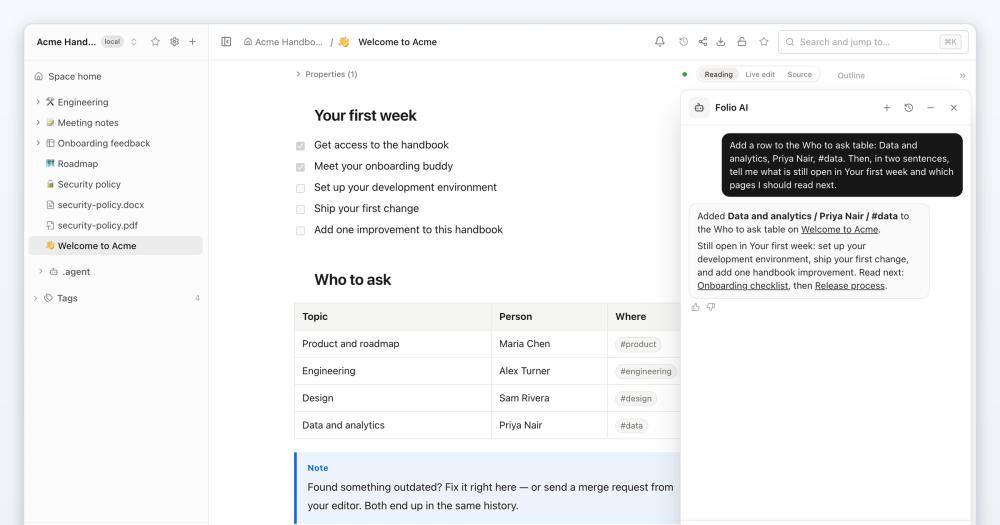
image of Folio
TL;DR

Folio is a self-hosted team wiki that keeps every page as a plain file in a Git repository. It is an open source alternative to Confluence and Notion, free under the MIT license, with real-time editing, tables, whiteboards, diagrams and AI agent support. Every feature, including single sign-on and an audit log, is in the open source version. Best for engineering teams that want their docs in Git and need people plus AI agents working on the same pages.

Read the full breakdownHide the full breakdownWho it is for, how it works, trade-offs, the quick start and the FAQ
who it's for

Who Folio is for#

Engineering teams documenting inside the codebase

Connect a space to the `docs/` folder of your product repository. Writers edit in a browser. Developers see real commits with the author's name when they run `git pull`. AI agents work over MCP (a standard connection for AI tools) and can update the same pages at the same time.

Skip if:

Your team prefers a fully hosted tool and does not want to manage a server. Tools like Notion or Confluence are simpler if Git ownership is not a priority.

Teams leaving Confluence or Notion

Folio can import a Confluence page or a whole tree as Markdown, with images, code and panels. Obsidian vaults open as spaces, with wikilinks and canvases working in the browser. Your files stay in the same plain-text format and in a Git repository you control.

Skip if:

Your team needs tight integration with Atlassian products like Jira or Trello. Confluence is a better fit when those integrations are important to daily work.

Teams running an Obsidian vault together

Open an existing Obsidian vault as a Folio space. Wikilinks, embeds and canvases work in the browser. Several people can edit the same notes at the same time, with live cursors. Folio does not rewrite your files.

Skip if:

You are a solo user with no need for shared editing. Obsidian's native apps are lighter and do not need a server.

Teams publishing AI agent dashboards to a shared wiki

Claude and Cursor can publish dashboards and reports directly into Folio spaces as interactive pages. Each dashboard becomes a file in Git. Anyone on the team can open it, and it keeps its filters after a reload.

Skip if:

Your AI workflow does not involve writing back to a knowledge base. If the agent only reads pages and answers questions, the built-in Folio AI assistant is enough.

the problem

The problem it solves#

Most team wikis store your content in their own private database. Getting your pages out means running an export and hoping the format is clean. When a service raises prices, shuts down, or changes what the free plan covers, your work is stuck.

Teams that want to keep docs next to code face a second challenge. Writing in a wiki and committing to Git are two separate workflows. They drift apart over time. Developers check the repository. Writers open the wiki. The two versions of the docs are never quite the same.

how Folio solves it

How it solves it#

Every page is a plain file in Git

Documents, tables, whiteboards and diagrams are stored as plain files in a Git repository you control. A document is a Markdown file. A table is a readable Markdown table. A whiteboard is saved as a picture file in the repository. Stop using Folio and the files are still there, readable in any editor.

Real-time editing for the whole team

Several people can edit one page at the same time. Each person has a live cursor and changes appear as they are typed. After about 90 seconds of quiet, Folio commits with the editor's name as the author. Tables, whiteboards and diagrams are all editable together in real time.

AI agents work alongside your team

A built-in assistant answers questions from your pages with sources. An MCP server (a standard way for AI tools to connect to outside services) with 52 tools lets Claude, Cursor and other AI tools read and write the same pages your team does. Each agent acts with the rights of whoever connected it.

Documents, tables, forms, whiteboards and diagrams

A data table is a small database you can link from any page, with typed columns, saved views and up to 20,000 rows. A form turns a table into a questionnaire. Whiteboards use Excalidraw and save as picture files. Mermaid diagrams have a visual editor you draw on instead of typing code.

Single sign-on and audit log included

Single sign-on (one login for all your work apps) works with Google accounts, OpenID Connect and SAML (a login standard). Groups, SCIM (automatic account setup from your identity provider) and an audit log are included. There is no paid tier that unlocks any of them.

Publish a space as a public website

Switch any space to public and it becomes a read-only website with search and an optional Ask AI for visitors. It can run on a path of your instance, a subdomain or your own domain. No separate hosting or export step is needed.

strengths · trade-offs

Strengths and trade-offs#

Strengths

  • No lock-in: your files are always readableBecause every page is a plain file in Git, you do not need Folio to read them. Any Markdown editor or code editor can open them. This is the opposite of tools that keep content in a private database and offer Git as an export.
  • Every feature included, MIT license, no paid tierSingle sign-on, audit log, automatic account management and public spaces are all in the open source version. Confluence and Notion both charge more per seat for features like these or put them behind enterprise plans.
  • Developers and writers share the same historyA writer editing in the browser and a developer pushing from their code editor both end up as commits in the same repository. `git log`, `git blame` and `git diff` work on your wiki pages because the pages are real files.
  • Works when the network does notPages you have opened stay editable without a connection. New pages can be created offline and appear in the tree right away. Everything reaches the server when the connection returns, with no duplicates and no data lost. Tables, forms and file uploads still need a connection.

Trade-offs

  • -Needs a persistent server with Postgres and RedisFolio runs Postgres and Redis on disk. It does not work on serverless hosting platforms like Vercel or Netlify. You need a server that stays running: a Linux server or VPS (a rented virtual server), a home server, or a platform like Railway, Render or Coolify.
  • -New project, early versionFolio was created in September 2026 and has 95 stars on GitHub. It is still in early development, with a small community and no long track record. Some features may change or have rough edges. Check the LIMITATIONS file in the repository before using it for a critical workflow.
versus alternatives

Folio vs alternatives#

Folio vs Confluence

Confluence is Atlassian's team wiki, used by many engineering teams. It is the most common paid tool teams replace when they move to Folio.

FeatureFolioConfluence
LicenseMITProprietary
Self-hostingYesCloud only
StoragePlain files in GitPrivate database
PriceFreePaid per seat
AI toolsBuilt-in + MCP serverPaid add-on
Single sign-on and audit logIncludedPaid tier

Folio is the better choice when your team wants to own its content, keep docs next to code in Git, or avoid a per-seat bill. Your pages stay as Git files your team can read without any tool.

Confluence is still a better fit when your team already uses Jira and other Atlassian tools, or needs the larger marketplace of plugins.

Folio vs Notion

Notion is a popular workspace tool many teams use as a wiki. Both tools offer rich editing and databases next to documents.

FeatureFolioNotion
LicenseMITProprietary
Self-hostingYesNo
StoragePlain files in GitNotion database
Free planFull featuresLimited
AI toolsBuilt-in + MCP serverPaid add-on

Folio stores everything in Git, so exporting is never needed. Notion has a more polished interface and a wider selection of templates and third-party integrations.

Pick Folio when ownership and Git history matter. Pick Notion when you want a fully hosted tool with no server to manage.

Folio vs Obsidian

Obsidian is a local-first Markdown knowledge base that stores notes as plain files. It is free for personal use but closed source. Its team features, shared editing and publishing, need paid add-ons.

FeatureFolioObsidian
LicenseMITProprietary (free for personal use)
Self-hostingYesYes (via shared folder)
Real-time editingYesNo (paid Sync only)
AI agentsMCP server includedThird-party plugins
Team featuressingle sign-on, groups, audit logNo

Folio can open an existing Obsidian vault as a space. Wikilinks and canvases work in the browser. Several people can edit the same notes at the same time, with live cursors.

Pick Folio when your vault needs to become a team tool. Keep Obsidian when you work alone and do not need a server or shared editing.

install · quick start

Quick start#

bash
Self-hosting runs on Docker and needs Docker and Git installed on your server.
```bash
git clone https://github.com/evergreen-it-dev/folio.git
cd folio
docker compose up -d
```
tech stack · detected from GitHub

What it's built on#

Languages
TypeScript
Frameworks
React
Databases
PostgreSQL
Infrastructure
AWS
Cache
Redis
frequently asked

FAQ#

Is Folio free to use?

Yes. Folio is MIT licensed and free to run on your own server. Every feature, including single sign-on, audit log, automatic account management and AI tools, is in the open source version. There is no paid tier or cloud service.

What does Folio need to run?

You need Docker and Git. Clone the repository, run docker compose up -d, and open the browser. Folio uses Postgres and Redis internally, and Docker Compose sets them up for you. It is not for serverless hosting platforms like Vercel or Netlify, which cannot run long-lived processes.

Can AI tools like Claude and Cursor edit Folio pages?

Yes. Folio has an MCP server (a standard way for AI tools to connect to outside services) with 52 tools. You connect Claude Code, Cursor or ChatGPT using a personal access token or by signing in through OAuth, a standard login method. The agent reads and writes pages with the rights of whoever connected it. Every change shows up as a commit in Git.

What happens to my pages if I stop using Folio?

Your pages are plain files in a Git repository you control. You do not need Folio to read them. Any Markdown editor or code editor can open them. Documents are Markdown files, tables are Markdown tables, and whiteboards are picture files. No export step is needed.

Can I bring my existing Obsidian vault into Folio?

Yes. Connect a Git repository that holds an Obsidian vault and open it as a Folio space. Wikilinks, embedded notes and canvases work in the browser. Several people can edit the same notes at the same time. Folio does not rewrite your files.

Looking for more

Other ways to replace Confluence, GitBook, Notion and Obsidian#

AppFlowy

#1 in the Notion guide

Full Notion replacement for small teams

79,592 GitHub stars

AFFiNE

#2 in the Notion guide

Docs, whiteboards, and databases in one workspace

78,509 GitHub stars

Outline

#3 in the Notion guide

Polished team wiki and internal knowledge base

41,390 GitHub stars

Macro Docs

#4 in the Notion guide

Markdown-native docs that agents and teammates edit together

6,521 GitHub stars
All 29 Notion alternatives9 open source Notion alternatives, ranked
by category

Open source tools in these categories#

333

Business & Productivity

OpenClaw, Excalidraw, RustDesk
173

Communication & Collaboration

freeCodeCamp, iptv, Excalidraw
137

Product & Project Management

agency-agents, freeCodeCamp, Gstack
Black Friday offerHostinger

Self-host Folio on a Hostinger VPS

Keep it running 24/7, even when your laptop is off. A Hostinger VPS gives it a server of its own.

  1. 01

    Choose a plan

    Starts from $6.49/mo

  2. 02

    Apply

    15% off yearly and longer plans, until 6 Dec

  3. 03

    Install Folio

    On a server that stays on

  4. 04

    Start building

    Focus on the app, not the server

Deploy on Hostinger

Sponsors

SnitchFeed

Live monitoring on LinkedIn, X, Reddit & more. Agentic social listening for startups.

Marketing & Growth

Windshift

Alternative toJira

Self-hosted work management for teams leaving Jira

  • 481 GitHub stars
  • AGPL-3.0Licence AGPL-3.0

Nuphos

Alternative toConductor

Agent workspace for teams running Claude Code or Codex

  • 802 GitHub stars
  • Apache-2.0Licence Apache-2.0
  • #AI Agents
Advertise your product

New open source projects by email

The projects we add and every new guide. Free, unsubscribe any time.

Find open source alternatives to paid software

/
  • Claude Code to OpenCode
  • Jira to Windshift
  • Notion to AppFlowy
  • Slack to Mattermost
  • Linear to GitLab
  • Wispr Flow to Handy
  • Microsoft To Do to Super Productivity
  • Arc to Zen Browser
  • CapCut to Concat
  • Grok Bot to Rakazo
  • Superhuman to Inbox Zero
  • Discord to Stoat
  • Airtable to AITable
  • Datadog to SigNoz
  • Muse to OpenClaw
  • Railway to Coolify
  • GitHub Copilot to Cline
  • Confluence to Wiki.js
  • Microsoft Teams to Rocket.Chat
  • 1Password to KeePassXC
  • Zapier to n8n
  • Pinecone to Qdrant
  • Contentful to Strapi
  • Firebase to Supabase