Open Source Alternatives
  • Alternatives
  • Categories
    Categories by size979 projects
    • Developer Tools505
    • AI & Machine Learning432
    • Business & Productivity220
    • Web Development202
    • Security & Monitoring147
    • IT Management133
    • Communication & Collaboration132
    • Cloud & Hosting116
    • LLMOps & AI Tooling111
    • Data & Analytics108
    Browse all 21 categoriesProduct & Project Management, Design & Creative and 9 more
  • Blog
  • Advertise
SearchNotion, Slack, password manager.../
Submit
Open Source Alternatives
  • Alternatives
    • Developer Tools505
    • AI & Machine Learning432
    • Business & Productivity220
    • Web Development202
    • Security & Monitoring147
    • IT Management133
    • Browse all 21 categories
  • Blog
  • Advertise
Submit your project

New open source projects by email

The projects we add and every new guide. Free, unsubscribe any time.

Open Source Alternatives LogoOpen Source Alternatives

Handpicked Open Source Alternatives to Paid Softwares

Product

  • Categories
  • Tag
  • Advertise

Resources

  • Blog
  • Collection
  • Submit

Company

  • Privacy Policy
  • Terms of Service
  • Refund Policy
  • Sitemap

Alternatives

  • Claude Code
  • Jira
  • Notion
  • Slack
  • Linear
  • Wispr Flow
  • All alternatives
© 2026 Open Source Alternatives. All rights reserved.
Open SourceAlternatives
Home/Categories/Developer Tools/Freebuff
icon of Freebuff

Freebuff

Open source alternative to Cursor and GitHub Copilot

  • 13.9K stars
  • Apache-2.0
  • Active this week
  • Last commit today

Last verified Oct 31, 2026

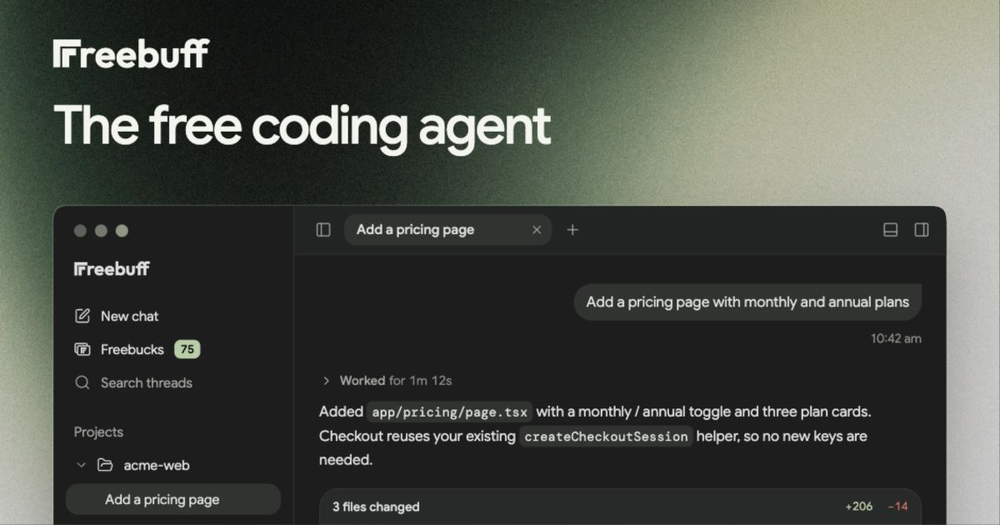
Build and ship code with a free AI agent running across desktop, CLI, browser, and cloud, funded by text ads instead of a subscription.

Visit websiteGitHub13.9K stars
image of Freebuff
TL;DR

Freebuff is a free AI coding agent that replaces paid subscription tools like Cursor and GitHub Copilot, funding frontier model access through text ads instead of monthly fees. It packages five specialized tools across desktop, CLI, browser, and cloud, using a multi-agent system that gathers context, plans, implements, and verifies changes. The Apache-2.0 license covers the codebase; a 5-hour daily free allowance covers the model usage on supported regions. Best for developers who want strong coding assistance without a recurring cost.

Read the full breakdownHide the full breakdownWho it is for, how it works, trade-offs, the quick start and the FAQ
who it's for

Who Freebuff is for#

Solo developers building side projects

Freebuff's free daily allowance makes it practical for solo developers who want strong AI assistance without monthly fees. The multi-agent system handles tasks end-to-end, surfacing what changed and why, so developers can stay focused on the project rather than managing prompts.

Skip if:

You are on an enterprise plan with Cursor or GitHub Copilot where IDE integration and organizational seat management are already part of the cost.

Developers who work across multiple devices

Thread continuity across desktop, CLI, browser, and mobile makes Freebuff useful for developers who switch surfaces during the day. Starting a task on desktop and continuing it in the browser or from a phone without losing context is the core cross-device capability.

Skip if:

You work exclusively in a single IDE and prefer deep inline completions over a separate agent surface. Freebuff does not offer ghost-text inside an editor.

Teams exploring multi-agent coding workflows

The Cloud product runs agents against GitHub repositories and Desktop supports parallel agents in separate workspaces. Teams evaluating how multi-agent orchestration fits their workflow can experiment without a subscription commitment, using the 5-hour daily free allowance.

Skip if:

Your team requires enterprise SSO, audit logs, or centralized billing before adopting a new tool.

Developers in high-cost subscription markets

Freebuff is available in every country. Developers in markets where $20 per month carries more purchasing-power weight gain access to frontier models at no cost on the same free-tier terms, making it a practical alternative to subscription tools that charge the same price globally.

Skip if:

You are in an unsupported region and need premium models like Gemini 4 Argon or GPT-6.1 Sol, which require a paid plan outside supported areas.

the problem

The problem it solves#

AI coding tools like Cursor and GitHub Copilot have made assisted development faster, but access comes with a recurring subscription: $10 to $20 per seat per month, more for advanced model access or higher usage limits. For independent developers and small teams, those costs add up, and the strongest models are locked behind premium tiers.

The harder pain point is model choice. On a free plan, developers make do with lighter models for complex tasks. On a paid plan, they pay the same rate whether they are doing a quick rename or running a multi-file refactor that needs a frontier reasoning model. Switching between tools to find the right model at the right price is its own friction.

how Freebuff solves it

How it solves it#

Five-surface product suite

The five products cover the full development workflow: Desktop runs parallel agents locally on macOS, Windows, and Linux; CLI installs globally via npm for terminal work; Web builds and ships full-stack apps in a browser sandbox; Cloud runs agents against any GitHub repository; and Chat handles research and thinking. Each product shares the same model catalog and thread history.

Specialized multi-agent workflow

Rather than sending every task through a single model and prompt, Freebuff uses specialized agents for different stages: file-finding agents map the codebase, implementation agents make changes and run commands, research agents browse documentation and test apps in a browser, and review agents inspect the result. This makes complex refactors and multi-file tasks more reliable than single-shot prompting.

Multi-model catalog

The model picker currently includes MiMo v2.6 Flash Fast, GLM 5.3 Flash, DeepSeek V4.1 Flash, GPT-6 Luna, MiMo 2.6 Pro, Solar Mini 4, Solar Pro 4, Gemini 3.8 Flash, Muse Spark 1.3, Gemini 4 Argon, GPT-6.1 Terra, and GPT-6.1 Sol. Models are priced in hours at a multiplier shown in the picker, and the Unlimited section uses no balance.

Cross-device thread continuity

Conversation threads live in the cloud, so a task started on desktop can be continued in the browser or checked from the mobile app (Android today, iOS coming soon). Context carries across devices without copying and pasting conversation history.

One-click integrations

The agent connects to GitHub, Linear, Notion, Stripe, Vercel, Supabase, Sentry, PostHog, and Resend from a single integrations panel. Once connected, the agent can read issues, write commits, trigger deploys, and inspect error traces as part of a coding task without manual copy-pasting.

Free daily access via text ads

Every account starts with 5 hours of free model access per day (4 on a VPN). Text ads shown in-session fund the model costs, so there is no credit card, no credits to watch, and no subscription. Referrals and bounties earn extra hours on top of the daily allowance.

strengths · trade-offs

Strengths and trade-offs#

Strengths

  • Apache-2.0 license with public sourceThe full codebase is Apache-2.0 licensed and public on GitHub. Custom agents and embedded applications are possible via the @codebuff/sdk and Codebuff documentation. Unlike closed coding tools, the underlying orchestration is inspectable and the license permits commercial use and modification without restriction.
  • No subscription for frontier modelsCursor and GitHub Copilot both require a monthly subscription to access their strongest model tiers. Freebuff funds the same class of models through text ads, giving every account 5 free hours per day without a card. Earned hours from referrals add on top of the daily allowance.
  • Multi-surface deployment flexibilityMost AI coding tools focus on one surface: Cursor is IDE-first, GitHub Copilot is editor-embedded. Freebuff spans desktop (local, parallel agents), CLI (any shell), browser (cloud sandbox), GitHub repositories (Cloud), and mobile (Android), so the same coding session carries across environments.
  • Strong early community tractionThe repository reached 13,874 stars and 1,478 forks as of October 2026, reflecting developer interest in the ad-funded model and multi-agent architecture. Active development continues with the last push on October 31, 2026.

Trade-offs

  • -Data may be used for AI trainingThe README includes an explicit notice: when a model or feature says data may be used for AI training, Freebuff or the provider may keep submissions to train, fine-tune, and test AI models, and Freebuff may share or sell that data to third parties. Developers handling proprietary or sensitive code should review the Privacy Policy before connecting a repository or starting a session.
  • -Regional access limits on premium modelsFull model access is available in supported regions only. Developers in unsupported regions or on a VPN receive limited access to five models (GLM 5.3 Flash, DeepSeek V4.1 Flash, MiMo v2.6 Flash Fast, Solar Mini 4, and Solar Pro 4) with a 4-hour daily allowance. Premium models like Gemini 4 Argon and GPT-6.1 Sol require a paid plan outside supported regions.
  • -161 open issues as of October 2026The repository carries 161 open issues (pull requests excluded). A tool this early in its lifecycle is expected to have rough edges, and the issue tracker reflects active community feedback across the multi-product architecture. Checking open issues before adopting it for production workloads is worthwhile.
  • -No end-user self-hosted pathFreebuff is designed as a client application backed by hosted infrastructure. The Contributing guide requires Docker and a configured .env.local for local development, which is a contributor workflow rather than a production self-hosting option. Developers who need full data isolation on their own infrastructure will find no documented deployment path for the full server stack.
versus alternatives

Freebuff vs alternatives#

Freebuff vs Cursor

Cursor and Freebuff both offer multi-model AI coding agents, but they start from different surfaces. Cursor is a VS Code fork with deep inline editor integration: ghost-text completions, inline edits, and codebase-aware context within the editor window. Freebuff runs as a desktop app, CLI, web product, and cloud service rather than living inside a code editor.

FeatureFreebuffCursor
LicenseApache-2.0Proprietary
PriceFree via text ads (5 hr/day)$20/month (Pro)
IDE integrationNoVS Code fork
Multi-agentYesLimited
SurfacesDesktop, CLI, Web, Cloud, MobileIDE only

Freebuff is the better choice when you want frontier model access at no cost, work across multiple surfaces, or need an agent that handles multi-file tasks autonomously. Cursor is still the better fit for developers who spend most of their time in VS Code and value tight inline completions: ghost-text within the editor is something Freebuff does not provide.

Freebuff vs GitHub Copilot

GitHub Copilot embeds in the IDE and integrates tightly with GitHub: PR reviews, repository context, and organizational billing are its strengths. Freebuff competes on model variety and autonomous task execution rather than editor depth.

FeatureFreebuffGitHub Copilot
LicenseApache-2.0Proprietary
PriceFree via text adsFree (limited) / $10-$19/month
IDE integrationNoVS Code, JetBrains, Vim, more
Model variety12+ modelsGPT and Claude series
SurfacesDesktop, CLI, Web, CloudIDE, GitHub.com

Freebuff suits developers who want broader model choice and a multi-agent workflow that goes beyond completions into autonomous task execution. GitHub Copilot is the stronger pick for teams on GitHub who need PR review, repository-aware context, and centralized organizational policies.

install · quick start

Quick start#

bash
Install the CLI globally with npm to run Freebuff in any project.

```bash
npm install -g freebuff
```
tech stack · detected from GitHub

What it's built on#

Languages
JavaScriptTypeScript
Frameworks
React
frequently asked

FAQ#

Is Freebuff actually free to use?

Yes, for most use cases. Every account gets 5 hours of free model access per day with no credit card required. Text ads shown in-session fund the model costs. Referrals and bounties earn extra hours, and paid plans are available for higher limits or premium model access.

What AI models does Freebuff include?

The current catalog includes MiMo v2.6 Flash Fast, GLM 5.3 Flash, DeepSeek V4.1 Flash, GPT-6 Luna, MiMo 2.6 Pro, Solar Mini 4, Solar Pro 4, Gemini 3.8 Flash, Muse Spark 1.3, Gemini 4 Argon, GPT-6.1 Terra, and GPT-6.1 Sol. Models are billed in hours at a multiplier shown in the picker; some are in the Unlimited section and use no balance. Availability depends on your region and access tier.

Does Freebuff use my code to train AI?

Only when a model or feature states that data may be used for training. The README includes an explicit notice: when that applies, Freebuff or the provider may keep submissions to develop, train, and fine-tune AI models, and Freebuff may share or sell that data to third parties. Developers with proprietary code should check the Privacy Policy before connecting a repository.

How does Freebuff compare to Cursor?

Both offer multi-model AI coding assistance, but they start from different surfaces. Cursor is a VS Code fork with deep inline editor integration, including ghost-text completions that Freebuff does not provide. Freebuff runs across desktop, CLI, browser, cloud, and mobile, and offers a broader model catalog at no subscription cost. Cursor is the better choice if you spend most of your time inside VS Code.

Can I install Freebuff in the terminal?

Yes. Install the CLI globally with npm install -g freebuff, then run freebuff inside any project directory. Describe what you want and Freebuff finds the relevant files, makes changes, and runs the checks for your project. Desktop apps for macOS, Windows, and Linux are also available as signed installers.

also worth a look

Similar open-source tools#

Superlearn

Alternative toNotebookLM

Interactive study boards for any topic, no new subscription needed

  • 124 GitHub stars
  • MITLicence MIT

fx

Alternative toClaude Code

Native Zig CLI coding agent, 7.8 MiB, any AI model.

  • 3,666 GitHub stars
  • Apache-2.0Licence Apache-2.0

codex

Alternative toClaude Code

OpenAI's terminal coding agent, Apache-2.0 licensed

  • 131,569 GitHub stars
  • Apache-2.0Licence Apache-2.0

kilocode

Alternative toCursor

Open source AI coding agent. 500+ models at zero markup.

  • 27,794 GitHub stars
  • MITLicence MIT

prime-agent

Alternative toDevin AI

Automate coding workflows with a self-improving agent

  • 22,448 GitHub stars
  • MITLicence MIT

Reasonix

Alternative toClaude Code

Open-source AI coding agent you can leave running locally.

  • 35,994 GitHub stars
  • MITLicence MIT
by category

Open source tools in these categories#

505

Developer Tools

REA (Reverse Engineer Anything), superpowers, Skills for Real Engineers
432

AI & Machine Learning

freeCodeCamp, REA (Reverse Engineer Anything), OpenClaw
38

Web & App Development

Flutter, Rust, Nvm

Sponsors

Inbox Zero

Alternative toSuperhuman

AI email assistant that drafts replies and clears your inbox

  • 12,855 GitHub stars
  • AGPL-3.0Licence AGPL-3.0
  • #Email

Omnara

Alternative toCClaude Managed Agents

Open-source agent deployment API. Self-host or use Omnara Cloud.

  • 3,325 GitHub stars
  • Apache-2.0Licence Apache-2.0
  • #AI Agents

rakazo

Alternative toGrok Bot

AI teammates you own: your keys, your model, your machine.

  • 6,242 GitHub stars
  • Apache-2.0Licence Apache-2.0
  • #AI Agents
Advertise your product

New open source projects by email

The projects we add and every new guide. Free, unsubscribe any time.

Find open source alternatives to paid software

/
  • Claude Code to OpenCode
  • Jira to Windshift
  • Notion to AppFlowy
  • Slack to Mattermost
  • Linear to GitLab
  • Wispr Flow to Handy
  • Arc to Zen Browser
  • CapCut to Concat
  • Grok Bot to rakazo
  • Superhuman to Inbox Zero
  • Airtable to AITable
  • Muse to OpenClaw
  • Railway to Coolify
  • GitHub Copilot to Cline
  • Datadog to Netdata
  • Microsoft Teams to Rocket.Chat
  • Confluence to Docmost
  • Pinecone to Qdrant
  • Zapier to n8n
  • Devin AI to OpenHands
  • Firebase to Supabase
  • 1Password to KeePassXC
  • Contentful to Strapi
  • Adobe Premiere Pro to Shotcut
  • Claude Code to OpenCode
  • Jira to Windshift
  • Notion to AppFlowy
  • Slack to Mattermost
  • Linear to GitLab
  • Wispr Flow to Handy
  • Arc to Zen Browser
  • CapCut to Concat
  • Grok Bot to rakazo
  • Superhuman to Inbox Zero
  • Airtable to AITable
  • Muse to OpenClaw
  • Railway to Coolify
  • GitHub Copilot to Cline
  • Datadog to Netdata
  • Microsoft Teams to Rocket.Chat
  • Confluence to Docmost
  • Pinecone to Qdrant
  • Zapier to n8n
  • Devin AI to OpenHands
  • Firebase to Supabase
  • 1Password to KeePassXC
  • Contentful to Strapi
  • Adobe Premiere Pro to Shotcut