

Who fx is for#
Backend engineers automating coding tasks in CI pipelines
fx can be scripted as a non-interactive coding agent with `fx ask`, making it usable in automated pipelines where a human is not present. Its non-interactive mode writes JSON to stdout and keeps stderr separate, so it composes cleanly with standard Unix tooling.
Skip if:
Your CI environment needs a full IDE experience with file-tree navigation and graphical diffs. fx is a CLI harness, not an IDE replacement, and does not produce rich visual output.
Platform engineers embedding an AI agent in a larger system
The small binary size and pluggable WebAssembly surface make fx practical to embed in sandboxed agent environments where binary size and startup time are constraints. ACP support lets it connect to editor clients without being the editor itself.
Skip if:
Your team has no existing agent orchestration infrastructure. fx's value as an embeddable component requires a host application to plug it into; it does not ship a managed orchestration layer.
Developers who prefer a terminal-first coding workflow
fx's shell-like UI avoids the heavy TUI patterns of most AI coding tools. It preserves scroll history by default, produces minimal output, and aims to feel like a Unix shell rather than an IDE running inside the terminal.
Skip if:
You want inline diff previews, file-tree navigation, or GUI-level diff tooling. fx explicitly does not aim to replicate those patterns and has no roadmap item for them.
Researchers comparing AI model outputs across providers
fx's model-agnostic design, combined with runtime provider switching via /setup, makes it practical for comparing outputs across Vercel AI Gateway, OpenAI Codex, xAI Grok, and local models without changing tooling. Session history is saved and resumable per workspace.
Skip if:
Your research workflow requires a managed cloud service with usage dashboards and team-level seat management. fx has no managed tier and no usage reporting UI.
The problem it solves#
Commercial AI coding tools like Cursor and GitHub Copilot are built around graphical editors and subscription services. Cursor ships as an Electron IDE fork that requires hundreds of megabytes to install and cannot run in a headless server environment. GitHub Copilot is a managed service embedded in editors with per-seat pricing and no self-hosted path. Neither tool fits into a build pipeline, an agent sandbox, or a low-resource server environment.
The deeper challenge is embeddability. Most AI coding tools assume the developer is sitting in front of an IDE. Teams that want to automate coding tasks, embed an AI agent in a CI workflow, or deploy an assistant in a resource-constrained environment have no good option from the commercial market. A 7.8 MiB binary that cold-starts in 10 microseconds and runs from any terminal addresses that gap in a way that heavyweight GUI tools cannot.
How it solves it#
~7.8 MiB native binary
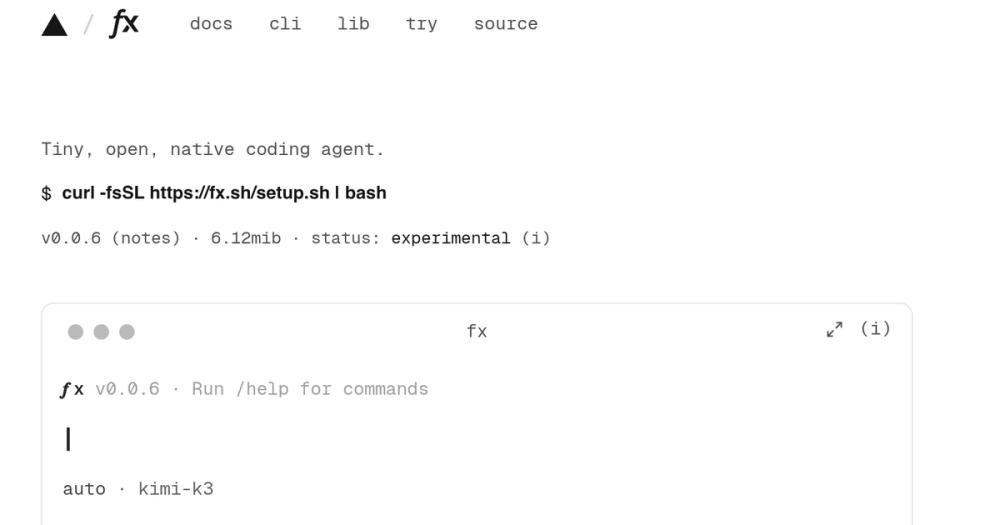
fx ships as a single native binary built with the Zig toolchain, weighing roughly 7.8 MiB. This makes it fast to download, instant to install, and practical to embed in agent sandboxes or resource-constrained server environments where a 300+ MB Electron app is not an option.
10-microsecond cold start
fx starts in 10 microseconds and does no unnecessary I/O before accepting the first prompt. This makes it practical for programmatic use, where each invocation may be a new process rather than a long-running session, and keeps latency low in automated pipelines.
WebAssembly build via Zig toolchain
The Zig compiler produces optimal fx.wasm builds that further reduce binary size and make the network stack pluggable. Hosts can provide their own transport, storage, and I/O, enabling fx to run in a browser or any Wasm-compatible runtime. The fx.sh demo runs the full CLI in WebAssembly in the browser with no installation.
Model and provider agnostic
fx works with Vercel AI Gateway, OpenAI Codex via ChatGPT subscription OAuth, xAI Grok via subscription OAuth, local model servers, and any provider accessible via an API key. The active provider and model can be switched at runtime with /setup inside the session without restarting.
ACP and WebAssembly embedding
fx exposes an Agent Client Protocol endpoint via `fx acp`, connecting it to editors and other ACP-compatible clients. JavaScript hosts can embed the agent core with `createFxAgent()` using fx-core.wasm, or the full interactive terminal with `createFxTerminal()` using fx-term.wasm.
Skills, MCP plugins, and subagents
Reusable instructions can be added via skills, external tools can be connected through MCP, and independent work can be delegated to subagents. The core stays minimal while extensibility is handled through this Unix-like plugin philosophy, keeping the base binary small.
Strengths and trade-offs#
Strengths
- Apache-2.0 license with no per-seat feesfx is Apache-2.0 licensed, permitting commercial use, modification, and distribution with no copyleft obligations. Unlike Cursor (proprietary) and GitHub Copilot (subscription starting at $10/user/month), there are no per-seat fees or vendor agreements required to run fx on your infrastructure.
- Minimal memory footprint for multi-instance usefx uses single-digit megabytes of memory at baseline, which means many instances can run on a single server. This is a meaningful advantage over Electron-based alternatives that consume gigabytes of RAM at idle and cannot be packed tightly in shared compute environments.
- Token-efficient by designThe system prompt and toolset are intentionally minimal to reduce token costs and improve time-to-first-token latency. This matters for teams running many short agent sessions or operating against rate-limited API tiers where each extra token in the system prompt compounds across hundreds of invocations.
Trade-offs
- -Experimental status with frequent breaking changesThe project ships with an explicit 'use at your own risk' warning and an experimental status indicator. At v0.0.5 and created on 2026-08-11, the API surface is unstable. Teams that need a stable embedding contract should wait for a more mature release before committing to fx as a dependency.
- -140 open issues on a two-week-old codebaseWith 140 open issues at launch, fx is moving fast and accumulating known gaps. For production workflows, the issue volume signals that many edge cases are still rough. This is typical of early open source tools but worth factoring in before building critical automation on top of fx.
- -No inline autocompletion or graphical editorfx is a terminal CLI harness, not an IDE assistant. It does not provide tab-completion inside a code editor, inline diff previews, or a file-tree explorer. Developers who rely on Cursor or GitHub Copilot for editor-integrated autocompletion will not find a drop-in replacement here.
fx vs alternatives#
fx vs Cursor
Cursor is a proprietary IDE fork built on VS Code, designed for developers who want AI coding assistance deeply integrated into a graphical editor. fx is a CLI-first coding agent with a 7.8 MiB binary and no graphical interface. The comparison is less about feature overlap and more about deployment context.
| Feature | fx | Cursor |
|---|---|---|
| License | Apache-2.0 | Proprietary |
| Self-hosting | Yes (native binary) | No |
| Binary size | ~7.8 MiB | 300+ MB |
| Interface | Terminal CLI | Electron IDE |
| Embeddable | Yes (Wasm + ACP) | No |
| Model choice | Any provider | Cursor-managed models |
Cursor wins for developers who want inline diff previews, a file-tree explorer, and GUI-based code review inside their editor. fx wins when the deployment target is a server, a pipeline, or a resource-constrained environment where Cursor cannot run. If you write code in Cursor by preference, switching to fx means giving up the visual editor layer entirely.
fx vs GitHub Copilot
GitHub Copilot is a subscription AI coding assistant starting at $10/month per user, integrated into VS Code, JetBrains, Neovim, and GitHub.com. fx does not compete on inline autocompletion, which is Copilot's core feature; it competes on agent-mode tasks and coding automation run from the terminal.
| Feature | fx | GitHub Copilot |
|---|---|---|
| License | Apache-2.0 | Proprietary |
| Self-hosting | Yes | No |
| Subscription required | No | Yes ($10/user/month+) |
| Inline autocompletion | No | Yes |
| Agent / CLI mode | Yes | Limited |
| Embeddable | Yes | No |
| Model choice | Any provider | GitHub-managed models |
GitHub Copilot is the better choice for teams that want IDE-integrated inline autocompletion across a full engineering org. fx is the better choice for teams that want an Apache-2.0 licensed coding agent they can run on their own infrastructure, embed in a pipeline, or point at any model provider. If your primary use case is tab-complete in VS Code, fx does not replace that.
Quick start#
Install fx from the official setup script with a single curl command.
```bash
curl -fsSL https://fx.sh/setup.sh | bash
```What it's built on#
- Languages
- JavaScriptPythonTypeScriptZig
- Frameworks
- Next.jsReact
FAQ#
Is fx free to use?
Yes. fx is Apache-2.0 licensed, free to download, and free to run. There is no subscription or per-seat fee for the binary itself. If you authenticate through Vercel AI Gateway, OpenAI Codex, or xAI Grok, those providers' own pricing applies to the model calls you make.
What AI models does fx support?
fx is model-agnostic. It connects to Vercel AI Gateway (via fx login or an API key), OpenAI Codex via a ChatGPT subscription using fx login codex, xAI Grok via a Grok subscription using fx login grok, local model servers, or any provider accessible via an API key configured with fx setup. The active provider and model can be switched at runtime with /setup inside the session.
How do I install fx?
Install fx with a single command: curl -fsSL https://fx.sh/setup.sh | bash. The installer downloads the native binary for your platform. Building from source requires Zig 0.16.0 or later; clone the repo and run zig build -Doptimize=ReleaseSafe to produce the binary at ./zig-out/bin/fx.
Can I embed fx in my own application?
Yes. fx builds to WebAssembly via the Zig toolchain, exposing createFxAgent() and createFxTerminal() for JavaScript hosts using fx-core.wasm and fx-term.wasm respectively. Native embedding uses fx acp to connect through the Agent Client Protocol to editors and other ACP-compatible clients. The WebAssembly SDK is marked experimental at this stage.
Is fx stable enough for production use?
Not yet. The project self-labels as experimental at v0.0.5, with an explicit 'use at your own risk' notice on the website and 140 open issues at launch. It is best treated as an early-access research tool or a development dependency for non-critical workflows. Frequent breaking changes are expected until a stable release is announced.
Similar open-source tools#

codex
OpenAI's terminal coding agent, Apache-2.0 licensed

kilocode
Open source AI coding agent. 500+ models at zero markup.

agentmemory
Persistent memory for AI coding agents

DeepSeek TUI
A coding agent that lives in your terminal.

Parallel Code
Run AI coding agents in parallel, each in its own worktree

Cline
VS Code AI agent that plans and edits across your entire project