Open Source Alternatives
  • Alternatives
  • Categories
    Categories by size1,162 projects
    • Developer Tools597
    • AI & Machine Learning503
    • Business & Productivity281
    • Web Development211
    • Security & Monitoring174
    • Communication & Collaboration155
    • IT Management147
    • LLMOps & AI Tooling129
    • Cloud & Hosting128
    • Product & Project Management124
    Browse all 21 categoriesDesign & Creative, DevOps & CI/CD and 9 more
  • Blog
  • Advertise
SearchNotion, Slack, password manager.../
Submit
Open Source Alternatives
  • Alternatives
    • Developer Tools597
    • AI & Machine Learning503
    • Business & Productivity281
    • Web Development211
    • Security & Monitoring174
    • Communication & Collaboration155
    • Browse all 21 categories
  • Blog
  • Advertise
Submit your project

New open source projects by email

The projects we add and every new guide. Free, unsubscribe any time.

Open Source Alternatives LogoOpen Source Alternatives

Handpicked Open Source Alternatives to Paid Softwares

Add Open Source Alternatives as a preferred source on Google

Product

  • Categories
  • Tag
  • Advertise

Resources

  • Blog
  • Collection
  • Submit

Company

  • Privacy Policy
  • Terms of Service
  • Refund Policy
  • Sitemap

Alternatives

  • Claude Code
  • Jira
  • Notion
  • Slack
  • Linear
  • Wispr Flow
  • All alternatives
© 2026 Open Source Alternatives. All rights reserved.
Open SourceAlternatives
Home/Categories/Business & Productivity/Gearslip
icon of Gearslip

Gearslip

  • 311 stars
  • AGPL-3.0
  • Active this week
  • Last commit today

Last verified Nov 7, 2026

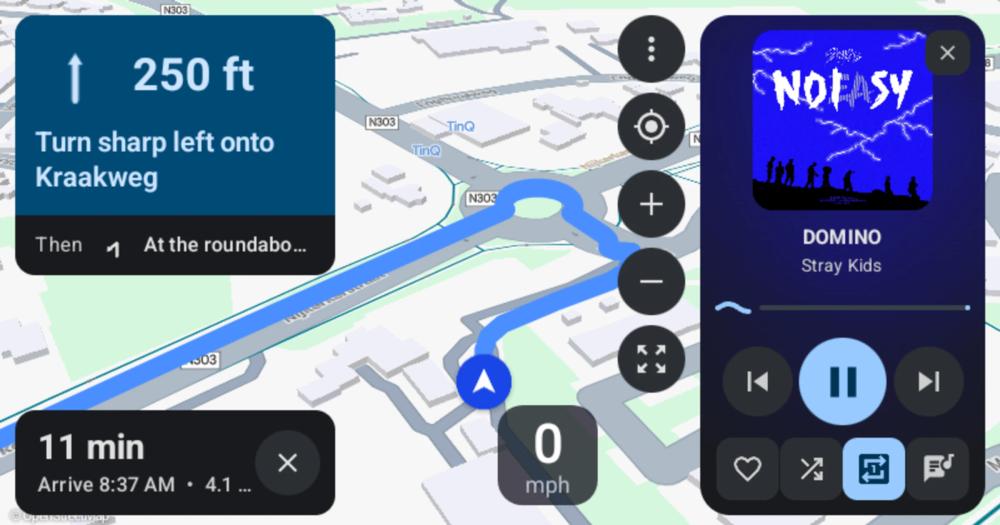
Connect Android phones to car head units using the Android Auto protocol, without Google software.

Visit websiteGitHub311 stars
image of Gearslip
TL;DR

Gearslip implements the Android Auto protocol without Google software, bringing maps, music, calls, and messaging to the car screen on any Android phone, including GrapheneOS. It replaces Google's Android Auto client for users who cannot or choose not to run it. Licensed under AGPL-3.0, installed as an APK from GitHub Releases or Obtainium, with no server or cloud account required. Best for GrapheneOS users and privacy-focused Android users who want a full in-car interface without Google services.

Read the full breakdownHide the full breakdownWho it is for, how it works, trade-offs, the quick start and the FAQ
who it's for

Who Gearslip is for#

GrapheneOS users who want a full car interface

GrapheneOS ships without Google Play Services, which means Android Auto is unavailable. Gearslip implements the same protocol from scratch, so navigation, music, calls, and messages all reach the car screen on a fully degoogled phone.

Skip if:

If your phone runs stock Android with Google Play Services and you have no privacy objection to Android Auto, the official app has better app compatibility, including Spotify's native car screen and Google Messages.

Drivers using privacy-focused map apps

Organic Maps, OsmAnd, and Vela work on the car screen through Gearslip, keeping navigation entirely off Google's servers. Users already running these apps for privacy reasons get the same offline maps on the car display they use on the phone.

Skip if:

If you rely on Google Maps for real-time traffic, Gearslip passes Google Maps turn-by-turn instructions to the instrument cluster nav bar but cannot put Google Maps' full car screen on the display.

Android head unit builders and dash modders

Gearslip can run as the launcher on an Android head unit or a spare phone mounted on the dash, through its 'Use as launcher' mode. It supports LIVI, the open-source head unit software used in homemade car dashboards.

Skip if:

If the head unit already runs official Android Auto natively and you are satisfied with it, adding Gearslip is redundant. It is most useful when the head unit is Android-based but cannot run the official client.

Stock Android users avoiding Google drive data

Even with Google Play Services present, switching to Gearslip keeps location, contacts, and music data off Google's servers during a drive. Users who keep Google on the phone for other apps but want the car interface to be independent can run Gearslip alongside the official app.

Skip if:

If you use Google Maps and Spotify's car interface actively, Gearslip does not currently support their native car screens. The tradeoff is real: privacy for the drive vs. feature completeness.

the problem

The problem it solves#

Android Auto has one client, and Google writes it. For users running GrapheneOS or any Android build without Google Play Services, the official app is unavailable. Even on stock Android, connecting a phone to a car head unit routes location data, music choices, and contacts through Google's servers on every drive.

The car head unit speaks an open protocol. The phone's apps already know how to draw car screens. The gap is a client that speaks the same protocol without a Google account in the path, and without sending every drive's data to a commercial platform outside the driver's control.

how Gearslip solves it

How it solves it#

Multiple map apps on the car screen

Navigation draws on Organic Maps, Vela, OsmAnd, Waze, Flitsmeister, MAPS.ME, and MapQuest. Turn-by-turn arrows, distances, and lane guidance appear on a large card while the map fills the rest of the screen. Turns from Google Maps or Waze on the phone appear in the nav bar and instrument cluster even without car-screen access.

Music playback with search and lyrics

Any app built for car screens works with Gearslip's player: Now Playing, Up Next, search, and lyrics that highlight word by word as the song plays. Spotify plays through Gearslip's built-in player. Type a search and apps that accept one play the best match.

Voice commands, calls, and messages

Tap the mic or press the steering wheel's talk button to navigate, play music, or dial contacts by name. During a call, the nav bar shows who you're talking to and you can mute or hang up from there. Incoming messages are read aloud, with a voice reply or a quick-reply option.

USB and wireless connection to most cars

Connects over USB or wirelessly to most cars. After the first wireless drive, Android asks once whether Gearslip may watch for that car's Bluetooth; from then on it connects automatically when the car's Bluetooth comes in range. Confirmed car models are listed in the project's CARS.md.

No root, adb, or Shizuku required

Every feature relies on an ordinary Android permission or an on-device consent dialog. No special Android access is needed. For audio routed through Gearslip rather than Bluetooth, two optional adb commands are offered in setup: one removes an audio confirmation prompt, the other keeps notifications visible during audio playback.

Android head unit and launcher support

Gearslip can act as the home screen of an Android head unit, or of a spare phone or tablet mounted on the dash. Enable 'Use as launcher' in Settings > Connection. It also works with LIVI, the open-source head unit software used in homemade car dashboards.

strengths · trade-offs

Strengths and trade-offs#

Strengths

  • No Google services on the data pathUnlike Android Auto, Gearslip sends nothing to Google. Maps, calls, music, and messages all stay between the phone and the car. Location data, music choices, and contacts never leave the phone via a Google service. This is the key reason GrapheneOS users choose it.
  • AGPL-3.0 source, fully auditableThe full source is on GitHub under AGPL-3.0, so the privacy guarantees are verifiable rather than claimed. No hidden background service, no analytics by default. Optional usage notes (which cars connected, which Gearslip version, anonymized by a salted hash) are off unless you turn them on.
  • Wide map app compatibilityGearslip hosts Organic Maps, Vela, OsmAnd, Waze, Flitsmeister, MAPS.ME, and MapQuest on the car screen. Users who have already chosen a privacy-respecting map app keep using it in the car without switching to Google Maps.
  • Automatic updates without an app storeOnce installed, Gearslip checks for a new APK once a day, downloads it, verifies the SHA-256 against GitHub's published hash, and installs it through Android's own installer. Automatic checks can be turned off in Settings. No app store dependency.

Trade-offs

  • -Alpha software: connections can dropThe README's own warning: Gearslip can drop the connection, freeze the car screen, or fail to start, and a new release can break a car that worked before. Set it up while parked and keep another navigation method available. With 311 GitHub stars and 27 open issues as of November 2026, the project is active but still early.
  • -Spotify and Google Messages car screens are not supportedSpotify's native car screen and Google Messages' own car screen accept only the official Android Auto client. Spotify audio still plays through Gearslip's built-in player, but Spotify's car UI is unavailable. TIDAL also restricts library browsing to approved apps.
  • -Some newer cars require a certificateCars from about 2020 onward may require an Android Auto certificate to accept a third-party client. On first launch, Gearslip asks where the certificate comes from: download the one the aasdk project publishes, or import your own. This one-time step is not required for older cars.
  • -AGPL-3.0 with a separate commercial licenseGearslip is AGPL-3.0, which allows anyone to run, modify, and share it, including for internal commercial use. The source must be shared for any modified version deployed as a service. Twink Software LLC sells a separate commercial license for use cases outside the AGPL's terms, such as proprietary forks. Standard self-hosting for personal or team use falls squarely within the AGPL.
versus alternatives

Gearslip vs alternatives#

Gearslip vs Android Auto

Gearslip and Android Auto serve the same in-car interface need: map, music, call, and message apps on the car screen, controlled by touch, steering wheel buttons, or voice. The choice hinges on whether you want your in-car experience to pass through Google's servers.

FeatureGearslipAndroid Auto
LicenseAGPL-3.0Proprietary
Google services requiredNoYes
Self-hostingAPK, no serverApp, no server
Map appsOrganic Maps, OsmAnd, Vela, Waze, and othersGoogle Maps, Waze, and other approved apps
Spotify car screenAudio only (via built-in player)Full Spotify car screen
Google Messages car screenNot supportedSupported
StabilityAlphaStable, production

Gearslip is the better choice when Google Play Services are absent, as on GrapheneOS, or when you want map, call, and music data to stay off Google's servers. It supports Organic Maps, OsmAnd, Vela, Flitsmeister, MAPS.ME, and other privacy-focused map apps that Android Auto does not.

Android Auto is the better choice when you want Spotify's full native car interface, Google Messages' in-car reply features, or the stability of a production-grade app. It is the only option when the car requires the official client's certificate chain.

install · quick start

Quick start#

bash
Download the Gearslip APK from GitHub Releases: https://github.com/twinksoftware/Gearslip/releases/latest
tech stack · detected from GitHub

What it's built on#

Languages
Kotlin
frequently asked

FAQ#

Does Gearslip work on stock Android, or only on GrapheneOS?

It works on both. GrapheneOS users get the full benefit because Google Play Services are absent and the official Android Auto client is unavailable; Gearslip is their only option. On stock Android, Gearslip runs alongside the Google client. The setup process is the same either way: install the APK, follow the permission prompts, and connect via USB or Bluetooth.

What happens to Spotify on a car screen with Gearslip?

Spotify audio plays through Gearslip's built-in media player: Now Playing, Up Next, and search all work. The limitation is Spotify's native car screen, which only the official Android Auto client can display; Gearslip cannot access it. TIDAL's library is similarly restricted to approved clients.

Is Gearslip safe to use while driving?

The README advises setting it up while parked and keeping another navigation method available, since it is alpha software that can drop the connection or freeze the car screen mid-drive. Voice commands, steering wheel controls, and touch all work, so the interface itself is designed for in-car use; the stability caveat is the reason to have a backup.

What certificate does Gearslip need, and where does it come from?

Gearslip ships without a certificate. On first launch, you choose: download the certificate the aasdk open-source project publishes, or import one of your own. The certificate stays on the phone; Gearslip never uploads or logs it. Some cars from around 2020 onward require this step; older cars typically do not.

Is Gearslip free to use?

Yes, for personal and team use. Gearslip is AGPL-3.0 licensed: you can run, modify, and share it freely, and self-hosting for personal or internal use is within the license's terms. The AGPL requires that you share source modifications if you offer a modified version as a service to others. Twink Software LLC also sells a separate commercial license for use outside the AGPL's terms.

also worth a look

Similar open-source tools#

CleanYourTV

Featured

Alternative toATV Launcher Pro

Debloat any Android or Google TV over Wi-Fi and get an Apple TV-style home.

  • 51,495 GitHub stars
  • MIT LicenseLicence MIT License

OpenClaw

Featured

Alternative toMuse

Self-hosted AI assistant for WhatsApp, Telegram, and more

  • 393,917 GitHub stars
  • MITLicence MIT

Inbox Zero

Featured

Alternative toSuperhuman

AI email assistant that drafts replies and clears your inbox

  • 12,915 GitHub stars
  • AGPL-3.0Licence AGPL-3.0

rakazo

Featured

Alternative toGrok Bot

AI teammates you own: your keys, your model, your machine.

  • 7,028 GitHub stars
  • Apache-2.0Licence Apache-2.0

paperclip

Featured

Alternative toGrok Bot

Self-hosted AI agent management with org charts and budgets

  • 111,113 GitHub stars
  • MITLicence MIT

Flowplan

Alternative toNotion

Docs, databases, whiteboards; self-hosted in one container, AGPL-3.0.

  • 97 GitHub stars
  • AGPL-3.0Licence AGPL-3.0
by category

Open source tools in these categories#

281

Business & Productivity

OpenClaw, Excalidraw, RustDesk

Sponsors

Inbox Zero

Alternative toSuperhuman

AI email assistant that drafts replies and clears your inbox

  • 12,915 GitHub stars
  • AGPL-3.0Licence AGPL-3.0
  • #Email

rakazo

Alternative toGrok Bot

AI teammates you own: your keys, your model, your machine.

  • 7,028 GitHub stars
  • Apache-2.0Licence Apache-2.0
  • #AI Agents

SnitchFeed

Live monitoring on LinkedIn, X, Reddit & more. Agentic social listening for startups.

Marketing & Growth

Advertise your product

New open source projects by email

The projects we add and every new guide. Free, unsubscribe any time.

Find open source alternatives to paid software

/
  • Claude Code to OpenCode
  • Jira to Windshift
  • Notion to AppFlowy
  • Slack to Mattermost
  • Linear to GitLab
  • Wispr Flow to Handy
  • Arc to Zen Browser
  • CapCut to Concat
  • Grok Bot to rakazo
  • Superhuman to Inbox Zero
  • Airtable to AITable
  • Muse to OpenClaw
  • Railway to Coolify
  • GitHub Copilot to Cline
  • Datadog to Netdata
  • Confluence to Wiki.js
  • Microsoft Teams to Rocket.Chat
  • Firebase to Supabase
  • Pinecone to Qdrant
  • Zapier to n8n
  • 1Password to KeePassXC
  • Devin AI to OpenHands
  • Asana to Leantime
  • Contentful to Strapi
  • Claude Code to OpenCode
  • Jira to Windshift
  • Notion to AppFlowy
  • Slack to Mattermost
  • Linear to GitLab
  • Wispr Flow to Handy
  • Arc to Zen Browser
  • CapCut to Concat
  • Grok Bot to rakazo
  • Superhuman to Inbox Zero
  • Airtable to AITable
  • Muse to OpenClaw
  • Railway to Coolify
  • GitHub Copilot to Cline
  • Datadog to Netdata
  • Confluence to Wiki.js
  • Microsoft Teams to Rocket.Chat
  • Firebase to Supabase
  • Pinecone to Qdrant
  • Zapier to n8n
  • 1Password to KeePassXC
  • Devin AI to OpenHands
  • Asana to Leantime
  • Contentful to Strapi