Open Source Alternatives
  • Alternatives
  • Categories
    Categories by size993 projects
    • Developer Tools507
    • AI & Machine Learning436
    • Business & Productivity227
    • Web Development202
    • Security & Monitoring149
    • Communication & Collaboration136
    • IT Management134
    • Cloud & Hosting118
    • LLMOps & AI Tooling111
    • Product & Project Management110
    Browse all 21 categoriesData & Analytics, Design & Creative and 9 more
  • Blog
  • Advertise
SearchNotion, Slack, password manager.../
Submit
Open Source Alternatives
  • Alternatives
    • Developer Tools507
    • AI & Machine Learning436
    • Business & Productivity227
    • Web Development202
    • Security & Monitoring149
    • Communication & Collaboration136
    • Browse all 21 categories
  • Blog
  • Advertise
Submit your project

New open source projects by email

The projects we add and every new guide. Free, unsubscribe any time.

Open Source Alternatives LogoOpen Source Alternatives

Handpicked Open Source Alternatives to Paid Softwares

Product

  • Categories
  • Tag
  • Advertise

Resources

  • Blog
  • Collection
  • Submit

Company

  • Privacy Policy
  • Terms of Service
  • Refund Policy
  • Sitemap

Alternatives

  • Claude Code
  • Jira
  • Notion
  • Slack
  • Linear
  • Wispr Flow
  • All alternatives
© 2026 Open Source Alternatives. All rights reserved.
Open SourceAlternatives
Home/Categories/Design & Creative/Lap
icon of Lap

Lap

Open source alternative to Mylio Photos and Excire Foto

  • 4.1K stars
  • GPL-3.0
  • Active this week
  • Last commit today

Last verified Oct 31, 2026

Manage your photo library locally with on-device AI search, face clustering, and folder-first organization on macOS, Windows, and Linux.

Visit websiteGitHub4.1K starsDeploy on Hostinger
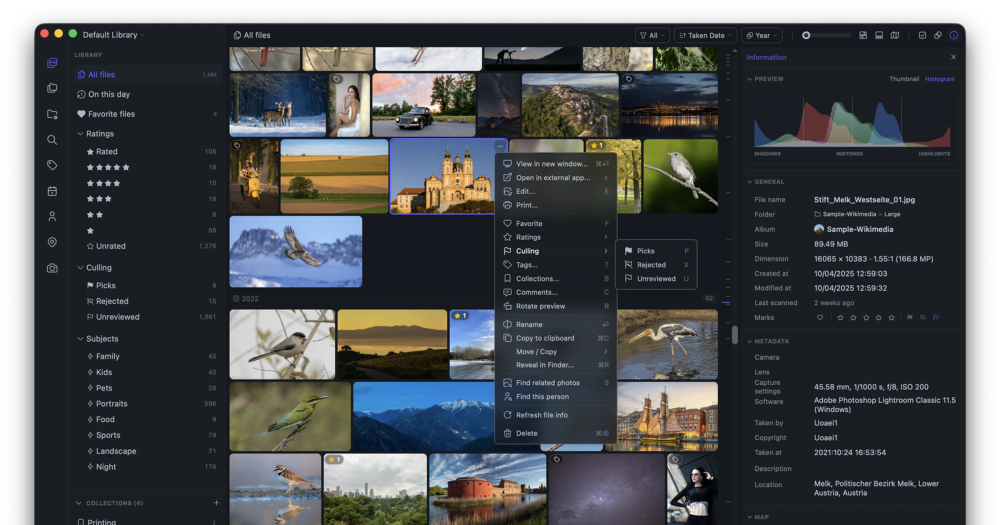
Image for Lap
TL;DR

Lap is an open-source photo manager for macOS, Windows, and Linux that runs AI search and face clustering entirely on the local machine. It replaces cloud-dependent tools like Mylio Photos and Excire Foto, offering a folder-first workflow using your existing directory structure with no vendor account required. Licensed under GPL-3.0, Lap handles libraries of 100,000+ files and ships as a signed installer on all three platforms.

Read the full breakdownHide the full breakdownWho it is for, how it works, trade-offs, the quick start and the FAQ
who it's for

Who Lap is for#

Photographers with large RAW archives on local storage

Lap indexes RAW files from all major manufacturers (Canon CR2/CR3, Nikon NEF, Sony ARW, Fujifilm RAF, and more) and displays RAW+JPEG pairs as single items. AI search across a 50,000+ file RAW archive lets you find photos by scene description rather than scrolling folder trees.

Skip if:

If your archive lives in Lightroom catalogs with extensive develop history and presets, Lap has no Lightroom catalog import and does not apply non-destructive RAW develop settings (curves, tone, color grading).

Privacy-conscious users moving off cloud photo services

Lap runs face clustering, AI tagging, and visual similarity search entirely on-device. Nothing is uploaded. The library stays as ordinary files in existing folders, so leaving Lap later requires no export step from a proprietary catalog.

Skip if:

If automatic cross-device sync is a hard requirement, Lap has no built-in sync service. You would need a separate tool such as Syncthing or a NAS share to keep the same folder available on multiple machines.

Families managing shared photo libraries across platforms

Lap runs on macOS, Windows, and Linux, so mixed-OS households can use the same tool. Geotagged photos appear on an interactive map with timeline filters, making it practical to browse by trip or location without building albums manually.

Skip if:

Lap stores organizational data (albums, tags, ratings) in a local database, not in file sidecars. If multiple users need to share organization state from the same library on different machines, they need to share the Lap database directory, which Lap does not manage automatically.

Home users culling event or vacation photos

The four-pane comparison viewer and pick/reject culling workflow let you work through a batch of similar photos quickly. Smart Albums with rule-based grouping isolate a date range or event folder without creating a separate physical copy of those files.

the problem

The problem it solves#

As personal photo libraries grow into the tens or hundreds of thousands of files, finding a specific photo takes more time than it should. Searching by folder name and date range covers basic retrieval, but describing a scene in plain words, or finding photos visually similar to a reference image, requires tools that most file managers and basic viewers do not have.

The tools that offer this kind of AI-powered search are almost all cloud services or proprietary paid applications. You hand over your library, accept a monthly fee, and accept that your photos and their organizational metadata live in a format tied to a specific vendor. Switching tools later means exporting from a closed catalog format, and face recognition data and custom tags rarely survive the migration.

how Lap solves it

How it solves it#

Local AI search in 50+ languages

Text prompts, visual similarity, and subject search run on-device using CLIP and ONNX Runtime. No image leaves your machine. Multilingual search covers 50+ languages, which serves teams or users working in languages other than English.

On-device face clustering and recognition

InsightFace models run locally to detect, group, and identify faces across your entire library. Identified people appear in browsable face groups, and all face data is stored in Lap's local database with no cloud component.

Folder-first library with no lock-in

Lap indexes your existing folder structure directly without importing everything into a proprietary database. File operations (move, copy, rename, delete) happen inside Lap so linked metadata stays consistent, but your originals remain in their folders and are accessible from any other application.

60+ photo, RAW, and video formats

Supported types include JPEG, HEIC/HEIF, AVIF, JXL, PSD, all major RAW formats (CR2, CR3, NEF, ARW, DNG, RAF, RW2, and more), and video up to MKV and MOV. RAW and JPEG/HEIC pairs display as one item and stay linked during file operations.

Interactive map view for geotagged photos

GPS-tagged photos and videos appear on an interactive Leaflet map in clustered groups. The map respects your current filters, so combining a date range or folder filter with the map view shows where photos from a specific period or trip were taken.

Smart Albums and duplicate detection

Smart Albums save rule-based views with custom grouping and sorting that update automatically as your library changes. The duplicate cleanup tool shows reclaimable-space summaries and lets you remove duplicates in bulk across matched sets.

strengths · trade-offs

Strengths and trade-offs#

Strengths

  • All AI features run with no cloud requirementText search, face clustering, smart tagging, and visual similarity all run locally using ONNX Runtime with bundled CLIP and InsightFace models. Mylio Photos requires a cloud account for device sync; Excire Foto requires a paid license for comparable features. Lap runs all of this at no cost, with no external connection needed.
  • Built for libraries of 100,000+ filesThe README cites large-collection performance as a core design goal. Browse, search, and face clustering are optimized for libraries that would slow down generic photo apps. SQLite-backed indexing keeps the database portable and local, and the application is written in Rust for performance-sensitive operations.
  • GPL-3.0 with actively maintained sourceThe full source is available under GPL-3.0, built in Rust and Vue with Tauri. The project launched in August 2024 and had its most recent commit on October 30, 2026, with 4,144 GitHub stars and translations contributed in 14 languages.
  • Folder structure stays intact; originals untouchedEXIF data (capture date, camera, GPS, lens) is read from each file and never overwritten by Lap. The folder structure of your originals is unchanged. Lap's local database holds its own organizational data (tags, ratings, collections, AI index), which you can back up separately in Settings > Storage.

Trade-offs

  • -Organizational metadata does not embed into filesCollections, tags, ratings, comments, and culling states are stored in Lap's local database, not written into EXIF, IPTC, or XMP sidecars. Moving or copying files outside Lap breaks the link to that organizational data. For workflows that depend on XMP sidecar compatibility with other tools, this is a real constraint.
  • -Windows installer is unsignedThe Windows MSI packages are not code-signed. Windows SmartScreen will block the download by default; users must click 'Keep anyway' to proceed. This is common for early-stage open source desktop apps but adds friction on managed Windows environments where SmartScreen enforcement is strict.
  • -77 open issues as of October 2026The tracker shows 77 open issues for a project created in August 2024. Active development continues (last commit October 30, 2026), but users should browse open issues before relying on Lap for a production workflow to confirm any edge cases relevant to their formats or platform.
  • -Linux video playback may need additional packagesOn Debian-based Linux systems, video playback uses GStreamer plugins. If gstreamer1.0-libav and gstreamer1.0-plugins-good are not installed, videos will fail to play. The AppImage bundles GStreamer but still depends on system codec plugins, adding a setup step absent on macOS and Windows.
versus alternatives

Lap vs alternatives#

Lap vs Mylio Photos

Mylio Photos is a proprietary photo management platform with device sync, local storage, and AI tagging features. The primary overlap with Lap is in local-first organization for large libraries with AI-powered search.

FeatureLapMylio Photos
LicenseGPL-3.0Proprietary
Vendor account requiredNoYes
AI searchOn-device, no cloudOn-device with cloud account
Cross-device syncNone built inCore feature
Mobile clientNoneiOS and Android
PriceFreeSubscription

Lap is the better fit when keeping photos on a single machine or NAS without a vendor account is the priority. All AI features run without connecting to Mylio's servers. Mylio Photos is worth considering when you need photos available on iOS or Android alongside a desktop; Lap has no mobile client and no built-in sync service.

Lap vs Excire Foto

Excire Foto is a Windows and macOS desktop photo tool with on-device AI features (AI keywords, semantic search, face recognition) sold as a one-time license.

FeatureLapExcire Foto
LicenseGPL-3.0Proprietary
PriceFreeOne-time license fee
Linux supportYesNo
AI searchText prompts, visual similarity, 50+ languagesAI keywords, semantic search
Source availableYesNo

Lap covers similar AI territory to Excire Foto at no cost and adds Linux support. Excire Foto is worth considering for users who want a commercially supported workflow with polished editing integration and do not need Linux support or source access.

install · quick start

Quick start#

bash
Install on macOS with the Homebrew cask; download signed installers for Windows or Linux from GitHub Releases: https://github.com/julyx10/lap/releases/latest

```bash
brew tap julyx10/lap
brew install --cask lap
```
tech stack · detected from GitHub

What it's built on#

Languages
JavaScriptRustTypeScript
Frameworks
Vue
frequently asked

FAQ#

Is Lap free to use?

Yes. Lap is licensed under GPL-3.0 and free to download and use. There is no subscription, no free tier with limits, and no paid features. The GPL-3.0 license permits personal and internal commercial use; it requires that you distribute source code if you distribute a modified version of the application to others.

Does Lap upload my photos to the cloud?

No. Every AI feature in Lap, including image-text search, face clustering, and visual similarity, runs locally using models bundled with the application. Lap's privacy policy notes optional online services (such as map tile fetching), but the core photo library and AI features work entirely offline with no account required.

What happens to my photos if I uninstall Lap?

Your original photo files are not affected. Lap stores its organizational data (tags, collections, ratings, AI index, thumbnails) in a separate local database outside your photo folders. Deleting the app and its database removes that organizational data but leaves all original media files in place in their folders.

How does Lap compare to Lightroom for RAW editing?

Lap is a photo manager and organizer, not a full RAW editor. Its built-in editing covers crop, rotate, flip, resize, and basic image adjustments, but it does not offer the non-destructive RAW develop pipeline (curves, tone, color grading) that Lightroom provides. Lap works alongside a dedicated RAW editor rather than replacing one.

What operating systems and hardware does Lap support?

Lap runs on macOS (Apple Silicon and Intel), Windows 10/11 (x64 and ARM64), and Linux x64 and ARM64. Debian-based Linux distributions can install via DEB package; other distributions use the AppImage. Video playback on Linux requires GStreamer; installing gstreamer1.0-libav and gstreamer1.0-plugins-good on Debian-based systems resolves most playback issues. No GPU is required for core features.

also worth a look

Similar open-source tools#

presenton

Alternative toGamma

Self-hosted AI slide generator with BYOK support and PPTX export.

  • 11,507 GitHub stars
  • Apache-2.0Licence Apache-2.0

Upscayl

Alternative toTopaz Labs Gigapixel AI

Free open source AI image upscaler for Mac, Linux, and Windows

  • 51,269 GitHub stars
  • AGPL-3.0Licence AGPL-3.0

God's Eye View

Featured

Alternative toFFlightradar24

Real-time global intelligence on a 3D globe

  • 61,172 GitHub stars
  • CustomLicence MIT with third-party data restrictions

OpenClaw

Featured

Alternative toMuse

Self-hosted AI assistant for WhatsApp, Telegram, and more

  • 393,358 GitHub stars
  • MITLicence MIT

Inbox Zero

Featured

Alternative toSuperhuman

AI email assistant that drafts replies and clears your inbox

  • 12,855 GitHub stars
  • AGPL-3.0Licence AGPL-3.0

rakazo

Featured

Alternative toGrok Bot

AI teammates you own: your keys, your model, your machine.

  • 6,242 GitHub stars
  • Apache-2.0Licence Apache-2.0
by category

Open source tools in these categories#

108

Design & Creative

ComfyUI, Excalidraw, Godot Engine
437

AI & Machine Learning

freeCodeCamp, REA (Reverse Engineer Anything), OpenClaw
228

Business & Productivity

OpenClaw, Excalidraw, RustDesk
Hostinger

Self-host Lap on a Hostinger VPS

Keep it running 24/7, even when your laptop is off. A Hostinger VPS gives it a server of its own.

  1. 01

    Choose a plan

    Starts from $6.49/mo

  2. 02

    Apply

    Extra 10% off yearly plans

  3. 03

    Install Lap

    On a server that stays on

  4. 04

    Start building

    Focus on the app, not the server

Deploy on Hostinger

Sponsors

Inbox Zero

Alternative toSuperhuman

AI email assistant that drafts replies and clears your inbox

  • 12,855 GitHub stars
  • AGPL-3.0Licence AGPL-3.0
  • #Email

Omnara

Alternative toCClaude Managed Agents

Open-source agent deployment API. Self-host or use Omnara Cloud.

  • 3,325 GitHub stars
  • Apache-2.0Licence Apache-2.0
  • #AI Agents

rakazo

Alternative toGrok Bot

AI teammates you own: your keys, your model, your machine.

  • 6,242 GitHub stars
  • Apache-2.0Licence Apache-2.0
  • #AI Agents
Advertise your product

New open source projects by email

The projects we add and every new guide. Free, unsubscribe any time.

Find open source alternatives to paid software

/
  • Claude Code to OpenCode
  • Jira to Windshift
  • Notion to AppFlowy
  • Slack to Mattermost
  • Linear to GitLab
  • Wispr Flow to Handy
  • Arc to Zen Browser
  • CapCut to Concat
  • Grok Bot to rakazo
  • Superhuman to Inbox Zero
  • Airtable to AITable
  • Muse to OpenClaw
  • Railway to Coolify
  • GitHub Copilot to Cline
  • Datadog to Netdata
  • Microsoft Teams to Rocket.Chat
  • Confluence to Docmost
  • Pinecone to Qdrant
  • Zapier to n8n
  • Devin AI to OpenHands
  • Firebase to Supabase
  • 1Password to KeePassXC
  • Contentful to Strapi
  • Adobe Premiere Pro to Shotcut
  • Claude Code to OpenCode
  • Jira to Windshift
  • Notion to AppFlowy
  • Slack to Mattermost
  • Linear to GitLab
  • Wispr Flow to Handy
  • Arc to Zen Browser
  • CapCut to Concat
  • Grok Bot to rakazo
  • Superhuman to Inbox Zero
  • Airtable to AITable
  • Muse to OpenClaw
  • Railway to Coolify
  • GitHub Copilot to Cline
  • Datadog to Netdata
  • Microsoft Teams to Rocket.Chat
  • Confluence to Docmost
  • Pinecone to Qdrant
  • Zapier to n8n
  • Devin AI to OpenHands
  • Firebase to Supabase
  • 1Password to KeePassXC
  • Contentful to Strapi
  • Adobe Premiere Pro to Shotcut