Open Source Alternatives
  • Alternatives
  • Categories
    Categories by size1,182 projects
    • Developer Tools610
    • AI & Machine Learning515
    • Business & Productivity282
    • Web Development214
    • Security & Monitoring178
    • Communication & Collaboration158
    • IT Management149
    • LLMOps & AI Tooling130
    • Cloud & Hosting129
    • Product & Project Management126
    Browse all 21 categoriesDesign & Creative, DevOps & CI/CD and 9 more
  • Blog
  • Advertise
SearchNotion, Slack, password manager.../
Submit
Open Source Alternatives
  • Alternatives
    • Developer Tools610
    • AI & Machine Learning515
    • Business & Productivity282
    • Web Development214
    • Security & Monitoring178
    • Communication & Collaboration158
    • Browse all 21 categories
  • Blog
  • Advertise
Submit your project

New open source projects by email

The projects we add and every new guide. Free, unsubscribe any time.

Open Source Alternatives LogoOpen Source Alternatives

Handpicked Open Source Alternatives to Paid Softwares

Add Open Source Alternatives as a preferred source on Google

Product

  • Categories
  • Tag
  • Advertise

Resources

  • Blog
  • Collection
  • Submit

Company

  • Privacy Policy
  • Terms of Service
  • Refund Policy
  • Sitemap

Alternatives

  • Claude Code
  • Jira
  • Notion
  • Slack
  • Linear
  • Wispr Flow
  • All alternatives
© 2026 Open Source Alternatives. All rights reserved.
Open SourceAlternatives
Home/Categories/Business & Productivity/Misterdownloadmanager
icon of Misterdownloadmanager

Misterdownloadmanager

Open source alternative to Internet Download Manager

  • 1.6K stars
  • GPL-3.0
  • Active this week
  • Last commit today

Last verified Nov 9, 2026

Manage downloads on Windows with parallel connections up to 128, built-in torrents, yt-dlp video support and crash-safe resume, free under GPL-3.0.

Visit websiteGitHub1.6K starsDeploy on Hostinger
image of Misterdownloadmanager
TL;DR

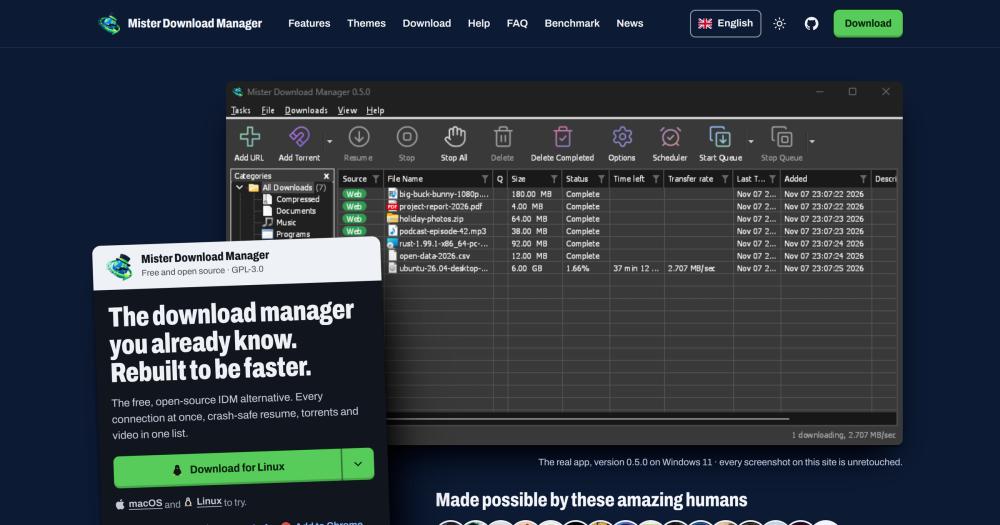
Misterdownloadmanager Mister Download Manager is a free, open source desktop download manager for Windows, written from scratch in Rust under the GPL-3.0 license. It replaces Internet Download Manager (IDM), a paid Windows download accelerator, and downloaded a 1 GiB file 5.4 times faster in a published benchmark on the same hardware. MDM supports HTTP, FTP, torrents, magnet links, and video pages via yt-dlp, with browser extensions for Chrome, Edge, Brave, Opera, Vivaldi and Firefox. Best for Windows users who want IDM's familiar interface without its licence fee, or who need torrent and video support in the same download queue.

Read the full breakdownHide the full breakdownWho it is for, how it works, trade-offs, the quick start and the FAQ
who it's for

Who Misterdownloadmanager is for#

Windows users replacing Internet Download Manager

MDM replicates IDM's toolbar, category list, progress window and browser button. IDM list import reads your existing IDM queue with each download's address, referrer and cookies. If IDM's licence cost or nag screens were the reason to switch, MDM covers the same workflow for free.

Skip if:

If you rely on IDM's vendor support or specific site-compatibility fixes that only IDM provides, MDM is still a new project (0.5.0) and some edge cases are still being resolved.

Users managing torrents and HTTP downloads together

Magnet links and .torrent files sit alongside HTTP and FTP downloads in the same queue with the same scheduler and speed limiter. No separate torrent client is needed. Debrid service links from Real-Debrid, AllDebrid or Premiumize can also be fed directly into MDM.

Skip if:

If you need a full-featured torrent client with private tracker support, seeding ratio management, or a large plugin ecosystem, a dedicated client like qBittorrent is a better fit.

Video and gallery archivists

Paste any YouTube, Vimeo, TikTok or gallery page address and MDM downloads the video at the quality you choose, using yt-dlp internally. Batch downloads and an RSS torrent feed let you automate recurring downloads. Archives (ZIP, TAR, 7z, RAR) extract automatically as they arrive.

Skip if:

If you need command-line scripting hooks for video download automation, calling yt-dlp directly gives more flexibility than MDM's GUI wrapper.

Home server and NAS operators

MDM's server mode runs without a window on a NAS, in Docker, or on Unraid. You feed it downloads from a phone or browser over the local network. The scheduler starts downloads overnight and can shut the machine down when finished. It also exposes an MCP API for assistant tools.

Skip if:

If your NAS runs Linux exclusively and browser extension integration is a priority, note that Flatpak browsers cannot connect to MDM on Linux yet.

the problem

The problem it solves#

Internet Download Manager has been the standard Windows download accelerator for years, but it charges a licence fee after a 30-day trial, displays nag screens until you pay, and does not support torrents or magnet links. For users who download large files regularly, those gaps mean paying an ongoing licence fee while also maintaining a separate torrent client.

Video downloads add another complication. Extracting video from YouTube, Vimeo, TikTok and thousands of other sites requires a separate tool or a browser extension that may break whenever a site updates its interface. Managing file downloads across three separate applications, paying for one, and tolerating nag screens in another, turns a background task into an ongoing maintenance burden.

how Misterdownloadmanager solves it

How it solves it#

Up to 128 parallel connections per file

Files are split across up to 128 simultaneous connections and re-split as the download progresses. In a published benchmark on the same hardware against the same test server, MDM downloaded a 1 GiB file in 1.0 second versus IDM's 5.5 seconds, and a 256 KiB file in 0.03 seconds versus IDM's 3.1 seconds. Results are Mann-Whitney p < 0.001.

Built-in torrent and magnet link support

Magnet links and .torrent files sit in the same download list as HTTP and FTP files. You pick which files to download from a torrent, watch each piece fill in real time, and queue or schedule torrents alongside your other downloads. IDM does not offer torrent or magnet link support.

Video downloads via yt-dlp

Paste a web page address and MDM lists the available video qualities, up to 4K, from YouTube, Vimeo, TikTok and over a thousand other sites. It uses yt-dlp under the hood and ffmpeg to merge picture and sound. Image gallery downloads let you save every photo from a gallery page into its own folder.

Browser extensions for six browsers

Extensions for Chrome, Edge, Brave, Opera, Vivaldi and Firefox intercept any download you click and send it to MDM automatically. The Chrome Web Store extension works across Chromium browsers; the Firefox add-on is on Mozilla's store. Both come bundled with the MDM installer or install separately from the stores.

Crash-safe resume and scheduler

MDM writes progress continuously and resumes exactly where it stopped after a crash or power loss, without re-downloading the whole file. The scheduler starts and stops queues by the clock (say, 2 a.m. to 7 a.m.) and can shut the computer down when the queue finishes.

Server mode and MCP assistant support

MDM runs without a visible window on a NAS, in Docker, or on Unraid, fed from a phone or browser over the local network. It also exposes a local API that Claude, Cursor, VS Code and other MCP assistants can use to list, add, pause and resume downloads.

strengths · trade-offs

Strengths and trade-offs#

Strengths

  • Free forever, GPL-3.0 licensedMDM costs nothing, with no trial limit, no nag screen, no paid edition, and no registration key. The GPL-3.0 license means the source is public, every release is built from that source via GitHub Actions on GitHub's servers, and each file carries a published SHA-256 checksum for verification.
  • Faster than IDM in published benchmarksOn the same PC against the same local test server, MDM downloaded a 1 GiB file in 1.0 second (IDM: 5.5 seconds), a 256 KiB file in 0.03 seconds (IDM: 3.1 seconds), and completed a server-limited two-connection download in 12.6 seconds (IDM: 15.9 seconds after opening 480 connections). Benchmark uses alternating runs with Mann-Whitney p < 0.001; raw data is published.
  • 86 interface languages, including right-to-leftMDM ships with every display language Windows 11 offers, 86 in total, compared to about 40 for IDM distributed as separate downloads. Arabic, Hebrew, Persian, Urdu and Uyghur render in a fully mirrored right-to-left window. The language is detected from the system and can be changed at any time in View, then Language.
  • Written from scratch in Rust, independent of IDMMDM is an independent project with no code or artwork from IDM, confirmed by the README. Rust's memory safety eliminates a whole class of crashes and security bugs common in download managers. The source is public on GitHub, and every release is built from it on GitHub's servers using GitHub Actions.

Trade-offs

  • -macOS and Linux support is experimentalWindows 10 and 11 is the stable operating system. macOS builds (Apple Silicon and Intel .dmg) are not notarized, so the first launch requires a right-click Open to bypass Gatekeeper. Linux runs on Ubuntu 24.04, Debian 12 and Fedora with GNOME, KDE, Xfce and Cinnamon, but screen readers such as Orca cannot read its windows yet, and Flatpak browsers cannot connect to MDM on Linux.
  • -Windows installer is not yet code-signedThe first time you run the MDM installer, Windows Defender may show a 'Windows protected your PC' warning because the binary is not yet code-signed. The README instructs users to click More info, then Run anyway. The source is public and all files include SHA-256 checksums so users can verify what they are installing.
  • -Early-stage project with 56 open issuesMDM 0.5.0 launched in late 2026 and has 56 open GitHub issues at the time of writing. As a new project it is actively developed but some features, translations (most are machine-translated and need native speaker review per the product website), and browser integration edge cases are still maturing.
versus alternatives

Misterdownloadmanager vs alternatives#

Mister Download Manager vs Internet Download Manager

Both tools accelerate file downloads on Windows by splitting files across multiple connections, but they differ on price, license, platform support and feature set.

FeatureMister Download ManagerInternet Download Manager
LicenseGPL-3.0 (open source)Proprietary
PriceFree, foreverPaid licence after 30-day trial
1 GiB download (benchmark)1.0 s5.5 s
256 KiB download (benchmark)0.03 s3.1 s
Torrent and magnet linksYesNot offered
Video downloadsYes, via yt-dlpYes, from web players
Interface languages86, right-to-left includedAbout 40 (separate downloads)
Browser extensionsChrome, Edge, Brave, Opera, Vivaldi, FirefoxChrome, Firefox, Edge
macOS and LinuxExperimental builds availableWindows only
Server mode (NAS, Docker)YesNo

MDM is the better choice when cost is the reason to switch from a paid download manager, when torrent and video support in a single application is needed, when interface languages beyond IDM's roughly 40 are required, or when a headless server-mode download daemon on a NAS is the goal. Its speed advantage over IDM 6.42 is documented in a published benchmark on the same hardware, with alternating runs, Mann-Whitney p < 0.001 and published raw data.

IDM is worth considering when a tool with many years of polish and an established track record is preferred, particularly in enterprise or heavily managed Windows environments where new software requires additional scrutiny, or when IDM-specific compatibility with complex authentication flows is needed. MDM is an actively developed new project (version 0.5.0 at launch) and some edge cases are still being resolved.

install · quick start

Quick start#

bash
Download the Windows installer, portable build, or macOS and Linux packages from GitHub Releases: https://github.com/anefzaoui/misterdownloadmanager/releases/latest
tech stack · detected from GitHub

What it's built on#

Languages
JavaScriptPythonRust
frequently asked

FAQ#

Is Mister Download Manager really free, with no paid plan or trial?

Yes. MDM is free under the GPL-3.0 license with no paid edition, no trial period, no licence key, no nag screen, and no ads. The product website states it is free for everyone, forever. GitHub Sponsors is offered as an optional way to support the developer, not a required subscription.

Does Mister Download Manager work on macOS and Linux?

macOS and Linux builds are available but marked experimental. macOS builds (Apple Silicon and Intel .dmg) are not notarized, so the first launch requires a right-click Open to bypass Gatekeeper. Linux builds include an AppImage, .deb for Ubuntu and Debian, and .rpm for Fedora. Screen readers such as Orca cannot read MDM's windows yet on Linux, and Flatpak browsers cannot connect to it. Windows 10 and 11 is the stable operating system.

Can I import my existing IDM download list into MDM?

Yes. MDM includes an IDM list import feature that reads your existing IDM queue with each download's address, referrer and cookies. This is listed among MDM's 27 features on the product website under 'Moving from IDM'.

What is the difference between the MDM installer and the portable download?

The installer (setup.exe) installs MDM, connects it to your browsers and prompts for language on first run. The portable download (portable.zip) runs from any folder or USB stick with no installation, keeping all settings in its own directory. The installer is recommended if you want browser extension integration set up automatically; the portable build suits USB stick use or systems where you prefer not to install software.

How does MDM download videos from YouTube and other sites?

MDM uses yt-dlp internally to list available qualities from YouTube, Vimeo, TikTok and over a thousand other sites. You paste the page address, choose a quality up to 4K, and MDM downloads the video. ffmpeg merges picture and sound when needed. Video downloads sit in the same queue as your other downloads and can be scheduled or speed-limited like any file.

also worth a look

Similar open-source tools#

Prism Download Manager

Alternative toInternet Download Manager

Cross-platform download manager: 32-connection engine, browser capture

  • 770 GitHub stars
  • MITLicence MIT

Plexo

Alternative toInternet Download Manager

Multi-network download manager for files, torrents, and magnets

  • 5,587 GitHub stars
  • MITLicence MIT

CleanYourTV

Featured

Alternative toATV Launcher Pro

Debloat any Android or Google TV over Wi-Fi and get an Apple TV-style home.

  • 53,395 GitHub stars
  • MIT LicenseLicence MIT License

OpenClaw

Featured

Alternative toMuse

Self-hosted AI assistant for WhatsApp, Telegram, and more

  • 394,144 GitHub stars
  • MITLicence MIT

Inbox Zero

Featured

Alternative toSuperhuman

AI email assistant that drafts replies and clears your inbox

  • 12,942 GitHub stars
  • AGPL-3.0Licence AGPL-3.0

rakazo

Featured

Alternative toGrok Bot

AI teammates you own: your keys, your model, your machine.

  • 7,478 GitHub stars
  • Apache-2.0Licence Apache-2.0
by category

Open source tools in these categories#

282

Business & Productivity

OpenClaw, Excalidraw, RustDesk
Hostinger

Self-host Misterdownloadmanager on a Hostinger VPS

Keep it running 24/7, even when your laptop is off. A Hostinger VPS gives it a server of its own.

  1. 01

    Choose a plan

    Starts from $6.49/mo

  2. 02

    Apply

    Extra 10% off yearly plans

  3. 03

    Install Misterdownloadmanager

    On a server that stays on

  4. 04

    Start building

    Focus on the app, not the server

Deploy on Hostinger

Sponsors

Inbox Zero

Alternative toSuperhuman

AI email assistant that drafts replies and clears your inbox

  • 12,942 GitHub stars
  • AGPL-3.0Licence AGPL-3.0
  • #Email

rakazo

Alternative toGrok Bot

AI teammates you own: your keys, your model, your machine.

  • 7,478 GitHub stars
  • Apache-2.0Licence Apache-2.0
  • #AI Agents

SnitchFeed

Live monitoring on LinkedIn, X, Reddit & more. Agentic social listening for startups.

Marketing & Growth

Advertise your product

New open source projects by email

The projects we add and every new guide. Free, unsubscribe any time.

Find open source alternatives to paid software

/
  • Claude Code to OpenCode
  • Jira to Windshift
  • Notion to AppFlowy
  • Slack to Mattermost
  • Linear to GitLab
  • Wispr Flow to Handy
  • Arc to Zen Browser
  • CapCut to Concat
  • Grok Bot to rakazo
  • Superhuman to Inbox Zero
  • Airtable to AITable
  • Muse to OpenClaw
  • Railway to Coolify
  • GitHub Copilot to Cline
  • Datadog to Netdata
  • Confluence to Wiki.js
  • Microsoft Teams to Rocket.Chat
  • 1Password to KeePassXC
  • Firebase to Supabase
  • Pinecone to Qdrant
  • Zapier to n8n
  • Devin AI to OpenHands
  • Asana to Leantime
  • Contentful to Strapi
  • Claude Code to OpenCode
  • Jira to Windshift
  • Notion to AppFlowy
  • Slack to Mattermost
  • Linear to GitLab
  • Wispr Flow to Handy
  • Arc to Zen Browser
  • CapCut to Concat
  • Grok Bot to rakazo
  • Superhuman to Inbox Zero
  • Airtable to AITable
  • Muse to OpenClaw
  • Railway to Coolify
  • GitHub Copilot to Cline
  • Datadog to Netdata
  • Confluence to Wiki.js
  • Microsoft Teams to Rocket.Chat
  • 1Password to KeePassXC
  • Firebase to Supabase
  • Pinecone to Qdrant
  • Zapier to n8n
  • Devin AI to OpenHands
  • Asana to Leantime
  • Contentful to Strapi