Open Source Alternatives
  • Alternatives
  • Categories
    Categories by size943 projects
    • Developer Tools489
    • AI & Machine Learning421
    • Business & Productivity207
    • Web Development199
    • Security & Monitoring141
    • Communication & Collaboration129
    • IT Management129
    • Cloud & Hosting111
    • Data & Analytics108
    • LLMOps & AI Tooling107
    Browse all 21 categoriesDesign & Creative, Product & Project Management and 9 more
  • Blog
  • Advertise
SearchNotion, Slack, password manager.../
Submit
Open Source Alternatives
  • Alternatives
    • Developer Tools489
    • AI & Machine Learning421
    • Business & Productivity207
    • Web Development199
    • Security & Monitoring141
    • Communication & Collaboration129
    • Browse all 21 categories
  • Blog
  • Advertise
Submit your project

New open source projects by email

The projects we add and every new guide. Free, unsubscribe any time.

Open Source Alternatives LogoOpen Source Alternatives

Handpicked Open Source Alternatives to Paid Softwares

Product

  • Categories
  • Tag
  • Advertise

Resources

  • Blog
  • Collection
  • Submit

Company

  • Privacy Policy
  • Terms of Service
  • Refund Policy
  • Sitemap

Alternatives

  • Claude Code
  • Jira
  • Notion
  • Slack
  • Linear
  • Wispr Flow
  • All alternatives
© 2026 Open Source Alternatives. All rights reserved.
Open SourceAlternatives
Home/Categories/Developer Tools/Prism Download Manager
icon of Prism Download Manager

Prism Download Manager

Open source alternative to Internet Download Manager and Folx Pro

  • 221 stars
  • MIT
  • Active this week
  • Last commit today

Last verified Oct 29, 2026

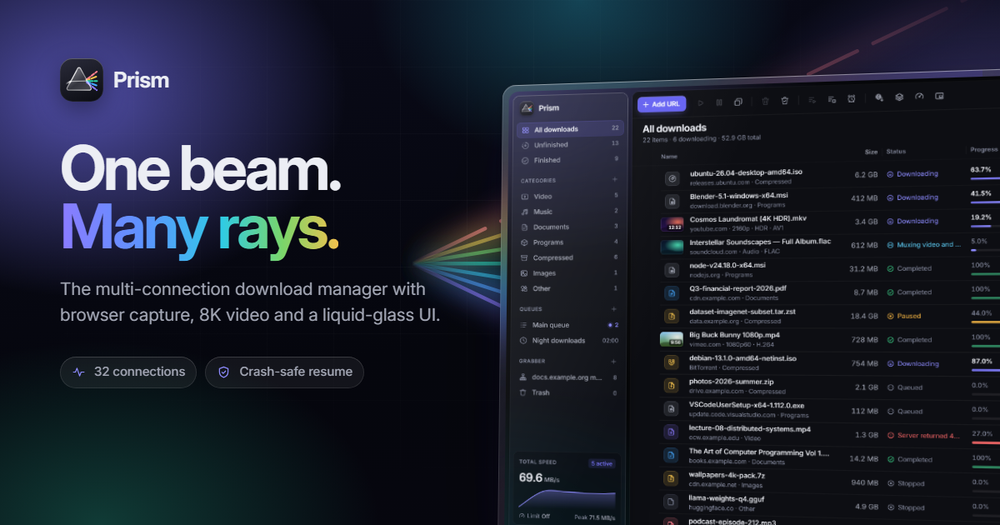
Manage downloads with up to 32 parallel connections, crash-safe resume, browser capture, and video extraction from 1000+ sites. MIT licensed, cross-platform.

Visit websiteGitHub221 stars
image of Prism Download Manager
TL;DR

Prism Download Manager Prism is a cross-platform download manager that replaces Internet Download Manager on Windows and Folx Pro on macOS with a single MIT-licensed app for Windows, macOS and Linux. Its multi-connection engine splits each file across up to 32 parallel segments, running up to 15 times faster than a browser download on servers that throttle each connection. Crash-safe resume, browser integration for Chrome, Edge, Brave, Opera, Vivaldi and Firefox, video extraction from 1,000+ sites via yt-dlp, and BitTorrent support are included. No ads, no account, and no telemetry.

Read the full breakdownHide the full breakdownWho it is for, how it works, trade-offs, the quick start and the FAQ
who it's for

Who Prism Download Manager is for#

Developers and sysadmins downloading large OS images and datasets

Prism's multi-connection engine reduces transfer time when fetching multi-gigabyte files from CDNs and mirrors that enforce per-connection bandwidth limits. The crash-safe resume means an interrupted transfer picks up from the last checkpointed byte rather than starting over, which matters when downloading a 4+ GB ISO over an unreliable connection.

Skip if:

Your source files come from a single high-speed unthrottled server such as a local NAS or dedicated mirror. On an unthrottled connection, all tools saturate the same line speed; Prism adds no advantage over a browser download in that scenario.

Content creators and researchers pulling video from the web

The browser extension adds a download button directly on the video player. Users pick quality from MP4 at resolutions up to 8K HDR down to audio-only MP3, with optional SponsorBlock chapter trim. Prism installs and maintains a verified yt-dlp and ffmpeg automatically, removing the manual update cycle those tools typically require.

Skip if:

You need advanced yt-dlp features like batch channel downloads with custom naming templates or extensive metadata writing. A standalone yt-dlp command-line workflow with a config file gives more control than Prism's UI exposes for those cases.

Users switching from IDM on Windows or Folx Pro on macOS

Prism replicates the core features those tools are known for: multi-connection engine, browser integration, scheduler, queue management and torrent support. It adds cross-platform coverage and removes the licensing cost. The browser extension registers the same way IDM's does, so the transition is straightforward for users familiar with those tools.

Skip if:

You rely on IDM-specific features like site login capture, complex download categories with per-category folder rules, or the IDM floating download panel. Prism's feature set is newer and not yet as deep as IDM's 20-year feature history.

Privacy-conscious users who want download management without telemetry

Prism collects no usage data, requires no account, and embeds no ads. The browser extension talks only to the local application, and the source code is auditable under the MIT license. For users replacing a commercial download manager over concerns about what data the app sends home, Prism is telemetry-free by design and verifiable.

Skip if:

You need cloud sync of your download history or remote management of downloads from a mobile device. Prism is a local desktop application with no cloud component.

the problem

The problem it solves#

Browser downloads use a single connection, which leaves most of a server's available bandwidth untouched when the server throttles each connection individually. At 4 MiB/s per connection, a 1 GiB file takes over four minutes from a server that would happily serve 16 connections at once.

Paid tools solve this with multi-connection engines, but each is platform-specific. Internet Download Manager is Windows-only with a per-license cost and a browser plugin that takes over all downloads by default. Folx Pro covers macOS but nothing else. Users who work across operating systems have had to juggle two different paid apps, or accept slower single-connection transfers everywhere.

how Prism Download Manager solves it

How it solves it#

Work-Stealing Multi-Connection Engine

Splits every file into segments and keeps up to 32 connections busy until the last byte. When a connection finishes its range, it immediately takes over half of the largest segment still in progress, so no connection idles waiting for a slow tail. On servers that throttle each connection to 4 MiB/s, this produces up to 15 times the throughput of a single-connection browser download.

Crash-Safe Resume

Progress is checkpointed only after data is flushed to disk. On resume, Prism validates the remote file using ETag and Last-Modified headers with If-Range requests. If the file on the server has changed, Prism starts fresh; if unchanged, it continues from the last safe byte. A pulled power cable or sleep interrupt loses at most a few seconds of transfer.

Browser Integration

A companion extension for Chrome, Edge, Brave, Opera, Vivaldi and Firefox intercepts download links and opens Prism in about 250 milliseconds, with the file name and size already known. Rules based on file type, MIME type and minimum size control which downloads Prism takes automatically. Logged-in downloads work because cookies go only to the local app, not to any external server.

Video Extraction from 1,000+ Sites

A download button appears directly on the video player in the browser. Prism manages a verified copy of yt-dlp and ffmpeg, installing and updating them automatically. Quality choices include MP4 up to 8K HDR or audio-only MP3, with optional subtitles, chapters and SponsorBlock support. The 1,000+ site count comes from yt-dlp's own supported-sites list.

Multi-Protocol Support

Handles HTTP/1.1, HTTP/2, FTP and FTPS, HLS and DASH adaptive streams, BitTorrent and magnet links in a single interface. The torrent client is built in; no separate application is needed. Server-side connection limits are detected automatically and respected, with per-host memory so the same limit applies on the next session without re-testing.

Queue and Schedule System

Each download queue has its own concurrency limit, speed cap and schedule. A queue can shut the computer down or run a command when it finishes. The site grabber points at a page URL and downloads files matching type and depth rules, which fits use cases like archiving a documentation set or a photo gallery.

strengths · trade-offs

Strengths and trade-offs#

Strengths

  • MIT License with No Usage RestrictionsThe MIT license covers Prism's own code with no usage restrictions, no commercial-use clauses, and no copyleft requirements. Compared to Internet Download Manager's proprietary license with per-machine activation limits, there is no trial expiration, no license key to manage, and no per-device cost. The codebase is auditable and forkable without restriction.
  • Cross-Platform Where Paid Alternatives Are NotInternet Download Manager is Windows-only; Folx Pro is macOS-only. Prism ships native installers for Windows 10/11, macOS 11 and later (both Apple Silicon and Intel), and major Linux distributions including .deb, .rpm and AppImage packages. One tool covers the whole team, regardless of operating system.
  • No Telemetry, No Account, No TrackingThe app collects no usage data and requires no account or login. The browser extension communicates only with the local Prism process; no data passes through any external server. Cookies captured from the browser stay on the local machine. This is verifiable from the open source codebase, not just a privacy policy claim.
  • Benchmarked Engine with Published ResultsPerformance benchmarks are published in the repository and reproducible with the included bench.sh script. On an unthrottled localhost connection, Prism reached 1,029 MiB/s, 3.2 times higher than aria2c on the same hardware. On a server with a 2% per-chunk drop rate that caused aria2c to give up, Prism completed the transfer at 37.7 MiB/s.

Trade-offs

  • -New Project with a Short Track RecordThe repository was created in October 2026 and had 222 stars as of launch. With 11 open issues and no established release history beyond v1.1.6, the project is too new to judge long-term maintenance reliability. Users who depend on stable, battle-tested tooling may prefer to wait for a longer release history before adopting Prism as their primary download tool.
  • -Installers Not Code-SignedThe Windows installer triggers a SmartScreen warning because it lacks a paid code-signing certificate. The macOS package is not notarized by Apple, so users must run a Terminal command (xattr -dr com.apple.quarantine /Applications/Prism.app) or approve it in System Settings on first launch. Users in managed environments where SmartScreen or Gatekeeper enforces strict policies will be blocked.
  • -Linux AppImage Requires Manual ffmpeg InstallOn Linux, the .deb and .rpm packages install ffmpeg and register the browser helper automatically. The AppImage package does not: ffmpeg must be installed from the distribution's package manager separately for video features, and browser helper registration is not automatic.
versus alternatives

Prism Download Manager vs alternatives#

Prism vs Internet Download Manager

Internet Download Manager (IDM) and Prism both use multi-connection engines to accelerate file downloads and integrate with major browsers. The core speed result is similar on throttled servers: Prism's benchmark reaches 60.9 MiB/s across 16 connections on a 4 MiB/s-per-connection server, comparable to aria2c at the same setting. IDM was not included in the published benchmarks because the test machine's trial had expired, though the same multi-connection engineering approach is used.

FeaturePrismIDM
LicenseMIT (open source)Proprietary
PriceFree~$29.95 one-time
PlatformsWindows, macOS, LinuxWindows only
Torrent supportYesNo
Video downloadsyt-dlp, 1,000+ sitesLimited
Code-signed installerNoYes

Prism is the better choice for users on macOS or Linux, for mixed-OS teams who want one tool for everyone, and for anyone who wants torrent or broad video download support included. IDM remains the more established option on Windows for users who need a code-signed installer, a 20-year feature history, and IDM-specific features like the floating download panel. Prism was created in October 2026, so its maturity and long-term support record are still being established.

Prism vs Folx Pro

Folx Pro is a macOS-only download manager with a multi-connection engine, scheduled downloading, torrent support and smart tags. It costs roughly $19.95 for the Pro version and installs without the friction Prism currently has on macOS.

FeaturePrismFolx Pro
LicenseMIT (open source)Proprietary
PriceFree~$19.95
PlatformsWindows, macOS, LinuxmacOS only
Video downloadsyt-dlp, 1,000+ sitesNo
Torrent supportYesYes
macOS notarizedNoYes

For macOS users, Prism covers Folx Pro's core use cases and adds video extraction from over 1,000 sites. The key friction point is the missing notarization, which requires a one-time Terminal command to clear the quarantine flag. Folx Pro installs with no extra steps. Prism is the better choice when cross-platform coverage or video download capability matters; Folx Pro is the smoother out-of-the-box experience on macOS for users who do not need those additions.

install · quick start

Quick start#

bash
Install the prerequisites listed in BUILD.md, then build Prism from source with the commands below.
```bash
git clone https://github.com/FortoGraphy/prism-download-manager
npm ci --prefix app
npm ci --prefix extension
npm run build --prefix extension
cd app && npm run tauri:build
```
tech stack · detected from GitHub

What it's built on#

Languages
JavaScriptPythonRustTypeScript
Frameworks
React
Tooling
esbuild
frequently asked

FAQ#

Is Prism free to use?

Yes. Prism is MIT licensed and completely free, with no ads, no trial period, and no account required. The only optional cost is a donation through Ko-fi, which the developer accepts but does not require.

Does Prism work on macOS?

Yes, with a one-time setup step. Prism supports macOS 11 Big Sur and later on both Apple Silicon (M1 to M4) and Intel Macs. Because the app is not yet notarized by Apple, macOS blocks it on first launch. Running xattr -dr com.apple.quarantine /Applications/Prism.app once in Terminal removes the restriction, or you can approve it through System Settings under Privacy and Security.

Can Prism replace Internet Download Manager?

For most use cases, yes. Prism matches IDM's core capabilities: multi-connection downloading, browser integration, crash-safe resume, queue management, scheduler and torrent support. It runs on Windows, macOS and Linux rather than Windows only, and it costs nothing. Users who depend on IDM-specific features like the floating download panel or advanced site login capture may find Prism's feature set less complete for those specific workflows.

How many sites does the video download feature support?

Prism uses yt-dlp for video extraction, which supports over 1,000 sites according to yt-dlp's own list. Prism installs and keeps yt-dlp and ffmpeg up to date automatically. A download button appears directly on the video player in the browser; users pick from MP4 at resolutions up to 8K HDR or MP3-only output. YouTube, Vimeo and most major video platforms are covered.

Does Prism work with Firefox?

Yes, with one note for Flatpak users. The browser extension is available for Firefox as well as Chrome, Edge, Brave, Opera and Vivaldi. Flatpak-packaged browsers cannot communicate with desktop applications due to Flatpak's sandbox design. If you use a Flatpak Firefox build, install the .deb or .rpm version of Firefox from your distribution's standard packages to enable full extension support.

also worth a look

Similar open-source tools#

Plexo

Alternative toInternet Download Manager

Multi-network download manager for files, torrents, and magnets

  • 5,120 GitHub stars
  • MITLicence MIT

CleanYourTV

Featured

Alternative toATV Launcher Pro

Debloat any Android or Google TV over Wi-Fi and get an Apple TV-style home.

  • 35,334 GitHub stars
  • MIT LicenseLicence MIT License

rakazo

Featured

Alternative toGrok Bot

AI teammates you own: your keys, your model, your machine.

  • 5,914 GitHub stars
  • Apache-2.0Licence Apache-2.0

Every App

InCloud & Hosting

Open source app platform on Cloudflare with shared auth and MCP

  • 61 GitHub stars
  • MITLicence MIT

Maccy

Alternative toPaste

Keyboard-driven clipboard history for macOS, MIT licensed and free

  • 22,092 GitHub stars
  • MITLicence MIT

Cherry Studio

Alternative toTypingMind

Local-first AI workstation with agents and multi-model chat.

  • 53,049 GitHub stars
  • AGPL-3.0Licence AGPL-3.0
by category

Open source tools in these categories#

489

Developer Tools

REA (Reverse Engineer Anything), superpowers, Skills for Real Engineers
208

Business & Productivity

OpenClaw, Excalidraw, RustDesk

Sponsors

Inbox Zero

Alternative toSuperhuman

AI email assistant that drafts replies and clears your inbox

  • 12,826 GitHub stars
  • AGPL-3.0Licence AGPL-3.0
  • #Email

Omnara

Alternative toCClaude Managed Agents

Open-source agent deployment API. Self-host or use Omnara Cloud.

  • 3,296 GitHub stars
  • Apache-2.0Licence Apache-2.0
  • #AI Agents

rakazo

Alternative toGrok Bot

AI teammates you own: your keys, your model, your machine.

  • 5,914 GitHub stars
  • Apache-2.0Licence Apache-2.0
  • #AI Agents
Advertise your product

New open source projects by email

The projects we add and every new guide. Free, unsubscribe any time.

Find open source alternatives to paid software

/
  • Claude Code to OpenCode
  • Jira to Windshift
  • Notion to AppFlowy
  • Slack to Mattermost
  • Linear to GitLab
  • Wispr Flow to Handy
  • Arc to Zen Browser
  • CapCut to Concat
  • Grok Bot to rakazo
  • Superhuman to Inbox Zero
  • Airtable to AITable
  • Muse to OpenClaw
  • Railway to Coolify
  • GitHub Copilot to Cline
  • Datadog to Netdata
  • Microsoft Teams to Rocket.Chat
  • Confluence to Docmost
  • Pinecone to Qdrant
  • Zapier to n8n
  • Devin AI to OpenHands
  • Firebase to Supabase
  • 1Password to KeePassXC
  • Contentful to Strapi
  • Adobe Premiere Pro to Shotcut
  • Claude Code to OpenCode
  • Jira to Windshift
  • Notion to AppFlowy
  • Slack to Mattermost
  • Linear to GitLab
  • Wispr Flow to Handy
  • Arc to Zen Browser
  • CapCut to Concat
  • Grok Bot to rakazo
  • Superhuman to Inbox Zero
  • Airtable to AITable
  • Muse to OpenClaw
  • Railway to Coolify
  • GitHub Copilot to Cline
  • Datadog to Netdata
  • Microsoft Teams to Rocket.Chat
  • Confluence to Docmost
  • Pinecone to Qdrant
  • Zapier to n8n
  • Devin AI to OpenHands
  • Firebase to Supabase
  • 1Password to KeePassXC
  • Contentful to Strapi
  • Adobe Premiere Pro to Shotcut