Open Source Alternatives
  • Alternatives
  • Categories
    Categories by size1,207 projects
    • Developer Tools622
    • AI & Machine Learning524
    • Business & Productivity294
    • Web Development216
    • Security & Monitoring183
    • Communication & Collaboration162
    • IT Management152
    • LLMOps & AI Tooling132
    • Cloud & Hosting130
    • Design & Creative126
    Browse all 21 categoriesProduct & Project Management, DevOps & CI/CD and 9 more
  • Blog
  • Advertise
SearchNotion, Slack, password manager.../
Submit
Open Source Alternatives
  • Alternatives
    • Developer Tools622
    • AI & Machine Learning524
    • Business & Productivity294
    • Web Development216
    • Security & Monitoring183
    • Communication & Collaboration162
    • Browse all 21 categories
  • Blog
  • Advertise
Submit your project

New open source projects by email

The projects we add and every new guide. Free, unsubscribe any time.

Open Source Alternatives LogoOpen Source Alternatives

Handpicked Open Source Alternatives to Paid Softwares

Add Open Source Alternatives as a preferred source on Google

Product

  • Categories
  • Tag
  • Advertise

Resources

  • Blog
  • Collection
  • Submit

Company

  • Privacy Policy
  • Terms of Service
  • Refund Policy
  • Sitemap

Alternatives

  • Claude Code
  • Jira
  • Notion
  • Slack
  • Linear
  • Wispr Flow
  • All alternatives
© 2026 Open Source Alternatives. All rights reserved.
Open SourceAlternatives
Home/Categories/Developer Tools/Modern Web Guidance Src
icon of Modern Web Guidance Src

Modern Web Guidance Src

  • 1.8K stars
  • Apache-2.0
  • Active this week
  • Last commit today

Last verified Nov 12, 2026

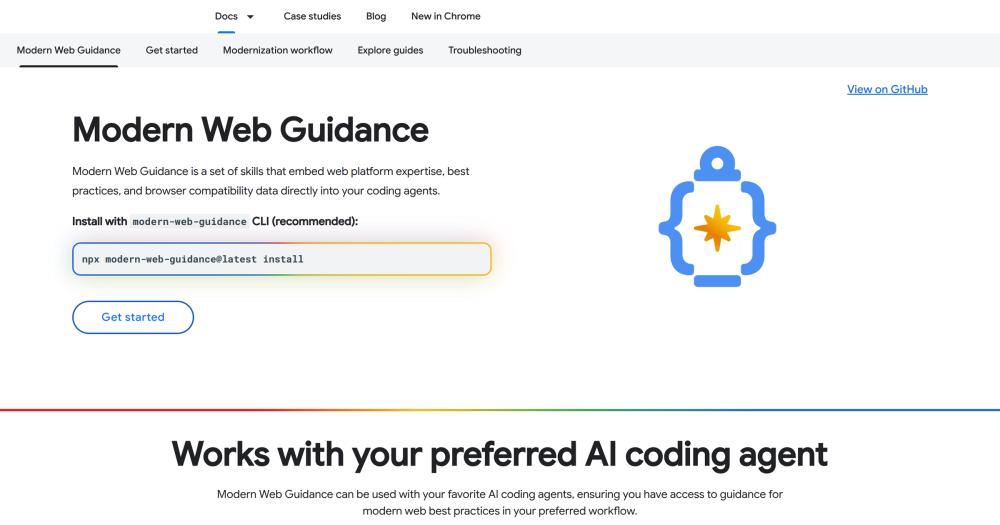
Build modern web features with AI agents guided by Chrome, Edge, Firefox, and MDN's current platform expertise and browser compatibility data.

Visit websiteGitHub1.8K stars
image of Modern Web Guidance Src
TL;DR

Modern Web Guidance Src Modern Web Guidance is a set of agent skills that inject current web platform expertise directly into AI coding agents, addressing the problem that LLM training data skews toward legacy patterns. It covers 250 modern web features across CSS layout, user experience, performance, forms and UI, accessibility, and native browser AI APIs, with guides calibrated to be token-efficient. Apache-2.0 licensed and stewarded by the Google Chrome, Microsoft Edge, Mozilla Firefox, and MDN teams, it installs via a single npx command and works with Claude Code, GitHub Copilot CLI, Vercel's agent skills, and Antigravity CLI. Best for web developers who want their AI coding workflow to produce modern, interoperable code rather than JavaScript-heavy approaches to tasks the browser platform handles natively.

Read the full breakdownHide the full breakdownWho it is for, how it works, trade-offs, the quick start and the FAQ
who it's for

Who Modern Web Guidance Src is for#

Web developers modernizing a legacy codebase

Run the legacy-scan CLI on an existing project to identify patterns with modern equivalents: custom modals that could use dialog, JavaScript-based tooltips that could use the Popover API and CSS Anchor Positioning, or scroll animations that could be scroll-driven. The guidance surfaces the specific API and implementation approach for each replacement.

Skip if:

Your codebase is already on current web platform APIs and you are not hitting legacy patterns in AI suggestions. The scan and guidance target the gap between legacy patterns and modern alternatives; if that gap does not exist in your work, the tool adds no value.

AI-assisted web developers building new features

Use the skill to steer your coding agent toward native platform features when building new UI components: anchor positioning for tooltips, the dialog element for modals, container queries for responsive layouts, and View Transitions for page animations. Sample prompts are on the project site for each major feature category.

Skip if:

You are building in a constrained browser environment that requires supporting very old browser versions. Modern Web Guidance targets current Baseline features; if your user base requires browsers from before 2022, most of the guidance will not apply.

Teams running web performance audits

Modern Web Guidance includes performance guidance on INP (Interaction to Next Paint) diagnostics, scheduler.yield for long-task management, and instant preloading. The Chrome DevTools for agents integration lets you pair real-time performance data with the guidance, running audits and applying precise code fixes in the same workflow.

Skip if:

Your performance issues are infrastructure-related (server response time, database query latency, CDN configuration). The guidance covers browser-side rendering performance; it does not address backend or network-layer performance.

Contributors to the web platform guidance project

The source repo is the right starting point for contributors who want to add guides, improve calibration, or run the evaluation dashboard. CONTRIBUTING.md and GOVERNANCE.md document how the project works. The eval dashboard at googlechrome.github.io/modern-web-guidance-src/ shows the current quality state of the guidance content.

Skip if:

You want to use Modern Web Guidance in your projects, not contribute to it. End users should install via `npx modern-web-guidance@latest install` without cloning the source repo.

the problem

The problem it solves#

AI coding agents are trained on vast amounts of code from the web, and the web's history is mostly legacy code. When you ask an agent to build a tooltip with CSS, it reaches for a JavaScript library. When you ask for smooth page transitions, it generates complex JavaScript animation logic instead of using View Transitions. When you ask for a modal, it builds a custom DOM overlay instead of using the native dialog element.

Even when a model knows a modern API exists, it often lacks the depth of real-world implementation patterns required to write production-ready code with it. The result is code that is heavier, less accessible, and less aligned with what browsers optimize than it needs to be. Developers who rely on AI-assisted coding for web work spend time correcting outdated patterns when the agent should have used a native API in the first place.

how Modern Web Guidance Src solves it

How it solves it#

250-feature modern web guidance library

Covers 250 modern web features across six disciplines: CSS layout (140 features including container queries, subgrid, anchor positioning, and scroll-driven animations), user experience (View Transitions, entry/exit animations), performance (INP diagnostics, scheduler.yield, instant preloading), forms and UI (Popover API, dialog element, field-sizing), accessibility (screen reader and keyboard operability), and browser-native AI APIs (translation, summarization, language detection). All guides...

Token-efficient skill delivery via CLI

The CLI returns only the targeted guidelines relevant to the current task, keeping context window usage low. The project runs evaluations to prune content that models already know so each skill insert is high signal. Use `npx modern-web-guidance@latest search 'animate a dialog backdrop'` to find relevant guides by description, or `npx modern-web-guidance@latest retrieve 'animate-to-from-top-layer'` to pull a specific guide by ID.

Legacy pattern scanner

The `legacy-scan` command scans a codebase for patterns that have modern platform equivalents. Run `npx modern-web-guidance@latest legacy-scan .` on an existing project to identify where old polyfills, JavaScript-based animations, or custom form implementations could be replaced with native APIs. Useful for auditing codebases before a modernization sprint and surfacing the highest-value rewrites.

Multi-agent-platform compatibility

Works with Claude Code (official plugin), GitHub Copilot CLI (marketplace), Vercel's agent skills (npx skills), and Antigravity CLI. Installation is interactive via `npx modern-web-guidance@latest install`, which detects the agent in use and configures the skill accordingly. No single-agent dependency; teams using different coding tools can all access the same guidance.

Browser-vendor stewardship

Maintained by the Google Chrome, Microsoft Edge, Mozilla Firefox, and MDN teams alongside the web development community. Browser compatibility data and best practices come from the teams who write the specifications and implement the APIs, so guidance reflects what works across current browsers rather than what was true when training data was collected.

strengths · trade-offs

Strengths and trade-offs#

Strengths

  • Free, Apache-2.0, no subscription requiredEvery developer gets the same guidance regardless of budget. The Apache-2.0 license permits commercial use, modification, and redistribution without restriction. Unlike paid AI coding tools that bundle guidance into subscription pricing, Modern Web Guidance adds to whatever agent you already use at no additional cost.
  • Source-of-truth guidance from browser vendorsThe Chrome, Edge, Firefox, and MDN teams maintain the content. When a new CSS feature becomes Baseline or a performance API stabilizes, the guidance reflects that before most training datasets catch up. This is the specific gap the tool addresses: agents know an API exists but lack the implementation depth to use it correctly in production code.
  • Works alongside existing paid toolsModern Web Guidance installs into Claude Code, GitHub Copilot CLI, and other agents without replacing them. If your team already pays for Cursor or GitHub Copilot, this adds the web platform layer those tools lack. No workflow change beyond the initial install; the guidance surfaces in context when relevant.

Trade-offs

  • -302 open issues at time of indexingThe repo had 302 open issues when this entry was written, with the project created in January 2026 and the community growing quickly. At this scale of open issues relative to the project's age, some guidance areas may be incomplete or awaiting community review. Check the issue tracker for the state of a specific feature area before depending on it for a critical workflow.
  • -Source repo focus: authoring and contributionThis is the source repository for authoring, calibrating, and evaluating the guidance content. End users who want to install and use the skill should use the distribution channel (`npx modern-web-guidance@latest install`) rather than cloning this repo. The source repo's README and issue tracker are aimed at contributors and project maintainers, not at daily users.
  • -Scoped to web platform features onlyThe guidance covers modern web platform APIs: CSS, HTML, JavaScript Web APIs, and browser compatibility. It does not cover backend frameworks, build tooling, React component patterns, or server-side concerns. Web developers who want broader AI guidance across a full stack still need to look elsewhere for non-browser concerns.
versus alternatives

Modern Web Guidance Src vs alternatives#

Modern Web Guidance vs Built-in AI Coding Tool Knowledge

GitHub Copilot, Cursor, and similar commercial AI coding tools are trained on large codebases, but training data skews toward the web's history of legacy patterns. These paid tools handle modern web platform APIs inconsistently: they may know an API exists but lack the implementation depth to use it correctly in production code.

FeatureModern Web GuidanceBuilt-in AI tool knowledge
LicenseApache-2.0Proprietary subscription
Web platform coverage250 current features, vendor-curatedTraining data, no explicit curation
Update cadenceCommunity-maintained, vendor-stewardedTied to model retraining cycles
Browser compatibility dataIncluded per featureVaries by model and training cut-off
Legacy pattern detectionCLI scanner includedNone

Modern Web Guidance is the better choice when your team uses AI coding tools for web development and needs consistent, accurate guidance on modern CSS layout, native browser APIs, and Core Web Vitals performance. The gap is clearest for newer APIs: container queries, anchor positioning, the Popover API, and scroll-driven animations are all areas where even current AI tools often reach for JavaScript-heavy approaches that the web platform now handles natively.

The built-in knowledge of paid AI coding tools remains more useful for broader software engineering context: architecture decisions, test writing, non-web backend logic, and language-specific patterns outside the browser. Modern Web Guidance addresses the specific slice of web platform knowledge those tools handle inconsistently, so the two are complementary rather than competing.

install · quick start

Quick start#

bash
Install Modern Web Guidance using the interactive setup wizard, or use the Claude Code plugin command for a direct config.

```bash
npx modern-web-guidance@latest install
claude plugin install modern-web-guidance@claude-plugins-official
```
tech stack · detected from GitHub

What it's built on#

Languages
JavaScriptTypeScript
Tooling
esbuild
frequently asked

FAQ#

Does Modern Web Guidance work with GitHub Copilot?

Yes. Install via the Copilot CLI marketplace: run /plugin marketplace add GoogleChrome/modern-web-guidance to add the marketplace, then /plugin install modern-web-guidance@googlechrome to activate it. The skill is then available in your Copilot-powered coding workflow.

What is the difference between this repo and GoogleChrome/modern-web-guidance?

This is the source repository, used for authoring, calibrating, and evaluating the guidance content. The distribution repository at GoogleChrome/modern-web-guidance is what end users install. If you want to use the guidance in your projects, install via npx modern-web-guidance@latest install. If you want to contribute guides, improve calibration, or run the evaluation suite, the source repo is the right place.

Is Modern Web Guidance affiliated with the browser vendors or just community-maintained?

It is stewarded by the Google Chrome, Microsoft Edge, Mozilla Firefox, and MDN teams alongside the broader web development community. The project page at developer.chrome.com/docs/modern-web-guidance is an official Chrome for Developers property, and the guidance content is maintained by the teams who implement the browser APIs it covers.

Can I use Modern Web Guidance in a commercial project?

Yes. The Apache-2.0 license permits use in commercial projects, modification, and redistribution without restriction. The guidance itself is freely available, and the CLI that delivers it carries the same license. No attribution requirement beyond the standard Apache-2.0 notice applies.

What modern web features does the guidance cover?

The library covers 250 modern web features across six areas: CSS layout (container queries, subgrid, anchor positioning, scroll-driven animations), user experience (View Transitions, entry/exit animations), performance (INP diagnostics, scheduler.yield, preloading), forms and UI (Popover API, dialog element, field-sizing), accessibility (screen reader operability, keyboard navigation), and browser-native AI APIs (native translation, summarization, language detection). The list grows as the project adds new guides.

also worth a look

Similar open-source tools#

Docmd

Alternative toMintlify

Markdown to website, search, and AI context files in one command.

  • 2,560 GitHub stars
  • MITLicence MIT

Paradev

Alternative toConductor

Open-source macOS workspace for parallel CLI coding agents

  • 16,193 GitHub stars
  • MITLicence MIT

Hallmark

InDesign & Creative

Design skill for coding agents with 48 themes, real photos and lint.

  • 51,128 GitHub stars
  • MITLicence MIT

CodeBoarding

Alternative toCodeDashboard

Review code changes as architecture maps, not line diffs

  • 2,675 GitHub stars
  • MITLicence MIT

Dyad

Alternative toLovable

Local, open-source AI app builder with your own API keys

  • 22,242 GitHub stars
  • CustomLicence Apache-2.0 with separate pro-directory license

Cloudflare Os

Alternative toDust

Open source AI workspace with sandboxed apps and Gatekeeper security

  • 11,725 GitHub stars
  • Apache-2.0Licence Apache-2.0
by category

Open source tools in these categories#

622

Developer Tools

REA (Reverse Engineer Anything), Skills for Real Engineers, superpowers
216

Web Development

freeCodeCamp, Skills for Real Engineers, superpowers
524

AI & Machine Learning

OpenClaw, freeCodeCamp, REA (Reverse Engineer Anything)

Sponsors

Inbox Zero

Alternative toSuperhuman

AI email assistant that drafts replies and clears your inbox

  • 12,987 GitHub stars
  • AGPL-3.0Licence AGPL-3.0
  • #Email

rakazo

Alternative toGrok Bot

AI teammates you own: your keys, your model, your machine.

  • 7,869 GitHub stars
  • Apache-2.0Licence Apache-2.0
  • #AI Agents

SnitchFeed

Live monitoring on LinkedIn, X, Reddit & more. Agentic social listening for startups.

Marketing & Growth

Advertise your product

New open source projects by email

The projects we add and every new guide. Free, unsubscribe any time.

Find open source alternatives to paid software

/
  • Claude Code to OpenCode
  • Jira to Windshift
  • Notion to AppFlowy
  • Slack to Mattermost
  • Linear to GitLab
  • Wispr Flow to Handy
  • Arc to Zen Browser
  • CapCut to Concat
  • Grok Bot to rakazo
  • Superhuman to Inbox Zero
  • Airtable to AITable
  • Muse to OpenClaw
  • Railway to Coolify
  • GitHub Copilot to Cline
  • Datadog to Netdata
  • Confluence to Wiki.js
  • Microsoft Teams to Rocket.Chat
  • 1Password to KeePassXC
  • Firebase to Supabase
  • Pinecone to Qdrant
  • Zapier to n8n
  • Devin AI to OpenHands
  • Asana to Leantime
  • Contentful to Strapi
  • Claude Code to OpenCode
  • Jira to Windshift
  • Notion to AppFlowy
  • Slack to Mattermost
  • Linear to GitLab
  • Wispr Flow to Handy
  • Arc to Zen Browser
  • CapCut to Concat
  • Grok Bot to rakazo
  • Superhuman to Inbox Zero
  • Airtable to AITable
  • Muse to OpenClaw
  • Railway to Coolify
  • GitHub Copilot to Cline
  • Datadog to Netdata
  • Confluence to Wiki.js
  • Microsoft Teams to Rocket.Chat
  • 1Password to KeePassXC
  • Firebase to Supabase
  • Pinecone to Qdrant
  • Zapier to n8n
  • Devin AI to OpenHands
  • Asana to Leantime
  • Contentful to Strapi