Open Source Alternatives
  • Alternatives
  • Categories
    Categories by size1,182 projects
    • Developer Tools610
    • AI & Machine Learning515
    • Business & Productivity282
    • Web Development214
    • Security & Monitoring178
    • Communication & Collaboration158
    • IT Management149
    • LLMOps & AI Tooling130
    • Cloud & Hosting129
    • Product & Project Management126
    Browse all 21 categoriesDesign & Creative, DevOps & CI/CD and 9 more
  • Blog
  • Advertise
SearchNotion, Slack, password manager.../
Submit
Open Source Alternatives
  • Alternatives
    • Developer Tools610
    • AI & Machine Learning515
    • Business & Productivity282
    • Web Development214
    • Security & Monitoring178
    • Communication & Collaboration158
    • Browse all 21 categories
  • Blog
  • Advertise
Submit your project

New open source projects by email

The projects we add and every new guide. Free, unsubscribe any time.

Open Source Alternatives LogoOpen Source Alternatives

Handpicked Open Source Alternatives to Paid Softwares

Add Open Source Alternatives as a preferred source on Google

Product

  • Categories
  • Tag
  • Advertise

Resources

  • Blog
  • Collection
  • Submit

Company

  • Privacy Policy
  • Terms of Service
  • Refund Policy
  • Sitemap

Alternatives

  • Claude Code
  • Jira
  • Notion
  • Slack
  • Linear
  • Wispr Flow
  • All alternatives
© 2026 Open Source Alternatives. All rights reserved.
Open SourceAlternatives
Home/Categories/Developer Tools/Openinterpreter
icon of Openinterpreter

Openinterpreter

Open source alternative to Claude Code and OpenAI Codex

  • 68.8K stars
  • Apache-2.0
  • Active this week
  • Last commit today

Last verified Nov 9, 2026

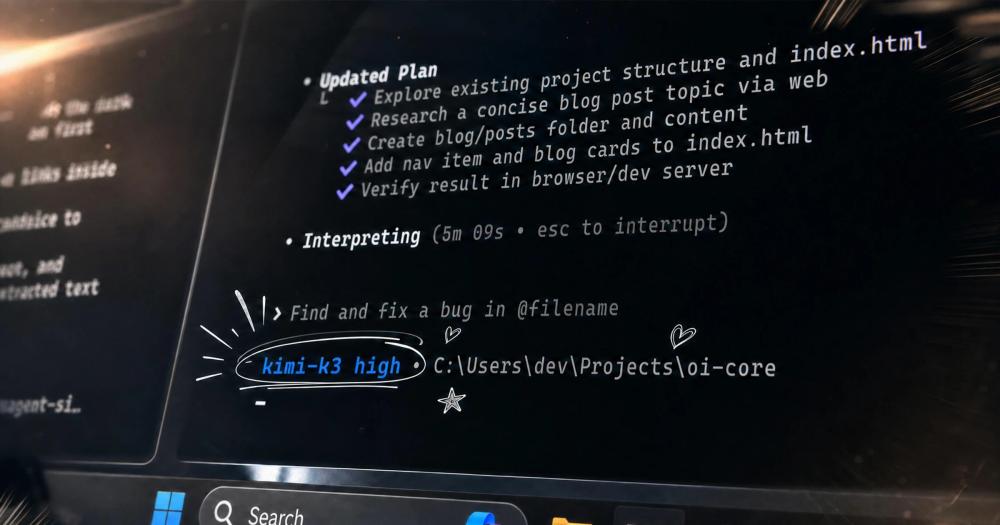
Run coding agents for open models like Kimi K3 and DeepSeek, with provider-tuned configurations and drop-in Codex compatibility.

Visit websiteGitHub68.8K stars
image of Openinterpreter
TL;DR

Openinterpreter Open Interpreter is a Rust-based coding agent for low-cost open models including Kimi K3, DeepSeek, Qwen, and GLM. It emulates provider-recommended agent configurations, so each model runs with the prompt structure and tool loop its maker tuned for. The agent installs as a single binary on macOS, Linux, and Windows, runs commands with native OS sandboxing, and stores all session state locally. It is ACP-compatible for editor integration and implements the Codex exec protocol, so projects using the Codex SDK can redirect to it with one configuration change. Apache-2.0 licensed.

Read the full breakdownHide the full breakdownWho it is for, how it works, trade-offs, the quick start and the FAQ
who it's for

Who Openinterpreter is for#

Developers Controlling API Spend

Use Open Interpreter when you want a capable coding agent but need to manage API costs. The configurations tuned for Kimi K3, DeepSeek, and Qwen can deliver strong task completion at a fraction of the cost of premium model subscriptions, using the same agent interface.

Skip if:

API cost is not a constraint and you need maximum task success; flagship model agents may outperform lower-cost alternatives on the most complex tasks.

Teams Migrating from Codex

Use Open Interpreter when your team is already using the Codex SDK and wants to change the underlying agent without rewriting integrations. The `codexPathOverride` configuration redirects execution with a one-line change, and a compatibility check script is included.

Skip if:

Your team is satisfied with OpenAI Codex and has no reason to change providers or reduce API costs.

Teams With Air-Gap or Privacy Constraints

Use Open Interpreter when your team cannot send code to external commercial platforms. The agent runs entirely locally, stores no data with Open Interpreter, and connects only to your chosen model provider using credentials you control.

Skip if:

You are already using an approved commercial coding agent and your infrastructure allows it.

Developers Needing Browser and App Automation

Use Open Interpreter when you need automated browser testing or native app interaction integrated with your coding agent. The built-in QA skill drives real browsers through agent-browser and native interfaces through trycua/cua without a separate automation tool.

Skip if:

Your test suite already covers UI automation through dedicated tools and you have no need for it inside the coding agent.

the problem

The problem it solves#

Agent tools built for commercial platforms assume you will use their flagship models. When you switch to lower-cost providers like DeepSeek, Kimi K3, or Qwen, the default scaffolding built for GPT-4 or Claude does not translate well: the system prompts, tool call formats, and loop logic optimized for one model family often degrade performance on another.

Running a low-cost model at the performance level its benchmarks suggest requires tuning the agent layer to match how that model was trained and what its maker documents as the optimal setup. Without this, you either pay for a premium model to get reliable results, or accept lower task success rates from cost-efficient alternatives.

Open Interpreter addresses this by reimplementing the provider-recommended configurations for each supported model in Rust. Rather than a generic agent loop, it switches between named setups that match each provider's documented approach, so DeepSeek, Kimi K3, and Qwen each run with the configuration intended for them.

how Openinterpreter solves it

How it solves it#

Provider Configuration Emulation

Switches between Rust-native agent configurations tuned for specific providers: Claude Code, Kimi Code, DeepSeek TUI, Qwen Code, ZCode, SWE-agent, and others. Each configuration uses the prompt structure and tool loop the provider recommends, so the model runs closer to its documented benchmark performance.

Codex SDK Drop-In Compatibility

Implements the same exec protocol as OpenAI's Codex CLI. Projects using the Codex SDK can redirect to Open Interpreter with a single configuration parameter, with no other code changes required. A local compatibility check script is included in the repository.

ACP Agent for Editors

Runs as an Agent Client Protocol (ACP) agent for editors and clients that support it. Launch with `interpreter acp` to integrate with ACP-compatible IDEs without additional configuration. ACP compatibility means the agent works within standard editor integration protocols rather than a proprietary plugin.

Native OS Sandboxing

Runs terminal commands inside native sandboxing on macOS, Linux, and Windows. Supports exec, MCP, skills, hooks, and a permissions system for controlling what the agent can access and execute during a coding session. Session state is stored locally under `~/.openinterpreter`.

Computer Use and UI Testing

Ships a built-in QA skill that lets any model drive web apps in a real browser through agent-browser, or operate and test native applications through trycua/cua. This enables automated browser and app interaction without a separate automation framework.

strengths · trade-offs

Strengths and trade-offs#

Strengths

  • Optimized for Low-Cost ModelsThe core design is extracting maximum performance from affordable models. The Rust-native configurations match what each provider documents as their recommended agent setup, so you get closer to benchmark performance from DeepSeek, Kimi K3, or Qwen than a generic agent loop would yield.
  • Minimal Migration from CodexTeams already using OpenAI's Codex SDK do not need to rewrite their integrations. The one-line `codexPathOverride` configuration redirects to Open Interpreter without touching the rest of the codebase, making adoption low-risk for existing Codex users.
  • Portable by DesignPrefers shared, tool-neutral standards: AGENTS.md, `.agents/skills` directories, MCP, ACP, and the Codex exec protocol. Configuration and session state under `~/.openinterpreter` are reserved for what has no practical shared standard, keeping setups portable across compatible agents.
  • No Server Infrastructure RequiredThe agent runs entirely on the user's machine as a single binary. There is no hosted service, no cloud component to configure, and no data sent to Open Interpreter infrastructure. All you need is an API key for the model provider you choose.

Trade-offs

  • -Python Version Is a Separate Community ForkThe original Python-based Open Interpreter now lives as a community fork at endolith/open-interpreter and is no longer actively developed by the core team. The main repository is the new Rust version, a fork of OpenAI's Codex CLI. Users who relied on the Python API or plugins built for the Python version will need to migrate to the new CLI.
  • -Requires External API CredentialsThe agent runs locally but connects to hosted model APIs. You supply an API key for your chosen provider (DeepSeek, Kimi, Qwen, etc.) and incur usage costs accordingly. There is no bundled local model option documented in the README, so the agent depends on external API access.
  • -Provider Catalog Updates Require PythonRefreshing or extending the provider catalog requires running a Python script (`scripts/write_provider_catalog.py`) with active provider credentials. For teams managing multiple providers, keeping the catalog current adds a maintenance step outside the main Rust toolchain.
versus alternatives

Openinterpreter vs alternatives#

Claude Code

Claude Code is Anthropic's official coding CLI, built exclusively for Claude models. It reads codebases, edits files, and runs commands with an interface tuned specifically for Anthropic's model family. Open Interpreter implements the Claude Code agent configuration as one of its selectable setups, so users who prefer that interaction style can apply it to a different model.

The practical difference is model coupling. Claude Code is a commercial platform tied to a specific provider; using it means using Claude models at Claude's pricing. Open Interpreter decouples the agent from the provider, so the same interaction style can run with other providers if that is what a workflow requires. For teams with existing Claude subscriptions who want the officially supported experience and direct access to new Claude model releases, Claude Code remains the stronger fit.

OpenAI Codex

Open Interpreter is a fork of OpenAI's Codex CLI and implements the same exec protocol. Projects using the Codex SDK can redirect execution to Open Interpreter with one configuration change: pass codexPathOverride: "interpreter" to the Codex constructor. This level of compatibility makes Open Interpreter the most direct migration path for Codex users.

The two projects diverge in model focus. OpenAI Codex is built as an interface for OpenAI's model ecosystem and receives official support for new OpenAI model releases. Open Interpreter's focus is running Codex-style agent behavior against any OpenAI-compatible provider, with configurations tuned for providers like DeepSeek, Kimi, and Qwen that are outside OpenAI's platform. For teams committed to OpenAI's models and official support, Codex is the right choice. For teams that need provider flexibility or want to reduce API costs by switching to lower-cost models, Open Interpreter provides the same agent interface with wider provider coverage.

install · quick start

Quick start#

bash
Install Open Interpreter with the official setup script.

```bash
curl -fsSL https://www.openinterpreter.com/install | sh
```

On Windows, run the install script in PowerShell:

```powershell
irm https://www.openinterpreter.com/install.ps1 | iex
```
tech stack · detected from GitHub

What it's built on#

Languages
PythonRust
frequently asked

FAQ#

What happened to the original Python-based Open Interpreter?

The original Python version is now maintained as a community fork at endolith/open-interpreter on GitHub. The main openinterpreter/openinterpreter repository is the new Rust-based version, a fork of OpenAI's Codex CLI. The two projects share a name and origin but have different codebases and are developed independently.

Which model providers does Open Interpreter support?

Open Interpreter supports any OpenAI-compatible provider through Chat Completions, plus named configurations for Kimi (Kimi K3), DeepSeek, Qwen (Qwen Code), Z.AI/GLM/ZCode, Claude Code, and SWE-agent. The provider catalog is generated from scripts and can be refreshed. See the provider guides in the documentation for setup details per provider.

Can Open Interpreter replace OpenAI Codex in an existing integration?

Yes. Open Interpreter implements the same exec protocol as the Codex CLI. If you are using the Codex SDK, pass codexPathOverride: "interpreter" when constructing the client. The repository includes a compatibility check script (scripts/test-codex-sdk-compat.sh) you can run locally to verify the integration before switching.

How does Open Interpreter handle security and what commands can it run?

The agent runs commands inside native OS sandboxing on macOS, Linux, and Windows. It supports a permissions system, hooks, and an approvals workflow so you can review or restrict what commands the agent executes. Session state is kept locally under ~/.openinterpreter. Review the sandbox and approvals documentation for the full list of controls.

What is the license for Open Interpreter?

Open Interpreter is released under the Apache-2.0 license. You can use it, modify it, and redistribute it, including for commercial purposes, with no restrictions beyond preserving the license notice and attribution. There is no network copyleft, usage fee, or service-resale restriction.

Looking for more

Other ways to replace Claude Code and OpenAI Codex#

OpenCode

#1 in the Claude Code guide

Broad provider and model choice in a terminal-first client, MIT-licensed with AGENTS.md instructions

225,303 GitHub stars

oh-my-pi

#2 in the Claude Code guide

Direct Claude configuration inheritance with Anthropic subscription support

38,138 GitHub stars

kilocode

#3 in the Claude Code guide

Documented Claude transcript import with IDE and CLI surfaces

27,906 GitHub stars

Goose

#4 in the Claude Code guide

ACP subscription bridge that reuses an existing Claude Code or ChatGPT subscription

56,339 GitHub stars
All 23 Claude Code alternatives10 open source Claude Code alternatives, ranked
by category

Open source tools in these categories#

610

Developer Tools

REA (Reverse Engineer Anything), Skills for Real Engineers, superpowers
515

AI & Machine Learning

freeCodeCamp, REA (Reverse Engineer Anything), OpenClaw

Sponsors

Inbox Zero

Alternative toSuperhuman

AI email assistant that drafts replies and clears your inbox

  • 12,942 GitHub stars
  • AGPL-3.0Licence AGPL-3.0
  • #Email

rakazo

Alternative toGrok Bot

AI teammates you own: your keys, your model, your machine.

  • 7,478 GitHub stars
  • Apache-2.0Licence Apache-2.0
  • #AI Agents

SnitchFeed

Live monitoring on LinkedIn, X, Reddit & more. Agentic social listening for startups.

Marketing & Growth

Advertise your product

New open source projects by email

The projects we add and every new guide. Free, unsubscribe any time.

Find open source alternatives to paid software

/
  • Claude Code to OpenCode
  • Jira to Windshift
  • Notion to AppFlowy
  • Slack to Mattermost
  • Linear to GitLab
  • Wispr Flow to Handy
  • Arc to Zen Browser
  • CapCut to Concat
  • Grok Bot to rakazo
  • Superhuman to Inbox Zero
  • Airtable to AITable
  • Muse to OpenClaw
  • Railway to Coolify
  • GitHub Copilot to Cline
  • Datadog to Netdata
  • Confluence to Wiki.js
  • Microsoft Teams to Rocket.Chat
  • 1Password to KeePassXC
  • Firebase to Supabase
  • Pinecone to Qdrant
  • Zapier to n8n
  • Devin AI to OpenHands
  • Asana to Leantime
  • Contentful to Strapi
  • Claude Code to OpenCode
  • Jira to Windshift
  • Notion to AppFlowy
  • Slack to Mattermost
  • Linear to GitLab
  • Wispr Flow to Handy
  • Arc to Zen Browser
  • CapCut to Concat
  • Grok Bot to rakazo
  • Superhuman to Inbox Zero
  • Airtable to AITable
  • Muse to OpenClaw
  • Railway to Coolify
  • GitHub Copilot to Cline
  • Datadog to Netdata
  • Confluence to Wiki.js
  • Microsoft Teams to Rocket.Chat
  • 1Password to KeePassXC
  • Firebase to Supabase
  • Pinecone to Qdrant
  • Zapier to n8n
  • Devin AI to OpenHands
  • Asana to Leantime
  • Contentful to Strapi