Open Source Alternatives
  • Alternatives
  • Categories
    Categories by size1,185 projects
    • Developer Tools610
    • AI & Machine Learning515
    • Business & Productivity285
    • Web Development214
    • Security & Monitoring178
    • Communication & Collaboration158
    • IT Management150
    • LLMOps & AI Tooling130
    • Cloud & Hosting129
    • Product & Project Management126
    Browse all 21 categoriesDesign & Creative, DevOps & CI/CD and 9 more
  • Blog
  • Advertise
SearchNotion, Slack, password manager.../
Submit
Open Source Alternatives
  • Alternatives
    • Developer Tools610
    • AI & Machine Learning515
    • Business & Productivity285
    • Web Development214
    • Security & Monitoring178
    • Communication & Collaboration158
    • Browse all 21 categories
  • Blog
  • Advertise
Submit your project

New open source projects by email

The projects we add and every new guide. Free, unsubscribe any time.

Open Source Alternatives LogoOpen Source Alternatives

Handpicked Open Source Alternatives to Paid Softwares

Add Open Source Alternatives as a preferred source on Google

Product

  • Categories
  • Tag
  • Advertise

Resources

  • Blog
  • Collection
  • Submit

Company

  • Privacy Policy
  • Terms of Service
  • Refund Policy
  • Sitemap

Alternatives

  • Claude Code
  • Jira
  • Notion
  • Slack
  • Linear
  • Wispr Flow
  • All alternatives
© 2026 Open Source Alternatives. All rights reserved.
Open SourceAlternatives
Home/Categories/IT Management/OpenInvento
icon of OpenInvento

OpenInvento

Open source alternative to Sortly and Itemit

  • 60 stars
  • PolyForm Shield 1.0.0
  • Active this week
  • Last commit today

Last verified Nov 9, 2026

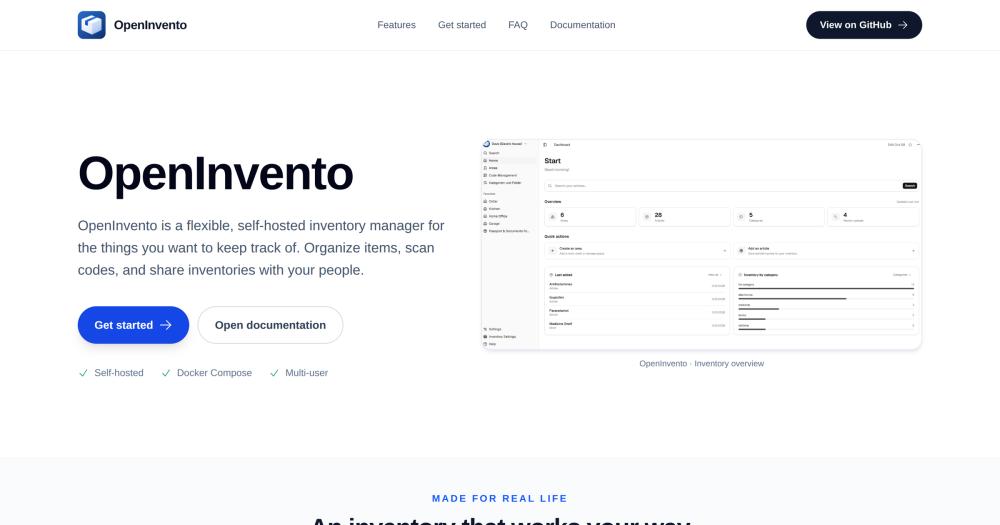
Track household and small-team inventories with QR/barcode scanning, custom fields, and multi-user sharing in a self-hosted Docker deployment.

Visit websiteGitHub60 starsDeploy on Hostinger
image of Openinvento
TL;DR

OpenInvento is a self-hosted inventory manager for homes, homelabs, and small teams. It replaces commercial paid platforms like Sortly by keeping all inventory data on your own server, with QR and barcode scanning, custom fields, article images, and multi-user shared inventories. Deployed via Docker Compose, it requires a server you operate; in return, there is no subscription and no cloud dependency. Best for individuals and small teams already running self-hosted services who want structured inventory tracking at no recurring cost.

Read the full breakdownHide the full breakdownWho it is for, how it works, trade-offs, the quick start and the FAQ
who it's for

Who OpenInvento is for#

Homelab operators tracking equipment and supplies

If you already run Docker services at home, OpenInvento drops into your stack with one Compose file. It tracks parts, cables, drives, and peripherals with QR labels for physical items and photo attachments for quick identification.

Skip if:

You need a mobile-first experience with a dedicated native app. OpenInvento runs as a web application; no dedicated mobile app is documented.

Small teams managing shared tool or equipment inventory

Multi-user shared inventories let a workshop or small business track who has what. Custom fields handle serial numbers, purchase dates, and location. The shared inventory keeps everyone on the same list without a separate subscription.

Skip if:

Your team needs GPS tracking, RFID asset tags, or mobile field workflows. Those capabilities are core to dedicated asset tracking tools like Itemit and are not documented in OpenInvento's current feature set.

Households organizing home inventory

A family managing a pantry, a craft supply room, or a media collection can share one inventory across multiple accounts. QR scanning speeds up item lookup, and custom categories keep different areas of the home organized separately.

Skip if:

You need a hosted, zero-maintenance option. OpenInvento requires a server to run. For simple household lists with no server available, a hosted tool is more practical.

the problem

The problem it solves#

Most households and small teams manage physical inventory with spreadsheets or generic note-taking apps, which break down as soon as more than one person needs to update the list. QR codes get applied to items but nothing reads them in context. Photos and attachments live in a separate folder. When a team member or family member wants to look something up, they have to ask the person who manages the spreadsheet.

Paid commercial inventory tools address this, but they come with per-user monthly subscriptions that make them expensive for small teams. Hosting inventory data in a commercial cloud service also means your stock levels, item photos, and category structure sit on a third party's servers.

how OpenInvento solves it

How it solves it#

QR Code and Barcode Scanning

Physical items can be tagged with QR codes or barcodes and looked up through the inventory interface. The scanner connects physical labels to digital records, letting you identify items quickly without manually searching through a list. Both QR and standard barcodes are supported.

Custom Fields and Flexible Categories

Each inventory item supports custom fields and configurable categories, so you can shape the record structure around what you actually track. Serial numbers for equipment, purchase dates for home supplies, or condition tags for a collection all fit without extra configuration.

Article Images and File Attachments

Items support uploaded images and file attachments stored directly in the record. A photo of the item and a scanned receipt or product manual can live together in the same entry, reducing the need to search external folders or drives.

Multi-User Accounts and Shared Inventories

OpenInvento supports multiple user accounts and shared inventories, so a household or team can stay synchronized on one install. Members can view and update shared lists without each person maintaining their own copy.

Docker Compose Deployment

The project ships a Docker Compose file for the full service. Download the Compose file, configure environment variables including initial admin credentials, and start OpenInvento with one command. No repository checkout is required.

strengths · trade-offs

Strengths and trade-offs#

Strengths

  • Full data ownership on your own serverAll inventory data stays on the server you operate. The website explicitly states: 'Your inventory and account data stay under your control, with no hosted service in the middle.' If the project were abandoned tomorrow, every record stays in your own storage.
  • No subscription or per-user feeRunning OpenInvento on your own server costs only the server it runs on. There is no subscription fee, no per-user pricing, and no commercial cloud plan to buy. For a household or small team already running infrastructure, the incremental cost is zero.
  • Flexible structure for homes, homelabs, and small businessesThe website describes OpenInvento as working for 'your home, workshop, or team'. GitHub topics include both homelab and smes. Custom fields and configurable categories cover everything from a household pantry to a small business tool crib without different plans or separate deployments.

Trade-offs

  • -Early-stage project with limited adoptionOpenInvento was created in September 2026 and has 60 GitHub stars with one fork. The codebase has 12 open issues and limited community testing. The project is young, and it has not yet had the breadth of real-world use that surfaces edge cases in a more established product.
  • -PolyForm Shield 1.0.0: source-available, not OSI-licensedSelf-hosters and teams running OpenInvento internally may use, modify, and distribute it freely, including for commercial internal use. The one thing the license forbids is using it to provide a product that competes with OpenInvento itself or with a product the licensor provides using it.
  • -Requires self-hosted infrastructure to runOpenInvento has no hosted or managed option; you need a server or home machine running Docker Compose. You are responsible for updates, backups, and uptime. For anyone without an existing home server or VPS, that is non-trivial setup and ongoing maintenance.
versus alternatives

OpenInvento vs alternatives#

OpenInvento vs Sortly

Sortly targets small businesses and teams that need visual inventory tracking with photos, QR and barcode scanning, and custom fields. OpenInvento covers the same core job and adds self-hosted deployment, keeping all inventory data on infrastructure you control.

FeatureOpenInventoSortly
LicensePolyForm Shield 1.0.0 (source-available)Proprietary
HostingSelf-hosted (Docker Compose)Paid subscription service
QR/barcode scanningYesYes
Custom fieldsYesYes
Multi-user sharingYesYes

OpenInvento is the better choice when data ownership is the priority, when subscription costs are prohibitive for a small team, or when the deployment fits into an existing self-hosted stack. For a household or small workshop already running Docker Compose services, OpenInvento adds no recurring expense.

Sortly is the better fit when the team needs a no-maintenance hosted product and no server is available. If getting started quickly without operating infrastructure matters more than data ownership, Sortly removes that requirement entirely.

OpenInvento vs Itemit

Itemit is built for asset tracking of tools, equipment, and fixed assets, with QR codes, RFID support, and GPS tracking for field teams. OpenInvento overlaps on QR scanning and inventory management but does not document RFID or GPS capabilities.

FeatureOpenInventoItemit
LicensePolyForm Shield 1.0.0 (source-available)Proprietary
HostingSelf-hosted (Docker Compose)Paid subscription service
QR codesYesYes
RFID supportNot documentedYes
GPS trackingNot documentedYes

OpenInvento suits teams that want general inventory tracking without field mobility requirements. Itemit is the better choice when tracking physical assets across multiple locations with field teams that rely on RFID scanning or GPS location; those are core Itemit capabilities and are not in OpenInvento's documented feature set.

install · quick start

Quick start#

bash
Self-hosting OpenInvento uses Docker Compose; download the project's docker-compose.yml, configure environment variables, then start the service.

```bash
docker compose up -d
```
tech stack · detected from GitHub

What it's built on#

Languages
JavaScriptPythonTypeScript
Frameworks
DjangoReact
Infrastructure
Docker
frequently asked

FAQ#

Where does OpenInvento store my inventory data?

OpenInvento is self-hosted, so it runs on infrastructure you control. Its Docker setup stores application data in the directory you configure for the service. Your inventory and account data stay on your server with no third-party cloud service involved.

What does the PolyForm Shield License 1.0.0 allow?

Self-hosters (individuals, teams, and businesses running it internally) may use, modify, and distribute OpenInvento freely, including for commercial and internal use. The one thing the license forbids is using it to provide a product that competes with OpenInvento itself or with a product the licensor provides using it. Personal homelab use, household use, and internal business inventory tracking are all permitted.

How do I install OpenInvento?

OpenInvento uses Docker Compose. Download the project's docker-compose.yml, create an environment file with the required settings including initial admin credentials, and run 'docker compose up -d'. No repository checkout is needed. Full setup instructions are in the official documentation at https://openinvento.github.io/docs/.

Can I share an inventory with other people?

Yes. OpenInvento supports multiple user accounts and shared inventories, so a household or small team can stay synchronized on one install. Members can view and update shared lists without each person maintaining a separate copy.

What kinds of items can I track with OpenInvento?

OpenInvento works for any items you want to organize: everyday supplies, tools, equipment, collections, and more. Custom fields let you add structure specific to what you track, such as serial numbers for equipment or purchase dates for home supplies. QR codes and barcodes help identify items quickly.

also worth a look

Similar open-source tools#

Snipe It

Alternative toAsset Panda

Self-hosted IT asset management for hardware, licenses, consumables.

  • 15,158 GitHub stars
  • AGPL-3.0Licence AGPL-3.0

Mole

Alternative toCleanMyMac X

Free CLI and native app for Mac cleanup, uninstall, and disk analysis

  • 74,362 GitHub stars
  • GPL-3.0Licence GPL-3.0

Vorssaint Utils

Alternative toiStat Menus

One menu bar icon replacing a dozen paid macOS apps

  • 33,309 GitHub stars
  • GPL-3.0Licence GPL-3.0

OpenBot

Alternative toGrok Bot

AI coworkers you can trust with real work

  • 10,552 GitHub stars
  • MITLicence MIT

FckSignups

InCustomer Support

Open-source tools that work instantly, no signup required

  • 4,570 GitHub stars
  • GPL-3.0Licence GPL-3.0

chippytea

Alternative toCleanMyMac

Free up Mac disk space with no account and no telemetry.

  • 234 GitHub stars
  • MITLicence MIT
by category

Open source tools in these categories#

150

IT Management

RustDesk, Immich, Stirling PDF
285

Business & Productivity

OpenClaw, Excalidraw, RustDesk
Hostinger

Self-host OpenInvento on a Hostinger VPS

Keep it running 24/7, even when your laptop is off. A Hostinger VPS gives it a server of its own.

  1. 01

    Choose a plan

    Starts from $6.49/mo

  2. 02

    Apply

    Extra 10% off yearly plans

  3. 03

    Install OpenInvento

    On a server that stays on

  4. 04

    Start building

    Focus on the app, not the server

Deploy on Hostinger

Sponsors

Inbox Zero

Alternative toSuperhuman

AI email assistant that drafts replies and clears your inbox

  • 12,942 GitHub stars
  • AGPL-3.0Licence AGPL-3.0
  • #Email

rakazo

Alternative toGrok Bot

AI teammates you own: your keys, your model, your machine.

  • 7,478 GitHub stars
  • Apache-2.0Licence Apache-2.0
  • #AI Agents

SnitchFeed

Live monitoring on LinkedIn, X, Reddit & more. Agentic social listening for startups.

Marketing & Growth

Advertise your product

New open source projects by email

The projects we add and every new guide. Free, unsubscribe any time.

Find open source alternatives to paid software

/
  • Claude Code to OpenCode
  • Jira to Windshift
  • Notion to AppFlowy
  • Slack to Mattermost
  • Linear to GitLab
  • Wispr Flow to Handy
  • Arc to Zen Browser
  • CapCut to Concat
  • Grok Bot to rakazo
  • Superhuman to Inbox Zero
  • Airtable to AITable
  • Muse to OpenClaw
  • Railway to Coolify
  • GitHub Copilot to Cline
  • Datadog to Netdata
  • Confluence to Wiki.js
  • Microsoft Teams to Rocket.Chat
  • 1Password to KeePassXC
  • Firebase to Supabase
  • Pinecone to Qdrant
  • Zapier to n8n
  • Devin AI to OpenHands
  • Asana to Leantime
  • Contentful to Strapi
  • Claude Code to OpenCode
  • Jira to Windshift
  • Notion to AppFlowy
  • Slack to Mattermost
  • Linear to GitLab
  • Wispr Flow to Handy
  • Arc to Zen Browser
  • CapCut to Concat
  • Grok Bot to rakazo
  • Superhuman to Inbox Zero
  • Airtable to AITable
  • Muse to OpenClaw
  • Railway to Coolify
  • GitHub Copilot to Cline
  • Datadog to Netdata
  • Confluence to Wiki.js
  • Microsoft Teams to Rocket.Chat
  • 1Password to KeePassXC
  • Firebase to Supabase
  • Pinecone to Qdrant
  • Zapier to n8n
  • Devin AI to OpenHands
  • Asana to Leantime
  • Contentful to Strapi