Open Source Alternatives
  • Alternatives
  • Categories
    Categories by size1,150 projects
    • Developer Tools590
    • AI & Machine Learning503
    • Business & Productivity278
    • Web Development209
    • Security & Monitoring173
    • Communication & Collaboration154
    • IT Management146
    • LLMOps & AI Tooling129
    • Cloud & Hosting128
    • Product & Project Management123
    Browse all 21 categoriesDevOps & CI/CD, Data & Analytics and 9 more
  • Blog
  • Advertise
SearchNotion, Slack, password manager.../
Submit
Open Source Alternatives
  • Alternatives
    • Developer Tools590
    • AI & Machine Learning503
    • Business & Productivity278
    • Web Development209
    • Security & Monitoring173
    • Communication & Collaboration154
    • Browse all 21 categories
  • Blog
  • Advertise
Submit your project

New open source projects by email

The projects we add and every new guide. Free, unsubscribe any time.

Open Source Alternatives LogoOpen Source Alternatives

Handpicked Open Source Alternatives to Paid Softwares

Add Open Source Alternatives as a preferred source on Google

Product

  • Categories
  • Tag
  • Advertise

Resources

  • Blog
  • Collection
  • Submit

Company

  • Privacy Policy
  • Terms of Service
  • Refund Policy
  • Sitemap

Alternatives

  • Claude Code
  • Jira
  • Notion
  • Slack
  • Linear
  • Wispr Flow
  • All alternatives
© 2026 Open Source Alternatives. All rights reserved.
Open SourceAlternatives
Home/Categories/AI & Machine Learning/Openworkbuddy
icon of openworkbuddy

Openworkbuddy

Open source alternative to Microsoft 365 Copilot

  • 393 stars
  • PolyForm Noncommercial License 1.0.0 with commercial license option
  • Active this week
  • Last commit today

Last verified Nov 6, 2026

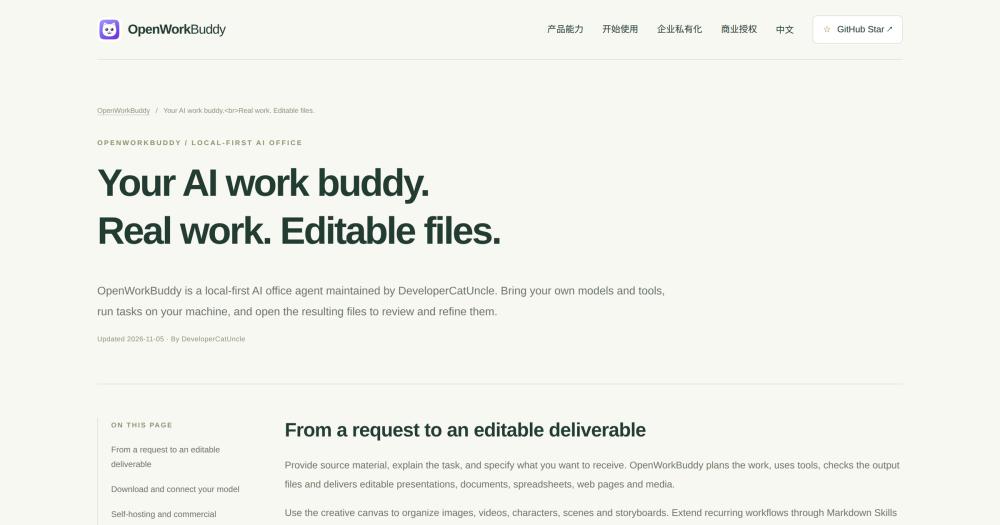
Run a local-first AI office agent that turns plain-language tasks into editable PPTX, DOCX, XLSX, and HTML files using models you choose.

Visit websiteGitHub393 starsDeploy on Hostinger
image of Openworkbuddy
TL;DR

Openworkbuddy is a local-first AI office agent that accepts plain-language task descriptions and delivers real, editable PPTX, DOCX, XLSX, and HTML files, running fully on your own machine. It is an alternative to cloud office AI subscriptions like Microsoft 365 Copilot for individuals and teams that need data privacy, model choice, or self-hosting. The PolyForm Noncommercial 1.0.0 licence covers personal, academic, non-profit, and government use at no cost; commercial use requires a paid licence from the copyright holder. It runs as a desktop application on macOS and Windows, or as a Docker-based server for teams.

Read the full breakdownHide the full breakdownWho it is for, how it works, trade-offs, the quick start and the FAQ
who it's for

Who Openworkbuddy is for#

Knowledge workers producing reports and presentations

If your work involves weekly status reports, project update decks, or data summaries, OpenWorkBuddy turns those into a task description plus a file download. Attach the source data, describe the format and content, and retrieve the .pptx or .docx in the results panel.

Skip if:

Your output is a plain conversational response or a simple text file. OpenWorkBuddy's value is delivering editable structured files; for quick Q&A or summarisation tasks, a standard chat interface is simpler and faster.

Teams self-hosting an office AI

Organisations that cannot route document content through a cloud AI vendor, or that want to control model costs per team, can run the Docker server deployment. Each member binds their own API keys; the admin sets quotas and permissions from the management console.

Skip if:

Your organisation has no data-privacy objections to cloud-hosted AI and is comfortable with a managed subscription. Microsoft 365 Copilot's direct integration with existing Office apps is a lower-setup path in that case.

Developers exploring agent architecture

The full agent loop, model routing, tool calling, file verification, and memory system live in one JavaScript repository. Running a real task from start to finish shows the planning cycle, tool dispatch, and progress verification in the execution trace, making it a readable reference for agent patterns.

Skip if:

You need a production-grade agent framework with multi-language support and a mature ecosystem. OpenWorkBuddy is primarily a product: its architecture is readable, but it is not a framework library.

the problem

The problem it solves#

AI-powered office tools embedded in subscription platforms create two overlapping costs. The first is financial: per-seat fees for Microsoft 365 Copilot add up quickly for small teams or freelancers who need the AI features but cannot justify the full plan cost. The second is data-related: generating a business report, financial model, or client deck through a cloud AI means that document content passes through a vendor's servers as part of the prompt, which creates compliance concerns for teams in regulated industries.

The deeper productivity frustration is that most AI assistants return a conversational response rather than a file. A ten-slide presentation from a chat session still requires opening PowerPoint, copying the content, building the slides, and reformatting everything. The manual file assembly step persists even when the AI response is good, and that is the specific pain point OpenWorkBuddy is built to close.

how Openworkbuddy solves it

How it solves it#

Editable file delivery

OpenWorkBuddy generates real .pptx, .docx, .xlsx, and .html files, not formatted chat responses. After each task, the results panel shows the deliverable: you can preview it, download it, and continue editing it by describing further changes in plain language. The agent verifies the file exists and is non-empty before marking the task complete.

Bring your own AI model

Connect to any supported provider by pasting an API key: DeepSeek, Qwen, Kimi, Zhipu, OpenRouter, Ollama, and Volc Engine are listed in the model settings. If you already have Claude Code or Codex installed locally, you can set either as the execution engine and avoid additional API billing entirely.

Skills system for extending capabilities

Save a Markdown file to skills/<name>/skill.md and it activates without a restart, code change, or rebuild. Skills define new workflows or domain-specific instructions that the agent picks up on the next task. This is the documented path for adding capabilities: no plugin packaging required, no marketplace involved.

Local-first data architecture

By default the server binds to 127.0.0.1, so the application is not reachable from the network unless you configure it otherwise. Configuration files and output files stay on your machine. Data reaches a remote server only when a task calls a cloud model API, which you control by choosing which models to connect.

Multi-tenant team deployment

Running bash deploy.sh against your domain provisions Docker containers with automatic HTTPS. The first registered account becomes the super-admin. Admins control which models members can access, set per-user quotas, and revoke access on demand. Linux deployments use bubblewrap for member command sandboxing.

Creative canvas for media workflows

An infinite canvas workspace lets you organise images, videos, and short-form media in connected nodes. The same agent loop that generates documents can produce character reference sheets, scene images, and timed video sequences from a scripted brief, with generation parameters passed between canvas nodes.

strengths · trade-offs

Strengths and trade-offs#

Strengths

  • Full execution transparencyEvery agent step, tool call, planning decision, and file verification is logged in the execution trace. You can inspect why the agent made a decision, what tools it called, and latency metrics for each model call. This is different from opaque cloud copilots that return only the final result with no visible reasoning.
  • No per-seat subscription costPersonal and non-commercial use is free under the PolyForm Noncommercial licence. You bring your own API key; model costs are whatever your chosen provider charges, not a bundled markup. Teams that run the Docker server pay for their own compute, not a per-user platform fee.
  • CLI and automation supportThe openworkbuddy CLI shares the same configuration, skills, memory, and sessions as the desktop application. Single-shot commands exit after completing the task (exit code 0 for success, 1 for failure), so they work in scripts and cron jobs without blocking. Piped input passes source material directly into the task.
  • MCP and IM integrationsOpenWorkBuddy supports MCP (Model Context Protocol) tools alongside its built-in toolset. IM integrations with Feishu (Lark), WeChat Work, DingTalk, and QQ allow remote task submission and result delivery through messaging apps, with scheduled tasks that catch up missed runs automatically.

Trade-offs

  • -Non-commercial licence for companiesIndividuals may self-host and use OpenWorkBuddy for free for non-commercial purposes. Any company or commercial use by an individual requires a paid commercial licence from the copyright holder. Companies can evaluate it for up to 30 days at no cost before beginning actual business use. Contact [email protected] for commercial licensing.
  • -macOS installer not Apple-notarizedThe macOS release package is locally signed but has not passed Apple notarization as of version 0.19.2. First-time installation requires going to System Settings > Privacy and Security > Open Anyway after the initial blocked-app prompt. The README documents the exact steps for the 'damaged app' variant as a separate case.
  • -Early-stage project, first released August 2026The first public release appeared in August 2026, giving the project a limited track record. It has 9 open issues and is under active development with releases shipping multiple times per week. Some documented features such as specific video generation APIs are listed as requiring prior self-testing before production use.
versus alternatives

Openworkbuddy vs alternatives#

OpenWorkBuddy vs Microsoft 365 Copilot

Both tools use AI to assist with office productivity tasks, but they represent opposite architectural choices. Microsoft 365 Copilot is embedded in the Microsoft 365 subscription, runs on Microsoft's servers, and integrates directly with Word, Excel, PowerPoint, and Teams. OpenWorkBuddy is a self-hosted, model-agnostic agent that runs on your own hardware with the AI provider of your choice.

FeatureOpenWorkBuddyMicrosoft 365 Copilot
LicencePolyForm Noncommercial (free for personal use)Proprietary, per-seat subscription
Self-hostingYesNo
Model choiceDeepSeek, Qwen, Ollama, Claude Code, and othersMicrosoft-managed (GPT-4 family)
Output.pptx, .docx, .xlsx, .html files on diskIn-app edits within Office apps
Data routingLocal by default; remote only on model API callsThrough Microsoft's servers

OpenWorkBuddy is the better choice when data privacy is a hard requirement, when your team cannot commit to a per-seat Microsoft 365 Copilot plan, or when you want to use a non-Microsoft AI model (DeepSeek, Ollama, or a locally running model) as the execution engine. It is also the choice for workflows where the .pptx or .docx file is the final deliverable that needs to be opened, edited, and shared independently of any vendor platform.

Microsoft 365 Copilot is the better choice when your organisation already subscribes to Microsoft 365 and needs Copilot tightly integrated into existing Office documents, email threads, and Teams meetings. The in-app integration means Copilot can read and write the document you have open directly, without a separate task submission step. For organisations with existing Microsoft agreements and established Office workflows, that integration depth is an advantage OpenWorkBuddy does not replicate.

install · quick start

Quick start#

bash
Download OpenWorkBuddy for macOS, Windows, or Linux from GitHub Releases: https://github.com/CatCatUncle/openworkbuddy/releases/latest
tech stack · detected from GitHub

What it's built on#

Languages
JavaScript
Frameworks
ElectronExpress
frequently asked

FAQ#

Can my company use OpenWorkBuddy for free?

The PolyForm Noncommercial licence allows individuals to self-host at no cost for personal, non-commercial use. Companies and individuals doing paid work need a commercial licence; a 30-day free evaluation is available for companies considering it. Contact [email protected] for commercial licensing.

Which AI models does OpenWorkBuddy support?

The settings panel lists presets for OpenAI, Anthropic, OpenRouter, DeepSeek, Qwen (Tongyi), Zhipu, Kimi, Volc Engine (ByteDance), and Ollama. If you have Claude Code or Codex installed locally, you can set either as the execution engine from the agent settings, which uses your existing subscription and avoids additional API billing. Model costs are charged by whichever provider you configure; OpenWorkBuddy does not bill separately for model usage.

Does OpenWorkBuddy work offline?

OpenWorkBuddy itself runs locally and does not require a network connection to start or manage files. Task execution that calls a cloud model API requires a network connection to that provider. Using Ollama as the model engine allows fully offline task execution on a machine with enough RAM for the local model weights.

How do I deploy OpenWorkBuddy for a team?

Clone the repository and run bash deploy.sh --domain your.domain.com. The script provisions Docker containers with automatic HTTPS. The first registered account becomes the super-admin. Admin controls include per-member model permissions, usage quotas, and access revocation. Linux team deployments require bubblewrap for the member command sandbox; the deploy script checks for it and blocks member commands if it is not installed.

What file formats does OpenWorkBuddy produce?

OpenWorkBuddy delivers PPTX (PowerPoint-compatible), DOCX (Word-compatible), XLSX (Excel-compatible), and HTML pages. HTML output can be opened directly in a browser or deployed to static hosting. The results panel lets you preview each file before downloading it. For media workflows on the creative canvas, the agent can also produce images and video sequences depending on the model capabilities you configure.

also worth a look

Similar open-source tools#

OpenClaw

Featured

Alternative toMuse

Self-hosted AI assistant for WhatsApp, Telegram, and more

  • 393,917 GitHub stars
  • MITLicence MIT

Inbox Zero

Featured

Alternative toSuperhuman

AI email assistant that drafts replies and clears your inbox

  • 12,915 GitHub stars
  • AGPL-3.0Licence AGPL-3.0

rakazo

Featured

Alternative toGrok Bot

AI teammates you own: your keys, your model, your machine.

  • 7,028 GitHub stars
  • Apache-2.0Licence Apache-2.0

paperclip

Featured

Alternative toGrok Bot

Self-hosted AI agent management with org charts and budgets

  • 111,113 GitHub stars
  • MITLicence MIT

Horizon

Alternative toFeedly

Self-hosted news pipeline with AI scoring and profile-based filtering.

  • 12,497 GitHub stars
  • MITLicence MIT

PipeVoice

Alternative toWispr Flow

Push-to-talk voice typing for Windows, cloud or fully offline

  • 39 GitHub stars
  • MITLicence MIT
by category

Open source tools in these categories#

503

AI & Machine Learning

freeCodeCamp, REA (Reverse Engineer Anything), OpenClaw
278

Business & Productivity

OpenClaw, Excalidraw, RustDesk
Hostinger

Self-host Openworkbuddy on a Hostinger VPS

Keep it running 24/7, even when your laptop is off. A Hostinger VPS gives it a server of its own.

  1. 01

    Choose a plan

    Starts from $6.49/mo

  2. 02

    Apply

    Extra 10% off yearly plans

  3. 03

    Install Openworkbuddy

    On a server that stays on

  4. 04

    Start building

    Focus on the app, not the server

Deploy on Hostinger

Sponsors

Inbox Zero

Alternative toSuperhuman

AI email assistant that drafts replies and clears your inbox

  • 12,915 GitHub stars
  • AGPL-3.0Licence AGPL-3.0
  • #Email

rakazo

Alternative toGrok Bot

AI teammates you own: your keys, your model, your machine.

  • 7,028 GitHub stars
  • Apache-2.0Licence Apache-2.0
  • #AI Agents

SnitchFeed

Live monitoring on LinkedIn, X, Reddit & more. Agentic social listening for startups.

Marketing & Growth

Advertise your product

New open source projects by email

The projects we add and every new guide. Free, unsubscribe any time.

Find open source alternatives to paid software

/
  • Claude Code to OpenCode
  • Jira to Windshift
  • Notion to AppFlowy
  • Slack to Mattermost
  • Linear to GitLab
  • Wispr Flow to Handy
  • Arc to Zen Browser
  • CapCut to Concat
  • Grok Bot to rakazo
  • Superhuman to Inbox Zero
  • Airtable to AITable
  • Muse to OpenClaw
  • Railway to Coolify
  • GitHub Copilot to Cline
  • Datadog to Netdata
  • Confluence to Wiki.js
  • Microsoft Teams to Rocket.Chat
  • Firebase to Supabase
  • Pinecone to Qdrant
  • Zapier to n8n
  • 1Password to KeePassXC
  • Devin AI to OpenHands
  • Asana to Leantime
  • Contentful to Strapi
  • Claude Code to OpenCode
  • Jira to Windshift
  • Notion to AppFlowy
  • Slack to Mattermost
  • Linear to GitLab
  • Wispr Flow to Handy
  • Arc to Zen Browser
  • CapCut to Concat
  • Grok Bot to rakazo
  • Superhuman to Inbox Zero
  • Airtable to AITable
  • Muse to OpenClaw
  • Railway to Coolify
  • GitHub Copilot to Cline
  • Datadog to Netdata
  • Confluence to Wiki.js
  • Microsoft Teams to Rocket.Chat
  • Firebase to Supabase
  • Pinecone to Qdrant
  • Zapier to n8n
  • 1Password to KeePassXC
  • Devin AI to OpenHands
  • Asana to Leantime
  • Contentful to Strapi