Open Source Alternatives
  • Alternatives
  • Categories
    Categories by size1,070 projects
    • Developer Tools541
    • AI & Machine Learning468
    • Business & Productivity250
    • Web Development205
    • Security & Monitoring164
    • Communication & Collaboration145
    • IT Management141
    • Cloud & Hosting125
    • LLMOps & AI Tooling122
    • Data & Analytics115
    Browse all 21 categoriesProduct & Project Management, Design & Creative and 9 more
  • Blog
  • Advertise
SearchNotion, Slack, password manager.../
Submit
Open Source Alternatives
  • Alternatives
    • Developer Tools541
    • AI & Machine Learning468
    • Business & Productivity250
    • Web Development205
    • Security & Monitoring164
    • Communication & Collaboration145
    • Browse all 21 categories
  • Blog
  • Advertise
Submit your project

New open source projects by email

The projects we add and every new guide. Free, unsubscribe any time.

Open Source Alternatives LogoOpen Source Alternatives

Handpicked Open Source Alternatives to Paid Softwares

Product

  • Categories
  • Tag
  • Advertise

Resources

  • Blog
  • Collection
  • Submit

Company

  • Privacy Policy
  • Terms of Service
  • Refund Policy
  • Sitemap

Alternatives

  • Claude Code
  • Jira
  • Notion
  • Slack
  • Linear
  • Wispr Flow
  • All alternatives
© 2026 Open Source Alternatives. All rights reserved.
Open SourceAlternatives
Home/Categories/DevOps & CI/CD/Portainer
icon of Portainer

Portainer

Open source alternative to Rancher by SUSE and Mirantis Kubernetes Engine

  • 38.8K stars
  • Zlib
  • Active this week
  • Last commit today

Last verified Nov 5, 2026

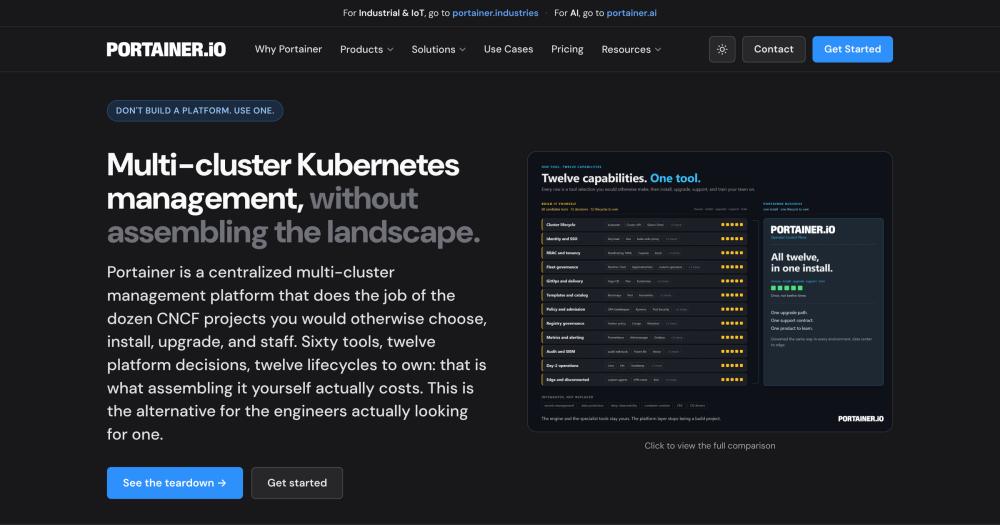
Manage Docker, Kubernetes, Swarm, and Podman from one self-hosted control plane, replacing a custom stack of CNCF tools with a single web interface.

Visit websiteGitHub38.8K starsDeploy on Hostinger
image of Portainer
TL;DR

Portainer is a self-hosted web console for governing Docker, Kubernetes, Docker Swarm, and Podman environments from one interface, with 38,000-plus GitHub stars. It replaces the need to assemble separate tools for access control, deployment workflows, and multi-environment visibility. The Community Edition is Zlib-licensed and free, suited for homelabs and learning; the Business Edition adds RBAC, GitOps, SSO, and commercial support for teams running production infrastructure.

Read the full breakdownHide the full breakdownWho it is for, how it works, trade-offs and the FAQ
who it's for

Who Portainer is for#

Infrastructure teams governing developer access to containers

Portainer Business Edition lets infrastructure teams define deployment templates, resource quotas, and access controls that developers use through a web interface without needing direct cluster credentials. This reduces the toil of handling individual access requests while keeping deployments within defined policies.

Skip if:

Your team needs full GitOps automation with PR-based deployments and policy-as-code. Tools like ArgoCD or Flux offer deeper Kubernetes-native GitOps with more community integrations. Portainer BE's centralized GitOps is simpler but less extensible for complex multi-team workflows.

Ops teams managing Docker Swarm and Kubernetes together

Teams running Docker Swarm for existing workloads alongside newer Kubernetes clusters get a single console for both under shared access controls. There is no requirement to migrate Swarm workloads to Kubernetes before governing them, which makes Portainer practical for teams in a gradual migration.

Skip if:

Your entire estate has already moved to Kubernetes and you need advanced lifecycle management, cluster provisioning, or multi-cloud cluster orchestration. Kubernetes-native tools offer deeper capabilities for that scope.

Homelab operators learning container orchestration

The Community Edition is free, Zlib-licensed, and well-suited to running on a home server or small VPS. It provides a visual interface for Docker and Kubernetes that makes exploring container workflows accessible without learning the full CLI toolset from scratch.

Skip if:

You need production SLAs, guaranteed issue responses, or commercial support. Portainer CE provides none of those. For production workloads, evaluate Portainer Business Edition or another managed container service.

the problem

The problem it solves#

Running containers across multiple hosts, clusters, and runtimes means managing access control, deployment workflows, audit trails, and visibility in separate places. Teams that build this governance layer themselves typically wire together distinct tools for Kubernetes access control, deployment automation, and monitoring, each with its own configuration format, upgrade schedule, and failure mode. The integration work never fully finishes, and the result is infrastructure that is difficult to hand off when team membership changes.

For teams without a dedicated infrastructure engineering function, the gap between running containers and governing them is wide. The common pattern is shared credentials and manual deployments, which works until a cluster grows or an incident requires an audit trail that does not exist.

how Portainer solves it

How it solves it#

Single console for Docker, Kubernetes, Swarm, and Podman

Manages Docker, Docker Swarm, Podman, Kubernetes on any distribution (EKS, AKS, GKE, bare metal, on-premises), and Azure Container Instances from one web interface. Teams running a mix of container runtimes do not need separate tools for each: Swarm stacks and Kubernetes clusters appear as environments in the same console under the same access controls.

Agent-based multi-cluster fleet management

Each managed environment runs a lightweight Portainer agent container. The central Portainer server connects to all agents, giving unified visibility and control across any number of environments without direct cluster API exposure from the management layer. Adding a new environment is a single agent container deployment on the target host.

Centralized GitOps engine without per-cluster controllers

Portainer Business Edition runs a GitOps engine on the Portainer server rather than deploying a controller inside each cluster. Promotion from dev to staging to production with rollback works without maintaining distributed Argo or Flux installations, each of which carries its own configuration and upgrade cycle.

Pre-defined templates with resource quotas and access controls

Developers can deploy from pre-approved application templates without needing direct cluster access. Resource quotas, namespace restrictions, and role-based access enforcement keep deployments within defined boundaries. Portainer Business Edition provides full RBAC so access policies propagate from the central server across all managed environments.

SSO, LDAP, and OIDC with audit logging and SIEM export

Portainer Business Edition integrates with existing enterprise identity providers through SSO, LDAP, and OIDC. Every deployment, access grant, and configuration change is recorded in audit logs that can be exported to a SIEM. Teams subject to compliance requirements get a full activity trail without building one themselves.

strengths · trade-offs

Strengths and trade-offs#

Strengths

  • Zlib license: use and self-host without restrictionThe Zlib license is a permissive OSI-approved license with no copyleft requirements. The Community Edition is free to run on your own infrastructure with no licensing fees. Teams can inspect the source, build from it, and run it internally without compliance concerns about distribution or modification.
  • Installs as one Docker container with no external dependenciesThe Portainer server and each environment agent both deploy as containers. Getting Portainer running requires a Docker host and a single container deployment. There is no external database, no message broker, and no cloud dependency required for the basic configuration, keeping the operational footprint small.
  • Governs Docker, Swarm, and Kubernetes from the same consoleTeams running Docker Swarm alongside Kubernetes clusters manage both from the same Portainer console under shared access controls. There is no requirement to migrate Swarm workloads to Kubernetes before bringing them under governance, which is a practical advantage over Kubernetes-only management tools. Docker, Docker Swarm, Podman, Kubernetes, and Azure Container Instances are all first-class environments.
  • 38,000-plus stars and active development since 2016Portainer has accumulated over 38,000 GitHub stars and 2,900 forks since its first release in 2016. The repository continues to receive regular pushes. For Community Edition users, the GitHub Issues tracker and community Slack are the support path, with assistance provided by other community members.

Trade-offs

  • -Community Edition is documented as non-production softwareThe README explicitly states that Portainer CE is intended for homelabs, learning environments, and personal projects, and is not intended for use in business, production, or any other environment where uptime, security, or data integrity matter. There is no SLA, no guaranteed response to issues, and no roadmap commitment. Production deployments require Portainer Business Edition.
  • -RBAC, GitOps, SSO, and audit logging require Business EditionThe features most relevant to production governance, including role-based access control, GitOps deployment workflows, SSO and LDAP integration, edge management, and audit logging with SIEM export, are only available in Portainer Business Edition. The Community Edition covers the basic management UI for all supported runtimes but without the production-grade access controls.
  • -721 open issues with no official CE support channelPortainer CE has 721 open GitHub issues. The README states that the Community Edition has no official support channel: assistance from GitHub Issues and the community Slack is voluntary and best-effort, provided by other community members rather than by Portainer. Teams that need guaranteed response or commercial support must use Business Edition.
versus alternatives

Portainer vs alternatives#

Portainer vs Rancher by SUSE

Both tools provide a web interface for managing Kubernetes environments, and both support self-hosted deployments. The key difference in scope is that Rancher by SUSE covers full Kubernetes lifecycle management, including cluster provisioning and upgrade orchestration, while Portainer focuses on the governance and visibility layer: access control, deployment templates, and a unified console for environments your team already operates.

Portainer also manages Docker, Docker Swarm, and Podman from the same console as Kubernetes. For teams running mixed container environments, that multi-runtime support avoids running separate tools for each runtime. Rancher by SUSE is worth evaluating when your primary need is provisioning Kubernetes clusters, managing multi-cloud fleets, or when you require its ecosystem of certified integrations.

Portainer vs Mirantis Kubernetes Engine

Mirantis Kubernetes Engine is an enterprise Kubernetes platform for large organizations with requirements for air-gapped deployments, FIPS compliance, and formal security certification. Portainer takes a narrower scope: a governance and visibility layer for teams already operating container environments, without the complexity and cost of a full enterprise container platform.

Portainer is the stronger choice for small to mid-size teams that need container access control, deployment templates, and self-service workflows without enterprise certification requirements or the full Mirantis toolchain. Mirantis Kubernetes Engine is worth evaluating for organizations that require certified enterprise security posture, formal compliance documentation, air-gapped deployment support, or dedicated on-premises support contracts that Portainer does not provide.

tech stack · detected from GitHub

What it's built on#

Languages
GoJavaScriptTypeScript
Frameworks
React
Infrastructure
DockerKubernetes
Tooling
Webpack
frequently asked

FAQ#

Is Portainer free to use?

Portainer Community Edition is free under the Zlib license and can be run on your own infrastructure at no cost. The Business Edition is a commercial product. Portainer's Take3 offer provides three nodes of Portainer Business Edition free for as long as you want them. Teams that need RBAC, GitOps, SSO, or commercial support require the Business Edition, which carries a price above the three free nodes.

What is the difference between Portainer CE and Business Edition?

Community Edition is a free, unsupported web UI for managing Docker, Kubernetes, Swarm, Podman, and ACI environments. The README documents it as intended for homelabs, learning, and experimentation, not production use. Business Edition builds on the same codebase and adds RBAC, GitOps deployment workflows, edge management, audit logging, SSO, LDAP, OIDC, and commercial support with guaranteed response times.

Does Portainer support both Docker and Kubernetes?

Yes. Portainer manages Docker, Docker Swarm, Podman, Kubernetes (on any distribution, including EKS, AKS, GKE, bare metal, and on-premises), and Azure Container Instances from the same console. Teams running mixed container environments do not need separate management tools for each runtime.

How is Portainer CE deployed?

Portainer CE deploys as a Docker container on a Linux server. The official installation documentation at https://docs.portainer.io/start/install-ce covers the full steps. Each environment you want to manage also runs a lightweight Portainer agent container that connects back to the central Portainer server. No external database or cloud dependency is required for the basic setup.

Is Portainer CE suitable for production use?

Portainer recommends against using Community Edition in production. The README states it is not intended for business, production, or any environment where uptime, security, or data integrity matter, and that there is no SLA or guaranteed response to issues. For production workloads, Portainer recommends its Business Edition, which includes commercial support and the security and governance features production environments require.

also worth a look

Similar open-source tools#

Homeio

Alternative toUnraid

Browser desktop for your self-hosted home server

  • 102 GitHub stars
  • AGPL-3.0Licence AGPL-3.0

FckSignups

InCustomer Support

Open-source tools that work instantly, no signup required

  • 4,539 GitHub stars
  • GPL-3.0Licence GPL-3.0

Nginx

Alternative toNGINX Plus

Serve static files, proxy requests, terminate TLS, and cache content.

  • 32,026 GitHub stars
  • BSD-2-ClauseLicence BSD-2-Clause

1Panel

Alternative tocPanel & WHM

One-click Docker and SSL from a web-based Linux server panel

  • 37,362 GitHub stars
  • GPL-3.0Licence GPL-3.0

Digger

Alternative toHashiCorp Terraform Cloud

Self-hosted Terraform CI/CD that runs natively in GitHub Actions

  • 5,062 GitHub stars
  • MITLicence MIT

Coolify

Alternative toVercel

Self-hosted Heroku and Vercel alternative for any app

  • 65,620 GitHub stars
  • Apache-2.0Licence Apache-2.0
by category

Open source tools in these categories#

110

DevOps & CI/CD

Nvm, Uptime Kuma, Netdata
125

Cloud & Hosting

dify, RuView, rtk
141

IT Management

RustDesk, Immich, Stirling PDF
Hostinger

Self-host Portainer on a Hostinger VPS

Keep it running 24/7, even when your laptop is off. A Hostinger VPS gives it a server of its own.

  1. 01

    Choose a plan

    Starts from $6.49/mo

  2. 02

    Apply

    Extra 10% off yearly plans

  3. 03

    Install Portainer

    On a server that stays on

  4. 04

    Start building

    Focus on the app, not the server

Deploy on Hostinger

Sponsors

Inbox Zero

Alternative toSuperhuman

AI email assistant that drafts replies and clears your inbox

  • 12,889 GitHub stars
  • AGPL-3.0Licence AGPL-3.0
  • #Email

rakazo

Alternative toGrok Bot

AI teammates you own: your keys, your model, your machine.

  • 6,568 GitHub stars
  • Apache-2.0Licence Apache-2.0
  • #AI Agents

SnitchFeed

Live monitoring on LinkedIn, X, Reddit & more. Agentic social listening for startups.

Marketing & Growth

Advertise your product

New open source projects by email

The projects we add and every new guide. Free, unsubscribe any time.

Find open source alternatives to paid software

/
  • Claude Code to OpenCode
  • Jira to Windshift
  • Notion to AppFlowy
  • Slack to Mattermost
  • Linear to GitLab
  • Wispr Flow to Handy
  • Arc to Zen Browser
  • CapCut to Concat
  • Grok Bot to rakazo
  • Superhuman to Inbox Zero
  • Airtable to AITable
  • Muse to OpenClaw
  • Railway to Coolify
  • GitHub Copilot to Cline
  • Datadog to Netdata
  • Confluence to Wiki.js
  • Microsoft Teams to Rocket.Chat
  • Pinecone to Qdrant
  • Zapier to n8n
  • 1Password to KeePassXC
  • Devin AI to OpenHands
  • Firebase to Supabase
  • Contentful to Strapi
  • Adobe Premiere Pro to Shotcut
  • Claude Code to OpenCode
  • Jira to Windshift
  • Notion to AppFlowy
  • Slack to Mattermost
  • Linear to GitLab
  • Wispr Flow to Handy
  • Arc to Zen Browser
  • CapCut to Concat
  • Grok Bot to rakazo
  • Superhuman to Inbox Zero
  • Airtable to AITable
  • Muse to OpenClaw
  • Railway to Coolify
  • GitHub Copilot to Cline
  • Datadog to Netdata
  • Confluence to Wiki.js
  • Microsoft Teams to Rocket.Chat
  • Pinecone to Qdrant
  • Zapier to n8n
  • 1Password to KeePassXC
  • Devin AI to OpenHands
  • Firebase to Supabase
  • Contentful to Strapi
  • Adobe Premiere Pro to Shotcut