Who project-nomad is for#
Emergency preppers and disaster preparedness planners
NOMAD keeps medical references, survival guides, Wikipedia, and offline maps accessible when infrastructure fails. Content is downloaded while internet access is available and stored locally, so it works indefinitely without connectivity during an outage or emergency.
Skip if:
You only need a static offline copy of a single resource such as a downloaded Wikipedia dump or a single offline map. A full NOMAD server is more infrastructure than a single-purpose offline archive.
Off-grid households, RV travelers, and live-aboards
Designed for environments where internet is intermittent or absent: sailboats, RVs, cabins, and remote properties. NOMAD runs on a repurposed desktop or laptop, serves all devices on a local WiFi network, and provides a complete library of maps, education, and reference materials.
Skip if:
Your off-grid situation has reliable satellite internet such as Starlink. At that point, a local offline server adds maintenance overhead without proportional benefit.
Self-hosting enthusiasts building a local AI stack
NOMAD handles Ollama setup, model management, and RAG via Qdrant in a single installer. Community builds range from refurbished desktops to dedicated GPU servers, and a benchmark leaderboard lets you compare hardware performance. You get a working local LLM setup with a knowledge base without configuring each component separately.
Skip if:
You need a production-grade LLM server for API access or multi-user teams. NOMAD is a personal server without authentication; a dedicated Ollama instance or a hosted API is a better fit for shared production use.
Remote classrooms and educators without reliable connectivity
Kolibri delivers the full Khan Academy K-12 curriculum with video, exercises, and progress tracking. Multiple students can access the platform simultaneously from tablets or laptops on the local network. The education platform works offline after the initial content download.
Skip if:
Your classroom has reliable internet. In that case, the direct Khan Academy site or a managed Kolibri cloud instance is simpler to maintain than a self-hosted NOMAD server.
The problem it solves#
Most knowledge and education resources require an internet connection. When connectivity fails during a disaster, goes offline in a remote area, or is deliberately avoided for privacy reasons, there is no local fallback. Medical references, survival guides, and educational curricula live behind streaming services and subscription platforms rather than on hardware you own.
Paid offline knowledge devices exist at $199 to $699, but they lock you into Raspberry Pi hardware with limited upgrade paths, and most offer no AI or only a basic 7B model with no GPU support. There was no free, hardware-agnostic option that bundled a full knowledge library with a capable AI assistant.
How it solves it#
Offline information library via Kiwix
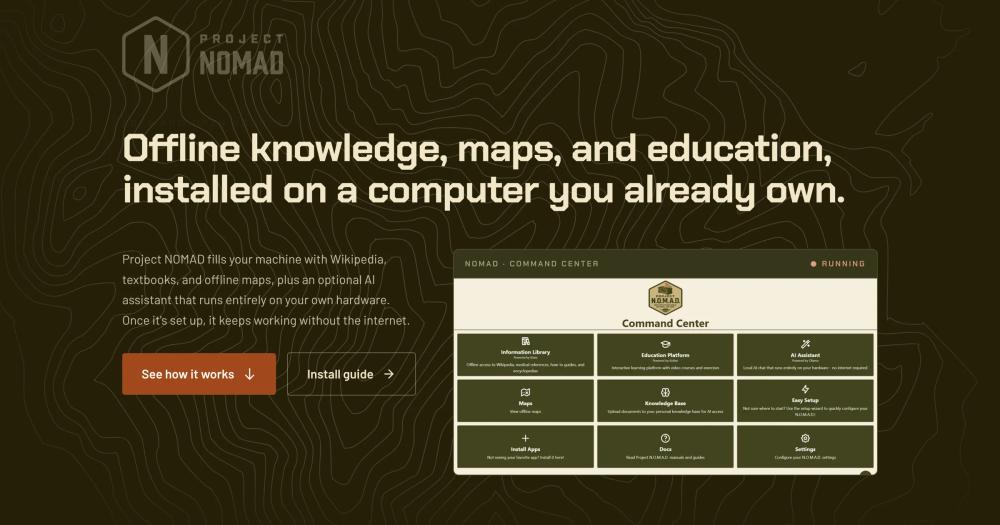
Downloads and serves Wikipedia, medical references, repair guides, survival guides, and Project Gutenberg ebooks for offline browsing. Content is stored locally as ZIM files managed through the Command Center. You choose which collections to download; everything works without connectivity once installed.
Local AI assistant with document RAG
Runs large language models entirely on your own hardware using Ollama, with no data sent to the cloud. Includes Qdrant vector search for document upload and semantic retrieval. Supports any Ollama-compatible model; GPU acceleration is available for machines with NVIDIA or AMD Radeon GPUs. You can also point NOMAD at an external OpenAI-compatible API server if you prefer a different host.
Khan Academy and offline education platform
Delivers complete K-12 Khan Academy courses with video, interactive exercises, and progress tracking via Kolibri. Multi-user support lets multiple learners use the same NOMAD instance simultaneously. Works entirely offline after the initial content download.
Downloadable offline maps
Downloads OpenStreetMap regional data through ProtoMaps for fully offline street-level navigation and browsing. You can download individual countries or continents and browse from continental scale down to individual streets with no connection required.
Supply Depot one-click app catalog
Includes a built-in catalog of additional open source apps (PDF tools, file browser, e-book library, password manager) installable with one click. Also supports running your own custom Docker containers through the Command Center, so you can extend the install beyond the bundled tools.
Opt-in automated updates with zero telemetry
Minor and patch releases install automatically during a configurable window after pre-flight checks (disk space, no active downloads). Major version updates always require manual approval. Project NOMAD has zero built-in telemetry; it makes no analytics requests and sends no data anywhere.
Strengths and trade-offs#
Strengths
- Free versus $199 to $699 paid alternativesPrepperDisk costs $199-$279, Doom Box $699, and R.E.A.D.I. $499. Project NOMAD is Apache 2.0-licensed and free to run. You pay only for the hardware you choose, which can be a refurbished desktop rather than a locked Raspberry Pi appliance.
- Runs on any PC, not locked to specific hardwareCompeting offline knowledge products (PrepperDisk, Doom Box, R.E.A.D.I.) all run on locked Raspberry Pi hardware with limited upgrade paths. Project NOMAD installs on any Debian-based PC from a $150 refurbished desktop to a GPU-powered workstation, and it serves your whole local network rather than a single device.
- GPU-accelerated AI on any compatible hardwareThe paid alternatives either include no AI or a basic 7B model with no GPU support. Project NOMAD's Ollama integration supports NVIDIA and AMD Radeon GPU acceleration. The community benchmark leaderboard shows builds scoring 60 to over 3,000 on the NOMAD Benchmark. You pick the model size your hardware can handle.
- Serves the whole local network simultaneouslyNOMAD runs as a server accessible to every device on your network via the device IP address. Multiple users can access the education platform, maps, and information library at the same time. PrepperDisk limits WiFi to 20 concurrent users; Doom Box and R.E.A.D.I. are single-device only.
Trade-offs
- -Significant hardware needed for AI workloadsThe minimum 4GB, 2-core spec runs the knowledge library and maps, but AI inference needs at least 32GB RAM and a dedicated GPU for capable model performance. The recommended build is an AMD Ryzen 7 or Intel i7 with an NVIDIA RTX 3060 or AMD equivalent. Running LLMs on the minimum spec will be slow or unusable for larger models.
- -No built-in authenticationBy design, Project NOMAD includes no user authentication. The README recommends using network-level access controls to manage which devices can reach the server. This works for a home LAN but makes it unsuitable for internet-facing deployments or multi-tenant environments without additional infrastructure. The feature is on the public roadmap but not yet implemented.
- -Native install path is Debian and Ubuntu onlyThe installer targets Ubuntu 22.04+ and Debian 12+. Windows users must follow a community-supported WSL2 path that involves additional steps. There is no macOS native install path documented in the README.
project-nomad vs alternatives#
Project NOMAD vs PrepperDisk, Doom Box, and R.E.A.D.I.
Project NOMAD occupies the same category as PrepperDisk, Doom Box, and R.E.A.D.I.: offline knowledge appliances for emergency preparedness and off-grid use. The central differences are hardware flexibility, price, and open source availability.
| Feature | Project NOMAD | PrepperDisk | Doom Box | R.E.A.D.I. |
|---|---|---|---|---|
| Price | Free | $199-$279 | $699 | $499 |
| License | Apache 2.0 | Partial (content proprietary) | Proprietary | Proprietary |
| Hardware | Any PC | Raspberry Pi (locked) | Raspberry Pi (locked) | Raspberry Pi (locked) |
| AI | GPU-accelerated LLMs | None | Basic 7B model | Basic 7B model |
| Network reach | Whole LAN | WiFi hotspot, up to 20 | Single device | Single device |
| Offline maps | OpenStreetMap (any region) | OpenStreetMap (via IIAB) | Basic | None |
| Education | Full Khan Academy | Khan Academy | None | None |
| Upgradeable | Yes | Yes (via web console) | No | No |
Where Project NOMAD wins
Project NOMAD is the better choice when hardware flexibility and cost matter. Running on any Debian-based PC means you can use a refurbished desktop rather than buying a locked appliance, and you can upgrade the hardware later without replacing the whole unit. The Apache 2.0 license means you can inspect, modify, and run the code at no cost.
For AI workloads, NOMAD's Ollama integration with GPU acceleration is the clearest advantage. PrepperDisk includes no AI. Doom Box and R.E.A.D.I. include basic 7B models with no GPU support. NOMAD runs larger models on GPUs you already own, and the community benchmark leaderboard gives you a real-world baseline before you commit to hardware.
Where the paid alternatives may be preferable
PrepperDisk, Doom Box, and R.E.A.D.I. are turn-key hardware appliances. If you want a device that arrives pre-loaded and powers on without a Linux terminal install, the paid options deliver that. Project NOMAD requires a compatible PC and basic familiarity with running a shell installer on Debian or Ubuntu.
PrepperDisk is the closest in terms of openness: it is partially open source and offers an upgrade path via its web console, making it the best paid alternative if you want managed hardware with some community involvement.

Quick start#
Self-hosting on Debian-based Linux uses the install script to set up Docker and all dependencies automatically.
```bash
curl -fsSL https://raw.githubusercontent.com/Crosstalk-Solutions/project-nomad/refs/heads/main/install/install_nomad.sh -o install_nomad.sh && sudo bash install_nomad.sh
```What it's built on#
- Languages
- TypeScript
- Frameworks
- React
- Databases
- MySQL
- Cache
- Redis
FAQ#
Does Project NOMAD require an internet connection to run?
No. An internet connection is only needed during initial setup to download dependencies and any content you choose to add. After installation, Project NOMAD runs entirely offline with no network requests. You can add content later when internet is available, but the server keeps working indefinitely without it.
What hardware do I need to run Project NOMAD?
Minimum specs are a 2GHz dual-core processor, 4GB RAM, 5GB free storage, and a Debian-based OS. This gets you the knowledge library and maps but not AI. For local LLMs, the recommended build is an AMD Ryzen 7 or Intel i7 with 32GB RAM and a dedicated GPU (NVIDIA RTX 3060 or AMD equivalent). The hardware guide at projectnomad.us/hardware covers three price-point build recommendations from around $150 to $1,000 or more.
Can Project NOMAD run large language models locally?
Yes. The AI assistant module uses Ollama, which supports models from 7B to 70B parameters and larger depending on your GPU VRAM. GPU acceleration is available for NVIDIA and AMD Radeon GPUs. You can also point NOMAD at an external Ollama or OpenAI-compatible API if you prefer to run the model on a separate host.
Is Project NOMAD free for commercial and internal organizational use?
Yes. Project NOMAD is licensed under Apache 2.0, which permits free use, modification, and redistribution for both personal and commercial purposes. You can run it internally at a business, school, or organization without licensing fees. Apache 2.0 requires attribution and a copy of the license notice, but imposes no restrictions on commercial internal use.
Does Project NOMAD have built-in authentication or access control?
No. Project NOMAD does not include user authentication by design. The README recommends using network-level controls such as firewall rules and port blocking to manage access. It explicitly advises against exposing the server directly to the internet. Optional authentication is on the public roadmap at roadmap.projectnomad.us but is not yet implemented.
Similar open-source tools#
supervision
Python toolkit for computer vision detection, tracking, and annotation
FckSignups
Open-source tools that work instantly, no signup required
fmt
Fast, type-safe C++ formatting that replaces printf and iostreams
dograh
Open source voice agent builder with telephony and BYOK AI support
iroh
Connect devices seamlessly without relying on the cloud.
God's Eye View
Real-time global intelligence on a 3D globe