Open Source Alternatives
  • Alternatives
  • Categories
    Categories by size1,333 projects
    • Developer Tools683
    • AI & Machine Learning552
    • Business & Productivity328
    • Web Development219
    • Security & Monitoring202
    • Communication & Collaboration171
    • IT Management166
    • Design & Creative151
    • DevOps & CI/CD145
    • LLMOps & AI Tooling142
    Browse all 21 categoriesCloud & Hosting, Product & Project Management and 9 more
  • Blog
  • Advertise
SearchNotion, Slack, password manager.../
Submit
Open Source Alternatives
  • Alternatives
    • Developer Tools683
    • AI & Machine Learning552
    • Business & Productivity328
    • Web Development219
    • Security & Monitoring202
    • Communication & Collaboration171
    • Browse all 21 categories
  • Blog
  • Advertise
Submit your project

New open source projects by email

The projects we add and every new guide. Free, unsubscribe any time.

Open Source Alternatives LogoOpen Source Alternatives

Handpicked Open Source Alternatives to Paid Softwares

Add Open Source Alternatives as a preferred source on Google

Product

  • Categories
  • Tag
  • Advertise

Resources

  • Blog
  • Collection
  • Submit

Company

  • Privacy Policy
  • Terms of Service
  • Refund Policy
  • Sitemap

Alternatives

  • Claude Code
  • Jira
  • Notion
  • Slack
  • Linear
  • Wispr Flow
  • All alternatives
© 2026 Open Source Alternatives. All rights reserved.
Open SourceAlternatives
Home/Categories/Business & Productivity/Purr
icon of Purr

Purr

Open source alternative to Wispr Flow, Superwhisper and VoiceInk

  • 109 stars
  • MIT
  • Active this week
  • Last commit today

Last verified Nov 25, 2026

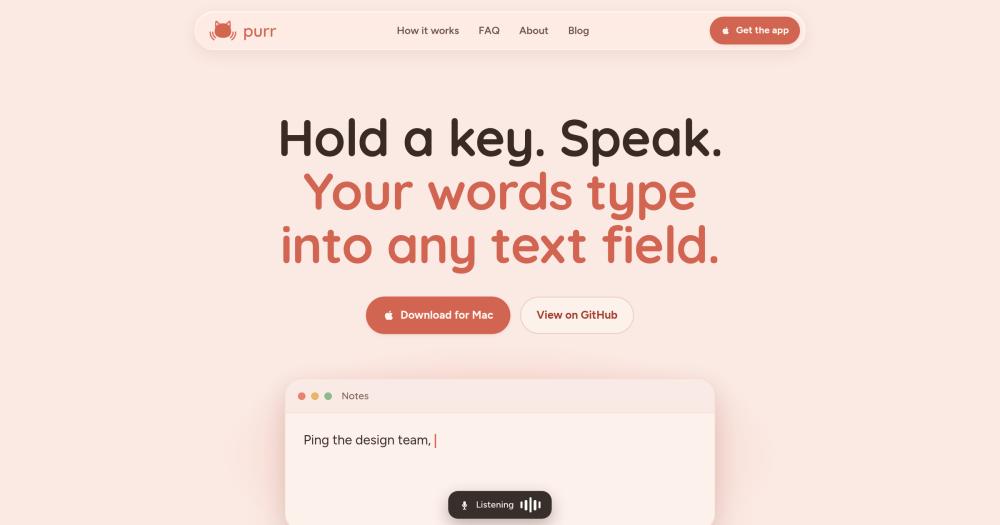
Run offline voice dictation and meeting notes on your Mac. MIT-licensed and free, with no account, no cloud, and no word cap.

Visit websiteGitHub109 stars
image of Purr
TL;DR

Purr is a free Mac app that types what you say into any text field. Everything runs on your Mac, and your voice never reaches a server. It is MIT-licensed with no word limit and no account required. Best for Mac users on Apple Silicon who want private dictation or meeting notes without a monthly fee.

Read the full breakdownHide the full breakdownWho it is for, how it works, trade-offs, the quick start and the FAQ
who it's for

Who Purr is for#

People with wrist or hand pain who need to cut keyboard time

Purr types what you say into any app, so your hands can rest for longer stretches. It works in Slack, email, notes, and anywhere else text goes. The app's founder built it because his wrists ached after long coding days.

Skip if:

Skip it if you have no issue typing for long periods. The main gain is reducing keyboard time, not speeding up writing.

Mac users who want private meeting notes

Tap a shortcut before a call, and Purr records and transcribes it without a bot joining. Notes and transcripts stay on your Mac. No third party receives your audio. Good for sensitive client calls or internal team meetings.

Skip if:

Skip it if you use Windows or need your notes to sync across devices. Purr is Mac-only and does not have a cloud notes service.

Writers and developers who think faster than they type

Some people can speak a first draft faster than they can write one. Purr types at close to speaking speed with Smart Typing on. With voice editing, you can say the change and hear it applied without lifting your hands.

Skip if:

Skip it if you are not on an Apple Silicon Mac. Purr does not run on Intel Macs or other platforms.

the problem

The problem it solves#

Good voice dictation tools cost money. Apps like Wispr Flow send your voice to a server in the cloud and process it there. That means your words sit on someone else's computer. Many apps also limit how many words you can dictate each week before requiring a paid plan.

If you work with sensitive material or want your recordings to stay on your own machine, those apps are not a good fit. And if you are on the keyboard for many hours a day, the cost of a good dictation app adds up fast.

how Purr solves it

How it solves it#

Dictation into any app

Hold a key, speak, and let go. Purr types your words into whichever app has the cursor: Slack, Notes, Mail, a browser, any text box. The default key is Right Option. You can change it to F5, a chord, or a tap-to-toggle in Settings.

Private meeting notes without a recording bot

Tap a shortcut to record your mic and your Mac's audio together. Purr labels each speaker (You, Speaker 1, Speaker 2) and saves a transcript on your Mac. It can also write a short summary. No bot joins the call.

Voice editing to rewrite selected text

Select text in any app, hold a shortcut, and say what you want to change. Purr rewrites the selection on your Mac using Apple Intelligence or a local Gemma model. The rewrite never leaves your computer. This requires Apple Intelligence or a 3.35 GB model download for Gemma.

Smart Typing as you speak

With Smart Typing on, your words appear in the app while you are still talking, not after you let go of the key. This works with the Parakeet engine and English only. It needs about 220 MB of extra model data to download.

Custom vocabulary and voice commands

Add names, product names, or technical terms that Purr keeps mishearing. It can also drop filler words like 'um' and 'uh' if you turn that on. During dictation, say 'comma', 'period', 'new line', or 'scratch that' to edit as you speak.

About 100 languages with Whisper

The default Parakeet engine handles English. Switch to Whisper in Settings to dictate in about 100 other languages. Whisper can also translate them into English. For meeting notes, Purr supports English and 27 other languages.

strengths · trade-offs

Strengths and trade-offs#

Strengths

  • Completely free with no word limitPurr has no paid tier, no subscription, and no cap on how many words you can dictate. Its website says it is completely free with no word limit. Wispr Flow's free plan limits your weekly words and charges $15 per user per month for the full version.
  • Your voice never leaves your MacRecording, meeting notes, summaries, and voice editing all run on your Mac. Purr only goes online to download speech models and check for updates. Once the models are downloaded, it works without an internet connection. There is no telemetry and no account to sign into.
  • MIT license, free to fork and changePurr is MIT-licensed. You can read the code, change it, fork it, or ship a modified version. The MIT license places no restrictions on commercial use. The full source is on GitHub.
  • No recording bot visible to other call participantsMost AI meeting tools join your call as a named participant that everyone can see. Purr works differently. It records your mic and your Mac's audio locally. No one on the call sees a bot, and your audio never reaches a third-party server.

Trade-offs

  • -Apple Silicon Macs onlyPurr requires an Apple Silicon Mac running macOS 14 or later. Intel Macs are not supported. If you use Windows, Linux, or an older Mac, Purr will not run. Wispr Flow and Superwhisper both support Windows and additional platforms.
  • -Smart Typing is English onlyThe 'types as you speak' mode works only in English with the Parakeet engine. If you dictate in another language, you must use Whisper, which types after you release the key rather than while you are still speaking.
  • -Voice editing needs a large model or Apple IntelligenceTo rewrite text with your voice, you need either Apple Intelligence on the latest macOS or Gemma 4 E2B, which is a 3.35 GB download. Without one of those, Voice Edit does not work. Meeting summaries have the same requirement.
versus alternatives

Purr vs alternatives#

Purr vs Wispr Flow

Wispr Flow and Purr both let you dictate into any app. The main difference is where your voice goes.

PurrWispr Flow
TranscriptionOn your MacIn the cloud
PlatformsMac onlyMac, Windows, iPhone, Android
PriceFree, no word limitFree tier with weekly cap; Pro at $15/user/month
Open sourceYes, MITNo
Works offlineYesNo

Purr is the better choice if you want your voice to stay on your computer, or if you do not want to pay monthly. Purr's maker says Purr put text on screen faster than Wispr Flow in a side-by-side test.

Wispr Flow is worth considering if you work across Mac, Windows, and iPhone and want your dictation settings to sync. It also has AI writing features beyond plain transcription.

Purr vs Superwhisper

Superwhisper can also run on your machine using local AI models, so both apps take the same privacy approach.

PurrSuperwhisper
PriceFreePaid
PlatformsMac onlyMac, Windows, iOS

Pick Purr if you want meeting notes and voice editing at no cost. Superwhisper has more model choices and customization options if you need them and are willing to pay.

Purr vs VoiceInk

VoiceInk is local-first and Mac-only, making it the most similar in design.

PurrVoiceInk
PriceFreePaid
App-aware modesNoYes
Custom vocabularyYesYes

Purr is free and MIT-licensed. VoiceInk is paid. VoiceInk has app-aware modes that change how it behaves in different apps, which Purr does not. If that matters to your workflow, VoiceInk is worth trying.

install · quick start

Quick start#

bash
Download the signed macOS installer from GitHub Releases: https://github.com/iamarunbrahma/purr/releases/latest
tech stack · detected from GitHub

What it's built on#

Languages
CSwift
frequently asked

FAQ#

Does my audio ever leave my Mac?

No. Recording, transcription, meeting notes, summaries, and voice editing all run on your Mac. Purr only goes online to download speech models and to check for updates. Once the models are downloaded, it works fully offline.

Which Mac models does Purr support?

Purr works on any Apple Silicon Mac running macOS 14 or later. That covers all Apple chips in the M series. Intel Macs are not supported.

Can Purr take meeting notes when everyone is in the same room?

Yes. When no call audio plays through your Mac's speakers, Purr uses only your microphone. It listens for different voices in the room and labels them Speaker 1, Speaker 2, and so on.

Does Purr support languages other than English?

Yes. The default Parakeet engine handles English. To dictate in another language, switch to Whisper in Settings. It covers about 100 languages and can translate them into English. Meeting notes work in English and 27 other languages. Smart Typing is English only.

How do I install and set up Purr?

Download the Purr install file (a .dmg disk image) from the GitHub Releases page, open it, and drag Purr into Applications. On first launch, a short setup lets you pick the speech engine and downloads its model (about 450 MB for Parakeet). Then click into any text box, hold the Right Option key, speak, and let go.

Looking for more

Other ways to replace Wispr Flow, Superwhisper and VoiceInk#

Handy

#1 in the Wispr Flow guide

Cross-platform offline dictation on Windows, macOS, and Linux, with the largest community of the eight

39,800 GitHub stars

VoiceInk

#2 in the Wispr Flow guide

Apple Silicon Mac dictation with local AI enhancement and no subscription

7,187 GitHub stars

FluidVoice

#3 in the Wispr Flow guide

macOS 15+ dictation with live transcription preview and optional on-device AI cleanup

13,217 GitHub stars

OpenWhispr

#4 in the Wispr Flow guide

Cross-platform dictation with documented meeting transcription, live diarization, and optional cloud processing

12,073 GitHub stars
All 17 Wispr Flow alternatives8 open source Wispr Flow alternatives, ranked
by category

Open source tools in these categories#

328

Business & Productivity

OpenClaw, Excalidraw, RustDesk

Sponsors

SnitchFeed

Live monitoring on LinkedIn, X, Reddit & more. Agentic social listening for startups.

Marketing & Growth

Windshift

Alternative toJira

Self-hosted work management for teams leaving Jira

  • 468 GitHub stars
  • AGPL-3.0Licence AGPL-3.0

Nuphos

Alternative toConductor

Agent workspace for teams running Claude Code or Codex

  • 802 GitHub stars
  • Apache-2.0Licence Apache-2.0
  • #AI Agents
Advertise your product

New open source projects by email

The projects we add and every new guide. Free, unsubscribe any time.

Find open source alternatives to paid software

/
  • Claude Code to OpenCode
  • Jira to Windshift
  • Notion to AppFlowy
  • Slack to Mattermost
  • Linear to GitLab
  • Wispr Flow to Handy
  • Microsoft To Do to Super Productivity
  • Arc to Zen Browser
  • CapCut to Concat
  • Grok Bot to Rakazo
  • Superhuman to Inbox Zero
  • Discord to Stoat
  • Airtable to AITable
  • Datadog to SigNoz
  • Muse to OpenClaw
  • Railway to Coolify
  • GitHub Copilot to Cline
  • Confluence to Wiki.js
  • Microsoft Teams to Rocket.Chat
  • Zapier to n8n
  • 1Password to KeePassXC
  • Pinecone to Qdrant
  • Contentful to Strapi
  • Firebase to Supabase