
Who pyvideotrans is for#
Content creators producing multi-language video at scale
Translate YouTube videos, course content, or branded video into multiple languages without paying per-minute SaaS fees. pyVideoTrans automates the full dubbing pipeline: upload one source video and get back a dubbed version with synced subtitles in the target language, with the option to review each stage before finalizing.
Skip if:
Your video volume is modest and technical setup is not your strength. A managed service like Rask AI may save time at low scale despite the per-minute cost.
Enterprise teams localizing training and internal video
Corporate training departments with privacy requirements can run pyVideoTrans on internal servers, keeping footage within the corporate network. CLI mode supports batch processing of entire video libraries, and speaker diarization maintains distinct voices for multi-person training content.
Skip if:
Your security team requires SOC 2 or ISO 27001 certified infrastructure for the video processing pipeline. pyVideoTrans is open source software, not a certified managed service.
Developers building automated video localization pipelines
CLI mode and the ability to specify model endpoints (including self-hosted Ollama) make pyVideoTrans suitable for integration into larger automation workflows. Batch processing handles multiple videos in sequence, and every pipeline stage is configurable via command line arguments.
Skip if:
Your pipeline requires voice cloning that exactly matches a trained on-brand voice profile. Zero-shot cloning in F5-TTS works well but does not replace a purpose-trained voice model.
Researchers and educators distributing content globally
Academics and educators who produce lectures, tutorials, or research presentations can translate content into multiple languages for broader reach. Fully local deployment means no subscription cost, and the project's community forum provides AI-assisted Q&A for setup and configuration questions.
Skip if:
You need broadcast-quality dubbing with lip-sync adjustment. pyVideoTrans syncs audio to existing video timing but does not modify video frames for lip movement.
The problem it solves#
Translating a video into another language involves four sequential steps: extracting the spoken dialogue, translating the text, synthesizing natural-sounding dubbed audio in the target language, and synchronizing the new audio with the video. Paid SaaS platforms like Rask AI or Dubverse handle all four steps, but they charge per minute of processed video, send your footage through their servers, and lock you into their proprietary model stack.
For content creators, educators, and enterprise teams producing high volumes of multi-language video, the per-minute cost compounds quickly. A 30-minute training video translated into three languages costs tens of dollars per run on managed platforms, every time. There is no self-hosted fallback if the platform changes pricing or removes a feature. Self-hosted pipelines were also historically difficult to assemble because the required models (ASR, translation LLM, TTS) were separate projects with no shared interface.
How it solves it#
One-Click Pipeline from Speech to Dubbed Video
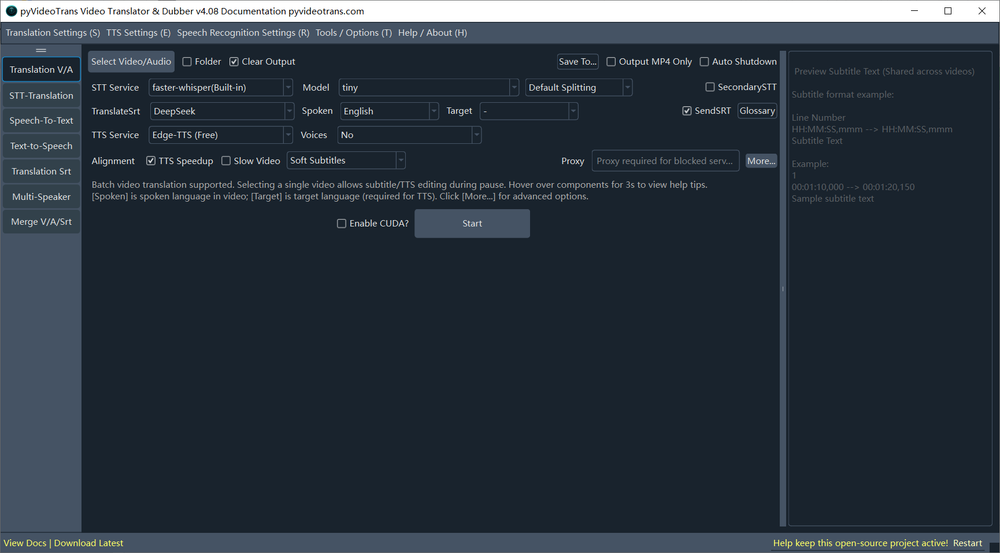
One-click workflow runs four stages in sequence: speech recognition (ASR) extracts dialogue, an LLM or machine translation engine translates it, a text-to-speech model synthesizes dubbed audio, and the final video is assembled with synced subtitles. Each stage can be paused for manual review and correction before the next stage runs.
Modular Model Support Across All Pipeline Stages
Each pipeline stage accepts multiple model choices. ASR options include Faster-Whisper (local), WhisperX with speaker diarization, and online APIs from Alibaba and ByteDance. Translation options include DeepSeek, ChatGPT, Claude, Gemini, Ollama (fully local), and M2M100. TTS options include Edge-TTS (free), OpenAI, Azure, and local models like ChatTTS and ChatterBox.
Zero-Shot Voice Cloning
Integrates F5-TTS, CosyVoice, and GPT-SoVITS for zero-shot voice cloning, so the dubbed output can approximate the original speaker's voice rather than using a generic TTS voice. Voice cloning runs locally on your own hardware and requires more compute than standard TTS synthesis.
Speaker Diarization and Multi-Role Dubbing
Speaker diarization (via WhisperX or Parakeet) identifies different speakers in the audio. Multi-role dubbing then assigns a distinct AI voice to each speaker, preserving conversational dynamics in the translated video rather than dubbing all speech with a single uniform voice.
Flexible Deployment: exe, Source, Docker, CLI, and WebUI
Windows users get a pre-packaged .exe requiring no Python environment setup. Developers on macOS or Linux use uv for fast dependency management. Docker supports containerized server deployment. CLI mode handles headless batch processing for automated pipelines, and a WebUI mode provides browser-based remote access on internal networks.
Fully Local Offline Mode
The entire pipeline can run without any cloud API calls. Faster-Whisper handles ASR locally, Ollama or M2M100 handle translation locally, and local TTS models (ChatTTS, F5-TTS) handle voice synthesis. This suits air-gapped environments or use cases where footage must not leave the local network.
Strengths and trade-offs#
Strengths
- No Per-Video Cost After SetupUnlike Rask AI or Dubverse, which charge per minute of video processed, pyVideoTrans has no per-video fee after initial setup. On fully local models the only ongoing cost is compute time. Teams processing large volumes of video see the cost difference immediately compared to managed SaaS billing.
- Full Data Ownership and Private InfrastructureSource footage never leaves your infrastructure when running in local or self-hosted mode. This matters for legal, healthcare, and corporate training teams that cannot send content to third-party servers. GPL-3.0 licensing also ensures the software itself remains open and inspectable.
- Per-Stage Model ConfigurabilityEach pipeline stage is independently swappable. You can use a local Faster-Whisper model for ASR, DeepSeek for translation, and Edge-TTS for synthesis, or swap any stage for a paid API when output quality takes priority over cost. No commercial dubbing platform offers this level of per-stage configurability.
- Active Development and Strong CommunityCreated in October 2023 and last pushed in August 2026, with over 18,000 GitHub stars and 2,300 forks. Nine open issues relative to its scope signals active maintenance. The modular Python architecture means new model integrations (ASR, LLM, TTS) are added regularly by contributors.
Trade-offs
- -Setup Requires Technical Knowledge on macOS and LinuxInstalling from source requires Python 3.10, FFmpeg configured in the system path, and the uv package manager. GPU acceleration adds CUDA 12.8 and cuDNN 9.11 as dependencies. Windows users can avoid most of this with the .exe bundle, but macOS and Linux users face a real dependency chain before the tool is usable.
- -CPU-Only Processing Is Slow for Long VideosOn CPU-only hardware, processing long videos with Faster-Whisper and a local LLM is substantially slower than real time. A 30-minute video may take significantly longer to process without GPU acceleration. NVIDIA CUDA 12.x support dramatically improves throughput but adds a hardware requirement that not all deployments meet.
- -GPL-3.0 Copyleft Restricts Proprietary EmbeddingGPL-3.0 requires that any modified version of the software distributed to others also be released under GPL-3.0. Teams wanting to embed pyVideoTrans in a proprietary product or SaaS pipeline need to comply with this copyleft requirement. MIT or Apache licensed tools carry no such obligation.
pyvideotrans vs alternatives#
pyVideoTrans vs Rask AI
Rask AI and pyVideoTrans both take a source video and produce a translated, dubbed version in the target language. The key difference is deployment model: Rask AI is a managed SaaS tool with no self-hosting option, while pyVideoTrans runs entirely on your own infrastructure.
| Feature | pyVideoTrans | Rask AI |
|---|---|---|
| License | GPL-3.0 | Proprietary |
| Self-hosting | Yes | No |
| Pricing | Free (compute costs only) | Subscription, per-minute billing |
| Offline mode | Yes | No |
| Model flexibility | Full (swap ASR, LLM, TTS) | Locked to platform models |
pyVideoTrans is the better choice when you process large volumes of video and per-minute costs are a concern, or when footage cannot leave your own servers. Rask AI is the better choice for teams that need a polished, no-setup web interface and are comfortable with managed SaaS pricing.
pyVideoTrans vs HeyGen
HeyGen focuses on AI avatar generation and talking-head video creation alongside translation. pyVideoTrans focuses on translating and dubbing real footage without generating synthetic faces.
| Feature | pyVideoTrans | HeyGen |
|---|---|---|
| License | GPL-3.0 | Proprietary |
| Self-hosting | Yes | No |
| AI avatar generation | No | Yes |
| Voice cloning | Yes (F5-TTS, CosyVoice) | Yes (managed) |
| Pricing | Free (compute costs only) | Subscription |
For translating real speaker video (lectures, training content, YouTube videos) without synthetic face generation, pyVideoTrans covers the workflow at no per-video cost. HeyGen's advantage is its avatar and lip-sync system, which adjusts video frames to match the new dubbed audio. pyVideoTrans syncs audio to existing video timing but does not modify video frames.
pyVideoTrans vs Dubverse
Dubverse is a managed dubbing platform targeting content teams and studios. pyVideoTrans trades managed quality guarantees for full configurability and no per-video cost.
| Feature | pyVideoTrans | Dubverse |
|---|---|---|
| License | GPL-3.0 | Proprietary |
| Self-hosting | Yes | No |
| Voice cloning | Yes (local models) | Yes (managed) |
| Speaker diarization | Yes | Yes |
| Pricing | Free (compute costs only) | Subscription |
pyVideoTrans is more appropriate for teams processing high volumes of video on a budget, or that need to keep footage on private infrastructure. Dubverse is worth choosing when you need managed quality assurance, enterprise support, and a no-setup workflow with a polished web interface.
Quick start#
Install from source using Git and the uv package manager.

```bash
git clone https://github.com/jianchang512/pyvideotrans.git
cd pyvideotrans
uv sync
uv run sp.py
```What it's built on#
- Languages
- Python
FAQ#
Is pyVideoTrans free to use?
Yes. The project is GPL-3.0 licensed and free to download and run. You own the infrastructure and compute costs, but pyVideoTrans itself charges nothing per video or per seat. If you configure paid API providers for ASR, translation, or TTS (such as OpenAI or Azure), you pay those providers directly; fully local model options eliminate that cost entirely.
Can pyVideoTrans run without internet access?
Yes. The pipeline supports fully offline operation using Faster-Whisper for speech recognition, Ollama or M2M100 for translation, and local TTS models such as ChatTTS or F5-TTS for voice synthesis. Internet access is only required when you configure cloud API providers like OpenAI, DeepSeek, or Azure for one of the pipeline stages.
What languages does pyVideoTrans support?
Language support depends on the models you configure. Faster-Whisper (based on OpenAI Whisper) supports speech recognition in 99 languages. Translation scope depends on the engine: LLMs like DeepSeek and ChatGPT cover dozens of languages, and M2M100 was trained on 100 languages. Edge-TTS, the default free TTS engine, covers 50+ languages and voice options.
How does pyVideoTrans compare to Rask AI or HeyGen?
Rask AI and HeyGen are managed SaaS tools with polished web UIs and per-minute or subscription billing. pyVideoTrans requires self-hosting and technical setup, but has no per-video cost, keeps footage on your own infrastructure, and lets you swap ASR, translation, and TTS models independently. For high-volume or privacy-sensitive workflows, pyVideoTrans is the more cost-effective and configurable path.
Does pyVideoTrans support voice cloning?
Yes. pyVideoTrans integrates F5-TTS, CosyVoice, and GPT-SoVITS for zero-shot voice cloning, which attempts to match dubbed output to the original speaker's voice. These models require local deployment and more compute than standard TTS synthesis, but produce more natural-sounding dubs than generic voices for most source material.
Similar open-source tools#

stt
Local speech-to-text with multi-format output and GPU acceleration

YouDub-webui
Self-hosted AI video dubbing: YouTube to Chinese, Bilibili to English
video-use
Edit videos by chatting with Claude Code, not clicking menus
MoneyPrinterTurbo
AI-powered short video generation from topic to publish

Inbox Zero
AI email assistant that drafts replies and clears your inbox

FU Flow
Free offline voice typing for Windows 10/11 and Ubuntu Linux