Open Source Alternatives
  • Alternatives
  • Categories
    Categories by size1,107 projects
    • Developer Tools557
    • AI & Machine Learning472
    • Business & Productivity270
    • Web Development208
    • Security & Monitoring171
    • Communication & Collaboration153
    • IT Management145
    • Cloud & Hosting127
    • LLMOps & AI Tooling123
    • Data & Analytics118
    Browse all 21 categoriesProduct & Project Management, DevOps & CI/CD and 9 more
  • Blog
  • Advertise
SearchNotion, Slack, password manager.../
Submit
Open Source Alternatives
  • Alternatives
    • Developer Tools557
    • AI & Machine Learning472
    • Business & Productivity270
    • Web Development208
    • Security & Monitoring171
    • Communication & Collaboration153
    • Browse all 21 categories
  • Blog
  • Advertise
Submit your project

New open source projects by email

The projects we add and every new guide. Free, unsubscribe any time.

Open Source Alternatives LogoOpen Source Alternatives

Handpicked Open Source Alternatives to Paid Softwares

Product

  • Categories
  • Tag
  • Advertise

Resources

  • Blog
  • Collection
  • Submit

Company

  • Privacy Policy
  • Terms of Service
  • Refund Policy
  • Sitemap

Alternatives

  • Claude Code
  • Jira
  • Notion
  • Slack
  • Linear
  • Wispr Flow
  • All alternatives
© 2026 Open Source Alternatives. All rights reserved.
Open SourceAlternatives
Home/Categories/Business & Productivity/SilverBullet
icon of Silverbullet

SilverBullet

Open source alternative to Obsidian, Notion, Roam Research and Confluence

  • 6.5K stars
  • MIT
  • Active this week
  • Last commit today

Last verified Nov 5, 2026

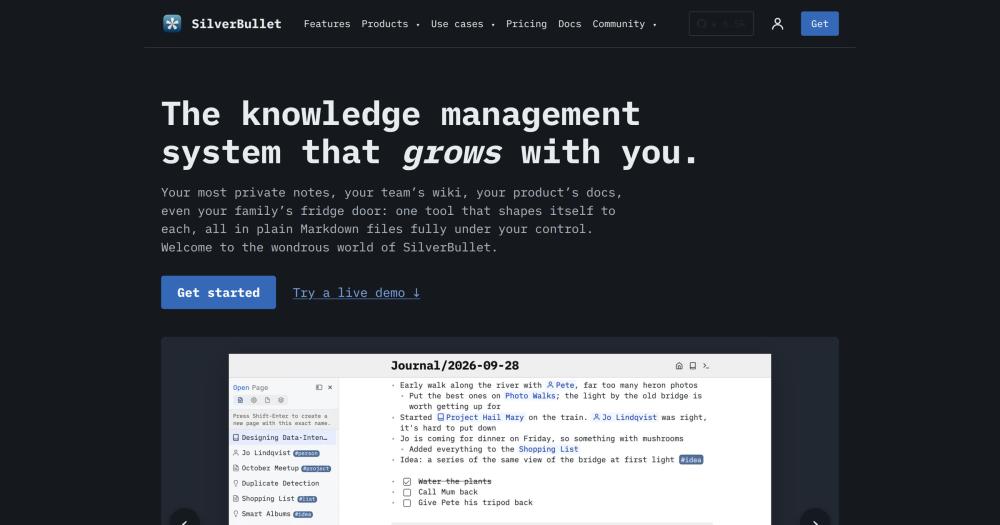
Build a programmable markdown knowledge base with wiki-style links, Lua scripting, and built-in queries for personal notes, team wikis, or docs.

Visit websiteGitHub6.5K starsDeploy on Hostinger
image of Silverbullet
TL;DR

SilverBullet is an MIT-licensed, self-hosted programmable knowledge base that combines wiki-style linking, a built-in query engine, and a Space Lua scripting environment. It is an alternative to SaaS platforms like Notion and Confluence, and to Obsidian for users who want server-based multi-device access and built-in scripting without paying for Obsidian Sync. Runs as a Docker container or a native desktop app on macOS, Windows, and Linux. Best for developers and technical writers who want structured knowledge management with no monthly fees or vendor lock-in.

Read the full breakdownHide the full breakdownWho it is for, how it works, trade-offs, the quick start and the FAQ
who it's for

Who SilverBullet is for#

Developers managing technical notes and project knowledge

SilverBullet's combination of markdown, git-compatible plain files, and Space Lua fits developers who want their notes in the same workflow as their code. Open a git repository's docs folder as a space, write notes next to the code, and query across the whole space using the built-in query language.

Skip if:

You need a Jira-style project tracker or Kanban board with ticket dependencies. SilverBullet's task support is for personal tasks, not project management with cross-linked issues.

Small teams running a shared wiki

The server deployment gives teams a shared space with real-time edits, @mention task assignment, and comments. Architecture decisions, sprint notes, and runbooks stay in one place accessible from any browser or mobile device.

Skip if:

Your organization requires SSO, fine-grained permission levels (edit vs view per page), or audit logs. SilverBullet's current auth model is simpler than enterprise wiki platforms.

Researchers and writers building a linked knowledge base

Bi-directional linking and the graph view surface connections that plain folder hierarchies do not. The query language lets you build live reading lists, link maps, and research summaries directly in your notes without a separate database tool.

Skip if:

You need collaborative annotation or multi-user concurrent editing with conflict resolution. SilverBullet works best when one person owns a space or when coordination happens asynchronously.

Teams writing docs-as-code

Open a git repository's docs folder as a SilverBullet space, write documentation in markdown, review it in pull requests, and optionally publish it as a static site. The documentation stays next to the code it describes and is versioned with git.

Skip if:

You need a docs platform with versioned API references, search indexing, and a hosted site out of the box. SilverBullet handles the editing and structure; publishing requires additional setup.

the problem

The problem it solves#

Most knowledge management tools force a tradeoff. Plain markdown editors give you portable files but no interconnections. A folder of notes has no way to query what links to what, no live tasks aggregated across pages, and no structured data without a separate spreadsheet. Database-style tools like Notion and Confluence give you queries and blocks, but your data lives on their servers, locked behind per-seat pricing, and difficult to migrate when you decide to leave.

The result is fragmented knowledge. Meeting decisions end up in Confluence. Quick notes end up in Notion. Code-adjacent documentation ends up in a git repo. These systems do not talk to each other, and moving between them means lossy exports and months of reorganization. Tools like Roam Research built on a unique data model make portability worse. When you leave their system, there is no clean path to standard markdown.

how SilverBullet solves it

How it solves it#

Wiki-style bi-directional links

Every page shows the other pages that mention it. Write a link once and both sides of the connection are recorded. When you revisit a note months later, all the pages that referenced it surface automatically, turning individual notes into connected knowledge.

Space Lua scripting environment

The built-in Lua dialect lives in your space like any other page. Use it to write custom commands, build page templates, create widgets, or generate content dynamically. Scripting is not a plugin layer bolted on; it is the same runtime the built-in features use.

Built-in query language (SLIQ)

The SLIQ query language lets you write a few lines of Space Lua directly in a page to pull every tagged book, all open tasks across projects, or decisions still pending. Results update live when the underlying notes change.

Live-preview markdown editor

The editor renders markdown as you type, so formatting is visible without toggling between raw text and preview modes. For structured writing, there is also an outliner mode with collapsible hierarchy.

Multiple deployment modes

Run SilverBullet as a Docker container for browser-based access from any device, or as a native desktop app for macOS, Windows, and Linux that keeps data local. Desktop and server can sync, so you can combine both and switch later.

Plain-file data model

Notes live as ordinary markdown files in a folder on disk, alongside images and PDFs. Open them in any editor, put them in git, back them up with any tool. The data is not locked to SilverBullet's format.

strengths · trade-offs

Strengths and trade-offs#

Strengths

  • MIT license with full self-hostingSilverBullet is MIT licensed and self-hosted, so you can run it on your own hardware, modify it, and use it commercially with no restrictions. Unlike Notion or Confluence, there are no per-seat fees and no data leaves your infrastructure.
  • No proprietary formatYour notes are plain markdown in an ordinary folder. If SilverBullet stopped working tomorrow, your knowledge would still be there, readable in any text editor, importable to any other tool, or versionable in git without an export step.
  • In-space scripting, not a plugin APISpace Lua scripts live in your space as regular pages and use the same runtime as the core features. You can read, write, and query any part of your space from a script, which makes customization far deeper than a typical plugin system allows.
  • Active development with 178 contributorsThe repository has 178 contributors and has been in active development since February 2022, with the last commit on 2026-11-04. With 6,457 GitHub stars and 528 forks, the project has an established contributor base outside the core maintainers.

Trade-offs

  • -356 open issuesThe project has 356 open issues. Some users report rough edges in the mobile browser experience and intermittent sync behavior. These are actively worked through, but expect occasional instability on the edges of supported features.
  • -Full scripting requires learning Space LuaThe query and scripting features that differentiate SilverBullet most from plain markdown editors require writing Lua. For users who want note-taking without any scripting, the tool still works as a wiki, but the most distinctive capabilities are behind a learning curve.
  • -Source builds require Rust and Node.js 24+Building SilverBullet from source requires both Rust (stable) and Node.js 24+. The official Docker image and desktop installers avoid this, but users who want to modify the codebase need both toolchains.
versus alternatives

SilverBullet vs alternatives#

SilverBullet vs Notion

Notion is the leading commercial workspace platform, combining notes, databases, tasks, and wikis. SilverBullet focuses on programmable markdown and plain-file storage.

FeatureSilverBulletNotion
LicenseMITProprietary
Data storageLocal markdown filesNotion's servers
Self-hostingYes (Docker or desktop)No
ScriptingSpace Lua (built-in)Formula fields, limited
PricingFree (self-hosted)$10-$20/seat/month (notion.com/pricing)

SilverBullet is the better fit when data ownership matters, when you want your notes in git alongside code, or when you need deeper scripting than Notion's formula fields allow. Notion remains the stronger choice for teams that need Kanban boards, Jira-style project tracking, or structured databases with relation and rollup fields without writing any code.

SilverBullet vs Obsidian

Both SilverBullet and Obsidian use local markdown files and support bi-directional links. Obsidian offers desktop and mobile apps free for personal use; Sync ($4/user/month billed annually) and Publish ($8/site/month billed annually) are paid add-ons, and commercial use requires a separate license ($50/user/year). See obsidian.md/pricing (checked 2026-11-05). SilverBullet includes a server mode accessible from any browser; the desktop app syncs to the server without a paid add-on. Space Lua scripting runs server-side and can query and modify your space programmatically.

FeatureSilverBulletObsidian
LicenseMITFree (personal use)
Server / browser accessYesNo
SyncBuilt-in (desktop to server)Paid add-on ($4/user/mo)
ScriptingSpace Lua (built-in)JavaScript plugins
Bi-directional linksYesYes

Obsidian is worth choosing if you want a large existing plugin ecosystem, mobile apps with offline sync, or a more polished desktop and mobile editor. SilverBullet is the better choice for self-hosting the server for multi-device access without a paid sync add-on.

SilverBullet vs Confluence

Confluence is Atlassian's enterprise wiki platform, commonly used alongside Jira. SilverBullet addresses a similar use case at team scale but with a different deployment and cost model.

FeatureSilverBulletConfluence
LicenseMITProprietary
Self-hostingYes (Docker)Yes (Data Center, expensive)
CostFree$5.78+/user/month (Standard, atlassian.com/software/confluence/pricing)
IntegrationMarkdown, gitJira, Atlassian suite

Confluence is the better fit for large organizations already in the Atlassian ecosystem that need tight Jira integration, audit logs, and enterprise SSO. SilverBullet fits smaller teams or individuals who want the structure of a wiki without the cost and complexity of Confluence's enterprise model.

install · quick start

Quick start#

bash
Deploy SilverBullet as a Docker server with your data folder mounted at /data.
```bash
docker run -p 3000:3000 -v /path/to/data:/data silverbullet
```
tech stack · detected from GitHub

What it's built on#

Languages
LuaRustTypeScript
Tooling
esbuild
frequently asked

FAQ#

Is SilverBullet free to use?

Yes. SilverBullet Server and the sb CLI are MIT licensed and free to self-host on your own hardware. The desktop app is free for personal use. There are no per-seat charges, no paid tiers for core features, and no mandatory cloud subscription.

Can SilverBullet work offline?

Yes. The desktop app works fully offline, storing your space as markdown files on your machine. The server deployment is browser-based and requires network access to the host, but the host itself can run locally on your laptop. Your data is never required to leave your machine.

How does SilverBullet compare to Obsidian?

Both tools use local markdown files and support bi-directional links, but differ in architecture. Obsidian is a local-first app with desktop and mobile clients, free for personal use; Sync ($4/user/month billed annually) and Publish ($8/site/month billed annually) are paid add-ons, and commercial use requires a separate license (obsidian.md/pricing). SilverBullet includes a server mode usable from any browser, Space Lua scripting that runs server-side, and a built-in query language. SilverBullet is fully MIT licensed including the server; Obsidian Sync and Publish are commercial add-ons.

What is Space Lua?

Space Lua is SilverBullet's built-in Lua dialect. Scripts live in your space as regular markdown pages and can read, write, and query any part of your space. Use it to build custom commands, page templates, widgets, or live queries that update as your notes change. Scripts run in the same runtime as the built-in features, so scripted behavior is as capable as anything the app ships.

How hard is SilverBullet to self-host?

Self-hosting the server runs as a single Docker container. One command maps a local folder to the container and exposes port 3000. The desktop app needs no server setup. Building from source requires both Rust and Node.js 24+, but most users use the pre-built Docker image or desktop installer. For a team, you need a machine to run the container and optionally a reverse proxy for HTTPS.

Looking for more

Other ways to replace Obsidian, Notion, Roam Research and Confluence#

AppFlowy

#1 in the Notion guide

Full Notion replacement for small teams

78,085 GitHub stars

AFFiNE

#2 in the Notion guide

Docs, whiteboards, and databases in one workspace

74,216 GitHub stars

Outline

#3 in the Notion guide

Polished team wiki and internal knowledge base

41,170 GitHub stars

Macro Docs

#4 in the Notion guide

Markdown-native docs that agents and teammates edit together

6,143 GitHub stars
All 28 Notion alternatives9 open source Notion alternatives, ranked
by category

Open source tools in these categories#

270

Business & Productivity

OpenClaw, Excalidraw, RustDesk
557

Developer Tools

REA (Reverse Engineer Anything), Skills for Real Engineers, superpowers
153

Communication & Collaboration

freeCodeCamp, iptv, Excalidraw
Hostinger

Self-host SilverBullet on a Hostinger VPS

Keep it running 24/7, even when your laptop is off. A Hostinger VPS gives it a server of its own.

  1. 01

    Choose a plan

    Starts from $6.49/mo

  2. 02

    Apply

    Extra 10% off yearly plans

  3. 03

    Install SilverBullet

    On a server that stays on

  4. 04

    Start building

    Focus on the app, not the server

Deploy on Hostinger

Sponsors

Inbox Zero

Alternative toSuperhuman

AI email assistant that drafts replies and clears your inbox

  • 12,889 GitHub stars
  • AGPL-3.0Licence AGPL-3.0
  • #Email

rakazo

Alternative toGrok Bot

AI teammates you own: your keys, your model, your machine.

  • 7,028 GitHub stars
  • Apache-2.0Licence Apache-2.0
  • #AI Agents

SnitchFeed

Live monitoring on LinkedIn, X, Reddit & more. Agentic social listening for startups.

Marketing & Growth

Advertise your product

New open source projects by email

The projects we add and every new guide. Free, unsubscribe any time.

Find open source alternatives to paid software

/
  • Claude Code to OpenCode
  • Jira to Windshift
  • Notion to AppFlowy
  • Slack to Mattermost
  • Linear to GitLab
  • Wispr Flow to Handy
  • Arc to Zen Browser
  • CapCut to Concat
  • Grok Bot to rakazo
  • Superhuman to Inbox Zero
  • Airtable to AITable
  • Muse to OpenClaw
  • Railway to Coolify
  • GitHub Copilot to Cline
  • Datadog to Netdata
  • Confluence to Wiki.js
  • Microsoft Teams to Rocket.Chat
  • Firebase to Supabase
  • Pinecone to Qdrant
  • Zapier to n8n
  • 1Password to KeePassXC
  • Devin AI to OpenHands
  • Asana to Leantime
  • Contentful to Strapi
  • Claude Code to OpenCode
  • Jira to Windshift
  • Notion to AppFlowy
  • Slack to Mattermost
  • Linear to GitLab
  • Wispr Flow to Handy
  • Arc to Zen Browser
  • CapCut to Concat
  • Grok Bot to rakazo
  • Superhuman to Inbox Zero
  • Airtable to AITable
  • Muse to OpenClaw
  • Railway to Coolify
  • GitHub Copilot to Cline
  • Datadog to Netdata
  • Confluence to Wiki.js
  • Microsoft Teams to Rocket.Chat
  • Firebase to Supabase
  • Pinecone to Qdrant
  • Zapier to n8n
  • 1Password to KeePassXC
  • Devin AI to OpenHands
  • Asana to Leantime
  • Contentful to Strapi