Open Source Alternatives
  • Alternatives
  • Categories
    Categories by size1,330 projects
    • Developer Tools682
    • AI & Machine Learning550
    • Business & Productivity326
    • Web Development219
    • Security & Monitoring202
    • Communication & Collaboration171
    • IT Management166
    • Design & Creative151
    • DevOps & CI/CD144
    • LLMOps & AI Tooling142
    Browse all 21 categoriesCloud & Hosting, Product & Project Management and 9 more
  • Blog
  • Advertise
SearchNotion, Slack, password manager.../
Submit
Open Source Alternatives
  • Alternatives
    • Developer Tools682
    • AI & Machine Learning550
    • Business & Productivity326
    • Web Development219
    • Security & Monitoring202
    • Communication & Collaboration171
    • Browse all 21 categories
  • Blog
  • Advertise
Submit your project

New open source projects by email

The projects we add and every new guide. Free, unsubscribe any time.

Open Source Alternatives LogoOpen Source Alternatives

Handpicked Open Source Alternatives to Paid Softwares

Add Open Source Alternatives as a preferred source on Google

Product

  • Categories
  • Tag
  • Advertise

Resources

  • Blog
  • Collection
  • Submit

Company

  • Privacy Policy
  • Terms of Service
  • Refund Policy
  • Sitemap

Alternatives

  • Claude Code
  • Jira
  • Notion
  • Slack
  • Linear
  • Wispr Flow
  • All alternatives
© 2026 Open Source Alternatives. All rights reserved.
Open SourceAlternatives
Home/Categories/Design & Creative/Suhina
icon of Suhina

Suhina

Open source alternative to Ableton Live, FL Studio and Bitwig Studio

  • 131 stars
  • GPL-3.0
  • Active this week
  • Last commit today

Last verified Nov 25, 2026

Build and arrange music with a free, open source program that works like Ableton Live and opens your existing project files.

Visit websiteGitHub131 stars
image of Suhina
TL;DR

Suhina is a free, open source music production program for Windows, macOS, and Linux, built as an alternative to Ableton Live and FL Studio. It has the same clip-launching and arrangement workflow as Ableton Live and can open your existing Ableton Live and FL Studio project files. It is GPL-3.0 licensed and runs on your own computer with no subscription. Suhina is in early development (pre-alpha), so it is best for producers who want to test it rather than those with production deadlines.

Read the full breakdownHide the full breakdownWho it is for, how it works, trade-offs, the quick start and the FAQ
who it's for

Who Suhina is for#

Electronic music producers switching from Ableton Live

If you make music in Ableton Live and want a free alternative with the same clip-launching workflow, Suhina is built for this. It opens your .als files and uses the same Launcher and Arrangement layout. You can test it with your own projects without losing access to your Ableton setup.

Skip if:

Skip Suhina for professional or deadline work right now. It is still in pre-alpha and not stable enough for work you cannot afford to redo.

FL Studio users who want to try a clip-launching workflow

Suhina opens FL Studio .flp files, bringing in patterns, samplers, and plug-ins. You can test Suhina with your actual projects. The clip-launching view is different from FL Studio's pattern-based approach and may suit producers who want to explore a different style of working.

Skip if:

Skip Suhina if you rely on FL Studio's pattern-based workflow and are not interested in clip launching. The two programs work quite differently.

Developers who want to automate music production

Suhina exposes every action as a command. You can play, render, and control a session from the terminal with suhina-cli, or connect an AI agent through MCP, a protocol that lets tools control the program remotely. This level of control is unusual in music production software.

Skip if:

Skip Suhina for production-ready automation today. The app is pre-alpha and the command-line tool and MCP interface are still early.

Open source audio contributors

Suhina is GPL-3.0 and written in Rust. Its codebase and roadmap are both public. You can explore how a music production program works from the inside or contribute code directly. You can also build custom audio effects using the Rust device SDK (a toolkit for writing your own effects).

Skip if:

Skip Suhina if you need a stable, finished tool. It is a project to contribute to, not yet a finished product.

the problem

The problem it solves#

Music production software is expensive. Ableton Live costs hundreds of dollars for a standard license, and FL Studio and Bitwig Studio are priced similarly. These programs save your projects in their own formats. Producers who want to switch programs lose all their existing work. They have to start from scratch.

Free alternatives have traditionally not matched the clip-launching, session-view workflow that electronic music producers rely on. Producers who want that workflow have had to pay for it. The added cost of plug-ins and sample libraries on top of the program itself makes the total even higher.

how Suhina solves it

How it solves it#

Clip launcher and arrangement in one project

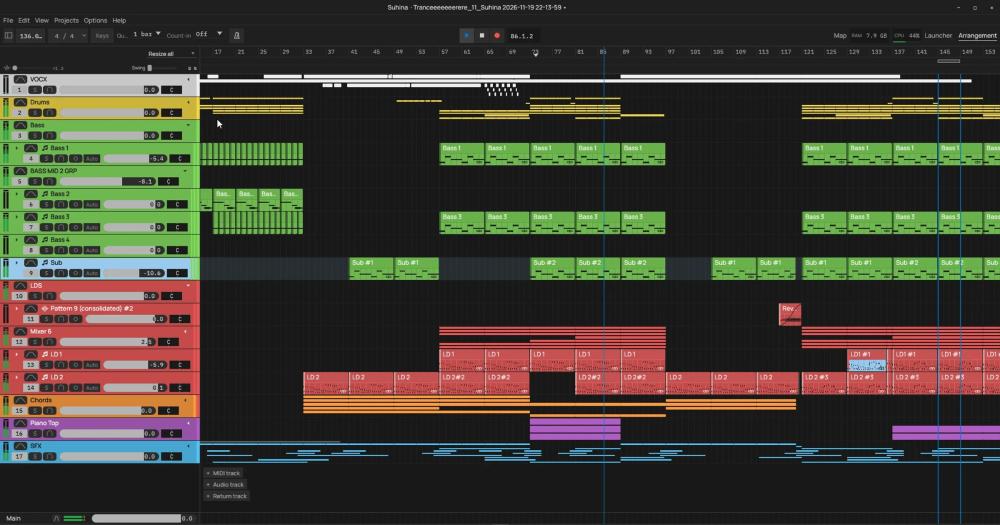
Suhina has two views. The Launcher shows your clips and scenes for live performance or sketching ideas. The Arrangement lays the song out on a timeline. Both views look at the same project, so you can jump between them without losing anything. Several projects can stay open in tabs at the same time.

Opens your Ableton Live and FL Studio project files

Suhina reads Ableton Live (.als) and FL Studio (.flp) project files. The FL Studio importer brings in patterns, samplers, audio clips, plug-ins with their settings, mixer routing, and automation. It tells you clearly what it could not bring in. This gives producers a way to try Suhina with their existing work.

Plug-ins run in their own process

Your CLAP, VST3, and VST2 plug-ins run in a separate program that Suhina starts up for them. If a plug-in crashes or freezes, your session keeps running. You do not lose unsaved work because of a third-party plug-in. There is also experimental support for ARA, a standard that lets plug-ins work more closely with the host program.

Built-in instruments and effects

Suhina comes with an FM (frequency modulation) Synth that reads DX7 voice files, a Sampler for sample, slice, and grain playback, and effects including a tone equaliser, Compressor, Delay, Reverb, Limiter, Saturator, Overdrive, and several more. No third-party plug-ins are needed to start making music.

Command line and AI agent control

Every action in Suhina can be run as a command. The suhina-cli tool lets you play, render, and control sessions from a terminal. An AI agent can also connect via MCP, a protocol for sending commands to the program from outside it. The agent gets the same full set of commands and one shared undo history. Agent access is off by default until you enable it.

Sample browser by sound

The sample map shows your library as a visual grid or cloud where similar-sounding samples sit next to each other. Finding one good sound leads you to others nearby. You can browse by feel rather than typing search terms.

strengths · trade-offs

Strengths and trade-offs#

Strengths

  • Free to use with no limitsSuhina is GPL-3.0 licensed and costs nothing to run. There is no free tier with feature limits, no subscription, and no paid version with more features. Everything in the app is available from the first download.
  • Opens your existing Ableton and FL Studio filesYou can bring your existing project files into Suhina instead of starting from scratch. The FL Studio importer brings in patterns, samplers, audio clips, plug-ins with their settings, mixer routing, and automation. The Ableton Live (.als) importer works the same way.
  • A crashed plug-in cannot stop your sessionPlug-ins run in a separate process from the main app. If a plug-in crashes, Suhina keeps going. This is a real practical improvement over most music production programs, where one bad plug-in can take the whole session down and lose unsaved work.
  • Runs on Windows, macOS, and LinuxSuhina publishes nightly builds for all three operating systems, including both Intel and Apple Silicon on macOS. Not all music production programs support Linux at all, and some are macOS-only or Windows-only.

Trade-offs

  • -Pre-alpha: expect missing features and bugsSuhina is in pre-alpha. The team asks you to work on copies of your projects because nightly builds are development builds, not stable releases. With 358 open issues and many features still in progress, it is not the right tool for a production deadline. It is a project to test and contribute to, not yet a finished product.
  • -No signed installers yetThe macOS and Windows builds are not signed with an official certificate. Both operating systems will warn you before running them. You have to approve the app manually in your security settings. The Linux version needs the audio library `libasound2` installed before it can play sound.
  • -Very new project with a small teamSuhina was first released in October 2026. It is an independent project. The roadmap is public, but how quickly features ship depends on contributor activity and the maintainers' time. Many features shown in the roadmap are not complete yet.
versus alternatives

Suhina vs alternatives#

Suhina vs Ableton Live

Ableton Live is the most popular program for making electronic music. Its Session View, where you launch and arrange clips, is the workflow Suhina copies most closely. Both have a Launcher and an Arrangement view that look at the same project.

FeatureSuhinaAbleton Live
PriceFreePaid
LicenseGPL-3.0Proprietary
Opens Live filesYes (.als)Yes
Plug-in sandboxingYesNo
StatusPre-alphaStable

Suhina is the better choice when you want the same clip-launching workflow at no cost and are willing to use pre-alpha software. It also opens your existing .als files so you can try it with your own projects. Ableton Live is still the better fit for any professional or deadline work. Suhina is not yet stable enough for that.

Suhina vs FL Studio

FL Studio is known for its pattern-based workflow and lifetime free updates. Its user base is large in hip-hop and electronic music. Suhina can open FL Studio .flp files, so you can bring your existing projects in to try it.

FeatureSuhinaFL Studio
PriceFreePaid (lifetime free updates)
LicenseGPL-3.0Proprietary
Opens FL Studio filesYes (.flp)Yes
Clip launcherYesNo (pattern-based)
StatusPre-alphaStable

Suhina is the better choice when you want a clip-launching workflow instead of a pattern-based one and want to bring your .flp files along. FL Studio is still the better fit for anyone already comfortable in its workflow and needing a stable tool.

Suhina vs Bitwig Studio

Bitwig Studio is the paid program most similar to Suhina in design. It has a clip-launching grid, an arrangement timeline, and deep MIDI (a standard for connecting instruments and software) and audio integration. Producers switching from Bitwig will find Suhina's layout familiar.

FeatureSuhinaBitwig Studio
PriceFreePaid
LicenseGPL-3.0Proprietary
Clip launcherYesYes
Modular devicesNo (planned)Yes
StatusPre-alphaStable

Suhina is the better choice when you want a free, open source Bitwig-style workflow. Bitwig Studio is the better fit when you need a stable, fully featured tool today, especially one with Bitwig's modular device system, which Suhina does not have yet.

install · quick start

Quick start#

bash
Download the nightly build for Windows, macOS, or Linux from GitHub Releases: https://github.com/suhina-daw/suhina-daw/releases/tag/nightly
tech stack · detected from GitHub

What it's built on#

Languages
PythonRust
frequently asked

FAQ#

Is Suhina stable enough to use for real music projects?

Not yet. Suhina is pre-alpha and the team recommends working on copies of your projects. The nightly builds are development builds, not stable releases. With 358 open issues and many features still in progress, use it to test and give feedback rather than for work you cannot afford to redo.

Can Suhina open my Ableton Live and FL Studio projects?

Yes. Suhina opens Ableton Live (.als) and FL Studio (.flp) project files. The FL Studio importer brings in patterns, samplers, audio clips, plug-ins with their settings, mixer routing, and automation. It tells you what it could not bring in. The Ableton Live importer works the same way.

What plug-in formats does Suhina support?

Suhina supports CLAP, VST3, and VST2 plug-ins. They run in a separate process from the main app, so a plug-in that crashes does not take down your session. There is also experimental support for ARA, a standard that lets plug-ins work more closely with the host program.

Does Suhina work on Linux?

Yes, but you need the ALSA audio library (Linux's standard sound system) installed first. The package is called libasound2 on Debian and Ubuntu systems. Suhina publishes nightly builds for Linux on x86_64. PulseAudio and PipeWire are also supported through ALSA.

How do I keep Suhina up to date?

You only need to download Suhina once from GitHub Releases. After that, Suhina checks at each start whether a newer nightly build is out and shows a notice in the app. Press Download update now inside the app and it replaces the running build and offers to restart.

also worth a look

Similar open-source tools#

Pro Wave

Alternative toAbleton Live

Logic Pro-style DAW in Rust, with Piano Roll and plug-in hosting

  • 287 GitHub stars
  • GPL-3.0Licence GPL-3.0

God's Eye View

Featured

Alternative toFFlightradar24

Real-time global intelligence on a 3D globe

  • 66,451 GitHub stars
  • CustomLicence MIT with third-party data restrictions

ultrafast

Alternative toRemotion

GPU video engine for AI agents, free under Apache-2.0 or MIT.

  • Apache-2.0Licence Apache-2.0

Senthym

Alternative toSpotify

Desktop music player for YouTube Music, Deezer and SoundCloud, no ads

  • 12 GitHub stars
  • GPL-3.0Licence GPL-3.0

Picasso Suite

Alternative toAdobe Premiere Pro

DaVinci Resolve-style video editor in Rust for Windows, macOS, Linux

  • 67 GitHub stars
  • GPL-3.0Licence GPL-3.0

Material Decoration

InDesign & Creative

KWin decoration with title-bar menus, search, and tiling for KDE

  • 141 GitHub stars
  • GPL-2.0Licence GPL-2.0
by category

Open source tools in these categories#

151

Design & Creative

ComfyUI, Excalidraw, Godot Engine

Sponsors

SnitchFeed

Live monitoring on LinkedIn, X, Reddit & more. Agentic social listening for startups.

Marketing & Growth

Windshift

Alternative toJira

Self-hosted work management for teams leaving Jira

  • 468 GitHub stars
  • AGPL-3.0Licence AGPL-3.0

Nuphos

Alternative toConductor

Agent workspace for teams running Claude Code or Codex

  • 759 GitHub stars
  • Apache-2.0Licence Apache-2.0
  • #AI Agents
Advertise your product

New open source projects by email

The projects we add and every new guide. Free, unsubscribe any time.

Find open source alternatives to paid software

/
  • Claude Code to OpenCode
  • Jira to Windshift
  • Notion to AppFlowy
  • Slack to Mattermost
  • Linear to GitLab
  • Wispr Flow to Handy
  • Microsoft To Do to Super Productivity
  • Arc to Zen Browser
  • CapCut to Concat
  • Grok Bot to rakazo
  • Superhuman to Inbox Zero
  • Discord to Stoat
  • Airtable to AITable
  • Datadog to SigNoz
  • Muse to OpenClaw
  • Railway to Coolify
  • GitHub Copilot to Cline
  • Confluence to Wiki.js
  • Microsoft Teams to Rocket.Chat
  • Zapier to n8n
  • 1Password to KeePassXC
  • Pinecone to Qdrant
  • Contentful to Strapi
  • Firebase to Supabase