

Who terminal-browser is for#
Developers pairing AI coding agents with web tasks
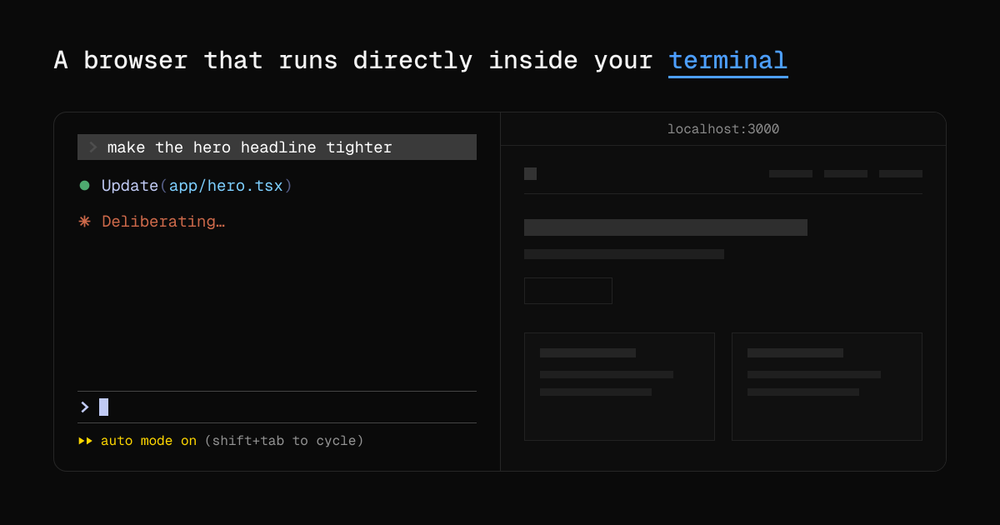
Keep a coding agent and a live browser in the same terminal tab. The agent can open URLs, test UI changes, and render HTML output via `terminal-browser action` without you relaying what is on screen.
Skip if:
Your AI agent workflows do not involve web output. A headless browser or curl-based fetch is simpler when you do not need to review browser-rendered results as part of the coding loop.
Remote developers previewing sites over SSH
Run `terminal-browser open localhost:8080` on a remote machine inside your SSH session and the browser renders there without port forwarding. The preview stays scoped to the remote host's filesystem and network.
Skip if:
You are already comfortable with SSH port forwarding and a local browser, or your remote environment is a cloud IDE like Codespaces that provides its own port preview panel.
Developers building terminal-native web apps
Use app mode to ship a terminal application built with web technology. The `--app-mode` flag removes browser chrome and shortcuts, leaving a full-screen web app frame inside the terminal with access to Electron preload and main-script APIs.
Skip if:
Your target is a standard web app for end users in a browser. App mode is for developers intentionally building terminal-facing tools, not a deployment target for general web apps.
The problem it solves#
When you pair a coding agent with web tasks, the browser lives in a separate window. The agent cannot see the page, cannot interact with it, and you have to manually relay what is on the screen. Context switching between a terminal agent session and a browser tab breaks the workflow every time the agent needs to check a result or test a UI change.
The challenge is compounded over SSH. Previewing a website running on a remote machine requires port forwarding or SSH tunnels, adding friction to every iteration. Text-only terminal browsers show markup without JavaScript, which means modern web apps never render correctly in the terminal. Until now there was no way to get a real, pixel-rendered browser inside the terminal itself.
How it solves it#
Full Chromium Rendering in the Terminal
Uses Electron's offscreen rendering API to capture pixels generated by Chromium directly from the GPU, then displays them inside the terminal via the kitty graphics protocol. JavaScript, CSS animations, and single-page apps all render correctly. DevTools are available via Cmd+Shift+I (macOS) or Ctrl+Shift+I (Linux).
Agent-Compatible Browser CLI
The `terminal-browser action` command exposes an agent-browser compatible CLI so AI coding agents can open URLs, navigate pages, and interact with open browser sessions programmatically. This lets a coding agent test a checkout flow, visualize an HTML plan, or inspect a UI without manual window switching.
SSH Remote Preview Without Port Forwarding
Run `terminal-browser open localhost:8080` directly on a remote machine over an SSH connection and the browser renders there without setting up port forwarding or SSH tunnels. The session stays scoped to the remote terminal tab, making remote web development significantly less tedious.
Split Pane Browser Launch
The `--split right` flag opens the browser in a split pane next to your active session. AI coding agents use this automatically when they call `terminal-browser open <url>`, keeping agent output and browser side by side in one terminal tab.
App Mode for Terminal Web Apps
The `--app-mode` flag disables the toolbar, tab strip, shortcuts, and right-click menu, turning the browser into a chrome-less app frame. Combined with `--preload` and `--main-script` options, it lets you build terminal-native apps using web technology, with the `terminal-code` project as a production example.
Strengths and trade-offs#
Strengths
- MIT License, Free to Self-HostThe MIT license means you can run terminal-browser on your own machines for any purpose, commercial or personal, with no licensing fees. There is no managed cloud tier required; the full feature set is available in the self-hosted install.
- Real Browser Engine, Not a Text RendererUnlike w3m or Lynx, which strip JavaScript and render only markup, terminal-browser runs Chromium. Modern web apps, React SPAs, and canvas-based tools render the same way they would in a standalone browser window. Trackpad scrolling and infinite canvas work correctly.
- Agent and Browser in One Terminal TabThe split-pane design and agent CLI mean an AI coding agent and its target browser share a single terminal tab. The agent does not need screen capture or a separate headless browser process; it controls an open terminal-browser session directly via the CLI.
- Broad Terminal CompatibilityAny terminal that implements the kitty graphics protocol works: Ghostty, Kitty, cmux, Herdr, and tmux, plus 50 or more others. This covers most modern terminal emulators used in developer workflows, with no vendor-specific plugin required beyond protocol support.
Trade-offs
- -Requires a Kitty-Protocol-Compatible Terminalterminal-browser only renders in terminals that support the kitty graphics protocol. The default macOS Terminal.app does not support it. Users on unsupported terminals need to switch to a compatible emulator such as Ghostty, Kitty, or tmux before installing.
- -macOS and Linux Only, No Windows SupportWindows is not supported. The README lists only macOS and Linux as target platforms. The background Swift component that enables smooth scrolling and trackpad input is platform-specific, and no Windows install path exists at this time.
- -Chrome Extensions Not Yet AvailableChrome extension support is on the roadmap but not yet shipped. Developers who depend on specific browser extensions for their workflow will need to keep a separate browser window for extension-dependent tasks until this ships.
terminal-browser vs alternatives#
terminal-browser vs GitHub Codespaces
GitHub Codespaces is a cloud-hosted development environment that runs VS Code in a browser and provides a browser preview panel for running apps. terminal-browser solves the same problem (seeing a browser alongside your code) from the opposite direction: it brings the browser into your local terminal rather than moving your terminal into a browser.
| Feature | terminal-browser | GitHub Codespaces |
|---|---|---|
| License | MIT | Proprietary |
| Hosting | Local install | GitHub-hosted only |
| Browser engine | Chromium (full) | Preview panel |
| SSH support | Yes, native | Not applicable |
| Agent CLI | Yes | No |
| Cost | Free | $0.18/core-hour and up |
terminal-browser is the better choice when you want an AI agent and browser together in one local terminal tab, when you are working over SSH on a remote server, or when you need the full Chromium feature set without a subscription. GitHub Codespaces is the better fit when your team needs a pre-configured cloud dev environment shared across collaborators, or when your machine cannot run Chromium locally.
terminal-browser vs Gitpod
Gitpod is a cloud-hosted development environment with a built-in browser preview for running web servers. Like Codespaces, it is vendor-hosted and accessed through a browser rather than a local terminal. terminal-browser is a local install that adds a browser layer to your existing terminal workflow without requiring a cloud account.
| Feature | terminal-browser | Gitpod |
|---|---|---|
| License | MIT | Proprietary |
| Hosting | Local | Cloud (or self-hosted enterprise) |
| Cost | Free | Free tier, then $9/month and up |
| Agent CLI | Yes | No |
terminal-browser is the better choice when you want to stay in your local environment, keep costs at zero, and give AI agents direct browser access in the same terminal tab. Gitpod is worth considering when your team needs ephemeral dev environments spun up from a git repo without any local machine setup.
Quick start#
Install on macOS or Linux using the official install script.
```bash
curl -fsSL https://terminal-browser.sh/install | bash
```What it's built on#
- Languages
- JavaScriptPythonRustSwiftTypeScript
- Frameworks
- React
- Tooling
- esbuild
FAQ#
Which terminals does terminal-browser support?
Any terminal that implements the kitty graphics protocol works, including Ghostty, Kitty, cmux, Herdr, and tmux. The project lists 50 or more compatible terminals. The default macOS Terminal.app does not support the kitty graphics protocol and will not display the browser.
Does terminal-browser work over SSH?
Yes. Run terminal-browser open <url> on the remote machine inside your SSH session and the browser renders there without setting up port forwarding. The session is scoped to the remote host, so you see the site as it runs on that machine.
Can an AI coding agent control terminal-browser?
Yes, via the terminal-browser action command, which exposes an agent-browser compatible CLI. Agents running in tools like Claude Code can open URLs, interact with pages, and visualize HTML output by calling terminal-browser CLI commands directly from the agent session.
What is the license for terminal-browser?
MIT. The MIT license lets you use, modify, and distribute the software for any purpose, including commercial projects, with no restrictions beyond attribution. You can run it on your own machines at no cost indefinitely.
Does terminal-browser support Windows?
No. terminal-browser supports macOS and Linux only. The smooth scrolling and trackpad input layer depends on a platform-specific Swift component, and no Windows install path is available or currently on the roadmap.
Similar open-source tools#

EmDash CMS
Web-based CMS for creating and managing AI playgrounds

VoidZero
Next-generation unified JavaScript tooling infrastructure

Zed
High-performance open source code editor with built-in AI

Obtainium
Android app updates direct from GitHub and F-Droid

Cloudflare Os
Open source AI workspace with sandboxed apps and Gatekeeper security

Firebase Ios Sdk
Open source Apple SDK for Firebase auth, data, push and crashes