Open Source Alternatives
  • Alternatives
  • Categories
    Categories by size1,075 projects
    • Developer Tools544
    • AI & Machine Learning470
    • Business & Productivity251
    • Web Development205
    • Security & Monitoring166
    • Communication & Collaboration145
    • IT Management143
    • Cloud & Hosting126
    • LLMOps & AI Tooling122
    • Data & Analytics116
    Browse all 21 categoriesProduct & Project Management, Design & Creative and 9 more
  • Blog
  • Advertise
SearchNotion, Slack, password manager.../
Submit
Open Source Alternatives
  • Alternatives
    • Developer Tools544
    • AI & Machine Learning470
    • Business & Productivity251
    • Web Development205
    • Security & Monitoring166
    • Communication & Collaboration145
    • Browse all 21 categories
  • Blog
  • Advertise
Submit your project

New open source projects by email

The projects we add and every new guide. Free, unsubscribe any time.

Open Source Alternatives LogoOpen Source Alternatives

Handpicked Open Source Alternatives to Paid Softwares

Product

  • Categories
  • Tag
  • Advertise

Resources

  • Blog
  • Collection
  • Submit

Company

  • Privacy Policy
  • Terms of Service
  • Refund Policy
  • Sitemap

Alternatives

  • Claude Code
  • Jira
  • Notion
  • Slack
  • Linear
  • Wispr Flow
  • All alternatives
© 2026 Open Source Alternatives. All rights reserved.
Open SourceAlternatives
Home/Categories/IT Management/Termix
icon of Termix

Termix

Open source alternative to Termius, MobaXterm, Royal TS, SecureCRT and CtrlOps

  • 15.8K stars
  • Apache-2.0
  • Active this week
  • Last commit today

Last verified Nov 5, 2026

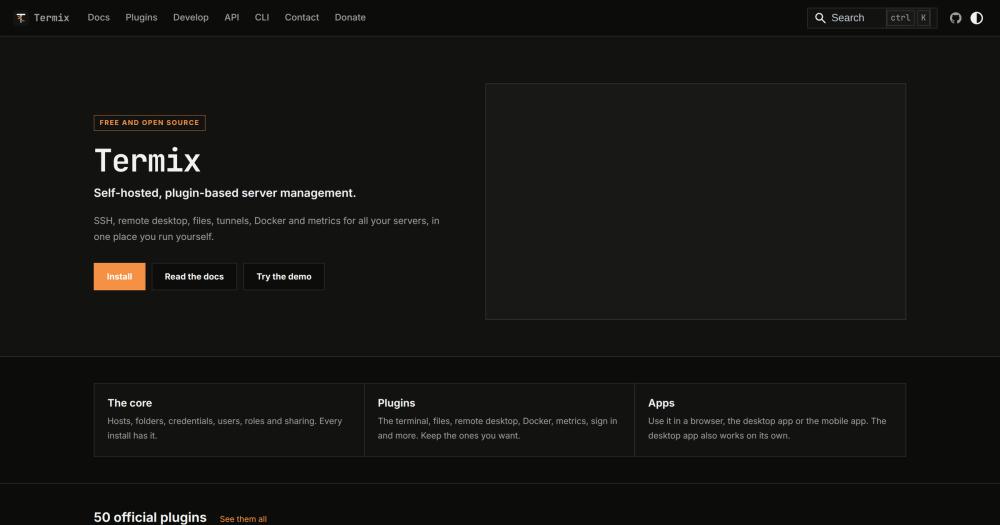
Manage servers, SSH sessions, remote desktops, and Docker containers from a self-hosted, plugin-based platform with 50 official plugins.

Visit websiteGitHub15.8K starsDeploy on Hostinger
Image for Termix
TL;DR

Termix is a free, open source server management platform built on plugins, used as a self-hosted alternative to paid tools like Termius and MobaXterm. The core handles host inventory, credentials, users, roles, and sharing; every other capability (SSH terminal, remote desktop, Docker, Kubernetes, file manager, monitoring, and more) is an installable plugin from a set of 50 official ones. Apache 2.0 licensed. Runs as a single Docker container on any server or VPS, with apps for web, Windows, macOS, Linux, iOS, and Android.

Read the full breakdownHide the full breakdownWho it is for, how it works, trade-offs, the quick start and the FAQ
who it's for

Who Termix is for#

Homelab operators managing 5-50 servers

Termix covers exactly what a homelab needs: SSH terminals, RDP and VNC for headless machines, Docker and Proxmox management, Tailscale integration, and a homepage widget for services. One Docker container on the homelab gives a web and mobile interface for the whole fleet without additional services.

Skip if:

If you manage one or two servers and prefer a lightweight native client, a standalone SSH client is simpler to maintain than a self-hosted server.

Engineering teams centralizing server credentials

Teams with shared server credentials and mixed access levels benefit from Termix's four-level role system: developers get connect access, seniors get view, ops gets edit. Session recording adds an audit trail. LDAP and SSO plugins integrate with existing identity providers so staff use their corporate login.

Skip if:

If your team already uses a zero-trust network access tool like Tailscale SSH or Cloudflare Access, adding a full server manager may add complexity without proportional benefit.

Cloud self-hosters avoiding subscription SSH tools

Termix replaces Termius for teams that want a web and mobile interface for SSH, remote desktop, and file management without per-seat licensing fees. Deploy once on a VPS, share the URL with team members, and add or remove users through the admin panel.

Skip if:

If you need a polished, zero-infrastructure mobile SSH client and do not want to manage a server, Termius's managed tier offers a faster out-of-box experience than self-hosting Termix.

the problem

The problem it solves#

Managing remote servers typically means juggling multiple tools: one SSH client for terminals, another for file transfers, a third for remote desktop sessions, and paid services that charge per seat for team access. Commercial tools like Termius and MobaXterm split their best features behind subscription tiers or Windows-only installers, leaving teams either paying ongoing licensing fees or working around capability gaps.

The problem compounds at the team level. Shared credentials are hard to manage securely, audit logs are absent or locked behind premium tiers, and there is no way to give a junior team member read-only access to a subset of servers without granting full access. Cloud-hosted tools add a third concern: session data and host credentials live on the vendor's servers, not yours.

how Termix solves it

How it solves it#

50-plugin architecture you configure

Termix ships with 50 official plugins covering SSH terminals, remote desktop, file management, Docker, Kubernetes, Proxmox, monitoring, security, and productivity. Admins enable, disable, or remove plugins from the admin panel; users see only what admins expose. A community registry adds third-party plugins, and a TypeScript SDK lets you build your own and deploy to your server in minutes.

RDP, VNC, and Telnet in the browser

The Remote Desktop plugin streams RDP, VNC, and Telnet sessions directly in a browser tab, with clipboard sync, file transfer, screen sharing, and session recording. All three protocols run from the same Docker container: no sidecar service is needed. Sessions can be shared with another user or broadcast to a group in a meeting room.

Fleet commands across multiple hosts

The Fleets plugin groups hosts into named sets and runs shell commands, package manager actions, and file transfers across all of them in one operation. Useful for patching, config distribution, or running checks across a whole tier of servers at once without opening individual terminals.

Four-level role-based host access

Termix's sharing model assigns four access levels (connect, view, edit, manage) to individual hosts, folders, and credentials. A junior team member with connect-only access cannot read credentials or change host settings. Roles apply to groups of users and can inherit access from parent folders.

Docker and Kubernetes management over SSH

The Docker plugin manages containers, images, and networks on remote hosts over SSH, with logs, stats, and an exec console per container. The Kubernetes plugin connects to clusters through SSH-tunneled kubeconfig, with log tailing, resource YAML editing, metrics, and a shell. Both work without opening any additional ports beyond SSH.

strengths · trade-offs

Strengths and trade-offs#

Strengths

  • Free forever with no paid tierTermix has no subscription, no per-seat pricing, and no feature gating behind paid tiers. The full plugin catalog is available to every install. Development is funded by donations. Compared to Termius, which charges per seat on team plans, the cost difference becomes significant for teams of five or more.
  • Active development with 15,800+ stars in under two yearsTermix was created in November 2024 and reached 15,837 GitHub stars with 9 open issues as of November 2026, reflecting active triage and fast issue resolution. Consistent daily pushes and an expanding plugin catalog show ongoing development with no sign of project dormancy.
  • Per-user credential encryption with optional disk encryptionEach user's passwords and SSH keys are encrypted with their own key; no other user (including admins) can read them. The database can also be encrypted on disk. The Secret Sources plugin integrates with 1Password to pull credentials at connection time rather than storing them in Termix at all, for teams with stricter key hygiene requirements.
  • Short-lived SSH certificates via Vault, Step CA, or OPKSSHThree plugins issue short-lived SSH certificates instead of permanent keys: HashiCorp Vault integration, smallstep step-ca, and OpenPubkey SSH (OPKSSH) for identity-provider-signed certs. All three avoid storing long-lived private keys on each host, reducing the blast radius of a compromised credential. No password manager or key rotation script needed.

Trade-offs

  • -Project launched November 2024, limited long-term track recordTermix was created in late 2024, giving it about two years of production use as of late 2026. While it is actively maintained with strong community adoption, it lacks the multi-year production track record of commercial tools like SecureCRT or Royal TS. Teams running critical infrastructure should validate Termix thoroughly before full adoption.
  • -Self-hosting required, no managed cloud tierTermix has no managed cloud option. If your team needs to be running in minutes without infrastructure work, a managed alternative like Termius starts faster. Running Termix on the same network it manages also creates a dependency: if the host Termix runs on is unreachable, so is the management interface. A separate VPS or cloud host mitigates this, as the README suggests.
  • -50-plugin catalog requires deliberate configuration choicesWith 50 official plugins, selecting the right set for a team requires planning. Plugins for LDAP, SSO, HashiCorp Vault, and certificate authorities need external systems to integrate with. Teams wanting only SSH and file transfers will find the catalog offers more than they need and must actively decide which plugins to disable or leave uninstalled.
versus alternatives

Termix vs alternatives#

Termix vs Termius

Termius and Termix cover the same ground: SSH connections, remote desktop, file management, and team credential sharing. The difference is where the data lives and what you pay.

FeatureTermixTermius
LicenseApache 2.0Proprietary
Self-hostingYesNo
PricingFree (self-hosted)Per seat (team plans)
Remote desktopRDP, VNC, Telnet (browser)No native RDP/VNC
Plugin system50 official pluginsFixed feature set
Mobile appsiOS, AndroidiOS, Android

Termix is the better choice when your team wants data ownership, needs remote desktop in the same tool as SSH, or wants to avoid per-seat fees as the team grows. The plugin system also means LDAP, SSO, or HashiCorp Vault integration comes at no extra cost.

Termius is the better choice when you need a fully managed service with zero infrastructure overhead, or when your primary use case is mobile SSH and you want a polished native app without maintaining a server.

Termix vs MobaXterm

MobaXterm is a Windows-only terminal with SSH, RDP, VNC, SFTP, and X11 forwarding built in. It is a client application; there is no server component and no team credential sharing.

FeatureTermixMobaXterm
LicenseApache 2.0Proprietary (Home Edition free)
PlatformWeb, Windows, macOS, Linux, iOS, AndroidWindows only
Team sharingYes (roles, folders)No (single-user)
Browser accessYesNo
Server componentYes (self-hosted)No

Termix is the better choice for teams, for multi-platform access, or when you need a browser interface. MobaXterm is the better choice if you work exclusively on Windows, want a standalone client with no server to maintain, and need X11 forwarding, which Termix does not offer.

Termix vs Royal TS

Royal TS is a cross-platform connection manager for RDP, SSH, VNC, and web-based endpoints used by teams to share credentials and organize connections. It requires licensed application installs and optional shared document storage.

FeatureTermixRoyal TS
LicenseApache 2.0Proprietary (per-seat)
Self-hostingYesShared document storage only
Browser accessYesDesktop app required
Plugin extensibility50 official + communityExtension set
MobileiOS, AndroidiOS, Android

Termix is the better choice for teams that want a browser interface, server-side session recording, or a self-hosted credentials store with role-based access. Royal TS is the better choice when your team is already familiar with its connection document workflow, needs its gateway functionality, or wants to avoid maintaining a server.

install · quick start

Quick start#

bash
Self-host Termix on your server using Docker.

```bash
docker run -d -p 8080:8080 -v termix-data:/app/data -e PORT=8080 --name termix --restart unless-stopped ghcr.io/termix-ssh/termix:latest
```
tech stack · detected from GitHub

What it's built on#

Languages
JavaScriptTypeScript
Frameworks
ElectronExpressReact
Databases
MySQLPostgreSQL
Infrastructure
Docker
Tooling
esbuild
frequently asked

FAQ#

Is Termix free to use?

Yes. Termix is Apache 2.0 licensed and free to self-host for any team size. There are no paid plans or premium tiers; development is funded by donations. You pay only for the infrastructure you host it on.

Does Termix support RDP and VNC for remote desktop?

Yes. The Remote Desktop plugin handles RDP, VNC, and Telnet sessions directly in the browser, with clipboard sync, file transfer, screen sharing, and session recording. All three protocols run from the same Docker container: no sidecar service is needed alongside Termix.

What is the difference between Termix and Termius?

Termius is a commercial SSH client with managed sync, per-seat pricing on team plans, and no self-hosting option. Termix is a free, self-hosted alternative: you deploy it on your own server, all credentials and session data stay on your infrastructure, and there is no subscription fee. Termix also covers remote desktop (RDP, VNC, Telnet) in the browser, which Termius does not offer.

Can I build my own plugins for Termix?

Yes. Termix provides a TypeScript SDK and a plugin template at github.com/Termix-SSH/Termix-Plugin-Template. Plugins built with the SDK run as tabs inside Termix and have access to the host, credential, and session APIs. Completed plugins can be submitted to the community registry or served from a private registry you host yourself.

How does Termix handle credentials and SSH keys?

Credentials in Termix are encrypted per user; no other user (including admins) can read another user's secrets. The database can also be encrypted on disk. The Secret Sources plugin integrates with 1Password to pull host passwords and keys at connection time instead of storing them in Termix at all, for teams with stricter key hygiene requirements.

also worth a look

Similar open-source tools#

Termux App

Alternative toTermius

Linux terminal and package manager for Android devices.

  • 64,009 GitHub stars
  • GPL-3.0-onlyLicence GPL-3.0-only

Nexion

Alternative toTermius

Web3 SSH manager that replaces passwords with crypto keys

  • 18 GitHub stars
  • Apache-2.0Licence Apache-2.0

Pangolin

Alternative toCloudflare Zero Trust

Zero-trust network access, reverse proxy, and AI gateway, self-hosted.

  • 23,314 GitHub stars

Infisical

Alternative toHashiCorp Vault

Self-hosted secrets, certs, and privileged access in one platform.

  • 30,275 GitHub stars
  • MITLicence MIT

Code Server

Alternative toGitHub Codespaces

VS Code in the browser, self-hosted, with no per-seat pricing.

  • 79,767 GitHub stars
  • MITLicence MIT

Beszel

Alternative toDatadog

Self-hosted server monitoring with Docker stats and disk health.

  • 26,836 GitHub stars
  • MITLicence MIT
by category

Open source tools in these categories#

143

IT Management

RustDesk, Immich, Stirling PDF
112

DevOps & CI/CD

Nvm, Uptime Kuma, Netdata
544

Developer Tools

REA (Reverse Engineer Anything), Skills for Real Engineers, superpowers
166

Security & Monitoring

Uptime Kuma, REA (Reverse Engineer Anything), RustDesk
Hostinger

Self-host Termix on a Hostinger VPS

Keep it running 24/7, even when your laptop is off. A Hostinger VPS gives it a server of its own.

  1. 01

    Choose a plan

    Starts from $6.49/mo

  2. 02

    Apply

    Extra 10% off yearly plans

  3. 03

    Install Termix

    On a server that stays on

  4. 04

    Start building

    Focus on the app, not the server

Deploy on Hostinger

Sponsors

Inbox Zero

Alternative toSuperhuman

AI email assistant that drafts replies and clears your inbox

  • 12,889 GitHub stars
  • AGPL-3.0Licence AGPL-3.0
  • #Email

rakazo

Alternative toGrok Bot

AI teammates you own: your keys, your model, your machine.

  • 6,568 GitHub stars
  • Apache-2.0Licence Apache-2.0
  • #AI Agents

SnitchFeed

Live monitoring on LinkedIn, X, Reddit & more. Agentic social listening for startups.

Marketing & Growth

Advertise your product

New open source projects by email

The projects we add and every new guide. Free, unsubscribe any time.

Find open source alternatives to paid software

/
  • Claude Code to OpenCode
  • Jira to Windshift
  • Notion to AppFlowy
  • Slack to Mattermost
  • Linear to GitLab
  • Wispr Flow to Handy
  • Arc to Zen Browser
  • CapCut to Concat
  • Grok Bot to rakazo
  • Superhuman to Inbox Zero
  • Airtable to AITable
  • Muse to OpenClaw
  • Railway to Coolify
  • GitHub Copilot to Cline
  • Datadog to Netdata
  • Confluence to Wiki.js
  • Microsoft Teams to Rocket.Chat
  • Pinecone to Qdrant
  • Zapier to n8n
  • 1Password to KeePassXC
  • Devin AI to OpenHands
  • Firebase to Supabase
  • Contentful to Strapi
  • Adobe Premiere Pro to Shotcut
  • Claude Code to OpenCode
  • Jira to Windshift
  • Notion to AppFlowy
  • Slack to Mattermost
  • Linear to GitLab
  • Wispr Flow to Handy
  • Arc to Zen Browser
  • CapCut to Concat
  • Grok Bot to rakazo
  • Superhuman to Inbox Zero
  • Airtable to AITable
  • Muse to OpenClaw
  • Railway to Coolify
  • GitHub Copilot to Cline
  • Datadog to Netdata
  • Confluence to Wiki.js
  • Microsoft Teams to Rocket.Chat
  • Pinecone to Qdrant
  • Zapier to n8n
  • 1Password to KeePassXC
  • Devin AI to OpenHands
  • Firebase to Supabase
  • Contentful to Strapi
  • Adobe Premiere Pro to Shotcut