Open Source Alternatives
  • Alternatives
  • Categories
    Categories by size988 projects
    • Developer Tools506
    • AI & Machine Learning434
    • Business & Productivity224
    • Web Development202
    • Security & Monitoring149
    • Communication & Collaboration134
    • IT Management134
    • Cloud & Hosting117
    • LLMOps & AI Tooling111
    • Data & Analytics108
    Browse all 21 categoriesProduct & Project Management, Design & Creative and 9 more
  • Blog
  • Advertise
SearchNotion, Slack, password manager.../
Submit
Open Source Alternatives
  • Alternatives
    • Developer Tools506
    • AI & Machine Learning434
    • Business & Productivity224
    • Web Development202
    • Security & Monitoring149
    • Communication & Collaboration134
    • Browse all 21 categories
  • Blog
  • Advertise
Submit your project

New open source projects by email

The projects we add and every new guide. Free, unsubscribe any time.

Open Source Alternatives LogoOpen Source Alternatives

Handpicked Open Source Alternatives to Paid Softwares

Product

  • Categories
  • Tag
  • Advertise

Resources

  • Blog
  • Collection
  • Submit

Company

  • Privacy Policy
  • Terms of Service
  • Refund Policy
  • Sitemap

Alternatives

  • Claude Code
  • Jira
  • Notion
  • Slack
  • Linear
  • Wispr Flow
  • All alternatives
© 2026 Open Source Alternatives. All rights reserved.
Open SourceAlternatives
Home/Categories/Business & Productivity/Tidymint
icon of Tidymint

Tidymint

Open source alternative to CleanMyMac and Sensei

  • 3 stars
  • MIT
  • Active this week
  • Last commit today

Last verified Oct 31, 2026

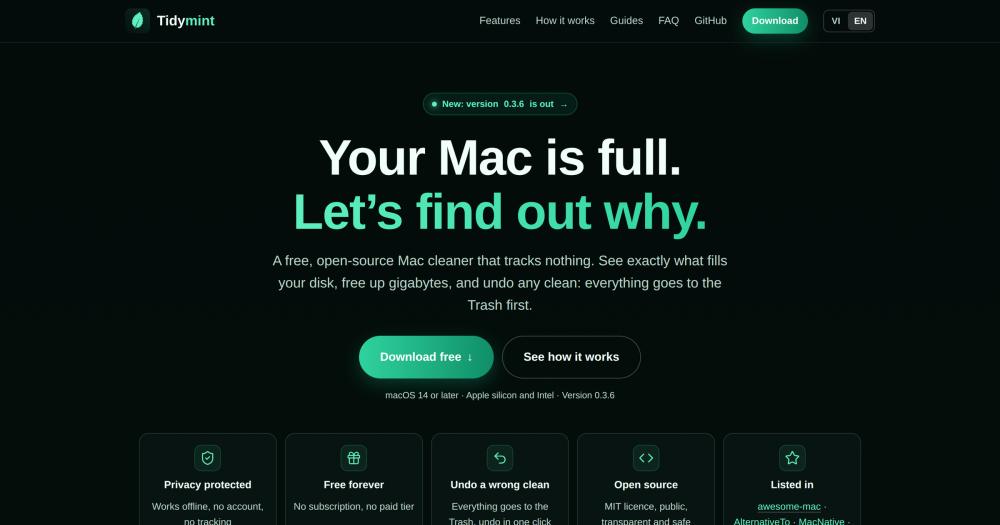
Manage disk space on macOS using nine built-in tools including a cache cleaner, uninstaller, and space map. Free, MIT licensed, no account required.

Visit websiteGitHub3 stars
image of Tidymint
TL;DR

Tidymint is a free, MIT-licensed Mac disk cleaner that replaces paid tools like CleanMyMac and Sensei. It runs nine cleaning modules (caches, logs, large files, duplicates, full app uninstall, space visualization, and per-app cleaning) and moves everything to the Trash first with one-click Undo. Best for developers, AI practitioners, and creative professionals who want a transparent, open source alternative to subscription-based Mac cleaners.

Read the full breakdownHide the full breakdownWho it is for, how it works, trade-offs, the quick start and the FAQ
who it's for

Who Tidymint is for#

AI practitioners managing model weight accumulation

Model weights from Ollama, Hugging Face, and local inference tools can fill a Mac in weeks. Tidymint's Space Lens labels these folders directly and Clean Now includes their cache directories, making it straightforward to see what you need versus what you downloaded once and forgot.

Skip if:

You manage models programmatically with tools like the Ollama CLI and prefer deletions in a terminal workflow. Tidymint's GUI approach adds a step you may not want.

Developers with large package manager caches

npm, Homebrew, pip, and similar tools leave large caches that do not clean themselves automatically. Clean Now targets these by name, sized and grouped, so you can reclaim space without hunting through Library folders. The project-folder protection prevents accidental deletion of files your active projects reference.

Skip if:

You already run automated cache clearing scripts in your dotfiles or CI setup. The manual GUI workflow does not add much if automation already handles it.

Video and photo editors with duplicate and export files

Exported renders, project drafts, and duplicate source assets accumulate quickly in creative workflows. The Large Files tab surfaces files over 100 MB sorted by size or last-opened date. The Duplicates scanner matches files by SHA-256 content hash across folders and keeps one copy.

Skip if:

You use a dedicated digital asset manager that already tracks versions and duplicates across your project library. Tidymint's duplicate detection is file-level, not aware of media library project structures.

the problem

The problem it solves#

Mac storage fills up faster than most users expect, and the culprit is rarely a single large file. Browser caches, editor caches, npm and Homebrew package stores, AI model weights, render drafts, and leftover files from apps you already deleted accumulate quietly across dozens of folders. macOS groups much of this under "System Data" in Storage Settings, a bucket that Finder cannot inspect directly.

Paid Mac cleaners exist to address this, but most require a subscription, bundle features beyond disk cleaning (RAM optimization, malware scanning), and run as closed-source software. Users who run AI workloads or development tools often find that generic cleaner categories miss the largest offenders (Ollama model caches, node_modules, Hugging Face downloads) entirely.

how Tidymint solves it

How it solves it#

Trash-first cleaning with one-click Undo

Every item Tidymint cleans goes to the Trash, not permanent deletion. The Undo page restores the last full clean in one click while those files are still in the Trash, giving you a safe recovery path after any scan. Photos, Mail, keychains, and Apple system caches are never touched.

Project-aware duplicate detection

Duplicates are matched by SHA-256 content hash regardless of filename, and one copy is always kept. Before removal, the app checks your designated project folders and flags any file still referenced by a script or skill in red and unticks it automatically, so a cleanup never breaks a build or AI workflow.

Space Lens disk map

A bubble map draws your entire drive as folders sized by real disk usage, with plain-language labels for common locations including Ollama model folders, npm caches, and Time Machine snapshots. Useful for tracking down the "Full, no idea why" category that macOS lumps into System Data.

Full app uninstaller with leftover removal

Dragging an app to the Trash leaves caches, preferences, logs, and saved state behind. Tidymint removes those alongside the app. A separate tab lists leftover files from apps you already deleted, and old installers are surfaced on their own tab.

Per-app cleaning for browsers and editors

Browsers, chat apps (Slack, Telegram), and editors (VS Code, CapCut) each get their own cleaning page. Caches are pre-selected; photos, videos, and files are grouped by month for you to choose; messages and logins are locked. Cleaning is refused while the app is open.

Menu bar disk and memory monitor

A mint-leaf icon in the menu bar fills as disk space decreases, showing free gigabytes next to it. It also displays RAM usage and Trash size at a glance and sends alerts when disk space or memory runs low. Light enough to leave running all day.

strengths · trade-offs

Strengths and trade-offs#

Strengths

  • MIT license with full source transparencyThe complete Swift codebase is on GitHub under the MIT license. Anyone can read every line, verify what the app touches, and fork or modify it. This contrasts with closed-source Mac cleaners like CleanMyMac, where users must trust the binary without inspecting it.
  • Free with no subscription, no paid tier, and no accountTidymint has no trial period, no feature gating, and no subscription. The full nine-tool set is available from the first launch at no cost. The project is funded by optional GitHub sponsorships, which go toward the Apple Developer account for notarization.
  • Works offline with no data collectionThe app works without internet access. Its only network call is a once-a-day version check that sends nothing about your Mac. No analytics, no data collection, no account required. Settings and activity logs stay local at ~/Library.
  • AI and developer workflow categories built inSpace Lens labels Ollama model folders directly. Clean Now picks up Hugging Face and npm caches by name. The duplicate finder's project protection works on AI skill and model directories. These are the categories where AI practitioners and developers accumulate the most gigabytes fastest.

Trade-offs

  • -Requires a manual first-launch security overrideTidymint is not notarized by Apple because notarization requires a paid Apple Developer account. On first launch, macOS blocks the app and users must open System Settings, go to Privacy and Security, and click Open Anyway. This extra step is a friction point compared to commercial Mac cleaners that open immediately.
  • -Very new project with no public community track recordThe repository was created on October 26, 2026, with 3 stars and 0 open issues. It has no long-term stability signal, no independent user reviews, and no established contributor community. Users evaluating it for production workflows should expect rough edges typical of a fresh release.
versus alternatives

Tidymint vs alternatives#

Tidymint vs CleanMyMac

CleanMyMac is the most widely known commercial Mac cleaning tool. Both tools scan for caches, uninstall apps with leftovers, and surface large files, making them direct alternatives for the core disk-cleaning use case.

FeatureTidymintCleanMyMac
LicenseMIT (open source)Proprietary
PriceFreeSubscription required
Source codePublic on GitHubNot available
Malware scanningRelies on macOS XProtectBundled scanner
NotarizedNot yetYes
AI workflow categoriesYes (Ollama, Hugging Face)General categories only

Tidymint is the better choice when source transparency matters, when the recurring subscription cost of CleanMyMac is a concern, or when you work with AI model folders that CleanMyMac's general categories miss. CleanMyMac is the better choice when you want a fully notarized app that opens without a security override, bundled malware detection, or an established support track record backed by years of user reports.

Tidymint vs Sensei

Sensei is a Mac utility focused primarily on performance monitoring and hardware metrics alongside basic disk cleaning. The overlap with Tidymint is limited to cache cleaning and storage space visibility.

FeatureTidymintSensei
LicenseMIT (open source)Proprietary
PriceFreeSubscription required
Primary focusDisk cleaning, storagePerformance monitoring
Space visualizationBubble map (Space Lens)Basic storage view
App uninstallerFull, with leftoversBasic
AI and dev cache categoriesYesNo

Tidymint is the better choice when disk cleaning and storage recovery are the primary goal, especially for developers and AI practitioners with category-specific caches. Sensei is the better choice when you want ongoing CPU, GPU, and RAM performance monitoring alongside a basic cleaning tool. The two products address different primary needs and can be run together rather than replacing one another.

install · quick start

Quick start#

bash
Download the macOS app (Apple silicon and Intel, macOS 14 or later) from GitHub Releases: https://github.com/HaiTrung-Workspace/tidymint/releases/latest
tech stack · detected from GitHub

What it's built on#

Languages
PythonSwift
frequently asked

FAQ#

Is Tidymint really free?

Yes. Tidymint is free forever under the MIT license with no subscription, no trial, and no paid tier. The full nine-tool set is available from the first launch. The project is funded by optional GitHub sponsorships, which go toward an Apple Developer account for notarization and faster release updates.

How is Tidymint different from CleanMyMac?

Tidymint is open source and free; CleanMyMac is closed source and requires a subscription. CleanMyMac bundles its own malware scanner and threat detection; Tidymint relies on macOS's built-in XProtect and Gatekeeper and focuses solely on disk cleaning and space recovery. The trade is feature breadth versus source transparency and no cost.

Why does macOS block Tidymint on the first launch?

Tidymint is not yet notarized by Apple because notarization requires a paid Apple Developer account. On first launch, click Done when macOS says it cannot be opened, then open System Settings, go to Privacy and Security, and click Open Anyway. The source code is public on GitHub for anyone who wants to inspect it before running it.

Does Tidymint delete files permanently?

No. Every clean moves selected files to the Trash and does nothing more. Files are not erased until you empty the Trash yourself. The Undo function on the Trash page restores the entire last clean in one click, as long as those files are still in the Trash.

Which macOS versions and chips does Tidymint support?

Tidymint requires macOS 14 or later and runs on both Apple silicon and Intel Macs. An iPhone version is not planned because iOS does not allow apps to clean other apps' data. A Windows version is listed as in development with no release date.

also worth a look

Similar open-source tools#

PureMac

Alternative toCleanMyMac

Free native Mac cleaner with app uninstall, cache scans, no telemetry.

  • 7,533 GitHub stars
  • MITLicence MIT

Mole

Alternative toCleanMyMac X

Free CLI and native app for Mac cleanup, uninstall, and disk analysis

  • 73,394 GitHub stars
  • GPL-3.0Licence GPL-3.0

Blitzclean

Alternative toCleanMyMac

macOS menu-bar monitor and storage cleaner for developers

  • 260 GitHub stars
  • MITLicence MIT

Cleaner

Alternative toCleanMyMac

Mac disk cleaner that shows every item before it removes anything.

  • 4 GitHub stars
  • MITLicence MIT

chippytea

Alternative toCleanMyMac

Free up Mac disk space with no account and no telemetry.

  • 236 GitHub stars
  • MITLicence MIT

CleanYourTV

Featured

Alternative toATV Launcher Pro

Debloat any Android or Google TV over Wi-Fi and get an Apple TV-style home.

  • 43,973 GitHub stars
  • MIT LicenseLicence MIT License
by category

Open source tools in these categories#

224

Business & Productivity

OpenClaw, Excalidraw, RustDesk

Sponsors

Inbox Zero

Alternative toSuperhuman

AI email assistant that drafts replies and clears your inbox

  • 12,855 GitHub stars
  • AGPL-3.0Licence AGPL-3.0
  • #Email

Omnara

Alternative toCClaude Managed Agents

Open-source agent deployment API. Self-host or use Omnara Cloud.

  • 3,325 GitHub stars
  • Apache-2.0Licence Apache-2.0
  • #AI Agents

rakazo

Alternative toGrok Bot

AI teammates you own: your keys, your model, your machine.

  • 6,242 GitHub stars
  • Apache-2.0Licence Apache-2.0
  • #AI Agents
Advertise your product

New open source projects by email

The projects we add and every new guide. Free, unsubscribe any time.

Find open source alternatives to paid software

/
  • Claude Code to OpenCode
  • Jira to Windshift
  • Notion to AppFlowy
  • Slack to Mattermost
  • Linear to GitLab
  • Wispr Flow to Handy
  • Arc to Zen Browser
  • CapCut to Concat
  • Grok Bot to rakazo
  • Superhuman to Inbox Zero
  • Airtable to AITable
  • Muse to OpenClaw
  • Railway to Coolify
  • GitHub Copilot to Cline
  • Datadog to Netdata
  • Microsoft Teams to Rocket.Chat
  • Confluence to Docmost
  • Pinecone to Qdrant
  • Zapier to n8n
  • Devin AI to OpenHands
  • Firebase to Supabase
  • 1Password to KeePassXC
  • Contentful to Strapi
  • Adobe Premiere Pro to Shotcut
  • Claude Code to OpenCode
  • Jira to Windshift
  • Notion to AppFlowy
  • Slack to Mattermost
  • Linear to GitLab
  • Wispr Flow to Handy
  • Arc to Zen Browser
  • CapCut to Concat
  • Grok Bot to rakazo
  • Superhuman to Inbox Zero
  • Airtable to AITable
  • Muse to OpenClaw
  • Railway to Coolify
  • GitHub Copilot to Cline
  • Datadog to Netdata
  • Microsoft Teams to Rocket.Chat
  • Confluence to Docmost
  • Pinecone to Qdrant
  • Zapier to n8n
  • Devin AI to OpenHands
  • Firebase to Supabase
  • 1Password to KeePassXC
  • Contentful to Strapi
  • Adobe Premiere Pro to Shotcut