

Who VoiceStudio is for#
Content creators producing multilingual voiceovers
Clone your own voice once, then render narration in any of 646 languages without a recording session. VoiceStudio's batch queue handles long scripts in the background, and all exported audio stays on your machine with no upload required.
Skip if:
If your voiceover work requires a managed cloud backup, real-time collaboration with a remote team, or output from a specific proprietary voice model (such as ElevenLabs Turbo), the local-only default adds friction that a cloud service avoids.
Developers integrating local TTS and transcription
VoiceStudio exposes an OpenAI-compatible API at localhost:3900 covering speech synthesis, voice listing, and transcription. Drop it behind any code that already calls the OpenAI audio API and redirect the base URL. An MCP server is also available for AI assistant integrations.
Skip if:
If you need a managed, scaled API with SLA guarantees and global edge delivery, VoiceStudio's localhost-only default is not a production cloud replacement out of the box. A cloud API path is listed as coming soon on the product website.
Audiobook and podcast producers working with long-form scripts
Import an EPUB or PDF, cast multiple character voices, and render a chaptered .m4b audiobook file. The Stories workspace handles multi-voice scripts with per-speaker voice assignments. Batch jobs run in the background with per-chapter progress tracking.
Skip if:
If your production workflow requires multi-track audio editing, a timeline DAW, or real-time collaboration on audio projects, VoiceStudio covers voice synthesis only and does not replace a full audio production suite.
Teams transcribing or re-voicing confidential audio
All transcription and synthesis runs locally. No audio clip, voice model, or output file is uploaded to an external server unless you explicitly enable an opt-in online service. This makes VoiceStudio suitable for legal, medical, or internal corporate audio where cloud processing raises compliance concerns.
Skip if:
If your compliance requirements mandate certified data handling with documented audit trails and formal vendor agreements, an open source local tool does not substitute for a compliant managed service. Verify with your compliance team before processing regulated data.
The problem it solves#
Voice AI services like ElevenLabs and Murf AI are subscription-gated: you pay per character or per minute, and every voice clone and audio file lives on their servers. For a casual user this is acceptable, but for production workflows the cost compounds quickly, and for anyone handling confidential recordings the privacy risk is real.
The pain gets worse when you need scale or control. Batch dubbing a video library means thousands of API calls and unpredictable billing. Working with proprietary tools like Descript ties your projects to a closed format. And if you want to run the pipeline offline, connect it to your own tooling via API, or modify the models you use, cloud-only platforms offer no path forward. Local voice AI has historically required stitching together multiple Python libraries with no unified interface, which creates its own maintenance challenge.
How it solves it#
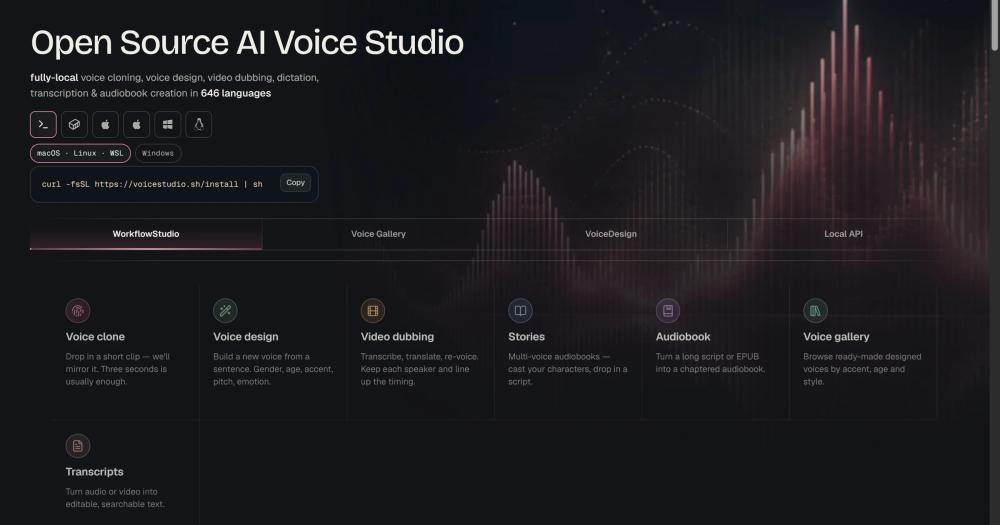
Voice Cloning from a 3-Second Clip
Clone any voice from a three-second audio clip, with zero-shot synthesis across 646 languages. The cloned voice is stored locally as a portable .ovsvoice bundle and works across all synthesis modes in the app, including TTS, video dubbing, and audiobook creation.
Video Dubbing with Speaker Diarization
Upload a video to get an automated pipeline that transcribes the dialogue, translates it, re-voices each speaker, and exports a final MP4 with synchronized audio. Speaker diarization via Pyannote and WhisperX separates multiple speakers automatically before re-voicing.
Audiobook and Multi-Voice Story Creation
Import an EPUB or PDF document, cast multiple voices to characters, and export a chaptered .m4b audiobook file. Long-form content renders in a batch queue with per-job progress tracking. The Stories workspace handles multi-voice scripted narration for shorter projects.
OpenAI-Compatible Local API
A local HTTP server at localhost:3900 mirrors the OpenAI audio API: POST /v1/audio/speech for synthesis, GET /v1/audio/voices for voice listing, and POST /v1/audio/transcriptions for transcription. Any library or tool built against the OpenAI SDK connects by changing the base URL.
16 TTS Engines with One-Click Switching
Switch between 16 TTS engines (including CosyVoice 3, GPT-SoVITS, MLX-Audio for Apple Silicon, and Sherpa-ONNX) from the Model Catalogue or from anywhere with Ctrl/Cmd+E. Each engine has its own device routing, language support, and voice cloning capability.
Remote GPU Workers for Offloaded Compute
Send jobs to GPUs on other machines by enrolling them with a QR code and join code. Batch audiobook rendering and dubbing jobs offload over a certificate-pinned connection, with per-worker live progress and a local CPU fallback when no remote is available.
Strengths and trade-offs#
Strengths
- Fully Local: No Account, No Usage MeterThe entire core workflow runs offline without an account or API key. Unlike ElevenLabs and Murf AI, which bill per character and store voice data on their servers, VoiceStudio keeps all synthesis, voice clones, and output files on your machine with no usage cap.
- 646 Languages Across 16 Engine OptionsThe default engine covers over 600 languages. Fifteen additional opt-in engines extend coverage, cloning capabilities, and platform-specific performance, including native Apple Silicon throughput via MLX-Audio. ElevenLabs language support varies by plan and model.
- Drop-In OpenAI SDK CompatibilityThe local API at localhost:3900 accepts the same request format as OpenAI's audio endpoints, so any existing integration works against VoiceStudio by changing the base URL. This makes it a local backend for developers already calling the OpenAI SDK.
- MCP Server for AI Coding Assistant IntegrationAn MCP server lets tools like Claude Code and Cursor drive voice synthesis and transcription directly from an AI coding assistant workflow. No equivalent MCP integration exists in ElevenLabs, Murf AI, Descript, or PlayHT.
Trade-offs
- -Active Beta: Breaking Changes Between ReleasesVoiceStudio is explicitly in active beta at v0.5.0. The README warns that things may break between releases and recommends running from source for the newest fixes. Production deployments should pin to a specific release version and test before each update.
- -Intel Mac Cannot Run the Local BackendmacOS on Intel processors cannot run the local backend (GitHub issue #889). Intel Mac users must point the desktop app at a remote backend on a compatible machine. Apple Silicon Macs, Windows x64, and Linux are fully supported.
- -First Launch Requires Model Weight DownloadsThe initial setup downloads model weights that require several minutes and at least 10 GB of disk space. On slow connections or in air-gapped environments, this step requires advance planning and access to HuggingFace model endpoints.
- -GPU Recommended for Practical PerformanceThe pipeline runs on CPU, but without a GPU (NVIDIA CUDA, Apple Silicon MPS, or AMD ROCm on Linux), generation is significantly slower. Dubbing a long video on a CPU-only machine can take many times the video's runtime.
VoiceStudio vs alternatives#
VoiceStudio vs ElevenLabs
ElevenLabs is the most direct comparison: both tools offer voice cloning from a short audio clip, text-to-speech in multiple languages, and transcription. The fundamental difference is deployment model. ElevenLabs processes everything on its cloud infrastructure, requiring an account and charging per character of generated audio. VoiceStudio runs on your own hardware with no account, no API key, and no per-character billing.
| Feature | VoiceStudio | ElevenLabs |
|---|---|---|
| License | AGPL-3.0 | Proprietary |
| Where it runs | Your hardware | ElevenLabs cloud |
| Voice cloning | Yes, 3-second clip | Yes, 3-second clip |
| Languages | 646 | Plan and model dependent |
| TTS engines | 16 (swappable) | 1 managed engine |
| Video dubbing | Yes, fully local | Yes, cloud-only |
| Audiobook creation | Yes (EPUB/PDF to .m4b) | No |
| Account required | No | Yes |
| Developer API | OpenAI-compatible at localhost | Credit-based cloud API |
| MCP server | Yes | No |
| Desktop app | Yes (macOS/Windows/Linux) | No |
VoiceStudio is the better choice when data privacy is a requirement, when you need to work offline, or when per-character billing at production volumes is not affordable. ElevenLabs is worth considering when you want a managed, low-setup experience with no hardware requirement, or when you need its proprietary voice models with guaranteed uptime and global edge delivery.
VoiceStudio vs Murf AI
Murf AI is a voice-over focused SaaS tool used by content teams for narration, explainer videos, and presentations. Unlike VoiceStudio, Murf AI is cloud-only with a subscription model and no self-hosted path. VoiceStudio covers Murf's core use case (text-to-speech narration with a library of voice presets) and adds voice cloning, video dubbing, and audiobook creation that Murf AI does not include. For teams moving off Murf AI to avoid subscription costs and data offloading, VoiceStudio covers most of the same workflow with local processing.
VoiceStudio vs Descript
Descript bundles voice AI with a full video and podcast editing suite, including screen recording, timeline editing, and overdub voice synthesis. VoiceStudio does not offer a video editor or podcast DAW: its scope is voice synthesis, cloning, dubbing, and transcription only. If you use Descript primarily for its AI voice features (overdub and transcription-based editing), VoiceStudio is a capable local replacement. If you depend on Descript's video editor or its word-processor-style transcript editing workflow, VoiceStudio does not cover those needs.
Quick start#
Install VoiceStudio by cloning the repository; the Python runtime and model weights are configured on first startup.
```bash
git clone https://github.com/debpalash/VoiceStudio.git
```What it's built on#
- Languages
- JavaScriptPythonRustTypeScript
- Frameworks
- React
FAQ#
Is VoiceStudio free to use?
Yes. VoiceStudio is AGPL-3.0 licensed and free to download and run on your own hardware. There is no subscription, no usage meter, and no account required for the local workflow. A commercial license is available for teams that want to ship VoiceStudio in a proprietary product without distributing their source code changes.
Does VoiceStudio work without an internet connection?
Yes. The core synthesis workflow runs entirely offline after the initial model download on first launch. Voice cloning, text-to-speech, dictation, video dubbing, and audiobook creation all work without an active internet connection. Optional cloud features are explicitly opt-in and do not affect the local workflow.
What is the difference between VoiceStudio and ElevenLabs?
ElevenLabs is a managed cloud API billed per character, with voice data processed on their servers and an account required. VoiceStudio runs on your own hardware with no account and no per-character billing. ElevenLabs offers managed infrastructure and a consumer web UI; VoiceStudio offers data privacy, 646 language support, 16 swappable engines, audiobook creation, and no usage caps.
Can VoiceStudio clone a voice from a short recording?
Yes. Voice cloning works from a clip as short as three seconds using zero-shot synthesis. Drop the clip into the Voice Cloning workspace, and VoiceStudio mirrors the voice for use in any of 646 languages. Cloned voices are stored locally as portable .ovsvoice bundles and work across all synthesis modes in the app.
Does VoiceStudio have a developer API?
Yes. VoiceStudio runs a local HTTP server at localhost:3900 that exposes OpenAI-compatible endpoints for speech generation, voice listing, and transcription. Any library or tool already integrated with the OpenAI audio SDK works against VoiceStudio by changing the base URL. An MCP server is also available for direct integration with AI coding assistants like Claude and Cursor.
Similar open-source tools#

Voicebox
Open source voice synthesis studio for generating audio

video-use
Edit videos by chatting with Claude Code, not clicking menus

whishper
Local speech-to-text transcription and subtitling with a web UI

supertonic
Instantly convert text to speech with customizable options

VoxCPM
Tokenizer-free multilingual text-to-speech with voice cloning

Hume AI
Empathic voice AI SDK with open source emotional models