Open Source Alternatives
  • Alternatives
  • Categories
    Categories by size1,196 projects
    • Developer Tools617
    • AI & Machine Learning520
    • Business & Productivity290
    • Web Development215
    • Security & Monitoring180
    • Communication & Collaboration159
    • IT Management151
    • LLMOps & AI Tooling132
    • Cloud & Hosting129
    • Product & Project Management126
    Browse all 21 categoriesDesign & Creative, DevOps & CI/CD and 9 more
  • Blog
  • Advertise
SearchNotion, Slack, password manager.../
Submit
Open Source Alternatives
  • Alternatives
    • Developer Tools617
    • AI & Machine Learning520
    • Business & Productivity290
    • Web Development215
    • Security & Monitoring180
    • Communication & Collaboration159
    • Browse all 21 categories
  • Blog
  • Advertise
Submit your project

New open source projects by email

The projects we add and every new guide. Free, unsubscribe any time.

Open Source Alternatives LogoOpen Source Alternatives

Handpicked Open Source Alternatives to Paid Softwares

Add Open Source Alternatives as a preferred source on Google

Product

  • Categories
  • Tag
  • Advertise

Resources

  • Blog
  • Collection
  • Submit

Company

  • Privacy Policy
  • Terms of Service
  • Refund Policy
  • Sitemap

Alternatives

  • Claude Code
  • Jira
  • Notion
  • Slack
  • Linear
  • Wispr Flow
  • All alternatives
© 2026 Open Source Alternatives. All rights reserved.
Open SourceAlternatives
Home/Categories/AI & Machine Learning/Labelme
icon of Labelme

Labelme

Open source alternative to Roboflow Annotate, Labelbox, V7 Labs and Encord

  • 16.3K stars
  • GPL-3.0
  • Active this week
  • Last commit 3 days ago

Last verified Nov 10, 2026

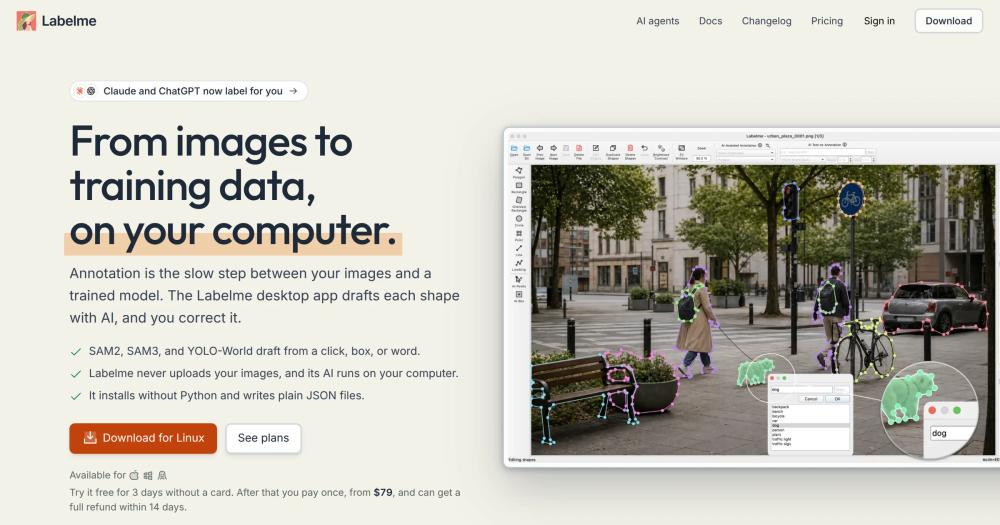
Create image annotations locally with SAM2, SAM3, and YOLO-World running offline; exports to YOLO and VOC without uploading your data.

Visit websiteGitHub16.3K stars
image of Labelme
TL;DR

Labelme is an image annotation desktop app that replaces cloud platforms like Roboflow Annotate and Labelbox with a local-first workflow. SAM2, SAM3, and YOLO-World run on your computer and draft shapes from a click, box, or text prompt; every annotation saves as a plain JSON file beside the original image, with no server and no data upload. The open source package (GPL-3.0) installs with pip; a standalone Pro app ($79, one-time) adds AI agent support and YOLO/VOC dataset export. Best for researchers and engineers who need offline annotation with data that cannot leave their machine.

Read the full breakdownHide the full breakdownWho it is for, how it works, trade-offs, the quick start and the FAQ
who it's for

Who Labelme is for#

Computer vision engineers building private training datasets

Labelme covers the full annotation loop: AI-assisted shape drafting, manual correction, review flagging, and export to YOLO or VOC. The local-only model means sensor data, medical scans, or proprietary images never leave the team's infrastructure during labeling.

Skip if:

If your team needs concurrent annotation across dozens of annotators with queue management and inter-annotator agreement tracking, Labelme lacks those coordination features. A cloud platform like Labelbox handles that scale better.

Researchers and academics annotating domain-specific images

The open source package is free and pip-installable, which fits research budgets. The plain JSON output integrates with standard Python computer vision scripts without extra dependencies. The 21-language interface and ten-year maintenance history make it a known quantity in academic labs.

Skip if:

If your institution has a managed annotation platform already integrated with your HPC cluster or data pipeline, switching to a desktop tool for annotation may add friction rather than remove it.

Solo developers and hobbyists training custom models

The three-day free trial and $79 one-time Pro license fit a solo budget. The offline AI makes quick work of drafting shapes without drawing from scratch. Plain JSON output connects directly to Ultralytics YOLO, PyTorch, and other popular training frameworks.

Skip if:

If your dataset is small enough to annotate by hand in a few hours, the AI-assist adds little value. The free open source package covers manual annotation with no payment required.

the problem

The problem it solves#

Annotating images for computer vision model training is time-consuming by design: every shape drawn by hand is time a team could spend on model development. The main paid annotation platforms (Roboflow Annotate, Labelbox, V7 Labs, Encord) are cloud services that require uploading images to their infrastructure. For medical imaging, satellite data, industrial inspection, or any work under a data handling agreement, that upload is a blocker.

Even teams without data restrictions face cost pressure. Annotation platforms charge per seat or per usage, and those costs scale with dataset size. Teams building a first dataset or training a hobby model often hit the free-tier limits before their dataset is usable.

how Labelme solves it

How it solves it#

AI-assisted annotation with SAM2, SAM3, and YOLO-World

SAM2 turns a click or Shift-click into a polygon that updates as you refine the selection. SAM3 accepts a rough bounding box or a text prompt and annotates matching objects across the image. YOLO-World handles open-vocabulary detection: type a class name and it draws boxes. All three models run on your computer after a one-time download.

Seven shape types for any annotation task

Polygon, rectangle, oriented rectangle (OBB), circle, point, line, and line strip cover the full range of computer vision annotation formats. Oriented bounding boxes are useful for overhead imagery and objects at non-horizontal angles. The tool draws one shape per click then returns to the last-used tool, keeping repetitive annotation fast.

Plain JSON output readable by any script

Each annotation saves as a JSON file in the same folder as the image, with the label, shape type, and polygon points. The format is stable and documented: scripts can consume it without importing labelme as a library. Pro adds export to YOLO, YOLO-OBB, and Pascal VOC for direct use with PyTorch, Ultralytics YOLO, TensorFlow, and PaddlePaddle training stacks.

AI agent integration via MCP server (Pro)

The Pro app exposes an MCP server so ChatGPT, Claude, Claude Code, and Codex can read the open image, create shapes, delete duplicates, and select annotations by description. The connection is set once from File > Connect AI Agent. An agent's model may run in the cloud; a local model keeps the entire workflow offline.

21-language interface with auto-save

The interface ships in 21 languages including English, Japanese, Korean, Simplified and Traditional Chinese, German, French, Spanish, and 13 others. Annotations save on every edit and on each image switch with no manual save step. Keyboard shortcuts (D for next image, A for back, T to hide shapes) keep one-handed annotation fast.

strengths · trade-offs

Strengths and trade-offs#

Strengths

  • No uploads: images and annotations stay on your computerLabelme never transmits images, annotations, or model outputs to a remote server. The app's built-in AI runs locally; the annotation files write to the same folder as the source images. This makes it one of the few annotation tools that works in air-gapped environments, behind firewalls, or on data covered by HIPAA, GDPR, or government classification.
  • GPL-3.0 open source package with 16K+ GitHub starsThe core annotation tool is GPL-3.0 and freely available via pip. With over 16,000 GitHub stars and a ten-year maintenance history from the same author (PhD from Imperial College London, formerly computer vision lead at Mujin), the codebase has the kind of community health and longevity that cloud services cannot match.
  • One-time payment for the Pro app, no subscriptionThe standalone Pro app costs $79 once, includes a year of tested builds, and keeps working after that year with no additional charge. Pro Lifetime includes every future update. Cloud annotation platforms charge monthly or annually per seat; Labelme's one-time model eliminates recurring cost entirely for small teams and solo annotators.
  • Works offline and air-gapped after initial setupAI models download once from labelme.io's mirror (or from an offline pack on request). After that, the app and its models work with no internet connection. For networks that restrict external traffic, the Pro app needs to allow only one host; the open source package can be fully isolated after the initial pip install.

Trade-offs

  • -No team collaboration or queue managementLabelme is a single-user desktop tool. It has no built-in annotation queue, label assignment, or multi-annotator review workflow. Teams that need concurrent annotation across a large dataset, inter-annotator agreement tracking, or a project manager view will need a workflow layer on top, or a different tool. Cloud platforms like Labelbox are specifically built for that coordination work.
  • -Dataset export to YOLO and VOC requires the Pro appThe open source package outputs Labelme JSON only. Converting to YOLO or Pascal VOC requires running a separate Python script. The Pro app adds a one-click export toolkit, but it costs $79. Teams on the free open source tier who need YOLO-formatted training data must handle the conversion step themselves.
  • -160 open issues, best-effort maintenance on the open source tierThe GitHub tracker shows 160 open issues. The project receives regular commits (last push November 2026). The maintenance model is best-effort for the open source package; Pro users receive priority email support.
versus alternatives

Labelme vs alternatives#

Labelme vs Roboflow Annotate

Both tools support polygon, bounding box, and segmentation annotation for computer vision datasets. The key difference is deployment: Roboflow Annotate is a cloud-based platform with integrated dataset management and model training, while Labelme is a desktop tool that keeps all data local.

FeatureLabelmeRoboflow Annotate
LicenseGPL-3.0 (open source)Proprietary
Data storageLocal only, no uploadsCloud (Roboflow servers)
AI-assisted annotationSAM2, SAM3, YOLO-World offlineSmart polygon, label assist (cloud)
Dataset exportYOLO, YOLO-OBB, Pascal VOC (Pro)Multiple formats
Team annotationSingle userMulti-user with queues
CostFree / $79 one-time (Pro)Subscription

Labelme is the better fit when images cannot be uploaded to a third-party cloud, when annotation is a solo or small-team task, or when avoiding recurring subscription cost is a constraint. Roboflow Annotate is the better fit when a team needs concurrent annotation with queue management, integrated training pipelines, and dataset version control in one cloud workspace.

Labelme vs Labelbox

Labelbox is an enterprise data labeling platform built for teams with large-scale annotation needs, model evaluation, and active learning pipelines. Labelme is a desktop tool for individual or small-team annotation without cloud infrastructure.

FeatureLabelmeLabelbox
LicenseGPL-3.0 (open source)Proprietary
Data storageLocal onlyCloud (Labelbox servers)
Team featuresNoneLabel queues, review workflows, assignment
AI annotationOffline SAM2/SAM3/YOLO-WorldCloud-based AI assist
PricingFree / $79 one-timeEnterprise pricing

For enterprise teams annotating at scale with cross-functional review workflows, Labelbox is built for that coordination. For teams where data must stay on-premise, or for individuals building training datasets without an enterprise budget, Labelme covers the annotation task at a fraction of the cost.

Labelme vs V7 Labs

V7 Labs is a cloud annotation platform with auto-labeling, dataset versioning, and NLP annotation support. Labelme handles image and video annotation locally, with no dataset versioning or NLP features.

For pure image annotation where privacy and cost are the primary drivers, Labelme is the stronger choice. V7 Labs is worth the subscription when a team needs dataset versioning, NLP annotation, or the auto-labeling pipeline integrated with model training in a managed cloud environment.

install · quick start

Quick start#

bash
The open source package installs via pip on Python 3.12 or later.
```bash
pip install labelme
```

Download the standalone desktop app (no Python required) from GitHub Releases: https://github.com/wkentaro/labelme/releases/latest
tech stack · detected from GitHub

What it's built on#

Languages
Python
frequently asked

FAQ#

What is the difference between the open source package and the Pro app?

The open source package (pip install labelme, GPL-3.0, free) includes all annotation tools and AI models but requires a Python setup and outputs only Labelme JSON. The Pro app installs without Python, adds the MCP server so AI agents (ChatGPT, Claude, Cursor) can annotate alongside you, includes export to YOLO, YOLO-OBB, and Pascal VOC, and mirrors AI model downloads through labelme.io so a filtered network needs to allow only one host. Pro costs $79 once and includes a year of updates; Pro Lifetime includes every future update.

Does Labelme upload my images to any server?

No. Labelme's desktop app never uploads images or annotations. The built-in AI models (SAM2, SAM3, YOLO-World) run on your computer after a one-time download. If you connect an AI agent using the Pro MCP server, the agent's model may run in the cloud (ChatGPT, Claude), but the image is not sent by Labelme; review your chosen agent's data handling. Connecting a local model keeps the full workflow offline.

Which AI models does Labelme support?

Labelme ships with SAM, SAM2, SAM3, and EfficientSAM for segmentation (point-to-polygon and box-to-polygon), and YOLO-World for text-prompt object detection. SAM2 responds to include/exclude clicks that refine a polygon in real time. SAM3 accepts a rough bounding box and annotates every matching object in the image. YOLO-World accepts a text label and draws detection boxes. Every model runs on your computer with no API key.

Can I use Labelme offline or in an air-gapped environment?

Yes. Download the AI model weights on a connected machine first, then copy them to the air-gapped environment, or email [email protected] for the offline pack. After that, neither the annotation tool nor its AI models require an internet connection. The Pro app mirrors model weights from a single labelme.io host, which simplifies firewall rules; the open source package downloads weights from GitHub and Hugging Face by default.

Is Labelme a subscription?

No. The open source package (pip install labelme) is free and GPL-3.0 licensed. The Pro standalone app is a one-time payment starting at $79 and includes a year of updates; your version keeps working after that year. Pro Lifetime includes every future update. There are no monthly or annual fees.

also worth a look

Similar open-source tools#

God's Eye View

Featured

Alternative toFFlightradar24

Real-time global intelligence on a 3D globe

  • 63,448 GitHub stars
  • CustomLicence MIT with third-party data restrictions

Open-Generative-AI

Alternative toMidjourney

Free AI image and video studio with 600+ models, no login needed

  • 33,418 GitHub stars
  • MITLicence MIT

Brag

InDesign & Creative

Agent skill that turns any project into a launch video in one command

  • 20,679 GitHub stars
  • MITLicence MIT

Awwwards-mcp

Alternative toLazyweb

MCP server for Awwwards design inspiration, no API key required.

  • 507 GitHub stars
  • MITLicence MIT

Lap

Alternative toMylio Photos

Local-first photo manager with on-device AI and face clustering

  • 4,264 GitHub stars
  • GPL-3.0Licence GPL-3.0

Open3D

InDeveloper Tools

C++/Python library for point clouds, meshes, and 3D visualization.

  • 14,186 GitHub stars
  • MITLicence MIT
by category

Open source tools in these categories#

520

AI & Machine Learning

freeCodeCamp, REA (Reverse Engineer Anything), OpenClaw
125

Design & Creative

ComfyUI, Excalidraw, Godot Engine

Sponsors

Inbox Zero

Alternative toSuperhuman

AI email assistant that drafts replies and clears your inbox

  • 12,942 GitHub stars
  • AGPL-3.0Licence AGPL-3.0
  • #Email

rakazo

Alternative toGrok Bot

AI teammates you own: your keys, your model, your machine.

  • 7,478 GitHub stars
  • Apache-2.0Licence Apache-2.0
  • #AI Agents

SnitchFeed

Live monitoring on LinkedIn, X, Reddit & more. Agentic social listening for startups.

Marketing & Growth

Advertise your product

New open source projects by email

The projects we add and every new guide. Free, unsubscribe any time.

Find open source alternatives to paid software

/
  • Claude Code to OpenCode
  • Jira to Windshift
  • Notion to AppFlowy
  • Slack to Mattermost
  • Linear to GitLab
  • Wispr Flow to Handy
  • Arc to Zen Browser
  • CapCut to Concat
  • Grok Bot to rakazo
  • Superhuman to Inbox Zero
  • Airtable to AITable
  • Muse to OpenClaw
  • Railway to Coolify
  • GitHub Copilot to Cline
  • Datadog to Netdata
  • Confluence to Wiki.js
  • Microsoft Teams to Rocket.Chat
  • 1Password to KeePassXC
  • Firebase to Supabase
  • Pinecone to Qdrant
  • Zapier to n8n
  • Devin AI to OpenHands
  • Asana to Leantime
  • Contentful to Strapi
  • Claude Code to OpenCode
  • Jira to Windshift
  • Notion to AppFlowy
  • Slack to Mattermost
  • Linear to GitLab
  • Wispr Flow to Handy
  • Arc to Zen Browser
  • CapCut to Concat
  • Grok Bot to rakazo
  • Superhuman to Inbox Zero
  • Airtable to AITable
  • Muse to OpenClaw
  • Railway to Coolify
  • GitHub Copilot to Cline
  • Datadog to Netdata
  • Confluence to Wiki.js
  • Microsoft Teams to Rocket.Chat
  • 1Password to KeePassXC
  • Firebase to Supabase
  • Pinecone to Qdrant
  • Zapier to n8n
  • Devin AI to OpenHands
  • Asana to Leantime
  • Contentful to Strapi