Open Source Alternatives
  • Alternatives
  • Categories
    Categories by size1,046 projects
    • Developer Tools532
    • AI & Machine Learning460
    • Business & Productivity244
    • Web Development204
    • Security & Monitoring157
    • Communication & Collaboration141
    • IT Management139
    • Cloud & Hosting122
    • LLMOps & AI Tooling120
    • Data & Analytics113
    Browse all 21 categoriesDesign & Creative, Product & Project Management and 9 more
  • Blog
  • Advertise
SearchNotion, Slack, password manager.../
Submit
Open Source Alternatives
  • Alternatives
    • Developer Tools532
    • AI & Machine Learning460
    • Business & Productivity244
    • Web Development204
    • Security & Monitoring157
    • Communication & Collaboration141
    • Browse all 21 categories
  • Blog
  • Advertise
Submit your project

New open source projects by email

The projects we add and every new guide. Free, unsubscribe any time.

Open Source Alternatives LogoOpen Source Alternatives

Handpicked Open Source Alternatives to Paid Softwares

Product

  • Categories
  • Tag
  • Advertise

Resources

  • Blog
  • Collection
  • Submit

Company

  • Privacy Policy
  • Terms of Service
  • Refund Policy
  • Sitemap

Alternatives

  • Claude Code
  • Jira
  • Notion
  • Slack
  • Linear
  • Wispr Flow
  • All alternatives
© 2026 Open Source Alternatives. All rights reserved.
Open SourceAlternatives
Home/Categories/Business & Productivity/BentoPDF
icon of Bentopdf

BentoPDF

Open source alternative to Smallpdf, iLovePDF, Adobe Acrobat and Sejda PDF

  • 16.3K stars
  • AGPL-3.0
  • Active this week
  • Last commit today

Last verified Nov 4, 2026

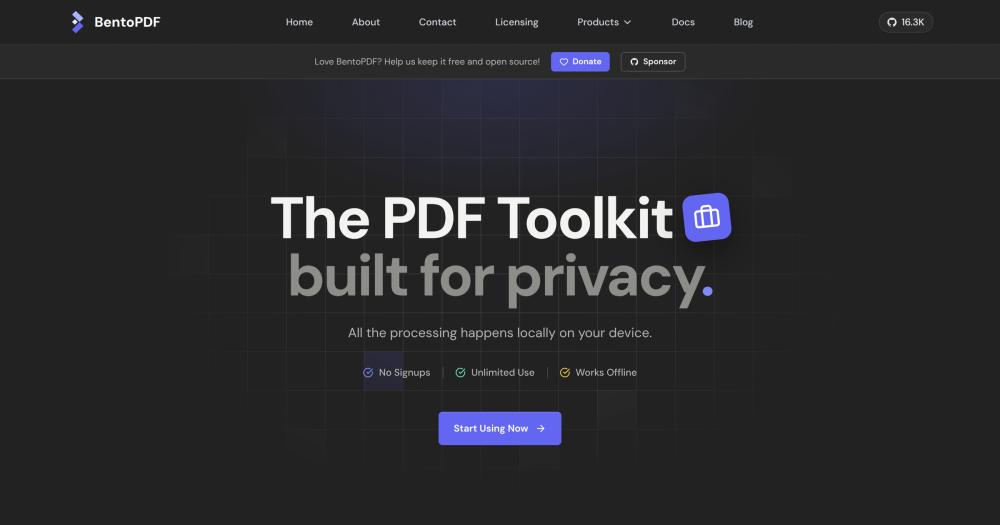
Convert, edit, merge, and secure PDFs entirely in your browser: 100+ tools under AGPL-3.0, with self-hosting via Docker and no server uploads required.

Visit websiteGitHub16.3K starsDeploy on Hostinger
image of Bentopdf
TL;DR

BentoPDF is a browser-based, client-side PDF toolkit that runs 100+ tools entirely in your browser with no server uploads. It replaces paid tools like Smallpdf, iLovePDF, and Adobe Acrobat for everyday PDF work: merging, splitting, editing, converting, compressing, signing, and securing files locally. Licensed under AGPL-3.0, it is free to self-host and runs on Docker in one command. Best for privacy-conscious users, legal teams, healthcare workers, and anyone who cannot send documents to a third-party server.

Read the full breakdownHide the full breakdownWho it is for, how it works, trade-offs, the quick start and the FAQ
who it's for

Who BentoPDF is for#

Legal teams handling confidential documents

Lawyers and paralegals working with contracts, court filings, or client records need PDF tools that do not upload documents to external servers. BentoPDF's client-side processing, redaction tool, Bates numbering, AES encryption, and X.509 digital signatures cover the core legal PDF workflow without cloud dependency.

Skip if:

Your firm uses Adobe Acrobat as part of an integrated e-signature and document management workflow with Adobe Sign. BentoPDF handles individual document tasks well but does not replace a document management system with version control or audit logs.

Healthcare workers managing sensitive documents

BentoPDF's FAQ explicitly notes HIPAA compliance because files never leave the client. Healthcare workers can split, redact, annotate, and convert patient-related PDFs without routing them through a third-party server. The offline mode works in clinical environments with restricted internet access.

Skip if:

Your facility requires a Business Associate Agreement with the PDF tool vendor. BentoPDF's self-hosted deployment has no BAA to sign since no data reaches the vendor's servers, which may or may not satisfy your compliance review depending on how your legal team interprets that.

Teams self-hosting a shared internal PDF toolkit

IT teams can deploy BentoPDF on a Docker server or static hosting and share the URL with colleagues. All processing still happens in each user's browser, so the server only serves the application files. One user report mentions self-hosting for a team after colleagues were using data-collecting cloud tools.

Skip if:

Your team needs centralized document storage, version history, or audit logs alongside PDF processing. BentoPDF is a stateless toolkit, not a document management system.

Developers automating multi-step PDF workflows

The PDF Workflow Builder provides a node-based editor for chaining PDF operations into reusable pipelines. Developers and power users can build workflows that combine merge, compress, watermark, convert, and stamp operations and run them without writing code. The LlamaIndex JSON export tool also prepares PDFs for RAG pipelines.

Skip if:

You need server-side batch processing of hundreds or thousands of PDFs at once. BentoPDF runs in the browser and suits interactive and moderate-volume tasks; server-side PDF libraries are more practical for high-throughput pipelines.

the problem

The problem it solves#

Most PDF tools are cloud-first: they accept your file upload, process it on a server you do not control, and return the result. For anyone handling sensitive documents, contracts, medical records, legal filings, or personal identification, that model creates real exposure. Cloud PDF services also impose limits: file size caps, monthly page quotas, mandatory account creation, and watermarks on the free tier.

Adobe Acrobat's desktop suite solves the privacy problem but costs hundreds of dollars per year per seat and locks you into an ongoing subscription. Smaller cloud tools like Smallpdf and Sejda PDF are affordable but still require file uploads. For teams with strict data handling requirements, neither path is ideal.

how BentoPDF solves it

How it solves it#

Client-side processing with no server uploads

Every operation runs directly in the browser using WebAssembly. Files are never transmitted to a server: OCR, compression, conversion, editing, and signing all execute locally on your device. This applies to the hosted version at bentopdf.com and to any self-hosted instance.

PDF Workflow Builder with a node editor

The Workflow Builder lets you chain PDF operations into reusable pipelines using a drag-and-drop node editor. You can combine merge, compress, watermark, convert, and other tools into a single automated workflow without writing code. One user report notes it saved half a day on a repetitive document task.

100+ tools covering organize, edit, convert, and secure

BentoPDF covers organize (merge, split, rotate, reorder, extract, delete pages), edit (text editing, annotation, redaction, form filling, Bates numbering, watermark), convert (40+ formats to and from PDF including DOCX, XLSX, PPTX, EPUB, MOBI, and SVG), and secure (AES encryption, X.509 digital signatures, RFC 3161 timestamps, metadata removal).

OCR and table extraction via PyMuPDF

The OCR tool makes scanned PDFs searchable and copyable using PyMuPDF's WASM module. The Extract Tables tool pulls tabular data from PDFs and exports it as CSV, JSON, or Markdown. Both run client-side, so sensitive documents with embedded tables or scanned text never leave the browser.

Format conversion covering 40+ input types

BentoPDF converts to PDF from images (JPG, PNG, HEIC, WebP, SVG, TIFF), documents (DOCX, XLSX, PPTX, ODT, RTF), e-books (EPUB, MOBI, FB2), and formats like XPS, PSD, EML, and MSG. It also exports from PDF to Word, Excel, CSV, Markdown, JSON, and common image formats.

Docker and static hosting options for self-hosting

BentoPDF ships a Docker container for self-hosted team deployments. Static hosting is also supported on Vercel, Netlify, GitHub Pages, Cloudflare Pages, AWS, and standard Nginx or Apache servers. Air-gapped deployments can configure WASM modules to load locally rather than from the jsDelivr CDN.

strengths · trade-offs

Strengths and trade-offs#

Strengths

  • Zero data exposure by architectureBentoPDF's client-side design is not a privacy policy claim; it is an architectural guarantee. No server receives your files, so there is nothing to breach, subpoena, or accidentally retain. Healthcare workers, legal teams, and schools have adopted it specifically because it satisfies data handling requirements that cloud PDF services cannot meet.
  • AGPL-3.0 with free self-hosting and no per-seat costThe AGPL-3.0 license means anyone can run BentoPDF on their own infrastructure at no cost, modify the source, and deploy it internally. Unlike proprietary PDF tools with per-seat subscription pricing, BentoPDF has no per-user charge for self-hosted deployments. The commercial license at $79 (lifetime) covers teams building proprietary products on top of it.
  • No file limits on any tierBentoPDF imposes no file size cap, no daily usage limit, and no watermark on any tool, including the hosted version. Cloud PDF services typically restrict the free tier to small files or a limited number of operations per day. BentoPDF's browser-based model has no server cost to pass along, so there is no limit to enforce.
  • 16,000+ GitHub stars in under one yearBentoPDF's repository reached 16,250 stars and 1,448 forks since its creation in October 2025, with the last push recorded in November 2026. That growth reflects active community use and ongoing development. The project receives organizational support from Vercel, DigitalOcean, NVIDIA Inception, and Vultr.

Trade-offs

  • -Commercial embedding requires a paid licenseEmbedding BentoPDF in a closed-source or proprietary product requires the commercial license at $79 (lifetime). The AGPL-3.0 license requires publishing source changes if you run a modified version as a network-accessible service. Teams building SaaS tools or white-labeled products on top of BentoPDF must either publish their source or purchase the commercial license. The commercial tier covers companies under $1 million in revenue and funding.
  • -Default setup loads processing modules from a CDNPyMuPDF, Ghostscript, and CoherentPDF WASM modules load from the jsDelivr CDN by default. Air-gapped or strict-outbound-network deployments require manually configuring these modules to serve locally. The documentation covers this path, but it adds setup steps that the default Docker deployment does not need.
  • -Client-side performance is bounded by the user's hardwareRunning PDF operations in the browser puts the compute load on the end user's device. Large files, complex OCR, or multiple concurrent tasks may run slowly on older hardware or mobile devices. Server-based PDF tools offload this processing to a dedicated machine; BentoPDF's client-side model trades that capacity for privacy.
  • -125 open issues for a rapidly growing projectBentoPDF had 125 open GitHub issues as of November 2026, one year after its creation. Fast adoption at this scale typically generates a mix of feature requests, edge-case bugs, and integration questions. Users relying on less common conversion formats or advanced workflows should check open issues before depending on those features in production.
versus alternatives

BentoPDF vs alternatives#

BentoPDF vs Smallpdf and iLovePDF

BentoPDF and cloud services like Smallpdf and iLovePDF overlap in feature coverage: merging, splitting, compressing, converting, and signing PDFs. The core difference is where processing happens. Smallpdf and iLovePDF upload your files to their servers and impose limits on the free tier. BentoPDF runs entirely in your browser, imposes no file or usage limits, and requires no account to use.

FeatureBentoPDFSmallpdfiLovePDF
Processing locationBrowser (client-side)Cloud serverCloud server
File upload requiredNoYesYes
Free tier limitsNoneYesYes
Self-hostingYes (Docker)NoNo
LicenseAGPL-3.0ProprietaryProprietary
Offline useYesNoNo

For privacy-sensitive use cases, BentoPDF is the clear choice: files never leave the client. If you need a managed service with no server to maintain and handle only non-sensitive documents, Smallpdf and iLovePDF are practical cloud options with no setup required.

BentoPDF vs Adobe Acrobat

Adobe Acrobat is the standard for professional PDF work: OCR, redaction, PDF/A conversion, Bates numbering, and digital signature workflows. BentoPDF now covers all of these in its browser toolkit, including OCR via PyMuPDF, Bates numbering, PDF/A conversion via Ghostscript, AES encryption, X.509 digital signatures, and RFC 3161 timestamps.

FeatureBentoPDFAdobe Acrobat
LicenseAGPL-3.0 / $79 commercial (lifetime)Proprietary subscription
Self-hostingYesNo
OCRYes (PyMuPDF)Yes
Digital signatures (X.509)YesYes
Bates numberingYesYes
PDF/A conversionYes (Ghostscript)Yes
Offline useYes (self-hosted)Partial (desktop app)

BentoPDF is a viable alternative to Adobe Acrobat for teams whose PDF needs center on editing, annotation, conversion, signing, and document organization. Adobe Acrobat maintains an edge in deep integration with other Adobe products and its managed cloud signing workflows. For most legal, healthcare, and administrative teams, BentoPDF covers the daily PDF workload at no per-seat cost under the AGPL-3.0 license.

install · quick start

Quick start#

bash
Self-hosting uses Docker with the official BentoPDF container.

```bash
docker run -d -p 3000:3000 ghcr.io/alam00000/bentopdf-simple
```
tech stack · detected from GitHub

What it's built on#

Languages
JavaScriptTypeScript
Frameworks
Vue
Infrastructure
Docker
frequently asked

FAQ#

Is BentoPDF really free with no file limits?

Yes. All 100+ tools are free to use with no file size caps, no upload limits, no watermarks, and no account required. The hosted version at bentopdf.com and any self-hosted deployment both operate under these terms. The project is funded through donations and sponsorships rather than a freemium model.

Does BentoPDF work offline?

Yes, once the page has loaded. BentoPDF runs entirely in your browser using WebAssembly, so after the initial page load the PDF processing tools work without an internet connection. The WASM modules load from the jsDelivr CDN by default; a self-hosted deployment can serve them locally for environments with no outbound access.

Can I self-host BentoPDF for my team?

Yes. The simplest path is a Docker container: one command starts the full application. Static hosting is also supported on Vercel, Netlify, GitHub Pages, Cloudflare Pages, and standard Nginx or Apache servers. All PDF processing still happens in each user's browser after they open the hosted URL, so the server only serves static files.

Does AGPL-3.0 affect commercial use?

AGPL-3.0 is free for personal use, internal team use, and open source projects. If you use BentoPDF as a network service and modify the source, AGPL-3.0 requires you to publish those changes. If you embed BentoPDF in a closed-source or proprietary product, you need the commercial license at $79 (lifetime). The commercial tier covers companies under $1 million in revenue and funding.

What is the PDF Workflow Builder?

The PDF Workflow Builder is a node-based visual editor that lets you chain BentoPDF tools into automated pipelines. You can combine operations like merge, compress, watermark, convert, and add page numbers into a single reusable workflow that runs in your browser without writing code. It is designed for repetitive multi-step document tasks.

also worth a look

Similar open-source tools#

PDFsam Basic

Alternative toAdobe Acrobat

Split, merge, rotate, and extract PDF pages for free

  • 4,657 GitHub stars
  • AGPL-3.0Licence AGPL-3.0

OCRmyPDF

Alternative toABBYY FineReader PDF

Make scanned PDFs searchable and copy-pasteable in one command.

  • 35,208 GitHub stars
  • MPL-2.0Licence MPL-2.0

Stirling PDF

Alternative toAdobe Acrobat

Self-hosted PDF editor with 50+ tools for every PDF task

  • 95,742 GitHub stars
  • MITLicence MIT

Okular

Alternative toAdobe Acrobat

Multi-platform document viewer supporting PDF, EPUB, and more

  • 1,565 GitHub stars

PDF4QT

Alternative toAdobe Acrobat

Open source PDF editor and viewer for Windows and Linux

  • 1,505 GitHub stars
  • MITLicence MIT

CleanYourTV

Featured

Alternative toATV Launcher Pro

Debloat any Android or Google TV over Wi-Fi and get an Apple TV-style home.

  • 51,495 GitHub stars
  • MIT LicenseLicence MIT License
by category

Open source tools in these categories#

244

Business & Productivity

OpenClaw, Excalidraw, RustDesk
532

Developer Tools

REA (Reverse Engineer Anything), Skills for Real Engineers, superpowers
Hostinger

Self-host BentoPDF on a Hostinger VPS

Keep it running 24/7, even when your laptop is off. A Hostinger VPS gives it a server of its own.

  1. 01

    Choose a plan

    Starts from $6.49/mo

  2. 02

    Apply

    Extra 10% off yearly plans

  3. 03

    Install BentoPDF

    On a server that stays on

  4. 04

    Start building

    Focus on the app, not the server

Deploy on Hostinger

Sponsors

Inbox Zero

Alternative toSuperhuman

AI email assistant that drafts replies and clears your inbox

  • 12,889 GitHub stars
  • AGPL-3.0Licence AGPL-3.0
  • #Email

rakazo

Alternative toGrok Bot

AI teammates you own: your keys, your model, your machine.

  • 6,568 GitHub stars
  • Apache-2.0Licence Apache-2.0
  • #AI Agents

SnitchFeed

Live monitoring on LinkedIn, X, Reddit & more. Agentic social listening for startups.

Marketing & Growth

Advertise your product

New open source projects by email

The projects we add and every new guide. Free, unsubscribe any time.

Find open source alternatives to paid software

/
  • Claude Code to OpenCode
  • Jira to Windshift
  • Notion to AppFlowy
  • Slack to Mattermost
  • Linear to GitLab
  • Wispr Flow to Handy
  • Arc to Zen Browser
  • CapCut to Concat
  • Grok Bot to rakazo
  • Superhuman to Inbox Zero
  • Airtable to AITable
  • Muse to OpenClaw
  • Railway to Coolify
  • GitHub Copilot to Cline
  • Datadog to Netdata
  • Microsoft Teams to Rocket.Chat
  • Confluence to Docmost
  • Pinecone to Qdrant
  • Zapier to n8n
  • Devin AI to OpenHands
  • Firebase to Supabase
  • 1Password to KeePassXC
  • Contentful to Strapi
  • Adobe Premiere Pro to Shotcut
  • Claude Code to OpenCode
  • Jira to Windshift
  • Notion to AppFlowy
  • Slack to Mattermost
  • Linear to GitLab
  • Wispr Flow to Handy
  • Arc to Zen Browser
  • CapCut to Concat
  • Grok Bot to rakazo
  • Superhuman to Inbox Zero
  • Airtable to AITable
  • Muse to OpenClaw
  • Railway to Coolify
  • GitHub Copilot to Cline
  • Datadog to Netdata
  • Microsoft Teams to Rocket.Chat
  • Confluence to Docmost
  • Pinecone to Qdrant
  • Zapier to n8n
  • Devin AI to OpenHands
  • Firebase to Supabase
  • 1Password to KeePassXC
  • Contentful to Strapi
  • Adobe Premiere Pro to Shotcut