Open Source Alternatives
  • Alternatives
  • Categories
    Categories by size1,215 projects
    • Developer Tools625
    • AI & Machine Learning524
    • Business & Productivity294
    • Web Development216
    • Security & Monitoring188
    • Communication & Collaboration165
    • IT Management154
    • LLMOps & AI Tooling132
    • Cloud & Hosting130
    • DevOps & CI/CD129
    Browse all 21 categoriesDesign & Creative, Product & Project Management and 9 more
  • Blog
  • Advertise
SearchNotion, Slack, password manager.../
Submit
Open Source Alternatives
  • Alternatives
    • Developer Tools625
    • AI & Machine Learning524
    • Business & Productivity294
    • Web Development216
    • Security & Monitoring188
    • Communication & Collaboration165
    • Browse all 21 categories
  • Blog
  • Advertise
Submit your project

New open source projects by email

The projects we add and every new guide. Free, unsubscribe any time.

Open Source Alternatives LogoOpen Source Alternatives

Handpicked Open Source Alternatives to Paid Softwares

Add Open Source Alternatives as a preferred source on Google

Product

  • Categories
  • Tag
  • Advertise

Resources

  • Blog
  • Collection
  • Submit

Company

  • Privacy Policy
  • Terms of Service
  • Refund Policy
  • Sitemap

Alternatives

  • Claude Code
  • Jira
  • Notion
  • Slack
  • Linear
  • Wispr Flow
  • All alternatives
© 2026 Open Source Alternatives. All rights reserved.
Open SourceAlternatives
Home/Categories/Security & Monitoring/Checkmk
icon of Checkmk

Checkmk

Open source alternative to Datadog, Dynatrace, New Relic, PRTG Network Monitor and LogicMonitor

  • 2.6K stars
  • GPL-2.0
  • Active this week
  • Last commit today

Last verified Nov 12, 2026

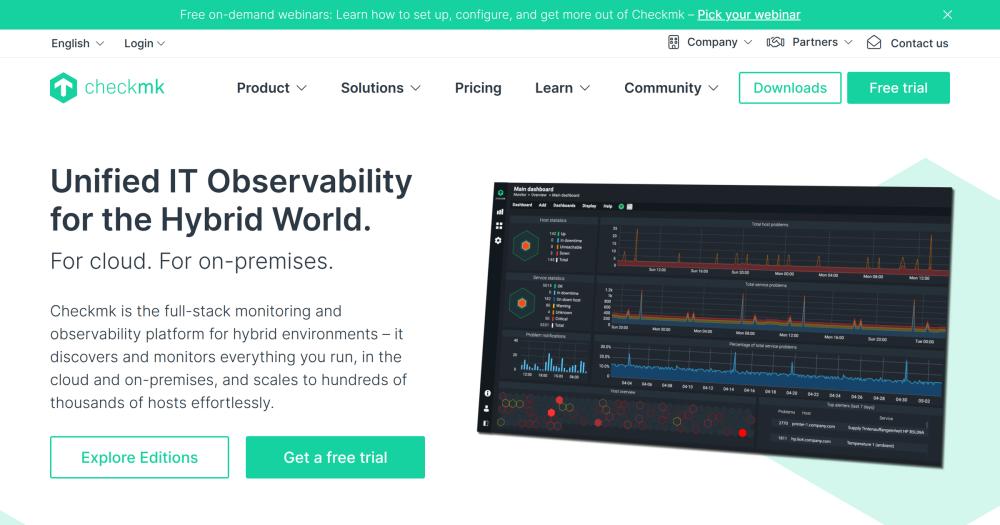
Monitor hybrid IT environments with auto-discovery, 2,000+ integrations, and AI-powered root cause analysis across servers, networks, cloud, and containers.

Visit websiteGitHub2.6K starsDeploy on Hostinger
image of Checkmk
TL;DR

Checkmk is an IT monitoring tool with a fully open source Community edition (GPL-2.0) and commercial Pro, Ultimate, and Cloud tiers. It replaces paid monitoring tools like Datadog, Dynatrace, and New Relic by running on your own infrastructure and covering servers, networks, Kubernetes, cloud workloads, and applications in one place. Auto-discovery finds every host and service automatically, drawing from over 2,000 built-in integrations. Best for infrastructure teams managing hybrid environments who need unified monitoring without per-host SaaS billing.

Read the full breakdownHide the full breakdownWho it is for, how it works, trade-offs and the FAQ
who it's for

Who Checkmk is for#

Infrastructure teams managing hybrid on-premises and cloud environments

Checkmk covers servers, Kubernetes clusters, AWS and Azure workloads, storage, and network devices from a single deployment, replacing per-layer monitoring tools with unified visibility. Auto-discovery handles the growing catalog as the environment expands.

Skip if:

Your environment is entirely cloud-native and you need deep APM traces, distributed tracing, or security monitoring tightly integrated with your cloud provider. Tools like Datadog or New Relic are better fits for application-layer observability in fully managed environments.

Managed service providers monitoring multiple client environments

The Ultimate edition with Multi-Tenancy supports centralized monitoring across multiple customer environments with isolated access controls and MSP-specific reporting. Data is strictly segregated across tenants from a single Checkmk installation.

Skip if:

Your MSP operates a small client roster where separate monitoring tools per client are operationally manageable and the cost of a multi-tenant license outweighs the operational efficiency gains.

Teams replacing expensive per-host SaaS monitoring

Teams migrating off Datadog, Dynatrace, or New Relic for cost reasons can self-host the Community edition (free for small environments) or the Pro edition at host-based pricing. Checkmk's 2,000+ integrations cover the same infrastructure surface as the leading SaaS tools.

Skip if:

Your team has no capacity to operate monitoring infrastructure. If running and maintaining a Linux server or Docker deployment is not feasible, Checkmk Cloud (the SaaS edition) is an alternative path.

the problem

The problem it solves#

Managing hybrid infrastructure with separate monitoring tools for each layer is slow and error-prone. Network devices, cloud services, and application containers each demand different agents, dashboards, and alert channels, so engineers spend incident response time correlating data across tools rather than fixing the actual problem.

The cost pressure is real: SaaS-based monitoring tools charge per host every month, and environments with hundreds or thousands of hosts generate bills that grow with the environment. Teams that want to bring monitoring costs under control by self-hosting face the same fragmentation problem if they piece together separate open source tools rather than a unified system.

how Checkmk solves it

How it solves it#

Automated Host and Service Discovery

Checkmk scans your environment and automatically finds every host and service, then applies the appropriate monitoring checks from a library of over 2,000 integrations covering servers, network devices, storage, cloud services, and containers. No manual check configuration is needed for standard infrastructure components.

Agent Bakery for Fleet-Wide Agent Management

The Agent Bakery generates custom monitoring agents for your fleet and deploys them centrally, handling configuration, versioning, and rollout without per-host manual steps. Both agent-based and agentless monitoring methods are supported depending on what the target host allows.

AI-Powered Alert Root Cause Analysis

The Explain with AI feature turns any alert into a one-click root cause summary with recommended next steps, reducing the time engineers spend manually tracing alert cascades. The Checkmk MCP server also connects external AI tools to live monitoring data with RBAC-enforced read-only access.

Advanced Analytics, Dashboards, and SLA Reporting

Pre-built dashboards, dependency mapping, and SLA reports give visibility into the health of business services down to their underlying components. Queryless exploration of large data volumes is available in the Pro and Ultimate editions for teams that need more than threshold-based alerting.

Distributed Monitoring for Multi-Site Environments

The Pro edition supports distributed monitoring, managing hundreds of global sites from a single location using a central storage backend. Multi-tenancy in the Ultimate edition keeps data strictly segregated across departments or clients, which suits MSPs monitoring multiple customer environments.

OpenTelemetry Application Observability

The Ultimate edition integrates natively with OpenTelemetry to collect application metrics, traces, and logs alongside infrastructure monitoring. Cross-analysis of application telemetry with infrastructure context helps teams trace incidents from application-layer symptoms to the underlying host or container.

strengths · trade-offs

Strengths and trade-offs#

Strengths

  • GPL-2.0 Community Edition with No Licensing CostThe Community edition is fully open source under GPL-2.0 and free to run for environments up to around 100 hosts. Unlike Datadog or Dynatrace, which have no self-hosted option, the Community edition incurs no per-host fees and requires no license purchase. It includes the core monitoring engine, web UI, and hundreds of community-maintained plugins.
  • Host-Based Pricing That Reduces Monitoring BillsThe commercial Pro and Ultimate editions use host-based pricing rather than per-metric or per-seat models, and the company states this can reduce monitoring spend by up to 70% compared to equivalent SaaS monitoring tools. Predictable host-count billing makes budgeting straightforward at scale.
  • Air-Gapped and Compliance-Ready DeploymentCheckmk supports fully air-gapped deployments where monitoring data never leaves the organization's network. This is documented as a supported configuration for organizations with critical infrastructure security requirements, covering scenarios that cloud-based monitoring tools cannot serve.
  • Infrastructure and Application Coverage in One DeploymentInfrastructure monitoring, synthetic monitoring, application observability, and smart alerting all run in a single Checkmk deployment. Teams avoid integrating separate tools for each layer, which reduces operational overhead and simplifies cross-layer incident correlation.

Trade-offs

  • -Community Edition Scales to About 100 HostsThe Community edition is documented as suitable for 'up to ~100 hosts.' Beyond that threshold, the more resource-efficient Pro edition is the recommended path, which requires a commercial license. Teams planning for larger environments need to budget for Pro from the outset or accept the Community edition's limitations at scale.
  • -Advanced Features Require a Commercial EditionDistributed monitoring, advanced analytics and dashboards, automated agent management via the full Agent Bakery, OpenTelemetry support, and official support are locked to the Pro, Ultimate, or Cloud editions. The Community edition is best for smaller environments with basic requirements in terms of automation, dashboarding, and support.
  • -Linux-Only Server InstallationThe Checkmk monitoring server installs on Linux only, with official packages for Red Hat, Ubuntu, and SUSE, plus Docker. There is no native Windows Server installation path for the monitoring server itself. Teams running Windows-only infrastructure management will need a separate Linux host or container for the Checkmk server.
versus alternatives

Checkmk vs alternatives#

Checkmk vs Datadog

Both tools cover infrastructure, application, and cloud monitoring in one place. The key difference is deployment model: Checkmk runs on your own infrastructure, while Datadog is a cloud-hosted SaaS with no self-hosting option.

FeatureCheckmkDatadog
LicenseGPL-2.0 (Community) / Proprietary (Pro+)Proprietary
Self-hostingYesNo
Pricing modelHost-based flat ratePer-host per-month SaaS
Air-gapped supportYesNo

Checkmk is the better choice when data must stay within your network, your host count makes per-host SaaS pricing prohibitive, or you need monitoring in an air-gapped environment. Datadog is worth considering when you need its native APM traces, security monitoring, or log analytics integrated with your cloud provider without managing monitoring infrastructure.

Checkmk vs Dynatrace

Dynatrace uses AI-driven automatic instrumentation to build a full topology map of your environment. Checkmk covers similar observability ground but takes an operator-configured approach with explicit checks and integrations rather than fully automatic agent instrumentation.

FeatureCheckmkDynatrace
LicenseGPL-2.0 (Community) / Proprietary (Pro+)Proprietary
Self-hostingYesLimited (Managed tier)
OpenTelemetryYes (Ultimate edition)Yes
AI assistanceAlert root cause summariesAutomated full-topology root cause

Checkmk suits teams that want a self-hosted monitoring tool with configuration control over what gets checked and how. Dynatrace is worth considering for large enterprise environments where fully automatic instrumentation and deep APM matter more than self-hosting and explicit configuration.

Checkmk vs New Relic

Both tools offer unified observability across infrastructure and applications. New Relic's strength is its data platform for APM, logs, and distributed traces; Checkmk's strength is hybrid infrastructure depth and self-hosted deployment.

FeatureCheckmkNew Relic
LicenseGPL-2.0 (Community) / Proprietary (Pro+)Proprietary
Self-hostingYesNo
Pricing modelHost-basedConsumption-based (data ingest)

Checkmk is the better fit for teams that prioritize hybrid infrastructure coverage, self-hosting, and predictable pricing. New Relic suits teams focused on application performance monitoring and distributed tracing who prefer a managed observability service without operating their own monitoring infrastructure.

tech stack · detected from GitHub

What it's built on#

Languages
C++JavaScriptPythonRustTypeScript
Frameworks
Vue
Tooling
esbuildRollup
frequently asked

FAQ#

Is the Checkmk Community edition completely free?

Yes. The Community edition is GPL-2.0 licensed and free to download and run on your own infrastructure with no licensing cost. It includes the core monitoring engine, web UI, agent-based and agentless monitoring, and hundreds of integrations. It scales to around 100 hosts. For larger environments or advanced features, the commercial Pro, Ultimate, and Cloud editions are available.

What is the difference between the Checkmk Community and Pro editions?

The Community edition is open source under GPL-2.0 and covers basic infrastructure monitoring for up to roughly 100 hosts. The Pro edition adds distributed monitoring for multi-site setups, up to 80% more resource efficiency, advanced analytics and reporting, enterprise integrations including LDAP and REST APIs, the full Agent Bakery for automated agent management, and professional support. Pro is the recommended path for data center environments and growing enterprises.

Can Checkmk monitor Kubernetes and cloud environments like AWS and Azure?

Yes. Checkmk covers Kubernetes, AWS, Azure, and GCP workloads in addition to on-premises servers, network devices, and containers. The Ultimate edition adds enhanced capabilities for dynamic, ephemeral environments including push agents and auto-registration of hosts. Cloud integrations are available across the Community, Pro, and Ultimate editions.

What operating systems does the Checkmk monitoring server run on?

The Checkmk monitoring server installs on Linux via official DEB and RPM packages, with support for Red Hat and derivatives including CentOS, AlmaLinux, Rocky Linux, and Oracle Linux, Ubuntu, and SUSE Linux Enterprise Server. It also runs as a Docker container. Installation packages are available from the Checkmk downloads page. There is no native Windows Server installation path for the monitoring server.

Does Checkmk support OpenTelemetry?

Yes. OpenTelemetry support is included in the Ultimate edition. It enables native collection of application metrics, traces, and logs using the OpenTelemetry protocol alongside infrastructure monitoring. This allows cross-analysis of application telemetry with infrastructure context in a single Checkmk deployment.

also worth a look

Similar open-source tools#

Apache SkyWalking

Alternative toDatadog

APM platform covering traces, metrics, logs, and AI agent monitoring.

  • 25,004 GitHub stars
  • Apache-2.0Licence Apache-2.0

Uptrace

Alternative toDatadog

Self-hosted APM for distributed traces, metrics, and logs.

  • 4,311 GitHub stars
  • AGPL-3.0Licence AGPL-3.0

ClickStack

Alternative toDatadog

Self-hosted observability stack on ClickHouse with session replay

  • 10,031 GitHub stars
  • MITLicence MIT

Prometheus

Alternative toDatadog

Time series monitoring with a dimensional model and PromQL query language.

  • 67,616 GitHub stars
  • Apache-2.0Licence Apache-2.0

ClawTrace

Alternative toLangSmith

Visualize agent execution trees and track token costs per step

  • 47 GitHub stars
  • Apache-2.0Licence Apache-2.0

Stakpak

Alternative toDatadog

Open source agent that automates app deployment and monitoring

  • 1,855 GitHub stars
  • Apache-2.0Licence Apache-2.0
by category

Open source tools in these categories#

188

Security & Monitoring

REA (Reverse Engineer Anything), RustDesk, Sherlock
129

DevOps & CI/CD

Nvm, Uptime Kuma, Netdata
154

IT Management

RustDesk, Immich, Stirling PDF
Hostinger

Self-host Checkmk on a Hostinger VPS

Keep it running 24/7, even when your laptop is off. A Hostinger VPS gives it a server of its own.

  1. 01

    Choose a plan

    Starts from $6.49/mo

  2. 02

    Apply

    Extra 10% off yearly plans

  3. 03

    Install Checkmk

    On a server that stays on

  4. 04

    Start building

    Focus on the app, not the server

Deploy on Hostinger

Sponsors

Inbox Zero

Alternative toSuperhuman

AI email assistant that drafts replies and clears your inbox

  • 12,987 GitHub stars
  • AGPL-3.0Licence AGPL-3.0
  • #Email

rakazo

Alternative toGrok Bot

AI teammates you own: your keys, your model, your machine.

  • 7,869 GitHub stars
  • Apache-2.0Licence Apache-2.0
  • #AI Agents

SnitchFeed

Live monitoring on LinkedIn, X, Reddit & more. Agentic social listening for startups.

Marketing & Growth

Advertise your product

New open source projects by email

The projects we add and every new guide. Free, unsubscribe any time.

Find open source alternatives to paid software

/
  • Claude Code to OpenCode
  • Jira to Windshift
  • Notion to AppFlowy
  • Slack to Mattermost
  • Linear to GitLab
  • Wispr Flow to Handy
  • Arc to Zen Browser
  • CapCut to Concat
  • Grok Bot to rakazo
  • Superhuman to Inbox Zero
  • Airtable to AITable
  • Muse to OpenClaw
  • Railway to Coolify
  • GitHub Copilot to Cline
  • Datadog to Netdata
  • Confluence to Wiki.js
  • Discord to Fluxer
  • Microsoft Teams to Rocket.Chat
  • 1Password to KeePassXC
  • Firebase to Supabase
  • Pinecone to Qdrant
  • Zapier to n8n
  • Devin AI to OpenHands
  • Asana to Leantime
  • Claude Code to OpenCode
  • Jira to Windshift
  • Notion to AppFlowy
  • Slack to Mattermost
  • Linear to GitLab
  • Wispr Flow to Handy
  • Arc to Zen Browser
  • CapCut to Concat
  • Grok Bot to rakazo
  • Superhuman to Inbox Zero
  • Airtable to AITable
  • Muse to OpenClaw
  • Railway to Coolify
  • GitHub Copilot to Cline
  • Datadog to Netdata
  • Confluence to Wiki.js
  • Discord to Fluxer
  • Microsoft Teams to Rocket.Chat
  • 1Password to KeePassXC
  • Firebase to Supabase
  • Pinecone to Qdrant
  • Zapier to n8n
  • Devin AI to OpenHands
  • Asana to Leantime