Open Source Alternatives
  • Alternatives
  • Categories
    Categories by size1,196 projects
    • Developer Tools617
    • AI & Machine Learning520
    • Business & Productivity290
    • Web Development215
    • Security & Monitoring180
    • Communication & Collaboration159
    • IT Management151
    • LLMOps & AI Tooling132
    • Cloud & Hosting129
    • Product & Project Management126
    Browse all 21 categoriesDesign & Creative, DevOps & CI/CD and 9 more
  • Blog
  • Advertise
SearchNotion, Slack, password manager.../
Submit
Open Source Alternatives
  • Alternatives
    • Developer Tools617
    • AI & Machine Learning520
    • Business & Productivity290
    • Web Development215
    • Security & Monitoring180
    • Communication & Collaboration159
    • Browse all 21 categories
  • Blog
  • Advertise
Submit your project

New open source projects by email

The projects we add and every new guide. Free, unsubscribe any time.

Open Source Alternatives LogoOpen Source Alternatives

Handpicked Open Source Alternatives to Paid Softwares

Add Open Source Alternatives as a preferred source on Google

Product

  • Categories
  • Tag
  • Advertise

Resources

  • Blog
  • Collection
  • Submit

Company

  • Privacy Policy
  • Terms of Service
  • Refund Policy
  • Sitemap

Alternatives

  • Claude Code
  • Jira
  • Notion
  • Slack
  • Linear
  • Wispr Flow
  • All alternatives
© 2026 Open Source Alternatives. All rights reserved.
Open SourceAlternatives
Home/Categories/AI & Machine Learning/Claude Quickstarts
icon of Claude Quickstarts

Claude Quickstarts

  • 20K stars
  • MIT
  • Active this week
  • Last commit 3 days ago

Last verified Nov 10, 2026

Build Claude API applications with deployable starter projects covering agents, computer use, browser automation, and Managed Agents patterns.

Visit websiteGitHub20K stars
image of Claude Quickstarts
TL;DR

Claude Quickstarts is an MIT-licensed collection of deployable reference projects for building with the Claude API, covering AI agents, computer and browser automation, Managed Agents sessions, and multi-platform chat bots. As an alternative to paid AI development platforms like Azure AI Studio or Vertex AI, it provides the same architectural patterns as open source code with no additional platform fees. Best for backend and full-stack developers who have Claude API access and want working agent code without starting from blank documentation.

Read the full breakdownHide the full breakdownWho it is for, how it works, trade-offs, the quick start and the FAQ
who it's for

Who Claude Quickstarts is for#

Backend developers building a first Claude integration

The quickstarts provide working patterns for the most common integration types: a tool-using agent, a chat bot, and browser automation. Each example includes the boilerplate that documentation pages skip: session lifecycle handling, error patterns, and environment variable setup.

Skip if:

If your use case is a simple single-turn prompt completion (send a message, get a response), the Claude API documentation is sufficient without a reference project.

Teams adding Claude to an existing product stack

The Managed Agents quickstarts show how to wire Claude into tools your team already uses: Slack, Linear, GitHub, and Sentry. Each integration uses a webhook bridge with no long-lived connections or databases, making it straightforward to add alongside an existing backend.

Skip if:

If your team needs a no-code or low-code path to AI integration, the quickstarts require reading and adapting code; a managed bot platform may be faster.

AI engineers prototyping computer or browser automation

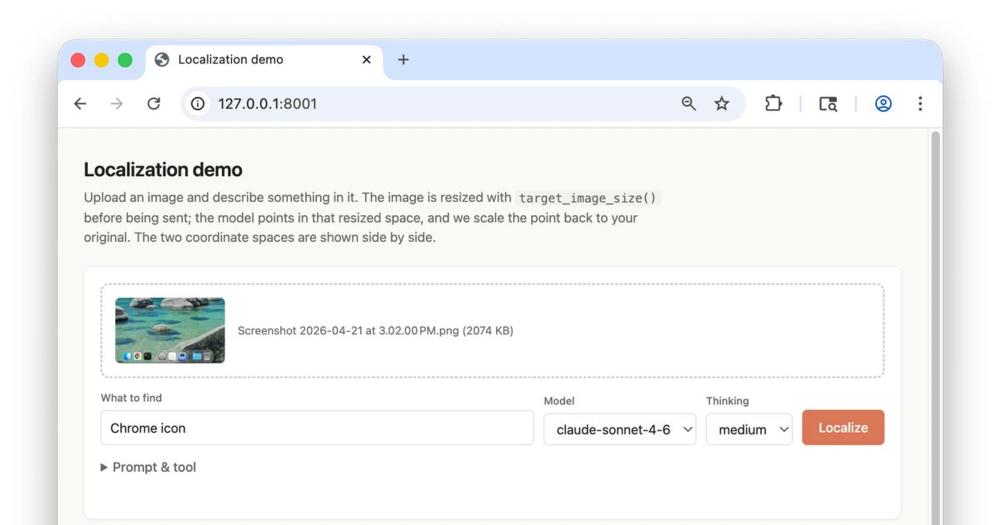
The Computer Use Best Practices quickstart is a native macOS reference implementation that demonstrates patterns for building reliable automation: explicit tool definitions, correct image sizing and pruning, prompt caching, and batched tool calls. The containerized Computer Use Demo provides a sandboxed environment for initial experimentation.

Skip if:

Running against the macOS desktop requires a VM; the quickstart documentation recommends against running computer use directly on a primary machine.

Developers building knowledge-retrieval or multi-agent workflows

The Knowledge Wiki quickstart shows how to distill a document corpus into a versioned memory store with provenance on every fact, then answer repeated questions from it at lower per-question cost than raw-document search. The Road Trip Planner demonstrates streaming, vault credentials, agent overrides, and a multiagent coordinator in one complete example.

Skip if:

If your data lives in structured databases rather than document corpora, a direct database query tool is likely simpler than the wiki pattern.

the problem

The problem it solves#

Most developers who get Claude API access face the same friction: the API documentation explains individual capabilities but does not show how to combine them into a working application. Building a customer support agent or a persistent coding agent from scratch means making dozens of small architecture decisions before writing a line of product code.

The challenge is especially sharp for teams without prior LLM integration experience. Tool definitions, session management, vault credentials, and multi-agent coordination are individually documented but rarely shown as a complete working system. Teams end up spending days on boilerplate infrastructure that has nothing to do with the actual problem they are trying to solve.

how Claude Quickstarts solves it

How it solves it#

Customer Support Agent with Knowledge Base

A complete customer support agent that uses Claude's tool-use capabilities to query a knowledge base and generate natural-language responses. The project demonstrates how to structure tool definitions, handle multi-turn conversations, and wire up a document retrieval layer without an external framework.

Computer and Browser Automation Toolsets

Two families of quickstarts cover desktop and browser automation: the Computer Use Demo runs Claude against a containerized desktop over VNC; the Browser Use Demo uses a Playwright-backed tool for DOM inspection, navigation, and form interaction. The best-practices variant adds prompt caching, server-side compaction, and trajectory recording for production-grade reliability.

Autonomous Coding Agent on Claude Agent SDK

A two-agent pattern built on the Claude Agent SDK: an initializer breaks down a feature list and hands work to a coding agent that persists progress in git between sessions. Each feature is built incrementally, so the agent can resume after interruption and work through a list of requirements autonomously.

Managed Agents: 10 Persistent Session Quickstarts

The Managed Agents family includes 10 quickstarts for session lifecycle management: a Daily Brief agent that posts Slack digests on a cron, a Knowledge Wiki that distills documents into a provenance-tracked memory store, a Sentry Autofix agent that opens PRs from stack traces, and a Linear bot that responds to @mentions. Each is deployed as files applied with `ant apply`.

MCP Server for Claude Managed Agents

A TypeScript MCP server that exposes the Managed Agents Sessions API as nine tools, letting Claude Desktop, Claude Code, or claude.ai interact with agents already deployed in a workspace. One tool converts the session event stream into a single request/response call. An agent allowlist limits what a bearer-token holder can reach.

Financial Data Analyst with Interactive Charts

A chat interface for analyzing financial data, powered by Claude's ability to write and run visualization code. The agent interprets natural-language queries about financial data, generates charts, and returns them interactively. No dedicated data science stack is required.

strengths · trade-offs

Strengths and trade-offs#

Strengths

  • MIT License with No Commercial RestrictionsEvery quickstart is MIT-licensed, so the code can be forked, modified, and used commercially with no restrictions. Unlike code samples tied to paid platforms or vendor SDKs with restrictive terms, the license places no limits on what you build with these patterns.
  • Full Coverage of Current Claude API CapabilitiesThe collection covers tool use, computer and browser automation, Managed Agents sessions, vault credentials, multi-agent patterns, and streaming with event deltas in a single repository. Developers building in any of these areas get reference code rather than assembling patterns from blog posts and issue threads.
  • Up-to-Date Versioned Toolset ShapesThe Computer Use and Browser Toolset quickstarts reference the current versioned toolset shapes (computer_toolset_20260801, browser_toolset_20260801), which is the correct interface for Claude's computer and browser capabilities. Projects built against older interface shapes often break silently when the API changes.
  • Minimal, Readable Reference CodeEach quickstart is intentionally small. The Browser Toolset and Computer Toolset minimal examples show the interface without production complexity, and the Managed Agents examples each demonstrate one to four specific API features. This makes it straightforward to extract the relevant patterns without reading through unrelated code.

Trade-offs

  • -Requires a Claude API Key Before Anything RunsEvery quickstart requires a Claude API key from console.anthropic.com before anything runs. Teams exploring before committing to the Claude API have no offline or no-key path; the projects are reference implementations for Claude specifically, not general LLM-agnostic templates.
  • -124 Open Issues in an Actively Extended RepositoryThe repository has 124 open issues. For a reference collection that is actively extended, some quickstarts may lag behind the latest API changes or have rough edges reported by the community. Reviewing relevant open issues before building on a specific quickstart is worth the time.
  • -No Managed Runtime or Deployment ToolingThe quickstarts provide code, not a hosted platform. Deploying a Managed Agents session in production requires you to manage the infrastructure: a server, environment variables, vault setup, and monitoring. For teams that want a fully managed AI agent platform, this is code to run yourself, not a service to subscribe to.
versus alternatives

Claude Quickstarts vs alternatives#

Claude Quickstarts vs Azure AI Studio

Both offer starting points for building AI-powered applications, but they serve different developer models. Azure AI Studio is a managed platform for deploying and monitoring AI features; Claude Quickstarts is a source code collection for running the patterns yourself.

FeatureClaude QuickstartsAzure AI Studio
LicenseMITProprietary
CostFree (Claude API billed separately)Pay-per-use platform fees
Self-hostingYesNo (Azure-hosted only)
LanguagesPython, TypeScriptPython, C#, .NET
Patterns coveredAgents, computer use, Managed AgentsVaries by template

Claude Quickstarts is the better choice when you want to run agent patterns on your own infrastructure, avoid a managed platform dependency, or deploy to a non-Azure stack. Azure AI Studio is worth considering when your organization is already on Azure and wants unified deployment, monitoring, and access control in one console without managing the underlying server.

Claude Quickstarts vs Vertex AI Agent Builder

Vertex AI Agent Builder is Google's managed platform for building AI agents on Gemini. Claude Quickstarts targets Claude API users who want source-level control over their agent architecture.

FeatureClaude QuickstartsVertex AI Agent Builder
LicenseMITProprietary
ModelClaude (Anthropic)Gemini (Google)
Self-hostingYesNo (GCP-hosted)
CostFree code (Claude API billed)GCP compute + API fees
DeploymentYour infrastructureGoogle Cloud Platform

Claude Quickstarts gives you code you own, run, and modify. Vertex AI Agent Builder offers a managed runtime with GCP integration, monitoring, and no-code configuration. Teams building on Google Cloud or needing enterprise support contracts will prefer the managed path; teams that want to understand and control every layer of their agent will prefer the quickstarts.

install · quick start

Quick start#

bash
Clone the repository and navigate to a quickstart directory to install its dependencies.

```bash
git clone https://github.com/anthropics/claude-quickstarts.git
```
tech stack · detected from GitHub

What it's built on#

Languages
JavaScriptPythonTypeScript
Frameworks
Next.jsReact
Infrastructure
AWS
frequently asked

FAQ#

Do I need a paid Claude API plan to use these quickstarts?

Yes: each quickstart requires a Claude API key from console.anthropic.com. Anthropic offers a free tier for new accounts, and most of the quickstarts work within it for development and testing. High-volume or production use, especially computer and browser automation, will consume more tokens and may require a paid plan.

Can I use these quickstarts with other LLMs, not just Claude?

No: the quickstarts are written specifically for the Claude API, including its tool-use format, the Managed Agents framework, and the versioned computer and browser toolset shapes. They are not framework-agnostic templates, and adapting them to another provider would require rewriting the core integration code.

What languages do the quickstarts use?

Most quickstarts are in Python. TypeScript versions are also available for the Browser Toolset and Computer Toolset minimal examples and the Managed Agents MCP Server. The Managed Agents Chat SDK example is in TypeScript with Next.js.

Can I deploy these quickstarts commercially?

Yes: the entire repository is MIT licensed. You can fork any quickstart, adapt it, and ship it in a commercial product without restriction. The license applies to the code; API usage costs are separate and billed by Anthropic.

How is the Autonomous Coding Agent different from Claude Code?

The Autonomous Coding Agent quickstart is a reference implementation built on the Claude Agent SDK, designed to show the two-agent pattern (initializer plus coding agent) with progress persisted in git. Claude Code is a separate product. The quickstart teaches the pattern so you can build your own agent with similar behavior into your own application.

also worth a look

Similar open-source tools#

Hermes Agent

Featured

Alternative toGrok Bot

Self-hosted AI agent: persistent memory, multi-channel chat, model choice.

  • 261,524 GitHub stars
  • MITLicence MIT

Elephant Goldfish Model

Alternative toAmazon Kiro

Draft specs with context, review with fresh zero-context agents.

  • 16,479 GitHub stars
  • Apache-2.0Licence Apache-2.0

Billion Context

Alternative toCompresr

Compression proxy for AI coding agents, enabling 5x token savings.

  • 4,620 GitHub stars
  • CustomLicence MIT with attribution requirement

Hive

Alternative toConductor

AI coding agent orchestrator for isolated parallel worktrees

  • 475 GitHub stars
  • MITLicence MIT

Alethe

Alternative toConductor

Multi-agent coding workspace with real PTYs and MCP management

  • 1,140 GitHub stars
  • AGPL-3.0Licence AGPL-3.0

Maestro

Alternative toConductor

Desktop orchestrator for parallel AI coding agent fleets

  • 3,553 GitHub stars
  • AGPL-3.0Licence AGPL-3.0
by category

Open source tools in these categories#

520

AI & Machine Learning

freeCodeCamp, REA (Reverse Engineer Anything), OpenClaw
617

Developer Tools

REA (Reverse Engineer Anything), Skills for Real Engineers, superpowers
132

LLMOps & AI Tooling

Hermes Agent, OpenCode, MarkItDown

Sponsors

Inbox Zero

Alternative toSuperhuman

AI email assistant that drafts replies and clears your inbox

  • 12,942 GitHub stars
  • AGPL-3.0Licence AGPL-3.0
  • #Email

rakazo

Alternative toGrok Bot

AI teammates you own: your keys, your model, your machine.

  • 7,478 GitHub stars
  • Apache-2.0Licence Apache-2.0
  • #AI Agents

SnitchFeed

Live monitoring on LinkedIn, X, Reddit & more. Agentic social listening for startups.

Marketing & Growth

Advertise your product

New open source projects by email

The projects we add and every new guide. Free, unsubscribe any time.

Find open source alternatives to paid software

/
  • Claude Code to OpenCode
  • Jira to Windshift
  • Notion to AppFlowy
  • Slack to Mattermost
  • Linear to GitLab
  • Wispr Flow to Handy
  • Arc to Zen Browser
  • CapCut to Concat
  • Grok Bot to rakazo
  • Superhuman to Inbox Zero
  • Airtable to AITable
  • Muse to OpenClaw
  • Railway to Coolify
  • GitHub Copilot to Cline
  • Datadog to Netdata
  • Confluence to Wiki.js
  • Microsoft Teams to Rocket.Chat
  • 1Password to KeePassXC
  • Firebase to Supabase
  • Pinecone to Qdrant
  • Zapier to n8n
  • Devin AI to OpenHands
  • Asana to Leantime
  • Contentful to Strapi
  • Claude Code to OpenCode
  • Jira to Windshift
  • Notion to AppFlowy
  • Slack to Mattermost
  • Linear to GitLab
  • Wispr Flow to Handy
  • Arc to Zen Browser
  • CapCut to Concat
  • Grok Bot to rakazo
  • Superhuman to Inbox Zero
  • Airtable to AITable
  • Muse to OpenClaw
  • Railway to Coolify
  • GitHub Copilot to Cline
  • Datadog to Netdata
  • Confluence to Wiki.js
  • Microsoft Teams to Rocket.Chat
  • 1Password to KeePassXC
  • Firebase to Supabase
  • Pinecone to Qdrant
  • Zapier to n8n
  • Devin AI to OpenHands
  • Asana to Leantime
  • Contentful to Strapi