
Open Source Alternatives
  • Alternatives
  • Categories
    Categories by size1,139 projects
    • Developer Tools583
    • AI & Machine Learning498
    • Business & Productivity275
    • Web Development209
    • Security & Monitoring173
    • Communication & Collaboration154
    • IT Management146
    • Cloud & Hosting128
    • LLMOps & AI Tooling128
    • Product & Project Management122
    Browse all 21 categoriesDevOps & CI/CD, Data & Analytics and 9 more
  • Blog
  • Advertise
SearchNotion, Slack, password manager.../
Submit
Open Source Alternatives
  • Alternatives
    • Developer Tools583
    • AI & Machine Learning498
    • Business & Productivity275
    • Web Development209
    • Security & Monitoring173
    • Communication & Collaboration154
    • Browse all 21 categories
  • Blog
  • Advertise
Submit your project

New open source projects by email

The projects we add and every new guide. Free, unsubscribe any time.

Open Source Alternatives LogoOpen Source Alternatives

Handpicked Open Source Alternatives to Paid Softwares

Product

  • Categories
  • Tag
  • Advertise

Resources

  • Blog
  • Collection
  • Submit

Company

  • Privacy Policy
  • Terms of Service
  • Refund Policy
  • Sitemap

Alternatives

  • Claude Code
  • Jira
  • Notion
  • Slack
  • Linear
  • Wispr Flow
  • All alternatives
© 2026 Open Source Alternatives. All rights reserved.
Open SourceAlternatives
Home/Categories/Developer Tools/Alethe
icon of Alethe Agents

Alethe

Open source alternative to Conductor

  • 1.1K stars
  • AGPL-3.0
  • Active this week
  • Last commit 3 days ago

Last verified Nov 5, 2026

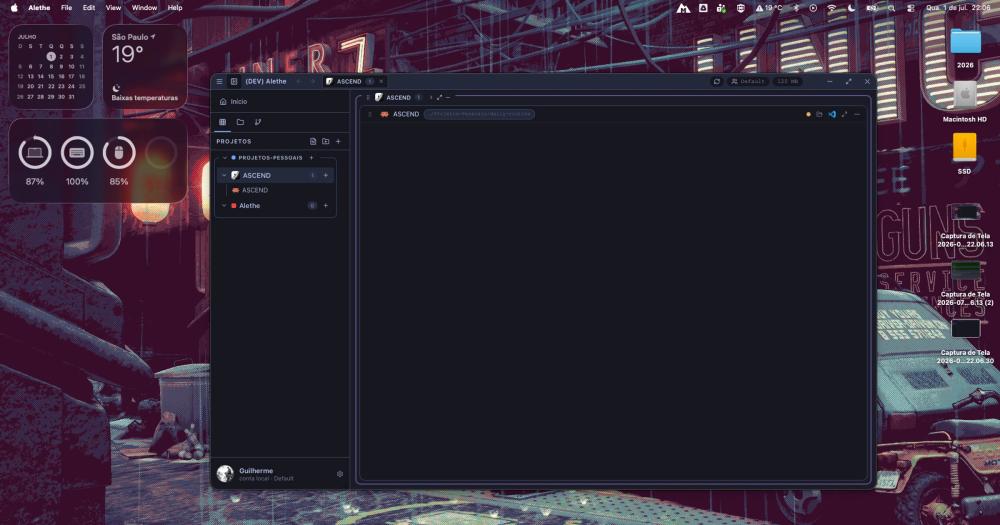
Orchestrate multiple coding agents side by side in a local-first desktop workspace with real PTYs, MCP management, and persistent sessions.

Visit websiteGitHub1.1K stars
Image for Alethe
TL;DR

Alethe is a local-first desktop workspace for running multiple coding agents side by side, replacing the terminal tab juggling that breaks down when several agents work across multiple repositories. It is an open source alternative to commercial multi-agent platforms, with AGPL-3.0 licensing, cross-platform support on Windows, macOS, and Linux, and no cloud dependency. Best for developers already using Claude Code, Codex, or similar agents who want persistent sessions, shared MCP management, and an optional orchestration layer for delegating parallel work to cheaper workers.

Read the full breakdownHide the full breakdownWho it is for, how it works, trade-offs, the quick start and the FAQ
who it's for

Who Alethe is for#

Developers running multiple coding agents in parallel

A developer working on separate tasks can open Claude Code, Codex, and a plain shell in the same project container, each with its own PTY, session history, and MCP configuration. Session resume means a restart does not wipe context; handoff packets let work move between agents without manual copy-paste.

Skip if:

If you run only one agent at a time and do not use shared MCP servers, a standard terminal emulator is simpler. Alethe's value scales with the number of agents and the complexity of shared configuration.

Teams orchestrating parallel coding workflows

The orchestration board lets a lead agent delegate bounded tasks to Claude and Codex workers running in separate git worktrees, each reporting status, cost, and diff on its card. Playbook canvases define workers, checks, and cost or quota conditions so the pattern is repeatable.

Skip if:

Orchestration is off by default and requires installing the official alethe skill. If your tasks are sequential or do not benefit from parallelism, the overhead adds complexity without benefit.

Developers managing shared MCP servers across agents

When several agents share the same MCP servers (a code graph server, a database MCP, or a custom tool), keeping configurations consistent across Claude Code, Codex, and Cursor JSON files by hand is error-prone. The MCP tab reads all configs in one view, copies entries between agents, and verifies connectivity.

Skip if:

If you use a single agent with one or two MCP servers, editing the JSON config file directly is faster. The MCP tab's value is managing servers shared across three or more agents.

the problem

The problem it solves#

Running one coding agent in a terminal is easy. Running five at once, across three different repositories, each with its own context, MCP configuration, and session history, is where the terminal-tab model stops working. Sessions get lost between restarts, MCP servers configured for one agent are not visible to another, and tracking which agent is doing what requires constant manual overhead.

The workflow breaks down even before orchestration. A developer switching between Claude Code for one task and Codex for another must manage two separate terminal windows, manually track each session's history, and re-enter context each time an agent loses its state after a restart. At scale, this becomes a reliability issue, not just a productivity one.

how Alethe solves it

How it solves it#

Real PTYs per agent pane

Each agent runs in its own backend process (PTY), not a simulated shell. Sessions stay alive when you rearrange the workspace, and scrollback persists per PTY so reattaching shows what happened before the disconnect. Closing a container hides it; the process keeps running in the background.

Cross-agent MCP management

The MCP tab reads configurations from Claude Code, Codex, Cursor, OpenCode, and Antigravity. Add, remove, and copy servers between agents; search the official registry; and ask each agent to verify it can reach a server. Every write is backed up and committed atomically.

Session resume and agent handoff

Claude Code, Codex, Cursor, and OpenCode sessions resume after a crash or restart. A Claude Code conversation can be handed off to Codex (and back) through a locally redacted context packet. The README notes that redaction is best-effort, so review the packet before starting the target agent.

Orchestration with visual playbooks

An orchestration board lets a lead agent delegate bounded tasks to Claude and Codex workers running in parallel git worktrees. Playbooks are configurable as visual canvases: workers, checks, and cost or quota conditions per step. Workers hand back result files only, not full transcripts, so the lead agent's context stays small.

Plugin system with SHA-256 checksum verification

Features load as plugins with declared permissions. Official plugins (Todo List, Git Control, Theme Pack) ship inside the installer; community plugins are listed in the in-app catalogue with SHA-256 checksums pinned per version, so what runs matches what was reviewed. An installed plugin arrives switched off and goes through a trust dialog before it runs.

Integrated git panel and PR review

A git panel per project covers status, staging, commits, branches, diffs, and worktrees for parallel tasks. The PR merge panel finds the open GitHub PR for an agent worktree through the local gh CLI, opens its metadata, and can start a read-only AI review inside the same isolated worktree. Squash-merging stays an explicit human action.

strengths · trade-offs

Strengths and trade-offs#

Strengths

  • No cloud account required for core functionalityAll workspace data, session history, and agent configurations stay on your machine. Cloud sync of preferences through GitHub is optional. Unlike cloud-based agent orchestration services, Alethe requires no sign-in, no subscription, and no remote server to run agents in parallel.
  • Supports twelve coding agents in one workspaceClaude Code, Codex, GitHub Copilot CLI, Cursor, Antigravity, OpenCode, Kiro CLI, Kimi Code, Grok Build, Codewhale, Mimo, and standard shells all run in the same workspace with one consistent pane model. Missing CLIs can be installed from inside the app, using the vendor's official installer where available.
  • AGPL-3.0 open source with auditable codeThe source is available under AGPL-3.0, so you can audit every file, fork the project, and contribute fixes upstream. AGPL-3.0 is an OSI-approved license, which means no proprietary hidden behavior and no license fees for personal or team use on your own infrastructure.
  • Orchestration savings through bounded worker transcriptsIn the playbook model, workers hand back result files rather than full transcripts, so the lead agent's context stays small. A published example from the README shows two workers producing 5.0 KB of transcripts on disk while the lead read only 595 bytes of results.

Trade-offs

  • -Early public release with 39 open issuesAlethe was released as an early public release and had 39 open GitHub issues (pull requests excluded, from the GitHub search API) at the time this was written. Expect rough edges, especially around less-common agents and plugin APIs. The project is active (last pushed November 2026), but breaking changes are likely in early versions.
  • -Desktop app only: no server or headless modeAlethe is a desktop application, not a server. Teams that need a shared remote workspace or CI integration where agents run on cloud hardware will need to run it on each developer's machine individually. There is no Docker deployment or headless mode.
  • -Agent context handoff is best-effortWhen handing a conversation off between agents (for example, Claude Code to Codex), Alethe creates a locally redacted context packet. The README explicitly notes that redaction is best-effort. Review the packet before starting the target agent to avoid leaking credentials or sensitive paths.
versus alternatives

Alethe vs alternatives#

Alethe vs Conductor

Both are local desktop apps for running multiple coding agents in parallel git worktrees: agents run on your machine, not on remote hardware. Conductor is macOS-only and proprietary. Alethe is cross-platform (macOS, Windows, Linux) and AGPL-3.0 open source. Alethe also adds a broader agent roster (12+), a visual cross-agent MCP tab, and an orchestration board with visual playbooks.

Conductor is winding down. Conductor Cloud (a paid add-on that ran agents in cloud microVMs) shuts down on November 20, 2026; local Conductor will reach end of life in early 2027. The company is joining Meta.

FeatureAletheConductor
LicenseAGPL-3.0Proprietary
PlatformmacOS, Windows, LinuxmacOS only
AgentsClaude Code, Codex, Copilot CLI, Cursor, 8+ moreClaude Code, Codex, Cursor, OpenCode
ExecutionLocal, real PTYsLocal, git worktrees
Cross-agent MCP tabYesNo
CostFree (open source)Free app; Conductor Cloud (paid add-on) shuts down Nov 20, 2026

For users on Conductor looking for a supported local alternative before the early 2027 wind-down, Alethe covers the same parallel agent workflow on all platforms. Conductor Cloud's paid remote microVMs are not replicated: all Alethe processes run locally on your machine.

install · quick start

Quick start#

bash
Download the installer for your platform (Windows, macOS, or Linux) from GitHub Releases: https://github.com/Kc1t/alethe-agents/releases/latest
tech stack · detected from GitHub

What it's built on#

Languages
JavaScriptPythonRustTypeScript
Frameworks
React
frequently asked

FAQ#

Is Alethe free to use?

Yes. Alethe is free to download and use. The core desktop app is AGPL-3.0 licensed and runs on your hardware at no cost. Update checks and provider usage polling are on by default; all other network features are optional or action-triggered.

Which operating systems does Alethe support?

Alethe supports Windows, macOS, and Linux. Signed installers for all three platforms are available from the GitHub Releases page at https://github.com/Kc1t/alethe-agents/releases/latest.

Does Alethe require a cloud account?

No cloud account is required for core functionality. All workspace data, session history, and MCP configurations are stored locally. Optional cloud sync of preferences requires a GitHub sign-in, but the workspace, agents, and MCP configurations work without it.

What coding agents does Alethe support?

Alethe supports Claude Code, Codex, GitHub Copilot CLI, Cursor, Antigravity, OpenCode, Kiro CLI, Kimi Code, Grok Build, Codewhale, Mimo, plain shell (bash, zsh, PowerShell), and WSL. Missing CLIs can be installed directly from inside the app, which probes the host for Node, npm, WinGet, Scoop, and Chocolatey.

How does Alethe's orchestration differ from using a coding agent directly?

In Alethe's orchestration mode, a lead agent delegates bounded tasks to cheaper worker agents running in parallel git worktrees. Workers hand back result files only, not full transcripts, so the lead's context stays small and cost is what each CLI reported. Without orchestration, the lead agent reads all context itself, which increases token spend on long tasks.

Looking for more

Other ways to replace Conductor#

paperclip

Featuredfor Conductor

Self-hosted AI agent management with org charts and budgets

111,113 GitHub starsVisit

Orca

#1 in the Conductor guide

Drop-in Conductor replacement with 27 or more agents on macOS, Windows, and Linux under MIT

115,397 GitHub stars

T3 Code

#2 in the Conductor guide

MIT-licensed control plane for 6 or more agents with mobile and web clients and a large community

46,806 GitHub stars

Paseo

#3 in the Conductor guide

Daemon-based architecture for agents running on a VM or Docker host with full mobile parity

23,074 GitHub stars
All 52 Conductor alternatives12 open source Conductor alternatives, ranked
by category

Open source tools in these categories#

584

Developer Tools

REA (Reverse Engineer Anything), Skills for Real Engineers, superpowers
499

AI & Machine Learning

freeCodeCamp, REA (Reverse Engineer Anything), OpenClaw
128

LLMOps & AI Tooling

Hermes Agent, OpenCode, MarkItDown

Sponsors

Inbox Zero

Alternative toSuperhuman

AI email assistant that drafts replies and clears your inbox

  • 12,915 GitHub stars
  • AGPL-3.0Licence AGPL-3.0
  • #Email

rakazo

Alternative toGrok Bot

AI teammates you own: your keys, your model, your machine.

  • 7,028 GitHub stars
  • Apache-2.0Licence Apache-2.0
  • #AI Agents

SnitchFeed

Live monitoring on LinkedIn, X, Reddit & more. Agentic social listening for startups.

Marketing & Growth

Advertise your product

New open source projects by email

The projects we add and every new guide. Free, unsubscribe any time.

Find open source alternatives to paid software

/
  • Claude Code to OpenCode
  • Jira to Windshift
  • Notion to AppFlowy
  • Slack to Mattermost
  • Linear to GitLab
  • Wispr Flow to Handy
  • Arc to Zen Browser
  • CapCut to Concat
  • Grok Bot to rakazo
  • Superhuman to Inbox Zero
  • Airtable to AITable
  • Muse to OpenClaw
  • Railway to Coolify
  • GitHub Copilot to Cline
  • Datadog to Netdata
  • Confluence to Wiki.js
  • Microsoft Teams to Rocket.Chat
  • Firebase to Supabase
  • Pinecone to Qdrant
  • Zapier to n8n
  • 1Password to KeePassXC
  • Devin AI to OpenHands
  • Asana to Leantime
  • Contentful to Strapi
  • Claude Code to OpenCode
  • Jira to Windshift
  • Notion to AppFlowy
  • Slack to Mattermost
  • Linear to GitLab
  • Wispr Flow to Handy
  • Arc to Zen Browser
  • CapCut to Concat
  • Grok Bot to rakazo
  • Superhuman to Inbox Zero
  • Airtable to AITable
  • Muse to OpenClaw
  • Railway to Coolify
  • GitHub Copilot to Cline
  • Datadog to Netdata
  • Confluence to Wiki.js
  • Microsoft Teams to Rocket.Chat
  • Firebase to Supabase
  • Pinecone to Qdrant
  • Zapier to n8n
  • 1Password to KeePassXC
  • Devin AI to OpenHands
  • Asana to Leantime
  • Contentful to Strapi