Open Source Alternatives
  • Alternatives
  • Categories
    Categories by size1,057 projects
    • Developer Tools539
    • AI & Machine Learning467
    • Business & Productivity246
    • Web Development205
    • Security & Monitoring159
    • Communication & Collaboration141
    • IT Management139
    • Cloud & Hosting123
    • LLMOps & AI Tooling121
    • Data & Analytics114
    Browse all 21 categoriesProduct & Project Management, Design & Creative and 9 more
  • Blog
  • Advertise
SearchNotion, Slack, password manager.../
Submit
Open Source Alternatives
  • Alternatives
    • Developer Tools539
    • AI & Machine Learning467
    • Business & Productivity246
    • Web Development205
    • Security & Monitoring159
    • Communication & Collaboration141
    • Browse all 21 categories
  • Blog
  • Advertise
Submit your project

New open source projects by email

The projects we add and every new guide. Free, unsubscribe any time.

Open Source Alternatives LogoOpen Source Alternatives

Handpicked Open Source Alternatives to Paid Softwares

Product

  • Categories
  • Tag
  • Advertise

Resources

  • Blog
  • Collection
  • Submit

Company

  • Privacy Policy
  • Terms of Service
  • Refund Policy
  • Sitemap

Alternatives

  • Claude Code
  • Jira
  • Notion
  • Slack
  • Linear
  • Wispr Flow
  • All alternatives
© 2026 Open Source Alternatives. All rights reserved.
Open SourceAlternatives
Home/Categories/Developer Tools/Claude Squad
icon of Claude Squad

Claude Squad

Open source alternative to Conductor

  • 8.7K stars
  • AGPL-3.0
  • Active recently
  • Last commit 76 days ago

Last verified Nov 4, 2026

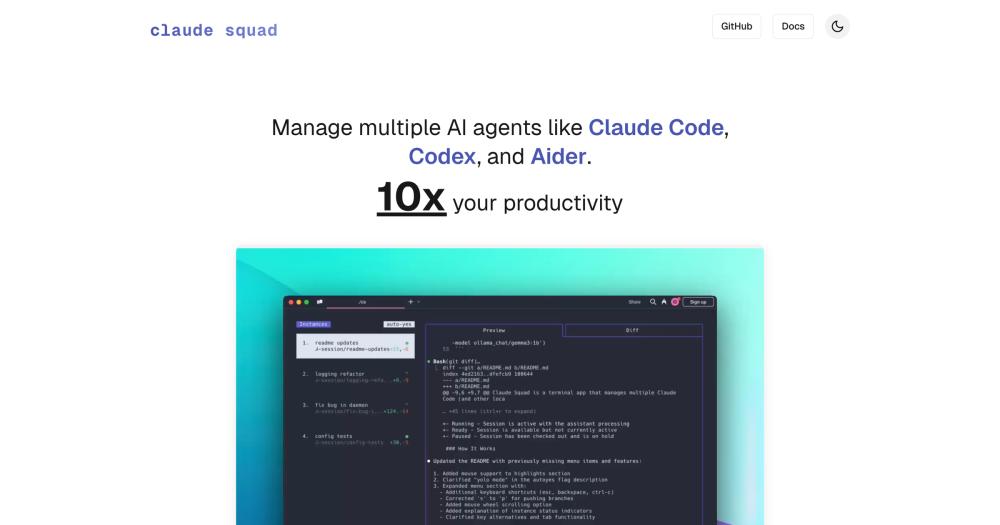
Manage multiple AI coding agents like Claude Code, Codex, and Aider in isolated git workspaces from a single terminal interface.

Visit websiteGitHub8.7K stars
Image for Claude Squad
TL;DR

Claude Squad is a terminal TUI that manages multiple AI coding agents, including Claude Code, Codex, Gemini CLI, and Aider, each in its own isolated git worktree. It is the terminal-first alternative to GUI-based commercial agent coordinators, running as a local binary with AGPL-3.0 licensing and no cloud dependency. Best for developers who want to parallelize AI coding sessions with branch isolation and diff review from a single keyboard-driven interface.

Read the full breakdownHide the full breakdownWho it is for, how it works, trade-offs, the quick start and the FAQ
who it's for

Who Claude Squad is for#

Developers running multiple AI coding sessions in parallel

If you are running a refactor in one AI session, a test addition in another, and a documentation pass in a third, Claude Squad keeps them in separate worktrees and surfaces all three diffs in one view. You review each one independently and push branches without leaving the terminal.

Skip if:

If you run only one AI coding session at a time, Claude Squad adds setup overhead with no benefit. A single terminal window with your preferred agent is simpler.

Engineers comparing multiple AI approaches to the same problem

Claude Squad lets you give the same prompt to Claude Code in one session and Codex in another, then compare their diffs side by side. Because each session is in its own worktree, the approaches do not interfere with each other. You pick the branch you prefer and discard the others.

Skip if:

If you are committed to a single AI provider and have no interest in comparing outputs, the multi-agent profile system adds no value over running that agent directly.

Teams automating background AI coding tasks

With auto-accept mode enabled, Claude Squad sessions run to completion without input. You start several agents on independent tasks, let them run while you work on other things, and return to review the diffs. This suits teams that want to parallelize AI-assisted refactors or exploratory code generation.

Skip if:

If you need a human in the loop on every agent step, auto-accept mode is not the right workflow. Run agents interactively in their native interfaces instead.

the problem

The problem it solves#

Running multiple AI coding agents on the same repository without workspace isolation causes branch conflicts. When two agents edit the same files, their changes collide on the same branch and one session overwrites the other. The usual fix is to create separate git worktrees by hand, switch terminal windows, and track which agent is on which branch manually. That overhead grows with the number of parallel sessions and erases the speed gain from running agents in parallel.

Reviewing agent output is a second problem. Each session may have drifted in a different direction before you check on it. Without a unified interface showing all active sessions and their diffs, catching a bad assumption early means constant context-switching between terminal windows.

how Claude Squad solves it

How it solves it#

Isolated git worktrees per session

Each agent session runs on its own git worktree, so changes on one branch never conflict with changes on another. Claude Squad creates the worktree automatically when you open a new session. You can review and merge branches independently without coordinating between sessions.

Support for Claude Code, Codex, Gemini, Aider, OpenCode, and Amp

Any agent that runs as a CLI command can be launched from Claude Squad. The default is Claude Code, with Codex, Gemini CLI, Aider, OpenCode, and Amp configured via the profiles system or the `--program` flag. Each profile stores a launch command, and sessions inherit the profile's configuration.

Split TUI with diff preview

The interface shows a session list on the left and a live diff preview on the right. You switch between sessions with arrow keys or vi-style navigation, review changes in the diff tab before applying them, and attach to any session to send a follow-up prompt. The `tab` key toggles between the preview and diff views.

Auto-accept background mode

The `--autoyes` flag turns on auto-accept mode: agents automatically accept every prompt and run to completion without input. This is the vibe-coding flow where you start several sessions with different tasks, leave them running, and return to review the diffs. Each session's output is captured in its own terminal pane.

Named profiles for multi-agent setups

The config file at `~/.claude-squad/config.json` holds a `profiles` array. Each profile has a name and a launch command, so you can store separate configurations for Claude Code, Codex, and Aider and pick among them when creating a new session. The profile picker appears at session creation when more than one is defined.

Push branches to GitHub from the TUI

The `s` key commits and pushes the current session's branch to GitHub without leaving Claude Squad. The `c` key checkouts and pauses a session, committing changes and stopping the agent. These keyboard shortcuts cover the common review-and-ship flow: finish, check the diff, push, and open a pull request in the browser.

strengths · trade-offs

Strengths and trade-offs#

Strengths

  • Runs anywhere tmux runs, including Linux and SSHBecause Claude Squad is a terminal TUI built on tmux, it works on macOS, Linux, and any remote server you can SSH into. You are not restricted to a desktop app. This matters for teams whose CI runners or development servers run Linux, and for engineers who prefer a consistent workflow across local and remote environments.
  • AGPL-3.0 with no cloud dependencyClaude Squad runs entirely as a local binary. There is no cloud service to authenticate against, no subscription, and no usage data sent to a third party. The only network calls are to the AI agents you configure, which you control. Teams running it on shared infrastructure face no licensing cost for internal use.
  • 8,700+ GitHub stars with active maintenanceClaude Squad reached 8,732 GitHub stars since its March 2025 launch and has 623 forks. The repository received its last push in August 2026, and the Go codebase has 16 open issues. The star count in this category reflects genuine developer adoption rather than speculative interest.
  • Works with any CLI-based agentClaude Squad is not tied to one AI provider. Any agent that accepts prompts as a CLI command, including local models run through Aider's model flag (`aider --model ollama_chat/gemma3:1b`), works as a session. The `--program` flag and profiles system handle the configuration without editing source code.

Trade-offs

  • -Terminal-only: no GUI or mouse interfaceClaude Squad is a keyboard-driven TUI. There is no graphical interface, no drag-and-drop session management, and no visual diff editor. Users who prefer a GUI workflow will need to stay in a terminal or use a different tool. Comfort with tmux key bindings and vi-style navigation is the minimum requirement.
  • -tmux and GitHub CLI are required prerequisitesClaude Squad requires tmux and the GitHub CLI (`gh`) to be installed before it works. On a fresh machine that is two additional installs before you can run your first session. The README documents both but does not automate their installation: you install tmux through your system package manager and `gh` separately.
  • -AGPL-3.0 restricts redistribution as a managed serviceAGPL-3.0 is permissive for internal use but requires releasing source modifications if you offer a modified version of Claude Squad as a hosted service to external users. Teams running it internally for their own engineers are not affected. The restriction applies only to redistribution as a service to others.
versus alternatives

Claude Squad vs alternatives#

Claude Squad vs Conductor

Both Claude Squad and Conductor run multiple AI coding agents in parallel with git workspace isolation. Claude Squad is a terminal TUI; Conductor was a macOS desktop GUI app that ran Claude Code, Codex, Cursor, and OpenCode in parallel local worktrees with Conductor Cloud as a hosted add-on.

FeatureClaude SquadConductor
InterfaceTerminal TUImacOS desktop GUI
LicenseAGPL-3.0Proprietary
PlatformmacOS, Linux, SSH sessionsmacOS only
Cloud add-onNoneConductor Cloud
Agents supportedClaude Code, Codex, Gemini, Aider, OpenCode, AmpClaude Code, Codex, Cursor, OpenCode

Claude Squad fits developers who work in terminal environments, run agents on remote Linux servers over SSH, or need agents beyond the set Conductor supports. Its AGPL-3.0 license has no licensing cost for teams using it internally, and the binary runs on any system with tmux installed.

Conductor announced on 2026-11-04 that it is joining Meta: new sign-ups closed immediately, Conductor Cloud shuts down on 2026-11-20, and the local app winds down in early 2027. It is not a viable option for new users.

install · quick start

Quick start#

bash
Install Claude Squad via Homebrew; the official shell script is the alternative for non-Homebrew setups.

```bash
brew install claude-squad
```
tech stack · detected from GitHub

What it's built on#

Languages
GoTypeScript
Frameworks
Next.jsReact
frequently asked

FAQ#

What AI coding agents does Claude Squad support?

Claude Squad supports Claude Code, Codex, Gemini CLI, Aider, OpenCode, and Amp out of the box. Any agent that runs as a command-line program works: set it via the --program flag or define a named profile in ~/.claude-squad/config.json. The default program is Claude Code (claude).

Does Claude Squad work on Linux?

Yes. Claude Squad is a Go binary that runs on macOS and Linux. Because it uses tmux for terminal session management, it works on any system where tmux is available, including remote Linux servers over SSH. Install via the official shell script: curl -fsSL https://raw.githubusercontent.com/smtg-ai/claude-squad/main/install.sh | bash.

What does AGPL-3.0 mean for teams using Claude Squad internally?

AGPL-3.0 is permissive for internal use. A team running Claude Squad on their own machines or servers for their own engineers has no licensing obligations. The copyleft clause applies only if you modify Claude Squad and distribute it as a service to external users. Internal use, including paid commercial team use, is unrestricted.

What are the prerequisites for Claude Squad?

Claude Squad requires tmux (for terminal session management) and the GitHub CLI (gh, for branch operations). Both must be installed separately: tmux through your OS package manager and gh from cli.github.com. The Claude Squad binary itself installs via Homebrew or the official shell script. The error 'failed to start new session: timed out waiting for tmux session' usually means your underlying agent (such as claude) needs an update to its latest version.

Can I run Claude Squad without connecting to any cloud service?

Yes. Claude Squad is a local binary with no cloud component. It uses tmux and git worktrees entirely on your machine. The only network activity comes from the AI agents you configure (Claude Code calling the Anthropic API, Codex calling OpenAI, and so on). Claude Squad itself does not phone home or require an account.

also worth a look

Similar open-source tools#

paperclip

Featured

Alternative toGrok Bot

Self-hosted AI agent management with org charts and budgets

  • 109,899 GitHub stars
  • MITLicence MIT

Nimbalyst

Alternative toConductor

Agent workspace with parallel sessions, visual editing, and a wiki.

  • 2,022 GitHub stars
  • MITLicence MIT

Pane

Alternative toConductor

Agent-agnostic parallel runner with auto worktrees, any OS.

  • 602 GitHub stars
  • CustomLicence AGPL-3.0 with attribution requirement

Paradev

Alternative toConductor

Open-source macOS workspace for parallel CLI coding agents

  • 15,923 GitHub stars
  • MITLicence MIT

Paseo

Alternative toConductor

Run any coding agent in parallel, across desktop, mobile, and CLI

  • 23,074 GitHub stars
  • Apache-2.0Licence Apache-2.0

Emdash

Alternative toConductor

Parallel coding agents in isolated worktrees, any provider.

  • 6,185 GitHub stars
  • Apache-2.0Licence Apache-2.0
by category

Open source tools in these categories#

539

Developer Tools

REA (Reverse Engineer Anything), Skills for Real Engineers, superpowers
467

AI & Machine Learning

freeCodeCamp, REA (Reverse Engineer Anything), OpenClaw

Sponsors

Inbox Zero

Alternative toSuperhuman

AI email assistant that drafts replies and clears your inbox

  • 12,889 GitHub stars
  • AGPL-3.0Licence AGPL-3.0
  • #Email

rakazo

Alternative toGrok Bot

AI teammates you own: your keys, your model, your machine.

  • 6,568 GitHub stars
  • Apache-2.0Licence Apache-2.0
  • #AI Agents

SnitchFeed

Live monitoring on LinkedIn, X, Reddit & more. Agentic social listening for startups.

Marketing & Growth

Advertise your product

New open source projects by email

The projects we add and every new guide. Free, unsubscribe any time.

Find open source alternatives to paid software

/
  • Claude Code to OpenCode
  • Jira to Windshift
  • Notion to AppFlowy
  • Slack to Mattermost
  • Linear to GitLab
  • Wispr Flow to Handy
  • Arc to Zen Browser
  • CapCut to Concat
  • Grok Bot to rakazo
  • Superhuman to Inbox Zero
  • Airtable to AITable
  • Muse to OpenClaw
  • Railway to Coolify
  • GitHub Copilot to Cline
  • Datadog to Netdata
  • Microsoft Teams to Rocket.Chat
  • Confluence to Docmost
  • Pinecone to Qdrant
  • Zapier to n8n
  • Devin AI to OpenHands
  • Firebase to Supabase
  • 1Password to KeePassXC
  • Contentful to Strapi
  • Adobe Premiere Pro to Shotcut
  • Claude Code to OpenCode
  • Jira to Windshift
  • Notion to AppFlowy
  • Slack to Mattermost
  • Linear to GitLab
  • Wispr Flow to Handy
  • Arc to Zen Browser
  • CapCut to Concat
  • Grok Bot to rakazo
  • Superhuman to Inbox Zero
  • Airtable to AITable
  • Muse to OpenClaw
  • Railway to Coolify
  • GitHub Copilot to Cline
  • Datadog to Netdata
  • Microsoft Teams to Rocket.Chat
  • Confluence to Docmost
  • Pinecone to Qdrant
  • Zapier to n8n
  • Devin AI to OpenHands
  • Firebase to Supabase
  • 1Password to KeePassXC
  • Contentful to Strapi
  • Adobe Premiere Pro to Shotcut