Open Source Alternatives
  • Alternatives
  • Categories
    Categories by size1,057 projects
    • Developer Tools539
    • AI & Machine Learning467
    • Business & Productivity246
    • Web Development205
    • Security & Monitoring159
    • Communication & Collaboration141
    • IT Management139
    • Cloud & Hosting123
    • LLMOps & AI Tooling121
    • Data & Analytics114
    Browse all 21 categoriesProduct & Project Management, Design & Creative and 9 more
  • Blog
  • Advertise
SearchNotion, Slack, password manager.../
Submit
Open Source Alternatives
  • Alternatives
    • Developer Tools539
    • AI & Machine Learning467
    • Business & Productivity246
    • Web Development205
    • Security & Monitoring159
    • Communication & Collaboration141
    • Browse all 21 categories
  • Blog
  • Advertise
Submit your project

New open source projects by email

The projects we add and every new guide. Free, unsubscribe any time.

Open Source Alternatives LogoOpen Source Alternatives

Handpicked Open Source Alternatives to Paid Softwares

Product

  • Categories
  • Tag
  • Advertise

Resources

  • Blog
  • Collection
  • Submit

Company

  • Privacy Policy
  • Terms of Service
  • Refund Policy
  • Sitemap

Alternatives

  • Claude Code
  • Jira
  • Notion
  • Slack
  • Linear
  • Wispr Flow
  • All alternatives
© 2026 Open Source Alternatives. All rights reserved.
Open SourceAlternatives
Home/Categories/Developer Tools/Paseo
icon of Paseo

Paseo

Open source alternative to Conductor

  • 23.1K stars
  • Apache-2.0
  • Active this week
  • Last commit today

Last verified Nov 4, 2026

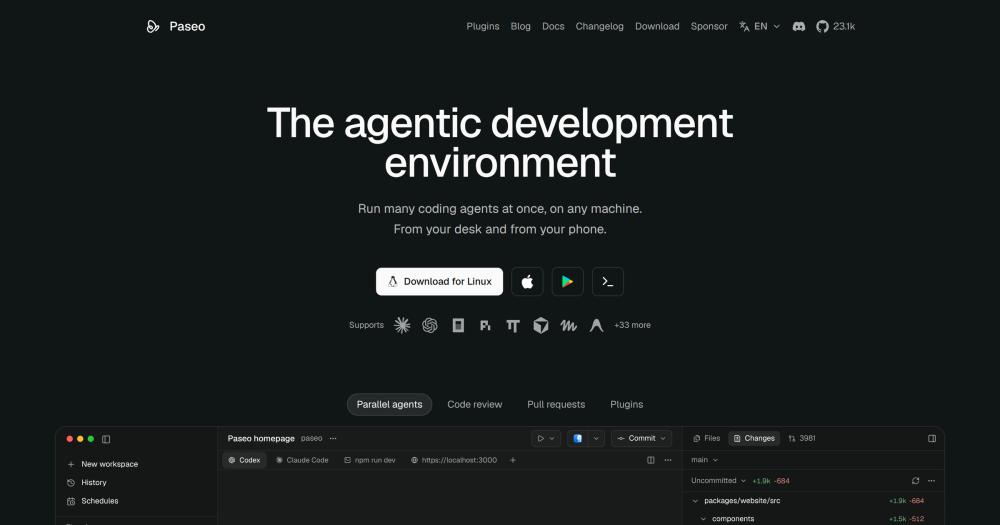
Orchestrate Claude Code, Codex, Copilot, and 30+ coding agents in parallel, from desktop, mobile, or CLI.

Visit websiteGitHub23.1K starsDeploy on Hostinger
image of Paseo
TL;DR

Paseo is an open source agentic development environment that runs multiple coding agents in parallel, each in its own git worktree. It is an alternative to paid tools like Conductor, with a cross-platform approach covering macOS, Windows, Linux, iOS, and Android. Apache 2.0 licensed, with no telemetry and no forced sign-in. Best for developers who want to run Claude Code, Codex, OpenCode, Pi, and other agents concurrently and check in from a phone.

Read the full breakdownHide the full breakdownWho it is for, how it works, trade-offs, the quick start and the FAQ
who it's for

Who Paseo is for#

Solo developers managing long-running agent tasks

Start a task on a desktop agent, then check in from a phone while away from the desk. The mobile client lets you review diffs, send follow-ups, and approve permission requests without opening a laptop. The encrypted relay handles the connection from outside the local network.

Skip if:

If all your agent work is short-session and you are always at your desk, the mobile sync adds setup overhead without payoff.

Teams fanning out GitHub issues to parallel agents

Use the CLI or SDK to take a set of ready GitHub issues and launch one agent per issue in a separate worktree. Each agent works independently. You review the diffs and merge the ones that pass. The MCP server exposes this workflow to other agents, so you can trigger fan-outs from a Claude Code or Codex session.

Skip if:

If your team runs a single agent sequentially with one person at a time, the orchestration layer adds setup complexity for no practical benefit.

Developers switching between coding agent providers

Paseo's multi-provider interface lets you run Claude Code for planning, Codex for implementation, and OpenCode for review without reconfiguring your environment. Each provider runs with its own credentials and config. You can hand off context between providers using the built-in skills.

Skip if:

If you are committed to a single provider and have no plan to change, the extra abstraction layer is unnecessary.

Home lab or cloud VM users who want mobile access

Run the Paseo daemon on a VM or server, install agent CLIs once, and connect from any device. The encrypted relay handles mobile pairing without exposing a port. Access agents from desktop, phone, or web without SSH.

Skip if:

If you only work from a single desktop machine and have no mobile use case, a simpler terminal setup may serve you as well.

the problem

The problem it solves#

Running multiple AI coding agents in parallel means juggling separate terminal windows, switching context manually, and losing track of which agent is working on which task. When you close the laptop, the session ends. Teams that want to fan out work across different agents have no shared interface: each agent has its own setup, its own output format, and its own window.

The mobile gap compounds the problem. Most coding workflows are desktop-only, so checking on a long-running agent from a phone means opening an SSH session and reading raw terminal output. There is no native way to review a diff, send a follow-up, or approve a permission request from a device in your pocket.

how Paseo solves it

How it solves it#

Parallel agents with isolated worktrees

Run multiple coding agents at the same time, each in a separate git worktree so their changes do not collide. Launch Claude Code on one task while Codex handles another. Review each agent's diff independently before merging. Agents can also create their own worktrees and spawn other agents, enabling automated fan-out from a single prompt.

30+ provider support through one interface

Supports Claude Code, Codex, Copilot, OpenCode, Pi, Antigravity, and Muse Code with custom integrations, plus any agent that speaks the ACP protocol. Switch providers per task without changing your environment. The same interface, the same diff viewer, and the same mobile client work regardless of which agent is running.

Full native mobile client on iOS and Android

The iOS and Android apps are native full clients built with Expo, not WebViews. Connect from a phone, review diffs, send follow-up instructions, and approve permission requests while away from your desk. Pairs with the desktop daemon or a headless server over an end-to-end encrypted relay. Pairing takes one step from Settings.

CLI and TypeScript SDK for automation

Every action available in the app is also available from the CLI. The TypeScript SDK lets you build orchestration scripts, fan out work to multiple agents from code, and integrate agent outputs into existing pipelines. Use `paseo run`, `paseo ls`, and `paseo attach` to script workflows from the terminal or from another agent via MCP.

Plugin system with live UI extension

Plugins run on the daemon and appear in every connected client, desktop and mobile, without a restart. A plugin can add sidebar panels, Command Center items, slash commands, and workspace views. Over 400 community plugins cover themes, Git integrations, and custom providers. Install from the registry with `paseo plugin add owner/slug`.

Voice control for hands-free task input

Dictate tasks or talk through problems without typing. Voice transcription runs locally on-device by default. Optionally configure OpenAI speech providers for higher transcription quality and text-to-speech. Hands-free input is useful when reviewing code on a second monitor or working without a keyboard.

strengths · trade-offs

Strengths and trade-offs#

Strengths

  • No telemetry, tracking, or forced loginPaseo has no telemetry and no required account. Agents run with your existing credentials on your hardware. For remote access, the relay is end-to-end encrypted and Paseo cannot read your traffic. Tailscale or a self-hosted relay server are documented alternatives for teams that prefer to route no traffic through Paseo's infrastructure at all.
  • Cross-platform with a native mobile clientPaseo runs on macOS, Windows, Linux, iOS, and Android. The mobile app is a native client built with Expo, not a wrapper around the web UI. This means diffs render properly and permission prompts are actionable from a phone, not just visible. No other open source agent orchestrator ships a native mobile app.
  • Apache 2.0 with 23,000+ GitHub starsApache 2.0 licensing means you can run, modify, and deploy Paseo commercially without restriction beyond preserving license notices. The project has over 23,000 GitHub stars and is used by tens of thousands of developers daily, per the maintainer. The active Discord and Reddit communities and a last push date of November 2026 indicate ongoing development.
  • Independent, single-maintainer project with no investor pressurePaseo is funded by GitHub Sponsors and Paseo Hub, with no investors. The maintainer has declined funding to keep the tool neutral. A tool that sits between your credentials and your agents has an incentive to monetize that access; Paseo has stated clearly why it avoids that structure.

Trade-offs

  • -843 open issues with a single maintainerThe GitHub tracker shows 843 open issues as of November 2026. With over 23,000 stars and one maintainer, response time on non-critical bugs can lag. High-priority issues get addressed, but the queue is long. Teams that need commercial support guarantees or SLAs will not find them here.
  • -Agent CLIs must be installed and configured separatelyPaseo orchestrates agent CLIs you already have installed. It does not bundle or manage them. Claude Code, Codex, Copilot, and others each require their own setup steps, credentials, and sometimes paid subscriptions. Paseo adds an orchestration layer on top; it does not reduce the underlying setup cost of each provider.
  • -Remote access requires relay or tunnel configurationRunning Paseo for a team or from outside a local network requires setting up the hosted relay, Tailscale, or another tunnel. The desktop app on a local machine is straightforward. A headless server deployment with remote pairing needs more configuration steps. The docs cover it, but it is not zero-effort.
versus alternatives

Paseo vs alternatives#

Paseo vs Conductor

Conductor is a macOS desktop app that runs Claude Code, Codex, Cursor, and OpenCode in parallel local worktrees, with Conductor Cloud as a hosted add-on. Conductor announced on November 4, 2026 that it is joining Meta: new sign-ups are closed, Conductor Cloud shuts down on November 20, 2026, and the local app winds down in early 2027.

FeaturePaseoConductor
LicenseApache 2.0Proprietary
PlatformsmacOS, Windows, Linux, iOS, AndroidmacOS only
Cloud add-onPaseo HubConductor Cloud (closing Nov 20, 2026)

Paseo and Conductor shared the same core idea: a GUI that runs multiple coding agents in parallel with isolated worktrees. Conductor focused on a polished macOS-only experience with a cloud collaboration layer. Paseo runs on every major OS, ships a full native mobile client, and is free and open source under Apache 2.0.

Given Conductor's announced wind-down, there is no meaningful scenario where new users should adopt it. Developers currently on Conductor should migrate to Paseo or another active orchestration tool before the local app winds down in early 2027.

Paseo vs Running Agents Directly

Developers who run Claude Code or Codex directly in a terminal get a single-session, single-window workflow with no shared view across agents. Paseo adds a daemon that manages multiple concurrent sessions, a diff and editor view, permission approval UI, mobile access, and a plugin system. The terminal CLI (paseo run, paseo attach) remains available for scripting. The orchestration layer is worth it for developers running more than one concurrent session; for single-session, desktop-only work, the extra setup is unnecessary.

install · quick start

Quick start#

bash
Download the desktop installer from GitHub Releases: https://github.com/getpaseo/paseo/releases/latest

Install the CLI to run Paseo as a headless daemon on a server or VM.
```bash
npm install -g @getpaseo/cli
paseo
```
tech stack · detected from GitHub

What it's built on#

Languages
JavaScriptTypeScript
Frameworks
ElectronReact
Tooling
esbuild
frequently asked

FAQ#

Is Paseo free, and what does the Apache 2.0 license allow?

Yes. Paseo is free and Apache 2.0 licensed. You can use, deploy, modify, and distribute it for any purpose including commercial self-hosting. Redistribution requires preserving license notices and marking modified files. No trademark rights beyond describing the software's origin are granted. You bring your own agent subscriptions: Claude Code, Codex, Copilot, and others each require separate credentials and may have their own costs. Paseo Hub, the optional cloud add-on, has a paid tier.

Does my code leave my machine when I use Paseo?

Paseo does not send your code anywhere. Agents run locally using your existing credentials and talk to their own APIs as they normally would. For remote device access, Paseo offers an optional end-to-end encrypted relay that it cannot read. Direct TCP, Tailscale, and other tunnels are supported alternatives for teams that want no third-party relay at all.

Can I use Paseo on Windows and Linux, not just macOS?

Yes. Paseo runs on macOS, Windows, and Linux. The iOS and Android apps are also full native clients. The desktop app bundles the daemon with a UI; on headless servers, you install the CLI and connect from any client. Mobile apps pair with the daemon over a relay or direct TCP connection.

What is the difference between Paseo and running agents directly in a terminal?

Running agents in a terminal gives you one session per window with no shared view. Paseo adds a daemon that manages multiple agent processes, a diff and editor view, a mobile client, permission approval UI, and a plugin system. The terminal CLI (paseo run, paseo attach) is still available for scripting. The overhead is worth it when you are running more than one concurrent agent session; for single-session work, a terminal is simpler.

How do worktrees work in Paseo?

When you start an agent with the worktree option, Paseo creates a git worktree for that agent on an isolated branch. The agent works without touching your main working directory. You review the diff when it finishes and decide whether to merge. Multiple agents can run on separate branches at the same time. Worktrees are optional: Paseo works in any directory, with or without git.

also worth a look

Similar open-source tools#

paperclip

Featured

Alternative toGrok Bot

Self-hosted AI agent management with org charts and budgets

  • 109,899 GitHub stars
  • MITLicence MIT

Claude Squad

Alternative toConductor

Terminal manager for multiple AI coding agents in isolated workspaces

  • 8,732 GitHub stars
  • AGPL-3.0Licence AGPL-3.0

Nimbalyst

Alternative toConductor

Agent workspace with parallel sessions, visual editing, and a wiki.

  • 2,022 GitHub stars
  • MITLicence MIT

Pane

Alternative toConductor

Agent-agnostic parallel runner with auto worktrees, any OS.

  • 602 GitHub stars
  • CustomLicence AGPL-3.0 with attribution requirement

Paradev

Alternative toConductor

Open-source macOS workspace for parallel CLI coding agents

  • 15,923 GitHub stars
  • MITLicence MIT

Emdash

Alternative toConductor

Parallel coding agents in isolated worktrees, any provider.

  • 6,185 GitHub stars
  • Apache-2.0Licence Apache-2.0
by category

Open source tools in these categories#

539

Developer Tools

REA (Reverse Engineer Anything), Skills for Real Engineers, superpowers
467

AI & Machine Learning

freeCodeCamp, REA (Reverse Engineer Anything), OpenClaw
Hostinger

Self-host Paseo on a Hostinger VPS

Keep it running 24/7, even when your laptop is off. A Hostinger VPS gives it a server of its own.

  1. 01

    Choose a plan

    Starts from $6.49/mo

  2. 02

    Apply

    Extra 10% off yearly plans

  3. 03

    Install Paseo

    On a server that stays on

  4. 04

    Start building

    Focus on the app, not the server

Deploy on Hostinger

Sponsors

Inbox Zero

Alternative toSuperhuman

AI email assistant that drafts replies and clears your inbox

  • 12,889 GitHub stars
  • AGPL-3.0Licence AGPL-3.0
  • #Email

rakazo

Alternative toGrok Bot

AI teammates you own: your keys, your model, your machine.

  • 6,568 GitHub stars
  • Apache-2.0Licence Apache-2.0
  • #AI Agents

SnitchFeed

Live monitoring on LinkedIn, X, Reddit & more. Agentic social listening for startups.

Marketing & Growth

Advertise your product

New open source projects by email

The projects we add and every new guide. Free, unsubscribe any time.

Find open source alternatives to paid software

/
  • Claude Code to OpenCode
  • Jira to Windshift
  • Notion to AppFlowy
  • Slack to Mattermost
  • Linear to GitLab
  • Wispr Flow to Handy
  • Arc to Zen Browser
  • CapCut to Concat
  • Grok Bot to rakazo
  • Superhuman to Inbox Zero
  • Airtable to AITable
  • Muse to OpenClaw
  • Railway to Coolify
  • GitHub Copilot to Cline
  • Datadog to Netdata
  • Microsoft Teams to Rocket.Chat
  • Confluence to Docmost
  • Pinecone to Qdrant
  • Zapier to n8n
  • Devin AI to OpenHands
  • Firebase to Supabase
  • 1Password to KeePassXC
  • Contentful to Strapi
  • Adobe Premiere Pro to Shotcut
  • Claude Code to OpenCode
  • Jira to Windshift
  • Notion to AppFlowy
  • Slack to Mattermost
  • Linear to GitLab
  • Wispr Flow to Handy
  • Arc to Zen Browser
  • CapCut to Concat
  • Grok Bot to rakazo
  • Superhuman to Inbox Zero
  • Airtable to AITable
  • Muse to OpenClaw
  • Railway to Coolify
  • GitHub Copilot to Cline
  • Datadog to Netdata
  • Microsoft Teams to Rocket.Chat
  • Confluence to Docmost
  • Pinecone to Qdrant
  • Zapier to n8n
  • Devin AI to OpenHands
  • Firebase to Supabase
  • 1Password to KeePassXC
  • Contentful to Strapi
  • Adobe Premiere Pro to Shotcut