Open Source Alternatives
  • Alternatives
  • Categories
    Categories by size1,057 projects
    • Developer Tools539
    • AI & Machine Learning467
    • Business & Productivity246
    • Web Development205
    • Security & Monitoring159
    • Communication & Collaboration141
    • IT Management139
    • Cloud & Hosting123
    • LLMOps & AI Tooling121
    • Data & Analytics114
    Browse all 21 categoriesProduct & Project Management, Design & Creative and 9 more
  • Blog
  • Advertise
SearchNotion, Slack, password manager.../
Submit
Open Source Alternatives
  • Alternatives
    • Developer Tools539
    • AI & Machine Learning467
    • Business & Productivity246
    • Web Development205
    • Security & Monitoring159
    • Communication & Collaboration141
    • Browse all 21 categories
  • Blog
  • Advertise
Submit your project

New open source projects by email

The projects we add and every new guide. Free, unsubscribe any time.

Open Source Alternatives LogoOpen Source Alternatives

Handpicked Open Source Alternatives to Paid Softwares

Product

  • Categories
  • Tag
  • Advertise

Resources

  • Blog
  • Collection
  • Submit

Company

  • Privacy Policy
  • Terms of Service
  • Refund Policy
  • Sitemap

Alternatives

  • Claude Code
  • Jira
  • Notion
  • Slack
  • Linear
  • Wispr Flow
  • All alternatives
© 2026 Open Source Alternatives. All rights reserved.
Open SourceAlternatives
Home/Categories/Developer Tools/Pane
icon of Pane

Pane

Open source alternative to Conductor

  • 602 stars
  • AGPL-3.0 with attribution requirement
  • Active this week
  • Last commit today

Last verified Nov 4, 2026

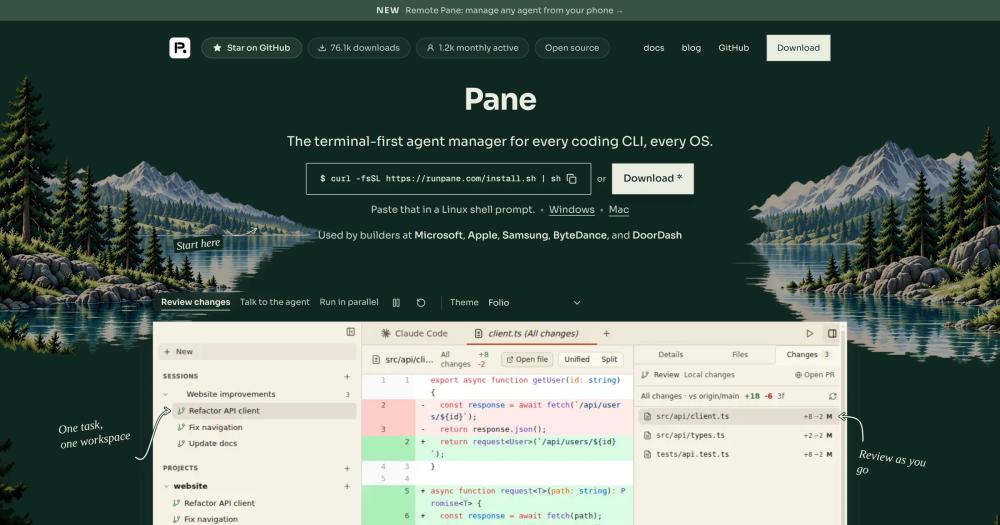
Run Claude Code, Codex, Cursor, and Aider side by side in isolated git worktrees, with an open source desktop app for Windows, macOS, and Linux.

Visit websiteGitHub602 starsDeploy on Hostinger
image of Pane
TL;DR

Pane is an open source desktop app for running Claude Code, Codex, Cursor, Aider, and any CLI coding agent in parallel, each in an isolated git worktree, on Windows, macOS, and Linux. It replaces paid commercial agent managers like Conductor by handling worktree creation, cleanup, port isolation, and .env synchronization automatically. Pane also includes Remote Pane, a self-hosted daemon for running agents on a VM or home server and controlling them from a laptop or phone. Licensed under AGPL-3.0 with an attribution requirement, it is best for developers who want parallel agent workflows on any OS without manually managing git worktrees.

Read the full breakdownHide the full breakdownWho it is for, how it works, trade-offs, the quick start and the FAQ
who it's for

Who Pane is for#

Developers running multiple agents on separate branches

Open one pane per feature, run Claude Code on one branch while Codex reviews another, and see both agents' status in the sidebar. Worktrees are created and cleaned up automatically, and each dev server starts on its own port.

Skip if:

You only run one agent at a time and do not need worktree isolation. Sequential tasks on a single branch work fine without Pane.

Teams with Windows or Linux developers

Pane runs the same feature set on Windows x64 and ARM64, macOS, and Linux. Teams with mixed operating systems, or Windows-primary stacks, get the full parallel agent workflow without being forced onto a Mac.

Skip if:

Your entire team is on macOS and you need features tied to macOS-specific agent tooling.

Developers keeping agents running on remote hardware

Run agents on a Linux box, home server, or cloud VM continuously while controlling them from a laptop or phone via Remote Pane. Agents, terminals, git state, and credentials stay on the host machine.

Skip if:

All your work runs on a single local machine and you have no reason to access agents remotely.

Developers who want scheduled overnight agent runs

Loops run an agent or command on a cron schedule, each run in a fresh worktree so you can review the results the next morning. Set up a nightly bug sweep and find the report waiting when you open Pane.

Skip if:

Your agents finish tasks in minutes and you have no need for scheduled or recurring runs.

the problem

The problem it solves#

Running multiple AI coding agents in parallel means keeping up with many terminal windows at once. Each agent needs its own git branch to avoid conflicts, which means running git worktree add, remembering paths, tracking which worktree is on which branch, cleaning up stale ones, and rebasing back to main before merging. Even experienced developers fumble this workflow regularly, and the commands are obscure enough that they interrupt the actual work.

The coordination overhead compounds fast. You are alt-tabbing between your diff viewer, your terminal, and your Git client, copy-pasting output between tabs, and losing track of which agent finished and which one needs a response. The agents can work autonomously for hours, but keeping up with several of them drains exactly the focus those hours were supposed to free.

how Pane solves it

How it solves it#

Automatic worktree creation and cleanup

Creates a git worktree whenever you open a new pane and removes it when you archive the pane. Each worktree gets its own branch, an isolated block of ports via $PANE_PORT, and an automatic copy of your .env file. You never run git worktree add, git worktree remove, or git rebase manually.

Agent-agnostic: any CLI tool runs without plugins

Claude Code, Codex, Cursor, Aider, OpenCode, Goose, Gemini, or any tool that starts in a terminal runs in Pane immediately with no plugins, no SDK, and no waiting for first-party support. The same terminal tab can switch between agents in sequence.

Self-hosted Remote Pane for distributed setups

The Remote Pane daemon is open source and runs on a VM, WSL box, home server, or cloud host. Connect from your desktop Pane or the browser app at runpane.com/app using a generated code over Tailscale or SSH. Dev server ports forward automatically to the client.

MCP server and agent-operable CLI

Pane registers its tools with Claude Code, Codex, and Cursor as MCP tools when it launches, including inside WSL. Agents can then discover Pane's command schema, register repos, open new panes, read terminal output, and check on other agents without any additional configuration.

Scheduled loops for recurring agent tasks

Loops run an agent or shell command on a cron schedule, such as a nightly bug sweep. Each run opens in a fresh worktree and a new pane so the results are ready to review. Loops are for large recurring jobs and run at most once per hour.

strengths · trade-offs

Strengths and trade-offs#

Strengths

  • Runs on Windows, macOS, and Linux with the same feature setPane ships native builds for Windows x64 and ARM64, macOS (Apple Silicon and Intel), and Linux x64 and ARM64. The UI, worktree management, Remote Pane, Loops, and MCP integration are identical across all platforms. Most commercial agent managers are macOS-only.
  • Remote access is free and fully self-hostedThe Remote Pane daemon is open source and free to run on any machine you control. Teams keep agents on a dedicated Linux box or home server and control them from a laptop or phone without paying for a cloud relay or subscribing to a hosted tier.
  • No lock-in: agents run in a plain terminalEvery agent runs directly in a terminal tab with no proprietary wrapper. If you stop using Pane, your agents, worktrees, and Git history are unchanged. The AGPL-3.0 source is auditable on GitHub at greenfield-inc/Pane.
  • Git worktree complexity is hidden completelyGit worktrees provide the isolation parallel agents need, but the commands are hard to remember and easy to mess up. Pane handles add, remove, rebase, and squash without exposing a single git worktree subcommand. The README credits this as the original motivation for building Pane.

Trade-offs

  • -Windows direct downloads trigger a SmartScreen warningThe app is currently unsigned on Windows, so direct downloads trigger a SmartScreen security prompt. The website documents the fix: click More info and then Run anyway. The PowerShell installer bypasses this warning and is the recommended install path on Windows.
  • -159 open issues as of November 2026The GitHub repository carried 159 open issues as of the November 2026 reading. For a tool at this stage of adoption the count is not unusual, but it is worth checking the issue tracker before depending on a specific feature or platform quirk.
  • -Remote Pane requires Tailscale or SSH configurationRemote Pane uses Tailscale for peer-to-peer connectivity between machines and requires HTTPS certificates enabled in the Tailscale admin console. An SSH mode is available for environments where Tailscale is not permitted, but neither path is zero-configuration.
versus alternatives

Pane vs alternatives#

Pane vs Conductor

Conductor is a macOS desktop app for orchestrating Claude Code, Codex, Cursor, and OpenCode in parallel local worktrees, with Conductor Cloud as a hosted add-on. Conductor Cloud shuts down on November 20, 2026, and the local app winds down in early 2027. Conductor is not accepting new sign-ups.

Pane and Conductor share the same core idea: open a task per feature, give each agent its own worktree, and review the results without managing git commands manually. The practical differences are platform coverage, agent flexibility, and self-hosting model.

FeaturePaneConductor
PlatformsWindows, macOS, LinuxmacOS only
LicenseAGPL-3.0 with attributionProprietary
Agents supportedAny CLI toolClaude Code, Codex, Cursor, OpenCode
Remote accessSelf-hosted Remote Pane daemonConductor Cloud (closing Nov 2026)

Pane's broadest advantage over Conductor is cross-platform coverage. Teams on Windows or Linux, or any team with a mixed OS environment, cannot use Conductor at all. Pane ships native builds for Windows x64 and ARM64, macOS (Apple Silicon and Intel), and Linux x64 and ARM64.

The agent-agnostic design is the other key difference. Pane runs any tool that starts in a terminal, including Aider, OpenCode, Goose, Gemini, or any custom CLI, with no plugins or SDK required. Conductor supports a fixed list of agents.

Since Conductor is winding down, Pane is the natural migration target for teams already using that style of worktree-based parallel agent management.

install · quick start

Quick start#

bash
Install Pane using the curl installer on macOS and Linux.
```bash
curl -fsSL https://runpane.com/install.sh | sh
```
tech stack · detected from GitHub

What it's built on#

Languages
JavaScriptPythonTypeScript
Frameworks
ElectronReact
Tooling
esbuild
frequently asked

FAQ#

Can I self-host Pane for my team commercially?

Yes. The AGPL-3.0 license with attribution permits running, modifying, and self-hosting Pane for any purpose including commercial internal use. You must share the source code of any modified versions under AGPL-3.0 and keep the visible Dcouple Inc attribution in the application UI. What is not permitted without written permission from Dcouple Inc is using the "foozol" name or Dcouple Inc branding to endorse a derived product.

What coding agents does Pane support?

Claude Code, Codex, Cursor, Aider, OpenCode, Goose, and Gemini are the agents specifically named in the documentation, but any tool that runs in a terminal works in Pane with no plugins or SDK required. If a CLI coding agent exists, Pane can run it.

Does Pane work on Windows?

Yes. Pane ships native builds for Windows x64 and ARM64. Direct downloads trigger a Windows SmartScreen security warning because the app is currently unsigned; the recommended install path is the PowerShell one-liner from the README: irm https://runpane.com/install.ps1 | iex. That command downloads the official release and bypasses the browser download friction.

What is Remote Pane and do I need Tailscale to use it?

Remote Pane is a self-hosted daemon that lets you run agents on a separate machine, such as a VM, WSL box, or home server, while controlling it from your desktop Pane app or the browser app at runpane.com/app. The default setup uses Tailscale for the peer-to-peer connection and requires HTTPS certificates enabled in the Tailscale admin console. An SSH-based alternative is available for environments where Tailscale is not permitted.

Does Pane replace my terminal emulator or IDE?

No. The README describes Pane as not an IDE and not a terminal emulator. It manages git worktrees and routes agents alongside your existing tools. Your editor, linters, and scripts continue to work as before; Pane adds the parallel worktree layer on top of them.

also worth a look

Similar open-source tools#

paperclip

Featured

Alternative toGrok Bot

Self-hosted AI agent management with org charts and budgets

  • 109,899 GitHub stars
  • MITLicence MIT

Claude Squad

Alternative toConductor

Terminal manager for multiple AI coding agents in isolated workspaces

  • 8,732 GitHub stars
  • AGPL-3.0Licence AGPL-3.0

Nimbalyst

Alternative toConductor

Agent workspace with parallel sessions, visual editing, and a wiki.

  • 2,022 GitHub stars
  • MITLicence MIT

Paradev

Alternative toConductor

Open-source macOS workspace for parallel CLI coding agents

  • 15,923 GitHub stars
  • MITLicence MIT

Paseo

Alternative toConductor

Run any coding agent in parallel, across desktop, mobile, and CLI

  • 23,074 GitHub stars
  • Apache-2.0Licence Apache-2.0

Emdash

Alternative toConductor

Parallel coding agents in isolated worktrees, any provider.

  • 6,185 GitHub stars
  • Apache-2.0Licence Apache-2.0
by category

Open source tools in these categories#

539

Developer Tools

REA (Reverse Engineer Anything), Skills for Real Engineers, superpowers
467

AI & Machine Learning

freeCodeCamp, REA (Reverse Engineer Anything), OpenClaw
Hostinger

Self-host Pane on a Hostinger VPS

Keep it running 24/7, even when your laptop is off. A Hostinger VPS gives it a server of its own.

  1. 01

    Choose a plan

    Starts from $6.49/mo

  2. 02

    Apply

    Extra 10% off yearly plans

  3. 03

    Install Pane

    On a server that stays on

  4. 04

    Start building

    Focus on the app, not the server

Deploy on Hostinger

Sponsors

Inbox Zero

Alternative toSuperhuman

AI email assistant that drafts replies and clears your inbox

  • 12,889 GitHub stars
  • AGPL-3.0Licence AGPL-3.0
  • #Email

rakazo

Alternative toGrok Bot

AI teammates you own: your keys, your model, your machine.

  • 6,568 GitHub stars
  • Apache-2.0Licence Apache-2.0
  • #AI Agents

SnitchFeed

Live monitoring on LinkedIn, X, Reddit & more. Agentic social listening for startups.

Marketing & Growth

Advertise your product

New open source projects by email

The projects we add and every new guide. Free, unsubscribe any time.

Find open source alternatives to paid software

/
  • Claude Code to OpenCode
  • Jira to Windshift
  • Notion to AppFlowy
  • Slack to Mattermost
  • Linear to GitLab
  • Wispr Flow to Handy
  • Arc to Zen Browser
  • CapCut to Concat
  • Grok Bot to rakazo
  • Superhuman to Inbox Zero
  • Airtable to AITable
  • Muse to OpenClaw
  • Railway to Coolify
  • GitHub Copilot to Cline
  • Datadog to Netdata
  • Microsoft Teams to Rocket.Chat
  • Confluence to Docmost
  • Pinecone to Qdrant
  • Zapier to n8n
  • Devin AI to OpenHands
  • Firebase to Supabase
  • 1Password to KeePassXC
  • Contentful to Strapi
  • Adobe Premiere Pro to Shotcut
  • Claude Code to OpenCode
  • Jira to Windshift
  • Notion to AppFlowy
  • Slack to Mattermost
  • Linear to GitLab
  • Wispr Flow to Handy
  • Arc to Zen Browser
  • CapCut to Concat
  • Grok Bot to rakazo
  • Superhuman to Inbox Zero
  • Airtable to AITable
  • Muse to OpenClaw
  • Railway to Coolify
  • GitHub Copilot to Cline
  • Datadog to Netdata
  • Microsoft Teams to Rocket.Chat
  • Confluence to Docmost
  • Pinecone to Qdrant
  • Zapier to n8n
  • Devin AI to OpenHands
  • Firebase to Supabase
  • 1Password to KeePassXC
  • Contentful to Strapi
  • Adobe Premiere Pro to Shotcut