Open Source Alternatives
  • Alternatives
  • Categories
    Categories by size1,057 projects
    • Developer Tools539
    • AI & Machine Learning467
    • Business & Productivity246
    • Web Development205
    • Security & Monitoring159
    • Communication & Collaboration141
    • IT Management139
    • Cloud & Hosting123
    • LLMOps & AI Tooling121
    • Data & Analytics114
    Browse all 21 categoriesProduct & Project Management, Design & Creative and 9 more
  • Blog
  • Advertise
SearchNotion, Slack, password manager.../
Submit
Open Source Alternatives
  • Alternatives
    • Developer Tools539
    • AI & Machine Learning467
    • Business & Productivity246
    • Web Development205
    • Security & Monitoring159
    • Communication & Collaboration141
    • Browse all 21 categories
  • Blog
  • Advertise
Submit your project

New open source projects by email

The projects we add and every new guide. Free, unsubscribe any time.

Open Source Alternatives LogoOpen Source Alternatives

Handpicked Open Source Alternatives to Paid Softwares

Product

  • Categories
  • Tag
  • Advertise

Resources

  • Blog
  • Collection
  • Submit

Company

  • Privacy Policy
  • Terms of Service
  • Refund Policy
  • Sitemap

Alternatives

  • Claude Code
  • Jira
  • Notion
  • Slack
  • Linear
  • Wispr Flow
  • All alternatives
© 2026 Open Source Alternatives. All rights reserved.
Open SourceAlternatives
Home/Categories/Developer Tools/Nimbalyst
icon of Nimbalyst

Nimbalyst

Open source alternative to Conductor

  • 2K stars
  • MIT
  • Active this week
  • Last commit today

Last verified Nov 4, 2026

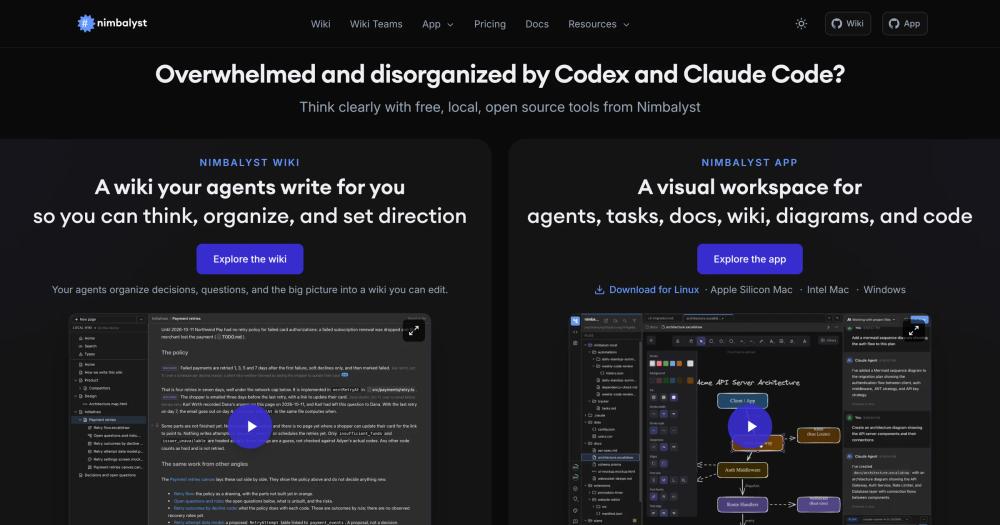
Run multiple coding agents in parallel with WYSIWYG editing, a session kanban, and an agent-written wiki. Free, MIT-licensed, local-first.

Visit websiteGitHub2K stars
image of Nimbalyst
TL;DR

Nimbalyst is an MIT-licensed desktop workspace for running Claude Code, Codex, and OpenCode in parallel, with WYSIWYG editing, a session kanban, task tracking, and an agent-written wiki. It is a free, local alternative to commercial agent orchestration tools like Conductor. Everything is stored as plain markdown files in your git repo, with no cloud account required. Best for developers and small teams running multi-agent workflows who want visual oversight without a cloud dependency.

Read the full breakdownHide the full breakdownWho it is for, how it works, trade-offs, the quick start and the FAQ
who it's for

Who Nimbalyst is for#

Solo developers running parallel Claude Code sessions

Developers who push several Claude Code or Codex sessions in parallel against different git worktrees get a single kanban to track all of them, WYSIWYG review of every diff, and an agent-updated wiki for context between sessions.

Skip if:

You run a single agent session at a time and prefer terminal-native workflows. The overhead of a desktop app wrapper is not worth it for one-at-a-time agentic work.

Small teams keeping agents on the same page

Teams where each person runs their own coding agent and wants to share the resulting decisions, open questions, and architectural notes without writing docs by hand. The wiki agents update together, and Wiki Teams adds real-time co-editing in the browser.

Skip if:

Your team needs enterprise SSO, audit logs, or on-premises hosting of the collaboration sync server. Those features are not in the current open source build.

Developers who want mobile oversight of agent sessions

Developers who start long-running agent sessions from a desk and then step away. The iOS companion shows which agents are waiting, lets them reply by voice or text, approve diffs with a swipe, and queue the next task without returning to the desktop.

Skip if:

Your primary mobile device is Android. The companion app is iOS only as of this writing.

the problem

The problem it solves#

Managing multiple coding agents is chaotic. Claude Code, Codex, and OpenCode each run in a terminal and produce diffs in raw text. When you have three or four sessions running in parallel across different git worktrees, tracking which session is doing what, reviewing changes before they land, and connecting agent work to your task list requires constant context-switching between terminal windows, a file manager, and a text editor.

The same context-switching problem compounds at the wiki layer. Every agent session generates decisions, questions, and design notes that belong in a shared document, but writing them down by hand while also reviewing code means one of those things gets dropped. Teams running agentic workflows consistently find that keeping the broader project context up to date is the work that falls through the cracks.

how Nimbalyst solves it

How it solves it#

Parallel agent sessions in isolated worktrees

Run Claude Code, Codex, OpenCode, and GitHub Copilot side by side, each isolated in its own git worktree. The session kanban tracks every session on a board; you can search, resume, and link sessions to the files they touched. Heterogeneous agents (Codex and Claude Code together, with OpenCode and Copilot in alpha) are supported in the same workspace.

WYSIWYG editors for every file type

Built-in visual editors cover markdown, mockups with annotations, Mermaid diagrams, Excalidraw, CSV, data models, and code in Monaco. You and the coding agent edit the same files. Proposed changes appear as red/green diffs rendered in the document, so you step through them and accept or reject each one rather than reading a raw patch.

Agent-written wiki

Agents organize decisions, open questions, and project context into a wiki you can read and edit. Each session's agent contributes what it learned as it works, so the wiki builds up without anyone writing pages by hand. Wiki Teams (the paid plan, free during beta) adds real-time collaborative editing in the browser for the whole team.

Task tracking agents can read and update

Plans, bugs, features, and todos live in trackers that your agents read alongside you. Agents can add tasks, move them, and execute them; you can view and edit the same tasks from the app. Everything is stored as files in your git repo, not in a proprietary database.

MCP client with visual widget rendering

Connect any MCP server to Nimbalyst. Tool results render as visual widgets rather than raw JSON, making the output of MCP tools readable in the workspace context instead of requiring a terminal pass.

Extension SDK for custom editors

Every editor, including the built-in ones, goes through the same EditorHost contract. An extension you build is first-class, not a plugin. Current built-in extensions include an Astro website editor, visual git log, mindmap, slides, and a 3D object editor. Ask your coding agent to build an extension for a file type the app does not ship.

strengths · trade-offs

Strengths and trade-offs#

Strengths

  • MIT license, free for individualsThe desktop app and core features are MIT-licensed and free for individuals, including commercial use. There is no per-seat fee, no token-metered access beyond your existing Claude Code or Codex subscription, and no account required for the core workspace.
  • Plain files, no proprietary storeAll content, status, and workflow data is stored as markdown and slash commands in your git repo. There is no vendor database to migrate away from, and the files work with any other tool. If you stop using Nimbalyst, your content stays in its original format.
  • Cross-platform with an iOS companionThe desktop app runs on macOS (Apple Silicon and Intel), Windows, and Linux. The iOS companion app lets you check which agents need a response, reply by text or voice, swipe through diffs, and queue tasks from your phone, with push notifications when an agent is waiting.
  • 2,000+ stars and active developmentThe repo reached 2,022 GitHub stars with 330 forks after launching in October 2025, with the last push on 2026-11-04. With 737 open GitHub issues, the community is actively reporting bugs and requesting features.

Trade-offs

  • -Early-stage velocity with 737 open issuesWith 737 open GitHub issues and a repo launched in October 2025, Nimbalyst is in active early development. Some features (OpenCode and GitHub Copilot integration) are in alpha. Users who need a stable, settled tool for a production workflow may find the pace of change disruptive.
  • -Collaboration sync server is not self-hostableThe core desktop app is MIT-licensed, but the collaboration sync server (`wss://sync.nimbalyst.com`) that powers real-time co-editing is a separate closed project hosted by the Nimbalyst team. Teams relying on that sync layer cannot run it themselves. The core app works without it, but Wiki Teams requires it.
  • -Mobile companion is iOS onlyThe mobile companion is iOS only. The repo mentions an iOS package in the workspace but no Android equivalent is listed in the README or the platform download table. Developers who rely on Android for mobile review will need to wait or use the app through other means.
versus alternatives

Nimbalyst vs alternatives#

Nimbalyst vs Conductor

Conductor is a macOS desktop app that runs Claude Code, Codex, Cursor, and OpenCode in parallel local worktrees, with Conductor Cloud as a hosted add-on. Conductor Cloud shuts down on November 20, 2026, and the local app winds down in early 2027.

FeatureNimbalystConductor
LicenseMIT (open source)Proprietary
PlatformsmacOS, Windows, LinuxmacOS only
Active developmentYesWinding down

Nimbalyst covers the same core need as Conductor, providing a visual layer for running multiple coding agents side by side across git worktrees. The key differences are platform reach (macOS, Windows, and Linux versus macOS only), license (MIT versus proprietary), and ongoing availability.

For teams or individuals who were using Conductor and need a path forward, Nimbalyst is one open source option. It adds an agent-written wiki, a cross-platform installer, an iOS companion for mobile oversight, an extension SDK for custom editors, and MCP tool results rendered as visual widgets.


install · quick start

Quick start#

bash
Download the installer for your platform from GitHub Releases: https://github.com/nimbalyst/nimbalyst/releases/latest
tech stack · detected from GitHub

What it's built on#

Languages
JavaScriptKotlinSwiftTypeScript
Frameworks
ElectronExpressReact
Tooling
esbuild
frequently asked

FAQ#

Is Nimbalyst free?

Yes, the desktop app is free for individuals and MIT-licensed. Wiki Teams, the paid plan for sharing a wiki across a team, is free during its beta. The core workspace has no subscription and no per-seat fee; it works with your existing Claude Code or Codex API key or subscription.

Does Nimbalyst work on Windows and Linux?

Yes. Installer downloads are available for macOS Apple Silicon and Intel, Windows 10+, and Linux (Debian/Ubuntu as a .deb and other distributions as an AppImage). The desktop app is an Electron application built from a TypeScript monorepo.

Does Nimbalyst send my code or documents to any server?

All content stays on your machine as plain files in your git repo. Nimbalyst sends anonymous usage analytics to PostHog (no PII, no file contents, no API keys), which you can opt out of in Settings > Advanced > Analytics. The collaboration sync server at wss://sync.nimbalyst.com is used only for the optional Wiki Teams co-editing feature.

Can I build my own editors or extensions for Nimbalyst?

Yes. The Extension SDK lets you build custom editors for any file type. All editors, including the built-in ones, go through the same EditorHost contract, so a custom editor you build is first-class. You can ask your coding agent to build an extension for a file type the app does not currently support.

Which coding agents does Nimbalyst support?

Claude Code and Codex are fully supported. OpenCode and GitHub Copilot are in alpha. The repo also mentions a Gemini provider. Each agent runs in its own isolated git worktree.

also worth a look

Similar open-source tools#

paperclip

Featured

Alternative toGrok Bot

Self-hosted AI agent management with org charts and budgets

  • 109,899 GitHub stars
  • MITLicence MIT

Claude Squad

Alternative toConductor

Terminal manager for multiple AI coding agents in isolated workspaces

  • 8,732 GitHub stars
  • AGPL-3.0Licence AGPL-3.0

Pane

Alternative toConductor

Agent-agnostic parallel runner with auto worktrees, any OS.

  • 602 GitHub stars
  • CustomLicence AGPL-3.0 with attribution requirement

Paradev

Alternative toConductor

Open-source macOS workspace for parallel CLI coding agents

  • 15,923 GitHub stars
  • MITLicence MIT

Paseo

Alternative toConductor

Run any coding agent in parallel, across desktop, mobile, and CLI

  • 23,074 GitHub stars
  • Apache-2.0Licence Apache-2.0

Emdash

Alternative toConductor

Parallel coding agents in isolated worktrees, any provider.

  • 6,185 GitHub stars
  • Apache-2.0Licence Apache-2.0
by category

Open source tools in these categories#

539

Developer Tools

REA (Reverse Engineer Anything), Skills for Real Engineers, superpowers
113

Product & Project Management

freeCodeCamp, agency-agents, Gstack
467

AI & Machine Learning

OpenClaw, freeCodeCamp, REA (Reverse Engineer Anything)

Sponsors

Inbox Zero

Alternative toSuperhuman

AI email assistant that drafts replies and clears your inbox

  • 12,889 GitHub stars
  • AGPL-3.0Licence AGPL-3.0
  • #Email

rakazo

Alternative toGrok Bot

AI teammates you own: your keys, your model, your machine.

  • 6,568 GitHub stars
  • Apache-2.0Licence Apache-2.0
  • #AI Agents

SnitchFeed

Live monitoring on LinkedIn, X, Reddit & more. Agentic social listening for startups.

Marketing & Growth

Advertise your product

New open source projects by email

The projects we add and every new guide. Free, unsubscribe any time.

Find open source alternatives to paid software

/
  • Claude Code to OpenCode
  • Jira to Windshift
  • Notion to AppFlowy
  • Slack to Mattermost
  • Linear to GitLab
  • Wispr Flow to Handy
  • Arc to Zen Browser
  • CapCut to Concat
  • Grok Bot to rakazo
  • Superhuman to Inbox Zero
  • Airtable to AITable
  • Muse to OpenClaw
  • Railway to Coolify
  • GitHub Copilot to Cline
  • Datadog to Netdata
  • Microsoft Teams to Rocket.Chat
  • Confluence to Docmost
  • Pinecone to Qdrant
  • Zapier to n8n
  • Devin AI to OpenHands
  • Firebase to Supabase
  • 1Password to KeePassXC
  • Contentful to Strapi
  • Adobe Premiere Pro to Shotcut
  • Claude Code to OpenCode
  • Jira to Windshift
  • Notion to AppFlowy
  • Slack to Mattermost
  • Linear to GitLab
  • Wispr Flow to Handy
  • Arc to Zen Browser
  • CapCut to Concat
  • Grok Bot to rakazo
  • Superhuman to Inbox Zero
  • Airtable to AITable
  • Muse to OpenClaw
  • Railway to Coolify
  • GitHub Copilot to Cline
  • Datadog to Netdata
  • Microsoft Teams to Rocket.Chat
  • Confluence to Docmost
  • Pinecone to Qdrant
  • Zapier to n8n
  • Devin AI to OpenHands
  • Firebase to Supabase
  • 1Password to KeePassXC
  • Contentful to Strapi
  • Adobe Premiere Pro to Shotcut