Open Source Alternatives
  • Alternatives
  • Categories
    Categories by size1,150 projects
    • Developer Tools590
    • AI & Machine Learning503
    • Business & Productivity278
    • Web Development209
    • Security & Monitoring173
    • Communication & Collaboration154
    • IT Management146
    • LLMOps & AI Tooling129
    • Cloud & Hosting128
    • Product & Project Management123
    Browse all 21 categoriesDevOps & CI/CD, Data & Analytics and 9 more
  • Blog
  • Advertise
SearchNotion, Slack, password manager.../
Submit
Open Source Alternatives
  • Alternatives
    • Developer Tools590
    • AI & Machine Learning503
    • Business & Productivity278
    • Web Development209
    • Security & Monitoring173
    • Communication & Collaboration154
    • Browse all 21 categories
  • Blog
  • Advertise
Submit your project

New open source projects by email

The projects we add and every new guide. Free, unsubscribe any time.

Open Source Alternatives LogoOpen Source Alternatives

Handpicked Open Source Alternatives to Paid Softwares

Add Open Source Alternatives as a preferred source on Google

Product

  • Categories
  • Tag
  • Advertise

Resources

  • Blog
  • Collection
  • Submit

Company

  • Privacy Policy
  • Terms of Service
  • Refund Policy
  • Sitemap

Alternatives

  • Claude Code
  • Jira
  • Notion
  • Slack
  • Linear
  • Wispr Flow
  • All alternatives
© 2026 Open Source Alternatives. All rights reserved.
Open SourceAlternatives
Home/Categories/AI & Machine Learning/Cross Platform Llm Client
icon of Cross Platform Llm Client

Cross Platform Llm Client

Open source alternative to Private LLM

  • 1.5K stars
  • MIT
  • Active this week
  • Last commit 2 days ago

Last verified Nov 6, 2026

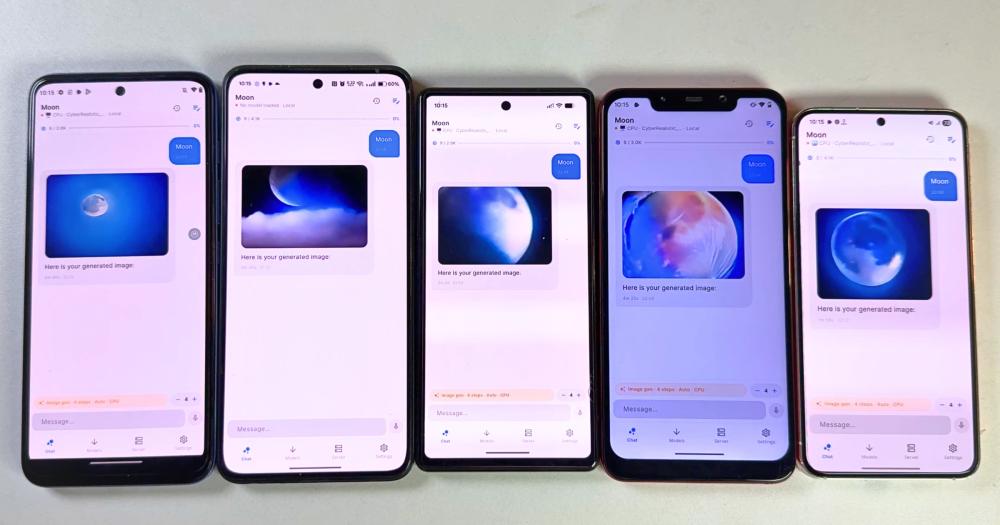
Run local LLM inference and cloud AI chat on Android, iOS, and web in one Flutter app, with GGUF model support and offline-first privacy.

Visit websiteGitHub1.5K stars
image of Cross Platform Llm Client
TL;DR

Cross Platform Llm Client PrivateLM is a Flutter-based mobile AI chat app that runs GGUF language models locally on Android via Vulkan GPU acceleration and on iOS via Metal GPU, with one-tap fallback to OpenAI, Anthropic, Google Gemini, and Kimi cloud APIs. It is an MIT-licensed, free alternative to paid mobile AI apps like Private LLM that keeps all conversation history on the device. Download the Android APK from GitHub Releases or sideload the iOS IPA via AltStore. Best for privacy-focused mobile users and developers who need offline inference on real hardware without a cloud subscription.

Read the full breakdownHide the full breakdownWho it is for, how it works, trade-offs, the quick start and the FAQ
who it's for

Who Cross Platform Llm Client is for#

Android users running GGUF models offline

Users who want to run Llama-3, Gemma, or Qwen2-VL locally on Android hardware without sending data to a cloud provider. PrivateLM handles GGUF download, Vulkan GPU offload, and context sizing automatically, so the setup is download the app, download a model, and start chatting.

Skip if:

Skip if your Android device is below API 28 (Android 9.0) or has less than 4 GB RAM. Smaller devices may work for lightweight quantized models but are not tested configurations per the README.

iPad users who want on-device AI without a subscription

Users on iPad who want local LLM inference without a subscription or App Store app. Metal GPU acceleration means larger quantized models run at usable speeds on modern Apple Silicon iPads. All chat history stays on device.

Skip if:

Skip if you are not comfortable with the AltStore sideloading process (requires a Mac or Windows PC and periodic re-signing). iPad is the recommended iOS target due to RAM headroom; iPhone is supported but has less headroom for larger models.

Developers benchmarking local LLMs on mobile hardware

Developers who need to validate GGUF model performance across Android SoCs (Snapdragon, Mediatek, Tensor) at different context sizes and quantization levels. The device-tier auto-detection and chat-template support (ChatML, Llama-3, Gemma, Phi) provide a consistent baseline for comparison testing.

Skip if:

Skip if you need a stable, well-documented testing baseline with no open issues. At 12 open issues and under a year old, the project is still settling; a developer needing a proven mobile inference tool should evaluate maturity first.

Users who want offline inference with a cloud fallback

Anyone who primarily uses a local model but occasionally needs stronger output from GPT-4 or Claude for complex tasks. PrivateLM switches between local inference and any of four cloud providers from the same chat interface, with per-session context stored locally regardless of which mode was used.

Skip if:

Skip if you need centrally managed API keys or enterprise audit logging. PrivateLM stores all keys locally in Hive with no central management layer.

the problem

The problem it solves#

Running a large language model on a mobile device requires the right hardware, the right model format, and an app that handles the complexity without demanding technical setup. Most mobile AI chat apps either lock you into a cloud subscription, sending every query to a third-party server, or they offer a local model option so buried in configuration that it only works for developers who know their way around Llama.cpp.

Switching between local inference and cloud providers mid-session is worse still. Each mode typically lives in a different app, so a user who wants the privacy of a local model but the speed of GPT-4 on complex tasks has to maintain two separate apps, two sets of chat histories, and two interfaces that work nothing alike. API keys entered into one are invisible to the other.

how Cross Platform Llm Client solves it

How it solves it#

Local GGUF Inference on Android via Vulkan GPU

Downloads and runs GGUF models directly on Android using a custom Flutter plugin wrapping llama.cpp, with Vulkan GPU acceleration. At first launch, the app reads your device's available RAM and GPU tier (ultra, high, mid, low), sets thread count automatically, and applies idle detection and 180-second hard timeouts to keep the UI responsive on mid-range hardware.

iOS and iPad Local Inference via Metal GPU

On iOS and iPad, llama.cpp runs using Metal GPU acceleration. The build is distributed as a sideloadable IPA via AltStore; iPad is the recommended iOS target due to RAM requirements for local models. The same GGUF model files and chat-template types (ChatML, Llama-3, Gemma, Phi) work on both Android and iOS.

Four Cloud API Providers as Instant Fallback

Connects to OpenAI, Anthropic, Google Gemini, or Kimi (Moonshot AI) from the same chat interface. A single CloudService normalizes all four API shapes: OpenAI standard completions, Anthropic Messages API, Google generateContent, and Kimi's OpenAI-compatible endpoint. API keys are stored locally in Hive and sent only to the provider's endpoint, never to any intermediary.

Multimodal Vision Chat

Sends images alongside text in conversations. Vision works with local Qwen2-VL models on Android and iOS and with cloud providers that support image inputs. The same chat interface handles both text-only and image-plus-text turns with no mode switching required.

Offline-First Local Storage via Hive

All chat sessions and app settings persist on-device via Hive, a lightweight key-value store. In local mode nothing leaves the device after the initial model download. In cloud mode, only the current query goes to the selected provider's endpoint; chat history remains local. API keys are stored in Hive and never transmitted to any server outside the chosen provider.

strengths · trade-offs

Strengths and trade-offs#

Strengths

  • MIT License with Full Source AccessThe entire codebase is MIT licensed, giving any team or individual the right to build, modify, and ship their own version without restriction. Unlike Private LLM, which is a closed proprietary iOS app sold as a one-time purchase, the llama.cpp integration, cloud API handling, and local storage layer are all fully inspectable.
  • No Account, No Server, No SubscriptionLocal inference runs entirely on the device with no server infrastructure and no mandatory account creation. The only network traffic in local mode is the initial GGUF model download. This removes the subscription cost and account tracking that come with cloud-first AI chat apps.
  • Android, iOS, and Web from One CodebaseAndroid, iOS, and web are all supported in a single Flutter build. Android has the most mature local inference path, with Vulkan GPU acceleration tested on Snapdragon, Mediatek, and Tensor SoCs. iOS adds Metal GPU inference; web is cloud-only. A developer building on any of these platforms works from the same Flutter codebase.
  • Smart Device-Tier Auto-ConfigurationOn first launch, the app reads the device's RAM and GPU capabilities and recommends an optimal context size and token limit for that hardware tier. This removes the need to manually research which GGUF quantization fits a Snapdragon 888 versus a mid-range Mediatek device.

Trade-offs

  • -iOS Install Requires AltStore SideloadingThe iOS build is not on the App Store. Users must install AltServer on a Mac or Windows PC and AltStore on the iOS device, download the IPA from GitHub Releases, and sideload it. Sideloaded apps expire after 7 days unless AltStore refreshes them automatically over the same Wi-Fi network. This is a real barrier for non-technical iOS users.
  • -Task Management Feature Not Yet AvailableThe README describes a task view for structured, multi-step AI workflows as under active development and explicitly notes it is not in the app yet. Users who need mobile LLM task automation should check the repository for updates before choosing PrivateLM for that use case.
  • -Project Under One Year Old with 12 Open IssuesThe repository was created in April 2026 and had 12 open issues as of November 2026. With 1,489 stars and 309 forks it is growing quickly, but the project is young. Some rough edges and undocumented behavior should be expected at this stage of development.
versus alternatives

Cross Platform Llm Client vs alternatives#

PrivateLM vs Private LLM

PrivateLM and Private LLM both run large language models locally on a mobile device, keeping conversations off cloud servers. The key decision turns on platform coverage: Private LLM targets iOS and macOS, while PrivateLM targets Android first, adds iOS via sideloading, and extends to web with cloud-only access.

FeaturePrivateLMPrivate LLM
LicenseMIT (open source)Proprietary
CostFreeOne-time purchase
AndroidYes (Vulkan GPU, API 28+)No
iOSYes (sideload via AltStore)Yes (App Store)
macOSNoYes
WebCloud-onlyNo
Cloud API fallbackOpenAI, Anthropic, Gemini, KimiNot documented

PrivateLM is the better choice for Android users, for anyone who wants the full source code under MIT, or for someone who needs both local offline inference and direct access to multiple cloud APIs from the same interface. The multimodal vision support (Qwen2-VL locally, cloud providers for image inputs) comes at no cost.

Private LLM is worth considering for iOS and macOS users who want an App Store experience without sideloading, or who prefer a polished paid app with no setup friction over a source-available one. The AltStore sideloading requirement for PrivateLM on iOS, with its 7-day expiry and AltServer dependency, is a real barrier for non-technical users who want a one-tap App Store install on iPhone or Mac.

install · quick start

Quick start#

bash
Download the Android APK or iOS IPA from GitHub Releases: https://github.com/orailnoor/cross-platform-llm-client/releases/latest
tech stack · detected from GitHub

What it's built on#

Languages
CC++Dart
frequently asked

FAQ#

What GGUF models does PrivateLM run locally on Android?

Any GGUF model compatible with llama.cpp runs on Android, including Llama-3, Gemma, Phi, and ChatML-templated models. The app wraps llama.cpp via a custom Flutter plugin for ARM64 devices with Vulkan GPU offload. At first launch it reads your device RAM and GPU tier, then recommends a context size and token limit matched to your hardware.

How do I install PrivateLM on iOS?

The iOS build is a sideloadable IPA, not an App Store release. First install AltServer on your Mac or Windows PC and AltStore on your iOS device. Then download the PrivateLM-iOS.zip from the GitHub Releases page, extract the IPA, and open it in AltStore. Sideloaded apps expire after 7 days, but AltStore tries to refresh them automatically when your device is on the same Wi-Fi as your AltServer computer. iPad is the recommended target for local inference; iPhone is supported but has less RAM headroom.

Is PrivateLM free to use?

Yes. PrivateLM is MIT licensed and costs nothing to run. Local inference is entirely free; you only pay for queries sent to cloud providers (OpenAI, Anthropic, Gemini, Kimi) using your own API keys. There is no subscription, no account requirement, and no in-app purchase.

Does PrivateLM work without an internet connection?

Yes, in local mode on Android and iOS. After downloading a GGUF model, all inference runs on-device with no network access needed. Chat history is stored locally in Hive and never leaves the device in local mode. The web version and cloud API mode both require an active internet connection.

What Android version does PrivateLM require?

PrivateLM requires Android API 28 or higher (Android 9.0 and above), as set by the minSdk in the platform configuration. Release APKs are split per ABI for smaller download sizes. Download the ABI variant that matches your device's processor architecture from the GitHub Releases page.

also worth a look

Similar open-source tools#

Fullmoon

Alternative toPrivate LLM

Private local LLM chat app for iPhone and Mac

  • 2,271 GitHub stars
  • MITLicence MIT

Hermes Agent

Featured

Alternative toGrok Bot

Self-hosted AI agent: persistent memory, multi-channel chat, model choice.

  • 260,560 GitHub stars
  • MITLicence MIT

Hive

Alternative toConductor

AI coding agent orchestrator for isolated parallel worktrees

  • 474 GitHub stars
  • MITLicence MIT

Alethe

Alternative toConductor

Multi-agent coding workspace with real PTYs and MCP management

  • 1,118 GitHub stars
  • AGPL-3.0Licence AGPL-3.0

Maestro

Alternative toConductor

Desktop orchestrator for parallel AI coding agent fleets

  • 3,540 GitHub stars
  • AGPL-3.0Licence AGPL-3.0

bb

Alternative toConductor

Multi-agent IDE coordinating Claude Code, Codex, Cursor, and more.

  • 4,896 GitHub stars
  • MITLicence MIT
by category

Open source tools in these categories#

503

AI & Machine Learning

freeCodeCamp, REA (Reverse Engineer Anything), OpenClaw
129

LLMOps & AI Tooling

Hermes Agent, OpenCode, MarkItDown

Sponsors

Inbox Zero

Alternative toSuperhuman

AI email assistant that drafts replies and clears your inbox

  • 12,915 GitHub stars
  • AGPL-3.0Licence AGPL-3.0
  • #Email

rakazo

Alternative toGrok Bot

AI teammates you own: your keys, your model, your machine.

  • 7,028 GitHub stars
  • Apache-2.0Licence Apache-2.0
  • #AI Agents

SnitchFeed

Live monitoring on LinkedIn, X, Reddit & more. Agentic social listening for startups.

Marketing & Growth

Advertise your product

New open source projects by email

The projects we add and every new guide. Free, unsubscribe any time.

Find open source alternatives to paid software

/
  • Claude Code to OpenCode
  • Jira to Windshift
  • Notion to AppFlowy
  • Slack to Mattermost
  • Linear to GitLab
  • Wispr Flow to Handy
  • Arc to Zen Browser
  • CapCut to Concat
  • Grok Bot to rakazo
  • Superhuman to Inbox Zero
  • Airtable to AITable
  • Muse to OpenClaw
  • Railway to Coolify
  • GitHub Copilot to Cline
  • Datadog to Netdata
  • Confluence to Wiki.js
  • Microsoft Teams to Rocket.Chat
  • Firebase to Supabase
  • Pinecone to Qdrant
  • Zapier to n8n
  • 1Password to KeePassXC
  • Devin AI to OpenHands
  • Asana to Leantime
  • Contentful to Strapi
  • Claude Code to OpenCode
  • Jira to Windshift
  • Notion to AppFlowy
  • Slack to Mattermost
  • Linear to GitLab
  • Wispr Flow to Handy
  • Arc to Zen Browser
  • CapCut to Concat
  • Grok Bot to rakazo
  • Superhuman to Inbox Zero
  • Airtable to AITable
  • Muse to OpenClaw
  • Railway to Coolify
  • GitHub Copilot to Cline
  • Datadog to Netdata
  • Confluence to Wiki.js
  • Microsoft Teams to Rocket.Chat
  • Firebase to Supabase
  • Pinecone to Qdrant
  • Zapier to n8n
  • 1Password to KeePassXC
  • Devin AI to OpenHands
  • Asana to Leantime
  • Contentful to Strapi