Open Source Alternatives
  • Alternatives
  • Categories
    Categories by size1,283 projects
    • Developer Tools660
    • AI & Machine Learning543
    • Business & Productivity307
    • Web Development219
    • Security & Monitoring198
    • Communication & Collaboration168
    • IT Management164
    • Design & Creative142
    • LLMOps & AI Tooling140
    • DevOps & CI/CD137
    Browse all 21 categoriesCloud & Hosting, Product & Project Management and 9 more
  • Blog
  • Advertise
SearchNotion, Slack, password manager.../
Submit
Open Source Alternatives
  • Alternatives
    • Developer Tools660
    • AI & Machine Learning543
    • Business & Productivity307
    • Web Development219
    • Security & Monitoring198
    • Communication & Collaboration168
    • Browse all 21 categories
  • Blog
  • Advertise
Submit your project

New open source projects by email

The projects we add and every new guide. Free, unsubscribe any time.

Open Source Alternatives LogoOpen Source Alternatives

Handpicked Open Source Alternatives to Paid Softwares

Add Open Source Alternatives as a preferred source on Google

Product

  • Categories
  • Tag
  • Advertise

Resources

  • Blog
  • Collection
  • Submit

Company

  • Privacy Policy
  • Terms of Service
  • Refund Policy
  • Sitemap

Alternatives

  • Claude Code
  • Jira
  • Notion
  • Slack
  • Linear
  • Wispr Flow
  • All alternatives
© 2026 Open Source Alternatives. All rights reserved.
Open SourceAlternatives
Home/Categories/AI & Machine Learning/Ffmpeg Skill
icon of Ffmpeg Skill

Ffmpeg Skill

Open source alternative to Rendi and Wireflow

  • 6.8K stars
  • MIT
  • Active this week
  • Last commit 1 day ago

Last verified Nov 17, 2026

Run 42 local FFmpeg tools from Claude Code, Cursor, or Codex: cut, caption, reframe, and export video with no cloud services required.

Visit websiteGitHub6.8K stars
image of Ffmpeg Skill
TL;DR

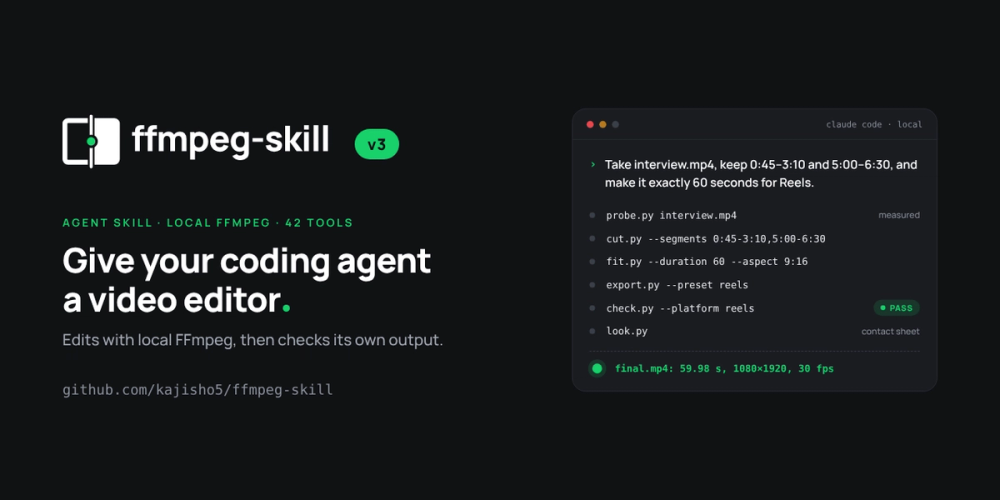
Ffmpeg Skill ffmpeg-skill is an agent skill for Claude Code, Cursor, and Codex that gives coding assistants a structured local video editor: 42 typed FFmpeg tools, an MCP server, and a machine-readable contract. It replaces cloud-based video processing services like Rendi and Wireflow, letting agents cut, caption, reframe, and export footage locally with no uploads, no API keys, and no account required. MIT licensed and built on Python's standard library, it runs on any machine with FFmpeg and Python 3 on the PATH. Best for developers who want their coding agent to handle video editing tasks without routing footage through a third-party cloud.

Read the full breakdownHide the full breakdownWho it is for, how it works, trade-offs, the quick start and the FAQ
who it's for

Who Ffmpeg Skill is for#

Developers building AI-assisted video editing workflows

Use ffmpeg-skill to give Claude Code or Cursor a structured interface to FFmpeg: probe a file, cut segments losslessly, fit them to a duration and aspect ratio, and export to a platform preset in one agent session. The machine-readable contract means the agent reads every tool's input schema before it runs anything, so it does not guess at flags.

Skip if:

You need a managed cloud API with no server or FFmpeg installation. For that, a cloud FFmpeg service with no local setup is simpler.

Content creators automating social platform exports

`render.py --template tiktok` (or reels, shorts, youtube, x, linkedin, facebook) produces a platform-ready file from a single agent command: the template handles aspect ratio, caption positioning, loudness normalization to -14 LUFS, and a platform compliance check. Exporting to all seven video destinations at once is `--template all`.

Skip if:

You do not use a coding agent (Claude Code, Cursor, Codex) or an MCP client. ffmpeg-skill is a skill for agents; it is not a standalone GUI or no-code editor.

Developers working with privacy-sensitive footage

Because every operation runs locally with no cloud, no API keys, and no account required, ffmpeg-skill is appropriate for footage that cannot leave the organization's machines. The optional local speech transcription (faster-whisper, Parakeet) also processes audio entirely on the local machine.

Skip if:

You need a hosted, zero-maintenance service and data privacy is not a constraint. Cloud-based alternatives are simpler when footage can be uploaded freely.

the problem

The problem it solves#

An AI coding agent that writes FFmpeg commands still guesses at key inputs: it assumes a frame rate, picks a codec the container does not support, re-encodes a stream that only needed a copy, and reports success without measuring the result. The agent has no structured interface to FFmpeg: every invocation is a generated shell command with no typed inputs, no post-run verification, and no way to confirm that the output file meets the destination's requirements.

For developers building video workflows with coding assistants, this means debugging outputs the agent reported as correct, re-encoding footage that did not need it, and writing prompt instructions that break each time the model interprets a flag differently. Cloud APIs for video processing charge per job and upload footage to remote servers, which is neither acceptable for high-volume work nor for footage that must stay on a local machine.

how Ffmpeg Skill solves it

How it solves it#

42 Typed FFmpeg Tools

Cut, join, silence removal, captions, overlays, HDR-to-SDR, loudness normalization, platform exports, multicam, and whole-edit rendering are each a separate Python script with typed argparse flags. No shell string generation: every flag is validated before FFmpeg runs, and each tool returns structured JSON with a probe of the output.

MCP Server with Contract-Derived Tool Specs

The MCP server advertises 12 core tools by default, keeping agent context small. Setting `FFMPEG_SKILL_MCP_FULL=1` lists all 42. Tool names, order, and `inputSchema` in `tools/list` are translated from each tool's argparse parser at startup, so a new flag added to a script appears in MCP without editing `mcp/`.

Probe-First, Lossless-When-Possible Editing

Every job starts with `probe.py`, which measures duration, fps (with variable-frame-rate detection), resolution, rotation, bit depth, HDR format including Dolby Vision, colour tags, and every audio stream. `cut.py` and `loudness.py` stream-copy what they do not need to transcode, so quality is preserved wherever possible.

Post-Execution Verification

After every tool runs, `check.py` validates the output against a platform spec (reels, TikTok, YouTube, etc.) and `look.py` produces a contact sheet the agent can inspect before reporting success. The verified workflow is probe, edit, check, then verify: the agent never reports done without measuring the result.

Platform Delivery Templates

`render.py --template tiktok` fills a shipped template: 9:16 crop, captions positioned above TikTok's description bar, -14 LUFS loudness, the tiktok export preset, and a platform check on the output. Templates ship for TikTok, Reels, Shorts, YouTube, X, LinkedIn, Facebook, podcast, and audiogram.

Local Speech Transcription for Captions

`caption.py --transcribe` and `silence.py --transcribe` use a locally installed speech engine (faster-whisper, Parakeet-MLX, or openai-whisper). The audio never leaves the machine. Without an engine installed, every other tool still works; `npx ffmpeg-skill doctor` lists the engine as missing optional.

strengths · trade-offs

Strengths and trade-offs#

Strengths

  • MIT License with No Runtime DependenciesThe MIT license means you can run it commercially, fork it, and modify it without restriction. The Python standard library is the only runtime dependency: no packages to install, no version conflicts, no extra steps beyond having FFmpeg and Python on the PATH.
  • Machine-Readable Contract Keeps MCP in Sync`contract --json` describes all 42 tools: input schema, output schema, role, required FFmpeg capabilities, verification tools to run afterward, and whether a visual check is required. The MCP surface derives from this contract, so a flag added to a script appears in `tools/list` automatically; CI fails the build if any definition drifts from its argparse parser.
  • FFmpeg 6.1 Through 9 Tested in CIThe test suite runs against FFmpeg 6.1, 7.1, 8, and 9 on every push, so a build that passes CI is verified against the specific FFmpeg versions developers are likely to have installed on their machines.
  • Offline Processing with No Upload RequiredEvery tool runs locally with no network calls and no cloud account. Footage stays on the machine. This directly addresses the main constraint of cloud-based alternatives like Rendi and Wireflow for teams with privacy requirements or upload-latency concerns.

Trade-offs

  • -FFmpeg Must Be Installed SeparatelyThe skill does not ship a bundled FFmpeg binary. You install FFmpeg through the system package manager (apt, Homebrew, Chocolatey) or build it. A Homebrew-installed FFmpeg without the `subtitles` filter, or a build without libvidstab, makes `doctor`'s overall `ok` report false even though most tools still work. Check `doctor --json`'s per-tool `usable` field, not just the top-level `ok`.
  • -No Managed Cloud FallbackWhen FFmpeg or Python 3 is not on the PATH, the skill cannot run. Teams that need a managed, always-available cloud API for video processing with no server setup or maintenance are better served by a cloud service like Rendi.
  • -26 Open Issues on an Active TrackerThe repository had 26 open issues at the time of writing. Created in September 2026, the project is under active development; the issue tracker reflects ongoing iteration rather than neglect, but some tool behaviors may change as the API stabilizes.
versus alternatives

Ffmpeg Skill vs alternatives#

ffmpeg-skill vs Rendi

ffmpeg-skill and Rendi both execute FFmpeg jobs, but on opposite sides of the cloud boundary. Rendi is a cloud REST API: you send an FFmpeg command to Rendi's servers, it runs the job, and returns the output. ffmpeg-skill runs the same jobs on your local machine.

Featureffmpeg-skillRendi
LicenseMITProprietary
DeploymentLocal (FFmpeg + Python required)Cloud API, no server setup
Data privacyFootage never leaves your machineFootage uploads to Rendi's servers
PricingFree (self-hosted)Paid cloud API
Agent integrationMCP server + SKILL.mdREST API
VerificationBuilt-in probe, check, contact sheetNone documented

ffmpeg-skill is the better choice when footage privacy matters, when you want free processing with no per-job cost, or when you need structured agent integration with probe-first and post-execution verification. Rendi is worth considering when you need a managed cloud service with no FFmpeg installation, no server, and no maintenance: a team with no local infrastructure and no data-privacy constraint is a natural fit.

ffmpeg-skill vs Wireflow

Wireflow is a hosted MCP server for AI-driven video pipelines: it runs video processing jobs for coding assistants like Claude and Cursor without requiring local FFmpeg. ffmpeg-skill is the local equivalent: a skill that installs into the same agents and processes footage on the developer's machine.

Featureffmpeg-skillWireflow
LicenseMITProprietary
DeploymentLocal (FFmpeg + Python required)Hosted SaaS, no install
Data privacyLocal processingCloud processing
MCP supportYes (stdio, all 42 tools)Yes (hosted)
PricingFreePaid hosted service
Offline useYesNo

ffmpeg-skill is the better choice when you need offline processing, local footage privacy, or the ability to modify the tool scripts. Wireflow is worth considering when you want a zero-install MCP server for video tasks without setting up FFmpeg locally.

install · quick start

Quick start#

bash
Install the skill with npx; FFmpeg and Python 3 must be on your PATH first.
```bash
sudo apt install ffmpeg
npx ffmpeg-skill
```
tech stack · detected from GitHub

What it's built on#

Languages
Python
Tooling
FFmpeg
frequently asked

FAQ#

Does ffmpeg-skill work with Claude Desktop and other MCP clients?

Yes. The MCP server uses the stdio JSON-RPC transport and works with any MCP client, not just Claude Code or Cursor. By default tools/list advertises 12 core tools to keep the client context window small. Setting FFMPEG_SKILL_MCP_FULL=1 lists all 42 tools.

Do I need Python packages beyond the standard library?

No packages are required to run the core tools. The Python standard library is the only runtime dependency. Optional local speech transcription (caption.py --transcribe, silence.py --transcribe) requires a separately installed speech engine: pip install faster-whisper is the simplest. The first run downloads the model, and audio never leaves the machine.

How does the skill avoid unnecessary re-encoding?

The skill probes the input first with probe.py, then uses stream copy wherever possible. cut.py and loudness.py copy streams they do not need to change. Re-encoding only happens when necessary: frame-accurate cuts, filters, format changes, or when a keyframe is farther from the cut point than the tolerance allows.

What happens if a required FFmpeg filter is missing from my build?

npx ffmpeg-skill doctor checks every FFmpeg component each tool needs and reports per-tool availability. Its overall ok is false if any filter is missing, but most tools still work. Check doctor --json's tools field for per-tool usable status rather than relying on the top-level ok. A plain Homebrew FFmpeg without the subtitles filter is a common case where ok is false but the majority of tools are usable.

Can I add captions to a video without a speech engine installed?

Yes. caption.py burns captions from a cue file (SRT or the skill's own .cues format) without a speech engine. The --transcribe flag, which generates the cue file from the audio, requires a local speech engine. Without one, doctor lists it as missing optional and --transcribe refuses with the install instructions for each supported engine.

also worth a look

Similar open-source tools#

Rea Video

Alternative toTwelve Labs

Video reverse-engineering CLI that runs inside AI coding assistants.

  • 9,704 GitHub stars
  • Apache-2.0Licence Apache-2.0

Brag

InDesign & Creative

Agent skill that turns any project into a launch video in one command

  • 21,409 GitHub stars
  • MITLicence MIT

Awwwards-mcp

Alternative toLazyweb

MCP server for Awwwards design inspiration, no API key required.

  • 720 GitHub stars
  • MITLicence MIT

Open3D

InDeveloper Tools

C++/Python library for point clouds, meshes, and 3D visualization.

  • 14,210 GitHub stars
  • MITLicence MIT

Unity Mcp

Alternative toUnity

MCP bridge for Unity: 50 tools, any AI client, MIT licensed.

  • 15,976 GitHub stars
  • MITLicence MIT

Hallmark

InDesign & Creative

Design skill for coding agents with 48 themes, real photos and lint.

  • 55,156 GitHub stars
  • MITLicence MIT
by category

Open source tools in these categories#

543

AI & Machine Learning

freeCodeCamp, REA (Reverse Engineer Anything), OpenClaw
660

Developer Tools

REA (Reverse Engineer Anything), Skills for Real Engineers, superpowers
142

Design & Creative

ComfyUI, Excalidraw, Godot Engine

Sponsors

Inbox Zero

Alternative toSuperhuman

AI email assistant that drafts replies and clears your inbox

  • 13,025 GitHub stars
  • AGPL-3.0Licence AGPL-3.0
  • #Email

rakazo

Alternative toGrok Bot

AI teammates you own: your keys, your model, your machine.

  • 8,291 GitHub stars
  • Apache-2.0Licence Apache-2.0
  • #AI Agents

SnitchFeed

Live monitoring on LinkedIn, X, Reddit & more. Agentic social listening for startups.

Marketing & Growth

Advertise your product

New open source projects by email

The projects we add and every new guide. Free, unsubscribe any time.

Find open source alternatives to paid software

/
  • Claude Code to OpenCode
  • Jira to Windshift
  • Notion to AppFlowy
  • Slack to Mattermost
  • Linear to GitLab
  • Wispr Flow to Handy
  • Arc to Zen Browser
  • CapCut to Concat
  • Grok Bot to rakazo
  • Superhuman to Inbox Zero
  • Discord to Stoat
  • Airtable to AITable
  • Datadog to SigNoz
  • Muse to OpenClaw
  • Railway to Coolify
  • GitHub Copilot to Cline
  • Confluence to Wiki.js
  • Microsoft Teams to Rocket.Chat
  • 1Password to KeePassXC
  • Firebase to Supabase
  • Pinecone to Qdrant
  • Zapier to n8n
  • Devin AI to OpenHands
  • Asana to Leantime
  • Claude Code to OpenCode
  • Jira to Windshift
  • Notion to AppFlowy
  • Slack to Mattermost
  • Linear to GitLab
  • Wispr Flow to Handy
  • Arc to Zen Browser
  • CapCut to Concat
  • Grok Bot to rakazo
  • Superhuman to Inbox Zero
  • Discord to Stoat
  • Airtable to AITable
  • Datadog to SigNoz
  • Muse to OpenClaw
  • Railway to Coolify
  • GitHub Copilot to Cline
  • Confluence to Wiki.js
  • Microsoft Teams to Rocket.Chat
  • 1Password to KeePassXC
  • Firebase to Supabase
  • Pinecone to Qdrant
  • Zapier to n8n
  • Devin AI to OpenHands
  • Asana to Leantime