Who Fluent-Qt is for#
C++ desktop developers targeting Windows with Fluent Design visuals
Teams building Windows desktop applications in C++ and Qt Widgets who want Fluent/WinUI visual consistency with Windows 11 and Microsoft's own apps. Fluent-Qt provides the control set for that look without switching to WinUI, which would require dropping Qt and targeting Windows only.
Skip if:
Your application targets a custom visual style, or runs primarily on Linux and macOS where users may find Fluent Design visually unfamiliar. Also skip if your project uses Qt Quick/QML rather than Qt Widgets.
Python/PySide6 developers adding Fluent-style controls
Python developers building PySide6 desktop applications who want Fluent-style controls without writing C++ extensions. The FluentQt PyPI package exposes the full native control set through Python bindings, installable in one pip command.
Skip if:
Your PySide6 application targets Qt Quick/QML rather than Qt Widgets. Fluent-Qt operates at the Qt Widgets layer only and is not compatible with the QML rendering pipeline.
Cross-platform C++ teams wanting consistent styling across operating systems
Teams shipping the same Qt Widgets application on Windows, macOS, and Linux who want a unified visual style rather than adapting to each platform's native widget appearance. Fluent-Qt's cross-platform build means the same control set and API render on all three desktop targets.
Skip if:
You need your application to feel native on macOS or Linux, where Fluent Design departs from platform conventions. Users on those platforms may find WinUI-inspired controls visually out of place compared to native macOS or GNOME/KDE styling.
The problem it solves#
Qt Widgets is the dominant C++ UI framework for native cross-platform desktop applications, but its default visual style has not kept pace with modern desktop design conventions. Windows users in particular expect Fluent Design: the visual language Microsoft uses across Windows 11, Office, and its own apps. Developers who need that look in a Qt Widgets app face three options: pay for a commercial component library, spend months building custom controls from scratch, or accept a visually dated application.
Commercial Qt component libraries from vendors such as Telerik (Progress Software) and DevExpress can cost several hundred to over a thousand dollars per developer per year. That pricing locks many independent developers, small studios, and open source projects out of modern-looking native Qt UIs entirely. Fluent-Qt removes that barrier: it provides core Fluent Design controls as a free, MIT-licensed library that integrates in minutes using CMake.
How it solves it#
Fluent-style controls across input, navigation, and data categories
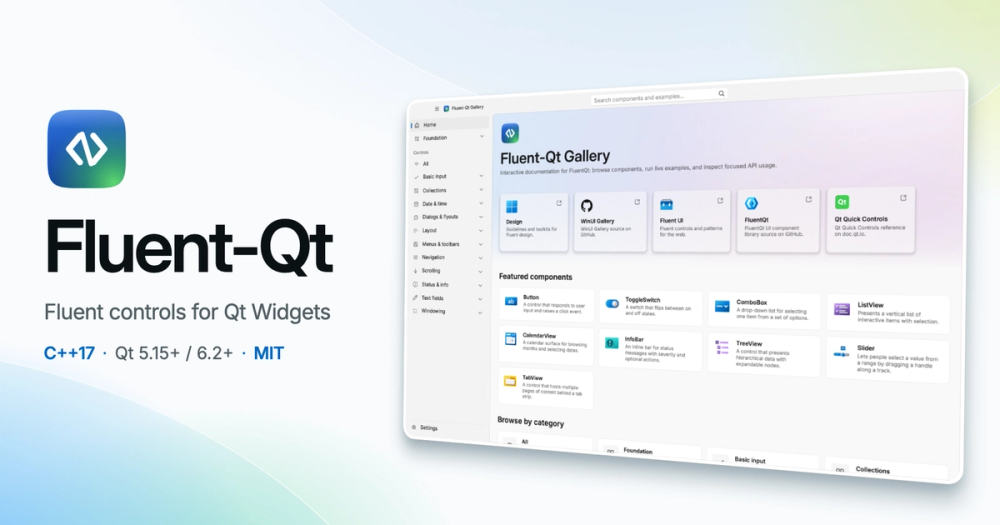
The library covers the major Fluent Design control categories: basic inputs (Button, ComboBox, ToggleSwitch, CheckBox), collections (ListView, GridView, TreeView), navigation (NavigationView, TabView, Breadcrumb), dialogs and flyouts (ContentDialog, Flyout, TeachingTip), date and time pickers, and windowing (Window, TitleBar). Each control has its own C++ API, states, and layout behavior.
Single unified API for Qt 5.15+ and Qt 6.2+
Application code uses one call site for both Qt 5.15+ and Qt 6.2+. No conditional compilation blocks or separate codepaths are needed when supporting both major Qt versions in the same codebase. The library target depends only on Qt Widgets, so it adds no unrelated runtime dependencies.
CMake FetchContent integration in a few lines
Adding Fluent-Qt to an existing CMake project requires a FetchContent_Declare block pointing at the GitHub repository, FetchContent_MakeAvailable, and a target_link_libraries call on FluentQt::FluentQt. No pre-installed system packages, no separate download step, and no build system migration are needed.
PySide6 Python bindings installable via PyPI
Python developers can use the same controls from PySide6 with a single pip install FluentQt command. The bindings expose Fluent-Qt's native C++ widgets through Shiboken6 and require Python 3.10+ for source builds. A separate FluentQt-Gallery package on PyPI provides an interactive Python gallery for evaluating controls before integration.
Light, Dark, and High Contrast themes with application-wide motion policy
Fluent-Qt ships Light, Dark, and High Contrast themes, matching Windows 11's accessibility mode support. An application-wide motion policy (Full, Reduced, or Disabled) controls animation behavior across all controls, letting developers comply with OS-level reduced-motion accessibility settings.
Live WebAssembly gallery for browser-based evaluation
The library compiles to WebAssembly, and the project hosts a live C++ Web Gallery at its project website that runs in any modern browser without a local Qt installation. Teams can browse controls, switch themes, and inspect C++ source examples before committing to a local build.
Strengths and trade-offs#
Strengths
- MIT license with no per-developer feesFluent-Qt's source is MIT licensed, so it can be used in commercial applications, modified, and distributed without paying a license fee. Commercial Qt UI component libraries typically charge per developer per year; Fluent-Qt removes that cost for teams willing to build from source.
- Drops into existing Qt Widgets projects without architectural changesThe library uses Qt's standard signals, slots, layouts, and event loop. No new framework layer sits between Fluent-Qt controls and the rest of a Qt Widgets application. Migrating a single widget or dialog to Fluent-style controls is possible without rewriting surrounding code.
- Runs on Windows, macOS, Linux, and the browser via WebAssemblyUnlike WinUI, which is Windows-only, Fluent-Qt brings the same design language to macOS and Linux builds. The same library and API work across all four targets, which matters for desktop apps shipping cross-platform under a single Qt codebase.
- AI-assisted GUI development skill includedThe project ships a build-fluentqt-gui skill for Claude Code, Codex, and Cursor that can scaffold a desktop app, add a GUI to an existing project, or fix an interface. A Live Scene preview workflow shows saved changes without a full rebuild cycle.
Trade-offs
- -New project with a small communityFluent-Qt was created in May 2026 and had 107 stars at the time of indexing. The project is under active development (last push September 2026), but it lacks the long track record of established Qt UI libraries. Teams requiring multi-year vendor stability or dedicated support contracts should weigh this.
- -Requires Qt 5.15+ or 6.2+ and CMake 3.16+ as prerequisitesFluent-Qt is a C++ library, not a drop-in binary. Using it requires a working Qt Widgets installation (Qt 5.15+ or Qt 6.2+) and a CMake 3.16+ build environment. Teams without an existing Qt toolchain face a non-trivial setup investment. Python users additionally need PySide6 6.2.4+ and Python 3.10+ for source builds.
Fluent-Qt vs alternatives#
Fluent-Qt vs Telerik UI for Qt
Telerik UI for Qt (Progress Software) is the most widely known commercial Qt component library. Both cover Qt Widgets controls, but Telerik spans a broader range including data grids and charts, while Fluent-Qt focuses on Fluent/WinUI-style design controls.
| Feature | Fluent-Qt | Telerik UI for Qt |
|---|---|---|
| License | MIT | Commercial subscription |
| Price | Free | Several hundred dollars per developer per year |
| Fluent/WinUI design language | Yes (primary focus) | Partial (one theme option) |
| C++ support | Yes (C++17) | Yes |
| Python bindings | Yes (PySide6 via PyPI) | No |
| WebAssembly | Yes | Limited |
| Platforms | Windows, macOS, Linux, Web | Windows, macOS, Linux |
| Data grid and chart controls | No | Yes |
Fluent-Qt is the better choice when you want Fluent Design as the primary visual language and do not need enterprise data grid or charting components. It is free to use commercially under MIT. Telerik UI for Qt covers a wider set of component types and comes with dedicated vendor support; teams building data-heavy applications with commercial support requirements may find that tradeoff worth the licensing cost.
Fluent-Qt vs WinUI (Windows App SDK)
WinUI is Microsoft's canonical Fluent Design framework and the reference implementation for the visual language Fluent-Qt draws from. The two serve different scenarios.
| Feature | Fluent-Qt | WinUI (Windows App SDK) |
|---|---|---|
| Platform | Windows, macOS, Linux, Web | Windows only |
| Language | C++17, Python (PySide6) | C++ (WinRT), C#, .NET |
| Framework | Qt Widgets 5.15+/6.2+ | Windows App SDK |
| License | MIT | MIT |
Fluent-Qt makes sense when you need Fluent Design visuals on macOS or Linux, or when your team has an existing Qt Widgets codebase and a framework switch would be impractical. WinUI is the right choice when you are building a Windows-only application and want the canonical Fluent Design implementation with Microsoft's platform integration. Fluent-Qt approximates the WinUI visual language rather than porting it; subtle differences in rendering and behavior should be expected.

Quick start#
Install Fluent-Qt into an existing CMake project by cloning from GitHub, or add the Python bindings via pip.
```bash
git clone --depth 1 --branch v1.8.3 https://github.com/calvinhxx/Fluent-Qt.git
pip install FluentQt
```What it's built on#
- Languages
- C++JavaScriptPython
- Runtimes
- WebAssembly
FAQ#
Does Fluent-Qt work with Qt 5 and Qt 6?
Yes. Fluent-Qt supports Qt 5.15+ and Qt 6.2+ through a single unified API. Application code does not need separate call sites for each major Qt version. The library links against Qt Widgets, which is available on both Qt 5 and Qt 6.
Can I use Fluent-Qt from Python?
Yes. Optional PySide6 bindings are available as pip install FluentQt on PyPI. The Python bindings expose the same native C++ controls through Shiboken6 and require Python 3.10+ for source builds and PySide6 6.2.4+. A separate FluentQt-Gallery package provides an interactive Python gallery for evaluating controls.
Is Fluent-Qt free for commercial use?
Yes. Fluent-Qt's source code is released under the MIT License, which permits use in commercial applications, modification, and redistribution without fee. Bundled assets and packaged runtime dependencies retain their own upstream terms, documented in THIRD_PARTY_NOTICES.md in the repository.
Does Fluent-Qt work on macOS and Linux?
Yes. The library targets Windows, macOS, Linux, and WebAssembly. Unlike Microsoft's WinUI, which is Windows-only, Fluent-Qt's Qt build means the same controls compile and run on macOS and Linux with the same API. Visual rendering approximates the Fluent Design look on all platforms rather than matching each OS's native appearance.
How do I evaluate Fluent-Qt controls before setting up a local build?
The project provides a live WebAssembly gallery at the project website that runs in any modern browser without a Qt installation. You can browse controls, switch Light, Dark, and High Contrast themes, and inspect the corresponding C++ source code. Pre-built desktop Gallery packages for Windows, macOS, and Linux are also available from GitHub Releases for offline evaluation.
Similar open-source tools#
Neon-Vision-Editor
Native Apple text and Markdown editor with safe file sync
Onlook
Visual React editor where every design change writes real code
image-optimizer
Free desktop image optimizer. Files stay on your machine.
screenshot-to-code
Turn any design screenshot into clean, working code with AI
material-ui
Open source React components for Google's Material Design
Optimo
Optimize and convert images and videos using open formats