Open Source Alternatives
  • Alternatives
  • Categories
    Categories by size1,196 projects
    • Developer Tools617
    • AI & Machine Learning520
    • Business & Productivity290
    • Web Development215
    • Security & Monitoring180
    • Communication & Collaboration159
    • IT Management151
    • LLMOps & AI Tooling132
    • Cloud & Hosting129
    • Product & Project Management126
    Browse all 21 categoriesDesign & Creative, DevOps & CI/CD and 9 more
  • Blog
  • Advertise
SearchNotion, Slack, password manager.../
Submit
Open Source Alternatives
  • Alternatives
    • Developer Tools617
    • AI & Machine Learning520
    • Business & Productivity290
    • Web Development215
    • Security & Monitoring180
    • Communication & Collaboration159
    • Browse all 21 categories
  • Blog
  • Advertise
Submit your project

New open source projects by email

The projects we add and every new guide. Free, unsubscribe any time.

Open Source Alternatives LogoOpen Source Alternatives

Handpicked Open Source Alternatives to Paid Softwares

Add Open Source Alternatives as a preferred source on Google

Product

  • Categories
  • Tag
  • Advertise

Resources

  • Blog
  • Collection
  • Submit

Company

  • Privacy Policy
  • Terms of Service
  • Refund Policy
  • Sitemap

Alternatives

  • Claude Code
  • Jira
  • Notion
  • Slack
  • Linear
  • Wispr Flow
  • All alternatives
© 2026 Open Source Alternatives. All rights reserved.
Open SourceAlternatives
Home/Categories/Developer Tools/Gopeed
icon of Gopeed

Gopeed

Open source alternative to Internet Download Manager and Folx Pro

  • 27.6K stars
  • GPL-3.0
  • Active this week
  • Last commit today

Last verified Nov 10, 2026

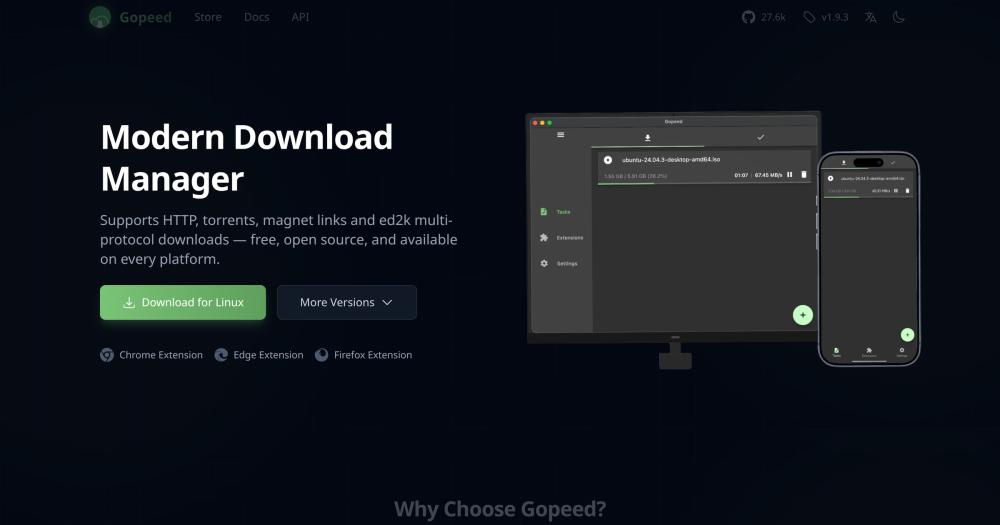
Manage HTTP, BitTorrent, magnet, and ed2k downloads across Windows, macOS, Linux, Android, iOS, and web with a native Flutter UI and no ads.

Visit websiteGitHub27.6K starsDeploy on Hostinger
image of Gopeed
TL;DR

Gopeed is a GPL-3.0 licensed download manager that handles HTTP, BitTorrent, magnet links, and ed2k from a single app across Windows, macOS, Linux, Android, iOS, and the web. It replaces paid tools like Internet Download Manager (Windows-only proprietary) and Folx Pro (Mac-only subscription) with a free, open source option that covers every platform they serve and adds cross-platform support. Built with Go and Flutter, it uses a native UI rather than Electron, keeping resource usage lower than browser-based alternatives. Best for users who download across protocols or platforms and want a single free tool without licensing fees.

Read the full breakdownHide the full breakdownWho it is for, how it works, trade-offs, the quick start and the FAQ
who it's for

Who Gopeed is for#

Windows users replacing Internet Download Manager

Gopeed replicates IDM's core workflow: HTTP downloads with multi-threaded acceleration, automatic browser download capture, and queue management. It runs without a license key, adds BitTorrent and magnet link support that IDM lacks, and works on other platforms the same user might pick up later.

Skip if:

IDM is still worth considering if you depend on its legacy Windows browser plugin compatibility or its site-specific download integrations, which have broader support with older browser configurations than Gopeed's extension system.

Mac users looking past Folx Pro

Gopeed covers every protocol Folx Pro handles and adds ed2k and magnet link support, at no cost. The native macOS app installs from GitHub Releases. Browser integration with Chrome, Edge, and Firefox is handled through the Gopeed browser extension.

Skip if:

Folx Pro is a better fit if you want tighter macOS design integration and Safari browser support, and you have no need for ed2k or cross-platform coverage.

Home server and NAS users managing downloads remotely

Deploy Gopeed with Docker and manage the download queue through any browser on the local network. The REST API integrates with home automation workflows. QNAP users have an official package through the App Center. The web UI shows task status and speed without requiring a desktop app installed on each client machine.

Skip if:

If your NAS vendor already provides a native download station with tight OS integration, that tool may be simpler to maintain than adding a separate Docker container.

ML engineers pulling model files from HuggingFace

The HuggingFace extension downloads model and dataset files directly from HuggingFace repositories. The MCP endpoint in Gopeed 2.0.0 lets AI agents queue downloads through natural language. For teams building pipelines that pull large model files regularly, this removes the need to manage the HuggingFace CLI separately.

Skip if:

If your download workflow is already scripted with huggingface_hub or the official CLI and those scripts are working reliably, adding Gopeed introduces a service dependency without a clear workflow benefit.

the problem

The problem it solves#

Managing downloads across protocols is messier than it looks. HTTP download accelerators, BitTorrent clients, and ed2k-compatible tools are separate software categories, and most tools handle only one protocol well. Users end up managing two or three download apps at once, each with its own queue, settings, and browser extension.

Paid download managers address the fragmentation problem but add their own friction. Internet Download Manager is Windows-only and requires a paid license, leaving Mac and Linux users without an equivalent. Folx Pro is Mac-native but requires a paid subscription and handles only HTTP and torrents, with no ed2k support. Neither works on mobile. For users who move between platforms or need ed2k support for older file-sharing networks, the commercial options leave gaps that require a separate tool.

how Gopeed solves it

How it solves it#

HTTP, BitTorrent, magnet, and ed2k in one queue

Gopeed handles all four download protocols from a single task list. HTTP and HTTPS transfers use multi-threaded connections that split the file across segments. BitTorrent and magnet links use a full engine with DHT peer discovery, uTP transport, Web Seeds, and selective file downloads within a torrent. The ed2k protocol covers files shared through older peer-to-peer networks, all managed from the same interface.

Native Flutter UI with no Electron

The interface renders natively on each platform using Flutter, not a WebView or Electron shell. This keeps memory overhead lower than browser-based download managers, and startup is faster. Eight accent colors and system-aware light and dark themes are available, along with a responsive layout that adapts across phones, tablets, and resizable desktop windows.

JavaScript extension system

The extension system lets community developers add download support for specific sites and services. Extensions exist for YouTube, HuggingFace model downloads, MediaFire, TikTok, Instagram, and GitHub repositories. These are browsable through a built-in extension store. Extensions run in JavaScript and are loaded into the core engine, so adding a new download source does not require modifying Gopeed itself.

Browser integration across Chrome, Edge, and Firefox

Install the Gopeed browser extension and download links from the browser are captured and forwarded to Gopeed automatically. The extension works with Chrome, Edge, Firefox, and other compatible browsers. Clicking a file in the browser triggers Gopeed instead of the browser's built-in download manager, with no manual URL copying needed.

REST API and CLI for scripting and remote control

Gopeed exposes a REST API that accepts download commands, lists tasks, and reports progress. The CLI installs with one go install command for scripting and automation workflows. The web UI is accessible from any device on the local network, so a home server running Gopeed can be managed from a laptop without opening a desktop app. Webhooks and post-download scripts are also supported.

AI integration through MCP in Gopeed 2.0.0

Gopeed 2.0.0 adds an MCP endpoint that connects to AI agents. The available tools include resolve_task, create_task, list_tasks, pause_task, continue_task, and delete_task. An AI assistant connected to this endpoint can queue, inspect, and manage downloads using natural language. The MCP interface uses the same authentication model as the REST API.

strengths · trade-offs

Strengths and trade-offs#

Strengths

  • Free on every platform, no licensing feeInternet Download Manager is a paid, Windows-only product. Folx Pro is a paid Mac subscription. Gopeed is GPL-3.0 and free on Windows, macOS, Linux, Android, iOS, and the web. There is no trial period, no upsell to a paid tier, and no cloud account required to install or run it.
  • Full BitTorrent engine, not a basic torrent clientThe BitTorrent implementation includes DHT peer discovery, uTP transport, Web Seeds, selective file downloads within a torrent, ratio-based and time-based seeding limits, tracker management, and per-peer and per-piece download statistics. This matches dedicated torrent clients rather than the limited torrent support found in tools like Folx Pro.
  • Active development with 27,500+ GitHub starsWith 27,552 GitHub stars, 1,797 forks, and commits through November 2026, Gopeed is actively maintained. Version 2.0.0 is in public beta, introducing a native FFI architecture for better cross-platform consistency. The project ships packages for all six supported platforms from one codebase, and the UI supports 20+ languages.
  • Self-hosted web UI with no cloud dependencyDocker deployment gives you a browser-accessible download manager on any server on your network. QNAP has an official package. The self-hosted path means your download history, queue, and settings stay on hardware you control, with no account creation and no reliance on external cloud services.

Trade-offs

  • -343 open GitHub issues across six platformsAs of November 2026, Gopeed has 343 open GitHub issues. Supporting six operating systems from one codebase means some platform-specific bugs take longer to resolve. Mobile users have reported feature gaps compared to the desktop experience, and some extension integrations have edge-case reliability issues documented in the issue tracker.
  • -2.0.0 beta carries unfinished featuresGopeed 2.0.0 (Beta 3 as of late 2026) redesigns the internal architecture to connect Flutter and Go via FFI instead of HTTP. The README notes that some features may still be incomplete or unstable. Users who need maximum reliability should use the latest stable 1.x release. The beta and stable channels do not share automatic upgrades.
  • -CLI install requires the Go toolchainThe command-line tool installs with go install, which requires Go 1.25 or higher on the machine. The desktop app and web UI are standalone and do not need Go installed. Scripting and automation workflows that use the CLI have an extra prerequisite that tools like IDM or Folx avoid by providing desktop-only interfaces.
versus alternatives

Gopeed vs alternatives#

Gopeed vs Internet Download Manager

Internet Download Manager (IDM) has been the dominant Windows download accelerator for two decades. The comparison with Gopeed comes down to platform coverage, protocol support, and licensing.

FeatureGopeedInternet Download Manager
LicenseGPL-3.0 (free)Proprietary (paid)
PlatformsWindows, macOS, Linux, Android, iOS, webWindows only
BitTorrentYes, full engine with DHTNo
ed2kYesNo
Browser integrationChrome, Edge, FirefoxChrome, Edge, Firefox
Multi-threaded HTTPYesYes

Gopeed is the better choice when you need downloads on more than one platform, want BitTorrent and ed2k alongside HTTP, or want to avoid a Windows-only paid license. The GPL-3.0 license also removes the serial key activation friction that IDM users encounter when reinstalling Windows.

IDM remains the better choice for Windows-only users who want the most mature HTTP acceleration engine and the widest site-specific browser download plugin compatibility. IDM's browser plugins have broader support with older Windows browser configurations than Gopeed's extension system.

Gopeed vs Folx Pro

Folx Pro is the most direct comparison for Gopeed on macOS: a polished Mac download manager with multi-threaded HTTP and torrent support. The difference is platform coverage, protocol support, and pricing model.

FeatureGopeedFolx Pro
LicenseGPL-3.0 (free)Proprietary (paid subscription)
PlatformsWindows, macOS, Linux, Android, iOS, webmacOS only
BitTorrentYes, full engine with DHTYes
ed2kYesNo
Browser extensionChrome, Edge, FirefoxSafari, Chrome
JavaScript extensionsYesNo

Gopeed is the better choice for Mac users who want to avoid the subscription fee, need ed2k support, or download across macOS and other platforms. It covers every protocol Folx Pro handles and adds ed2k and cross-platform coverage.

Folx Pro is worth considering if you want tighter macOS design integration and stronger Safari browser support. Folx follows Apple interface conventions more closely than Gopeed's cross-platform Flutter UI does, and it handles Safari-triggered downloads more natively for Mac-only users.

install · quick start

Quick start#

bash
Download the desktop app for Windows, macOS, Linux, Android, or iOS from GitHub Releases: https://github.com/GopeedLab/gopeed/releases/latest
tech stack · detected from GitHub

What it's built on#

Languages
C++DartGoJavaScriptSwift
Frameworks
Flutter
Tooling
Webpack
frequently asked

FAQ#

Is Gopeed free to use?

Yes. Gopeed is GPL-3.0 licensed and free to download and run on Windows, macOS, Linux, Android, iOS, and the web. There is no paid tier, no subscription, and no features locked behind a paywall. The source code is on GitHub, and self-hosting the web UI is also free, with no account required.

Does Gopeed support torrent and magnet link downloads?

Yes. Gopeed includes a full BitTorrent engine with DHT peer discovery, uTP transport, Web Seeds, selective file downloads within a torrent, and tracker management. Magnet links are supported. You can configure seeding ratios and time limits, and monitor per-peer and per-piece download statistics from the task detail view.

Can Gopeed capture downloads from my browser automatically?

Yes. Browser extensions for Chrome, Edge, and Firefox integrate with Gopeed. Once installed, clicking a download link in the browser sends it to Gopeed instead of the browser's built-in download handler. The extension is maintained in a separate repository at github.com/GopeedLab/browser-extension and works with other compatible browsers as well.

How do I run Gopeed on a home server or NAS?

Gopeed supports server deployment through its web UI build, with Docker and QNAP listed as supported platforms on the official website. QNAP users can install the official package through the App Center. After deployment, the web UI is accessible from any browser on the local network, and the REST API handles download management from scripts and other tools on the same network.

What is Gopeed 2.0.0 and should I use it?

Gopeed 2.0.0 is a major redesign currently in public beta (Beta 3 as of late 2026). The new version connects the Flutter UI and Go engine through FFI instead of HTTP, adds MCP-based AI agent integration, and improves cross-platform consistency. The README notes that some features may be incomplete or unstable. For maximum stability, use the latest 1.x stable release. Beta users will upgrade directly to the final 2.0.0 release when it ships; existing stable users will not be moved to the beta channel automatically.

also worth a look

Similar open-source tools#

Prism Download Manager

Alternative toInternet Download Manager

Cross-platform download manager: 32-connection engine, browser capture

  • 770 GitHub stars
  • MITLicence MIT

Plexo

Alternative toInternet Download Manager

Multi-network download manager for files, torrents, and magnets

  • 5,641 GitHub stars
  • MITLicence MIT

Torrie

Alternative toFolx Pro

Free macOS BitTorrent client with plugins, web remote, and an API.

  • 5 GitHub stars
  • MITLicence MIT

Misterdownloadmanager

Alternative toInternet Download Manager

Free IDM alternative in Rust, with torrents and video downloads.

  • 1,560 GitHub stars
  • GPL-3.0Licence GPL-3.0

CleanYourTV

Featured

Alternative toATV Launcher Pro

Debloat any Android or Google TV over Wi-Fi and get an Apple TV-style home.

  • 53,395 GitHub stars
  • MIT LicenseLicence MIT License

rakazo

Featured

Alternative toGrok Bot

AI teammates you own: your keys, your model, your machine.

  • 7,478 GitHub stars
  • Apache-2.0Licence Apache-2.0
by category

Open source tools in these categories#

617

Developer Tools

REA (Reverse Engineer Anything), Skills for Real Engineers, superpowers
290

Business & Productivity

OpenClaw, Excalidraw, RustDesk
Hostinger

Self-host Gopeed on a Hostinger VPS

Keep it running 24/7, even when your laptop is off. A Hostinger VPS gives it a server of its own.

  1. 01

    Choose a plan

    Starts from $6.49/mo

  2. 02

    Apply

    Extra 10% off yearly plans

  3. 03

    Install Gopeed

    On a server that stays on

  4. 04

    Start building

    Focus on the app, not the server

Deploy on Hostinger

Sponsors

Inbox Zero

Alternative toSuperhuman

AI email assistant that drafts replies and clears your inbox

  • 12,942 GitHub stars
  • AGPL-3.0Licence AGPL-3.0
  • #Email

rakazo

Alternative toGrok Bot

AI teammates you own: your keys, your model, your machine.

  • 7,478 GitHub stars
  • Apache-2.0Licence Apache-2.0
  • #AI Agents

SnitchFeed

Live monitoring on LinkedIn, X, Reddit & more. Agentic social listening for startups.

Marketing & Growth

Advertise your product

New open source projects by email

The projects we add and every new guide. Free, unsubscribe any time.

Find open source alternatives to paid software

/
  • Claude Code to OpenCode
  • Jira to Windshift
  • Notion to AppFlowy
  • Slack to Mattermost
  • Linear to GitLab
  • Wispr Flow to Handy
  • Arc to Zen Browser
  • CapCut to Concat
  • Grok Bot to rakazo
  • Superhuman to Inbox Zero
  • Airtable to AITable
  • Muse to OpenClaw
  • Railway to Coolify
  • GitHub Copilot to Cline
  • Datadog to Netdata
  • Confluence to Wiki.js
  • Microsoft Teams to Rocket.Chat
  • 1Password to KeePassXC
  • Firebase to Supabase
  • Pinecone to Qdrant
  • Zapier to n8n
  • Devin AI to OpenHands
  • Asana to Leantime
  • Contentful to Strapi
  • Claude Code to OpenCode
  • Jira to Windshift
  • Notion to AppFlowy
  • Slack to Mattermost
  • Linear to GitLab
  • Wispr Flow to Handy
  • Arc to Zen Browser
  • CapCut to Concat
  • Grok Bot to rakazo
  • Superhuman to Inbox Zero
  • Airtable to AITable
  • Muse to OpenClaw
  • Railway to Coolify
  • GitHub Copilot to Cline
  • Datadog to Netdata
  • Confluence to Wiki.js
  • Microsoft Teams to Rocket.Chat
  • 1Password to KeePassXC
  • Firebase to Supabase
  • Pinecone to Qdrant
  • Zapier to n8n
  • Devin AI to OpenHands
  • Asana to Leantime
  • Contentful to Strapi