Open Source Alternatives
  • Alternatives
  • Categories
    Categories by size1,076 projects
    • Developer Tools544
    • AI & Machine Learning470
    • Business & Productivity252
    • Web Development205
    • Security & Monitoring166
    • Communication & Collaboration146
    • IT Management143
    • Cloud & Hosting127
    • LLMOps & AI Tooling122
    • Data & Analytics116
    Browse all 21 categoriesProduct & Project Management, Design & Creative and 9 more
  • Blog
  • Advertise
SearchNotion, Slack, password manager.../
Submit
Open Source Alternatives
  • Alternatives
    • Developer Tools544
    • AI & Machine Learning470
    • Business & Productivity252
    • Web Development205
    • Security & Monitoring166
    • Communication & Collaboration146
    • Browse all 21 categories
  • Blog
  • Advertise
Submit your project

New open source projects by email

The projects we add and every new guide. Free, unsubscribe any time.

Open Source Alternatives LogoOpen Source Alternatives

Handpicked Open Source Alternatives to Paid Softwares

Product

  • Categories
  • Tag
  • Advertise

Resources

  • Blog
  • Collection
  • Submit

Company

  • Privacy Policy
  • Terms of Service
  • Refund Policy
  • Sitemap

Alternatives

  • Claude Code
  • Jira
  • Notion
  • Slack
  • Linear
  • Wispr Flow
  • All alternatives
© 2026 Open Source Alternatives. All rights reserved.
Open SourceAlternatives
Home/Categories/Security & Monitoring/Healthchecks
icon of Healthchecks

Healthchecks

Open source alternative to Cronitor and Dead Man's Snitch

  • 10.5K stars
  • BSD-3-Clause
  • Active this week
  • Last commit today

Last verified Nov 5, 2026

Monitor cron jobs and scheduled tasks with ping-URL checks that alert you when background work stops running on time.

Visit websiteGitHub10.5K starsDeploy on Hostinger
image of Healthchecks
TL;DR

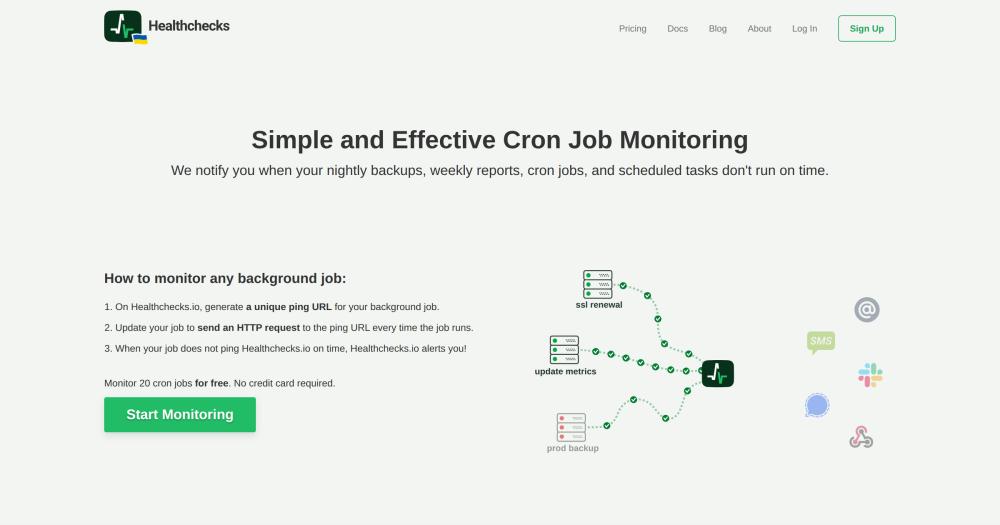
Healthchecks is a cron job and background task monitor that alerts you when scheduled work stops running on time. Each task gets a unique ping URL; your job sends an HTTP request on every successful run, and if the ping stops arriving within the configured window, Healthchecks fires an alert through any of its 25+ notification channels. It is BSD-3-Clause licensed, self-hostable via Docker, and replaces paid services like Cronitor and Dead Man's Snitch.

Read the full breakdownHide the full breakdownWho it is for, how it works, trade-offs, the quick start and the FAQ
who it's for

Who Healthchecks is for#

Sysadmins monitoring server maintenance tasks

If you run regular backups, SSL renewals, database exports, or antivirus scans via cron, Healthchecks gives you a central view of which jobs ran and when. Configure a grace period slightly above each job's expected runtime so brief slowdowns don't trigger false alerts.

Skip if:

If your jobs are already instrumented with alerting inside the job itself (e.g., a backup script that emails on failure), adding Healthchecks overlaps with that coverage. It is most useful for jobs that run silently with no built-in failure reporting.

Development teams monitoring data pipelines and scheduled workers

Healthchecks fits data import jobs, nightly report runs, and background queue workers that must run on schedule. The event log records every ping, making it straightforward to audit when a pipeline last ran and spot gradual drift in job duration.

Skip if:

If your pipeline tool already provides scheduling guarantees and failure alerting (e.g., Airflow with an SMTP integration), Healthchecks duplicates that monitoring. Use it where the job runner itself has no built-in check-in reporting.

Teams self-hosting infrastructure who want cron visibility without SaaS costs

For teams running on-premise or on a private cloud, Healthchecks self-hosted removes per-check pricing. The hosted healthchecks.io service offers up to 20 checks for free; the self-hosted path scales to as many checks as your server supports.

Skip if:

If you have fewer than 20 checks and no requirement to keep monitoring data on-premise, the hosted healthchecks.io free tier removes the need to operate your own instance.

IoT and embedded device health monitoring

Any device that can send an HTTP request (Raspberry Pi, NAS, router) can ping a Healthchecks check. Configure a check as an unconditional heartbeat: if the device goes offline or fails to run its health script, the missing ping triggers an alert. The website documents this use case explicitly.

Skip if:

If your devices cannot reach an external URL because they are on a fully airgapped network, Healthchecks requires a self-hosted instance reachable from that device network.

the problem

The problem it solves#

When a cron job fails silently, it leaves no log entry, no error page, and no pager notification. A database backup that stopped running three weeks ago looks exactly the same as one that ran an hour ago until the moment you need to restore from it. Scheduled tasks are invisible by default: they appear in crontabs and task schedulers, but nothing outside the job itself reports whether it actually executed.

Teams typically discover silent failures too late: the report wasn't sent, the import didn't run, the SSL renewal was skipped. Setting up custom alerting for each background job requires duplicating monitoring logic across scripts, adding complexity every time a new task is added.

how Healthchecks solves it

How it solves it#

Ping URL check-in monitoring

Each cron job or scheduled task gets a unique HTTP ping URL. Your job sends a GET or POST request to that URL on every successful run. If the ping stops arriving within the configured period plus grace time, Healthchecks fires an alert. No agents to install and no server credentials to share with the monitoring service.

Cron expression and period-based schedules

Define check schedules either as a fixed period (e.g., every 6 hours) or as a full cron expression. Healthchecks parses expressions using the cronsim library and tracks four states: New, Up, Late, and Down. The transition from Late to Down triggers notifications, so brief slowdowns during a grace window don't create false alerts.

25+ notification channels

Built-in integrations include Slack, Discord, PagerDuty, Opsgenie, PagerTree, ntfy, Gotify, Signal, Telegram, WhatsApp, Pushover, Microsoft Teams, Matrix, Mattermost, Rocket.Chat, Zulip, Spike.sh, Splunk On-Call, Trello, Prometheus, email, SMS, and webhooks. Toggle channels per check from the dashboard without changing any job configuration.

Live-updating dashboard with event log

The web dashboard lists all checks with current status, last ping time, and integration indicators. Each check's detail page shows a time-ordered event log of received pings, state transitions, and sent notifications. Logs keep the 100 most recent pings per check by default; the administration panel can raise this limit per user.

Project and team management

Organize checks into projects, invite team members, and assign read-only or full access per member. WebAuthn 2FA is available for account security without a third-party service. The Django administration panel lets a superuser adjust per-user limits and manage accounts.

Public status badges

Each tag you use on checks generates a status badge with a public but hard-to-guess URL. A global badge shows the overall status of all checks in an account. Badges can be embedded in READMEs, internal dashboards, or status pages to give stakeholders a live health view.

strengths · trade-offs

Strengths and trade-offs#

Strengths

  • BSD-3-Clause license with no per-check feesSelf-hosting is free and unrestricted. BSD-3-Clause means you can run Healthchecks on your own infrastructure, modify it, and use it commercially without paying per-check or per-user fees. The hosted healthchecks.io service offers up to 20 checks free; the self-hosted path removes all limits.
  • Over a decade of continuous developmentHealthchecks has been actively developed since 2015 and has 10,498 GitHub stars and 1,042 forks. The last commit was 2026-11-04, confirming ongoing maintenance. The monitoring approach (HTTP pings, period/grace states, notifications) is stable and unchanged across major versions.
  • Environment-variable configuration for clean deploymentsAll settings are configurable via environment variables, with an optional local_settings.py for Django overrides. This makes Healthchecks straightforward to deploy in Docker or Kubernetes with no manual file editing. External authentication via reverse proxy headers lets you plug into an existing SSO setup without modifying the application.
  • WebAuthn 2FA and project-based access controlHealthchecks includes WebAuthn two-factor authentication without requiring a third-party service. Project-based organization lets teams isolate checks per product or environment, with per-member read-only access for stakeholders who need visibility without edit permissions.

Trade-offs

  • -Requires a persistent sendalerts background processIn production, Healthchecks requires the sendalerts management command to run continuously alongside the web process. Without it, checks will change state but no notifications will fire. This means the deployment needs a process manager (systemd or supervisor) to keep sendalerts running and restart it on failure, adding operational overhead beyond a single container.
  • -Monitors tasks but does not schedule or run themHealthchecks only checks whether jobs ran on time. It does not execute jobs, retry failed runs, or manage job queues. If you need a scheduler that also runs tasks, you need a separate tool (Celery Beat, systemd timers, or a job runner) alongside Healthchecks.
  • -55 open GitHub issuesAs of 2026-11-05, the project has 55 open GitHub issues. Reviewing the open issue list before deployment is a reasonable step to confirm whether any affect your intended notification channels or database backend.
versus alternatives

Healthchecks vs alternatives#

Healthchecks vs Cronitor

Both tools use the same core mechanism: your job sends an HTTP ping on each run, and an alert fires when the ping stops arriving on time. Cronitor is a commercial monitoring service.

FeatureHealthchecksCronitor
LicenseBSD-3-ClauseProprietary
Self-hostingYesNo
Notification channels25+Managed service
Free tierUp to 20 checks (hosted); unlimited (self-hosted)Commercial plans

Healthchecks self-hosted removes per-check pricing and keeps monitoring data on your own infrastructure. It is the stronger choice for teams with privacy requirements, high check volumes, or a preference for running their own tooling. Cronitor is worth considering when you want a fully managed monitoring service without operating your own server.

Healthchecks vs Dead Man's Snitch

Dead Man's Snitch and Healthchecks both use the dead man's switch pattern: a unique check-in URL your job pings on success, with an alert when pings stop arriving. Dead Man's Snitch is a managed commercial service.

FeatureHealthchecksDead Man's Snitch
LicenseBSD-3-ClauseProprietary
Self-hostingYesNo
Notification channels25+Managed service
Team managementProjects, members, read-only accessCommercial plan

Healthchecks delivers a wider set of notification channels, including Slack, Discord, PagerDuty, Signal, and more than 20 others, plus project-based team management with read-only roles for stakeholders. Dead Man's Snitch suits teams that prefer a fully managed service with no server operations.


install · quick start

Quick start#

bash
Self-hosting uses Docker with pre-built images from Docker Hub.
```bash
docker run -d -p 8000:8000 healthchecks/healthchecks
```
tech stack · detected from GitHub

What it's built on#

Languages
JavaScriptPython
Frameworks
Django
frequently asked

FAQ#

Can Healthchecks monitor processes and services, not just cron jobs?

Yes. Any process that can send an HTTP request on a schedule can be monitored. The website documents examples including checking whether a Docker container is running, monitoring application processes, checking database replication lag, verifying free disk and RAM, and sending unconditional heartbeats from servers, NAS devices, and routers. Write a shell script that tests the condition and pings the check URL on success, then run the script on a schedule.

What databases does Healthchecks support?

Healthchecks works with PostgreSQL, MySQL, and MariaDB. SQLite is used in the default development configuration, but a persistent production database is the documented production path. Configure the database connection through environment variables or the local_settings.py Django settings override file.

Is there a hosted version I can use without self-hosting?

Yes. Healthchecks.io is the hosted service run by the project maintainers. It offers a free tier covering up to 20 checks with no credit card required. Paid plans support more checks. The self-hosted version is freely available under the BSD-3-Clause license with no check limits and no per-check fees.

How does the grace period work?

The grace period extends the alert window beyond the check's normal period. When a ping is overdue, the check moves to 'Late' status; it stays in Late until the period plus the grace time has passed, at which point it moves to 'Down' and triggers notifications. Set the grace period to slightly above the expected maximum runtime of your job so a slow run doesn't fire a false alert.

Does Healthchecks support team access and multiple projects?

Yes. You can create multiple projects within one Healthchecks account, invite team members to each project, and assign read-only or full-access roles. The Django administration panel (available to superusers) lets you adjust per-account limits and manage users. WebAuthn two-factor authentication is supported for account security.

also worth a look

Similar open-source tools#

Termix

Alternative toTermius

Self-hosted, plugin-based server manager with SSH and remote desktop.

  • 15,837 GitHub stars
  • Apache-2.0Licence Apache-2.0

Infisical

Alternative toHashiCorp Vault

Self-hosted secrets, certs, and privileged access in one platform.

  • 30,275 GitHub stars
  • MITLicence MIT

Code Server

Alternative toGitHub Codespaces

VS Code in the browser, self-hosted, with no per-seat pricing.

  • 79,767 GitHub stars
  • MITLicence MIT

Shannon

Alternative toXBOW

Autonomous AI pentester for web apps and APIs, AGPL-licensed

  • 50,850 GitHub stars
  • AGPL-3.0Licence AGPL-3.0

Minimal

Alternative toChainguard Images

150 hardened container images, MIT-licensed, signed and rebuilt daily

  • 555 GitHub stars
  • MITLicence MIT

Statlite

InSecurity & Monitoring

Self-hosted Spring Boot monitoring, no Prometheus or Grafana needed

  • 197 GitHub stars
  • MITLicence MIT
by category

Open source tools in these categories#

167

Security & Monitoring

REA (Reverse Engineer Anything), RustDesk, Uptime Kuma
113

DevOps & CI/CD

Nvm, Uptime Kuma, Netdata
545

Developer Tools

Skills for Real Engineers, REA (Reverse Engineer Anything), superpowers
Hostinger

Self-host Healthchecks on a Hostinger VPS

Keep it running 24/7, even when your laptop is off. A Hostinger VPS gives it a server of its own.

  1. 01

    Choose a plan

    Starts from $6.49/mo

  2. 02

    Apply

    Extra 10% off yearly plans

  3. 03

    Install Healthchecks

    On a server that stays on

  4. 04

    Start building

    Focus on the app, not the server

Deploy on Hostinger

Sponsors

Inbox Zero

Alternative toSuperhuman

AI email assistant that drafts replies and clears your inbox

  • 12,889 GitHub stars
  • AGPL-3.0Licence AGPL-3.0
  • #Email

rakazo

Alternative toGrok Bot

AI teammates you own: your keys, your model, your machine.

  • 6,568 GitHub stars
  • Apache-2.0Licence Apache-2.0
  • #AI Agents

SnitchFeed

Live monitoring on LinkedIn, X, Reddit & more. Agentic social listening for startups.

Marketing & Growth

Advertise your product

New open source projects by email

The projects we add and every new guide. Free, unsubscribe any time.

Find open source alternatives to paid software

/
  • Claude Code to OpenCode
  • Jira to Windshift
  • Notion to AppFlowy
  • Slack to Mattermost
  • Linear to GitLab
  • Wispr Flow to Handy
  • Arc to Zen Browser
  • CapCut to Concat
  • Grok Bot to rakazo
  • Superhuman to Inbox Zero
  • Airtable to AITable
  • Muse to OpenClaw
  • Railway to Coolify
  • GitHub Copilot to Cline
  • Datadog to Netdata
  • Confluence to Wiki.js
  • Microsoft Teams to Rocket.Chat
  • Pinecone to Qdrant
  • Zapier to n8n
  • 1Password to KeePassXC
  • Devin AI to OpenHands
  • Firebase to Supabase
  • Contentful to Strapi
  • Adobe Premiere Pro to Shotcut
  • Claude Code to OpenCode
  • Jira to Windshift
  • Notion to AppFlowy
  • Slack to Mattermost
  • Linear to GitLab
  • Wispr Flow to Handy
  • Arc to Zen Browser
  • CapCut to Concat
  • Grok Bot to rakazo
  • Superhuman to Inbox Zero
  • Airtable to AITable
  • Muse to OpenClaw
  • Railway to Coolify
  • GitHub Copilot to Cline
  • Datadog to Netdata
  • Confluence to Wiki.js
  • Microsoft Teams to Rocket.Chat
  • Pinecone to Qdrant
  • Zapier to n8n
  • 1Password to KeePassXC
  • Devin AI to OpenHands
  • Firebase to Supabase
  • Contentful to Strapi
  • Adobe Premiere Pro to Shotcut